PLC Simulator

IO-Link Smart Sensors

All sensor labs
Discrete inputadvanced lab

IO-Link Smart Sensors

IO-Link turns an ordinary point-to-point sensor cable into a bidirectional digital channel — unlocking remote parameterisation, rich diagnostics, and event data alongside the normal process value.

PLC addressIO-Link master
SignalCyclic data + diagnostics
BenchLive + faults
FIELD DEVICE / 24 VDC

01 / Recognize it

What this sensor looks like

Learn the housing, active face, mounting, and connector before you meet it on a machine.

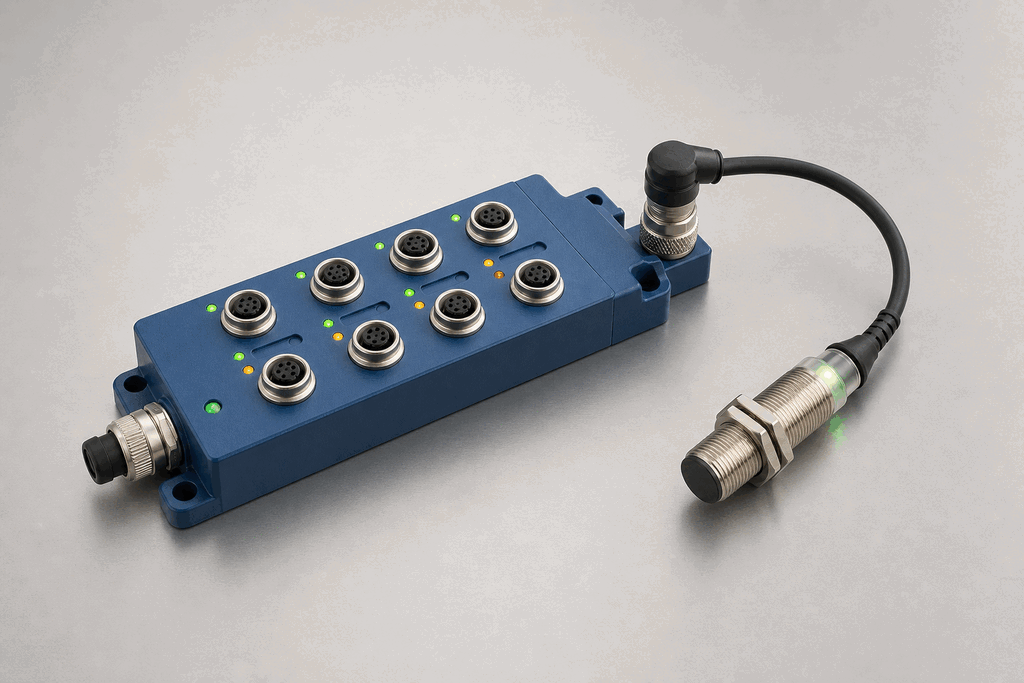
Representative real-world IO-Link Smart Sensors hardware on an industrial workbench
Representative field appearance · form factors vary by manufacturer

Hardware recognition

Know what to look for

Use the silhouette, active face, and connection style to identify the device before checking its part number and datasheet.

Body and mounting
The field sensor may look conventional; the IO-Link master is a multi-port IP67 block.
Active face
Status LEDs identify ports, device communication, and diagnostic state.
Cable and terminals
Standard unshielded M12 sensor cables carry L+, L−, and the C/Q data line.
Field rule: identify by appearance, then verify the exact wiring, range, approvals, and output type from the device label and datasheet.

02 / Understand the principle

Watch cause become a PLC signal

Follow the physical event through the sensing element and into the exact controller value.

Signal story / live loop

IO-Link Smart Sensors: cause to controller

Paused

Now showingPhysical event

Process condition changes → Cyclic frame is assembled → IO-LINK PD = 70%

03 / Test and commission it

Commission it on the bench

Move the process, adjust the setpoint, invert the logic and inject faults. Watch the PLC value respond immediately.

Commissioning bench

IO-Link Smart Sensors

24 VDCIO-Link master
9.60 mA
35 %
70 %

PLC channel

IO-Link master

RAW 9677

Engineering value

35 %

Cyclic data + diagnostics

Output logic
Inject a field fault

Channel healthy

Signal is inside the expected operating range

Terminals
L+C/QL−

Commissioning note: Store parameter sets in the master so a replacement device can be restored automatically.

Field guide

IO-Link is a point-to-point communication standard (IEC 61131-9) that runs over the same three-wire unshielded cable already used for standard sensors. The cable carries 24 V power, the conventional SIO (standard IO) bit, and the IO-Link serial channel on a single conductor — no extra wiring, no fieldbus topology, no star cabling required.

The IO-Link master is a module that sits on a fieldbus (PROFINET, EtherNet/IP, EtherCAT) and provides four to eight ports, each of which connects to one IO-Link device. Every port is independently configurable: you can run port 1 as a conventional digital input while ports 2 and 3 run full IO-Link at COM3 speed.

Three baud rates are defined: COM1 at 4.8 kbps for simple devices, COM2 at 38.4 kbps for most sensors, and COM3 at 230.4 kbps for high-speed process data. A modern inductive or photoelectric sensor typically negotiates COM2 automatically during the port activation handshake.

The data channel is split into three parts. Process data carries the primary measurement — the bit or word value the PLC reads every scan. Service data is on-demand read/write access to device parameters such as switching point, output logic, and filter time. The device IODD (IO Device Description) file describes every readable and writable parameter in a machine-readable XML format that engineering tools use to build configuration UIs automatically.

Diagnostics are what make IO-Link compelling for maintenance teams. A device can push an event asynchronously — lens dirty, target too close, supply voltage low — without waiting for the PLC to poll it. The master forwards the event to the controller within one IO-Link cycle. This turns a silent trip into an actionable alarm with a plain-English description.

Use this when…

  • When you need to read diagnostic data like 'lens dirty' or 'alignment lost' from a sensor without walking to the machine
  • When you want to change sensor parameters — range, hysteresis, output polarity — from the PLC program without physically re-teaching the device
  • When you're building a system where rapid sensor swap-out is important and the replacement device must self-configure from stored IODD parameters

Where you will see it

Automotive body shop

IO-Link photoelectric sensors on welding fixtures report lens contamination directly to the SCADA system; maintenance is dispatched before a false trip ever occurs.

Pharmaceutical filling line

Inductive IO-Link sensors report their internal temperature alongside the part-present bit; a rising trend flags a ventilation problem before it causes measurement drift.

Concept and commissioning lab

This topic is taught through the live bench and reference rather than a separate ladder challenge. Continue to a physical sensor when you are ready to wire a PLC input.