Ladder Diagram (LD) and Function Block Diagram (FBD) are both graphical languages defined in the same IEC 61131-3 standard, and both run on the same CPU inside the PLC. So the real question is rarely "which is better" — it is "which fits the logic in front of me."
Short answer: reach for ladder when you are writing discrete boolean logic — interlocks, start/stop seal-ins, permissives, relay-replacement. Reach for function block diagram when you are routing signals through processing — analog scaling, PID loops, filters, and reusable custom blocks. Most real projects use both, often in the same program.
Here is the full comparison, with ASCII sketches so you can see the difference in shape.
What Is Ladder Logic?
Ladder Diagram is modeled on the relay circuits PLCs replaced in the 1970s. A program is a stack of horizontal rungs drawn between two vertical rails. Each rung has contacts (input conditions) wired in series or parallel, and one or more coils (outputs or memory bits) on the right.
|--[Start]--+--[/Stop]--( Motor )--|
|           |                       |
|--[Motor]--+                       |
That rung is the canonical motor start/stop seal-in: Motor energises when Start is pressed, seals itself in through the Motor contact, and drops out when normally-closed Stop opens.
The mental model is power flowing left to right when all series contacts are closed. Electricians and maintenance techs with relay-panel experience read ladder on sight — that intuitiveness is exactly why it is the most deployed PLC language in the world.
What Is Function Block Diagram?
Function Block Diagram looks less like a wiring panel and more like a signal flow diagram or a P&ID. Instead of rungs, you place blocks (each with named input and output pins) and draw connection lines between them. Data flows along the wires from output pin to input pin — left to right through the network.
A timer in FBD makes the shape obvious:
        +----------+
EN  --->|   TON    |---> Q
IN  --->|          |---> ET
PT  --->|          |
        +----------+
IN and PT (preset time) feed in on the left; Q (output) and ET (elapsed time) come out on the right. You wire Q straight into the next block's input pin and the value just travels there. Compare a small chain — a scaled analog input feeding a comparator that drives an alarm:
   +---------+         +---------+
RAW->|  SCALE  |--EU--->|   GT    |---> HighAlarm
SP-->|         |   HL-->|         |
   +---------+         +---------+
The same boolean logic from the ladder rung above is expressible in FBD too — an OR block (Start, Motor) feeding an AND with a negated Stop input — but you can see that discrete interlock logic reads more naturally as a rung, while signal-processing reads more naturally as a block chain.
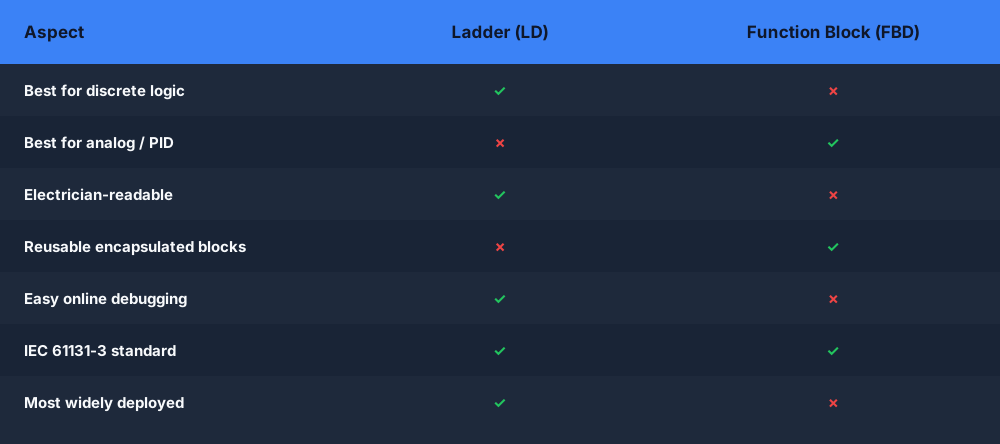
Side-by-Side Comparison
| Ladder Diagram (LD) | Function Block Diagram (FBD) | |
|---|---|---|
| Shape | Rungs of contacts and coils | Blocks wired with signal lines |
| Best for | Discrete I/O, interlocks, seal-ins, permissives | Analog, PID, filters, signal flow |
| Data type focus | Boolean | Mixed: REAL, INT, BOOL flow on the wires |
| Readability for electricians | High | Moderate |
| Readability for process engineers | Moderate | High (resembles a P&ID) |
| Reusability | Rungs are hard to package | Encourages custom, reusable function blocks |
| Execution order | Rung order, top to bottom | Network order (data-flow sequenced) |
| Debugging | Watch contacts/coils energise live | Watch values on each connection line |
| Vendor support | Universal | Universal in modern PLCs |
| IEC 61131-3 | Yes (LD) | Yes (FBD) |
Where Ladder Wins
Discrete and Interlock Logic
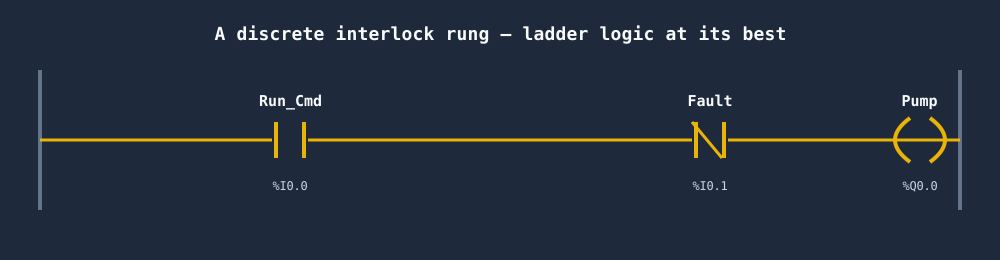
Start/stop, permissives, "this valve may only open if those three conditions hold" — these are pure boolean conditions and they map directly onto contacts and coils. Trying to express a dense interlock as a forest of AND/OR blocks is usually harder to read than a single rung.
Relay Replacement and Field Troubleshooting
A maintenance technician can go online with the PLC and watch contacts light up rung by rung. The visual feedback of ladder online mode is unmatched for fault-finding a stopped machine at 2 a.m.
Safety-Style Logic
Contact/coil logic maps cleanly onto the way safety functions are written in a safety manual, which keeps the audit trail readable.
Where Function Block Diagram Wins
Analog and PID Control
This is FBD's home turf. Most vendors ship a pre-built PID (or PIDE/PID_Compact) function block. You drop it in, wire the process variable and setpoint to its input pins, and route the output to your control valve. Doing the same in ladder means stitching together math instructions across many rungs — possible, but noisy.
Signal Flow and Processing
Scaling a raw analog count to engineering units, running it through a filter, comparing it against limits, and latching an alarm is a chain of blocks where the data visibly flows from one to the next. The diagram reads like the process itself.
Reusability
FBD strongly encourages building your own function blocks. Wrap a pump-control sequence once — with its own inputs, outputs, and internal state — and instantiate it for all twelve pumps. Each instance keeps its own data. Ladder has no equally natural unit of reuse, so duplicated rung logic tends to get copied and drift out of sync.
Execution Order Semantics
This is a subtlety worth knowing. In ladder, rungs execute strictly top to bottom. In FBD, the runtime evaluates blocks in data-flow order within a network — a block runs only after the blocks feeding its inputs. Most editors compute this for you, but when a network has feedback (an output looping back to an earlier input), the evaluation order — and therefore the one-scan delay — matters. Knowing this prevents subtle "my value is always one scan stale" bugs.
Vendor Support
Both languages are first-class citizens in every major environment:
- Allen-Bradley Studio 5000 — Ladder Diagram plus Function Block Diagram routines; AB leans heavily on FBD for process (the
PIDEblock lives there). - Siemens TIA Portal — LAD and FBD are interchangeable views for much of the same logic, and
PID_Compactis the standard analog block. - CODESYS (and the many vendors built on it — WAGO, Beckhoff, OpenPLC, and others) — full LD and FBD support side by side.
Because both are IEC 61131-3 languages, the concepts transfer across vendors even though the exact block library and pin names differ. See PLC Dialects Compared: IEC 61131-3 vs Allen-Bradley vs Siemens for how the same standard languages diverge in practice.
Which Should You Learn First?
Learn ladder first. It is the most widely deployed language, it appears in the majority of job postings, and the relay metaphor makes logic behavior visible without any prior programming experience. Once you can write a clean motor starter and a timer sequence in ladder, the contact/coil mental model carries straight over.
Learn function block diagram next, and prioritize it if you are heading into process industries — water treatment, oil and gas, chemicals, food and beverage — where analog loops and PID dominate. In those plants you will spend much of your day in FBD wiring control loops, with ladder reserved for the discrete interlocks around them.
If your background is textual programming and you want to compare graphical against text, read the sibling post Ladder Logic vs Structured Text: Which One to Learn First — it covers the third common comparison (and confirms ladder-first for most learners).
Practical Next Steps
- Write a motor start/stop seal-in as a ladder rung. Confirm you can read the power flow at a glance.
- Build a small FBD network: scale an analog input, compare it to a limit, drive an alarm. Notice the value flowing along each connection line.
- Drop a TON timer into both views. The same instruction appears as a box on a rung in LD and as a wired block in FBD — same engine underneath.
- For an analog loop, instantiate a vendor PID block in FBD and watch why nobody hand-builds PID in ladder.
The honest takeaway: this is not an either/or. A production program routinely uses ladder for the discrete interlocks, FBD for the analog and PID loops, and structured text for the heavy maths — all in the same project, all on the same CPU. Picking the right language per task is the skill, not picking one language forever.
Frequently asked questions
What is the difference between ladder logic and function block diagram?
Ladder logic (LD) is a graphical language of rungs, contacts, and coils that reads like a relay circuit — ideal for discrete, boolean interlock logic. Function Block Diagram (FBD) wires reusable blocks together so data flows along the connections — ideal for analog signal processing and PID control. Both are IEC 61131-3 languages and many projects use both.
When should you use function block instead of ladder logic?
Use Function Block Diagram when you are working with analog signals, PID loops, maths-heavy signal chains, or reusable encapsulated logic that you want to drop in multiple places. Ladder logic is the better fit for discrete on/off interlocks, safety permissives, and relay-replacement logic where electricians need to read the rung at a glance.
Is function block easier than ladder logic?
Function Block can be quicker to write for signal-flow and analog control because one block replaces many rungs, but it is often harder to debug online — you cannot watch individual contacts energise the way you can in ladder. Ladder logic is usually easier for beginners and maintenance staff to read and troubleshoot, which is a big reason it is still the most deployed language.
Why is ladder logic still used?
Ladder logic remains the most widely used PLC language because it maps directly onto the relay circuits PLCs replaced, so electricians and technicians can read and troubleshoot it without prior programming experience. Every major vendor supports it, the visual rung makes live debugging easy, and decades of installed programs are written in it.
Practice both languages in the simulator — free, in your browser. No install. No credit card. Build real ladder logic against a live machine model, then explore the rest of the PLC ladder logic simulator.