RSLogix 5000 Tutorial for Beginners — Practise Free in Your Browser
RSLogix 5000 (now Studio 5000 Logix Designer) is the dominant Allen-Bradley programming environment. This tutorial walks you through the core skills — tag-based XIC/XIO/OTE ladder, timers, counters — in a free browser simulator, with no Windows VM and no Rockwell licence.
Learn the behavior first, then move into licensed vendor software.
This independent tutorial does not reproduce Studio 5000. It teaches the tag, instruction, timer, counter, scan and troubleshooting concepts you need before a real controller project becomes productive.
01Start with readable Boolean tags and a motor requirement before learning platform-specific project navigation.
02Understand what each instruction examines or writes during the scan; the symbols do not describe field-contact construction.
03Trace PRE, ACC, EN, TT and DN across time so timer members become behavior rather than vocabulary.
04Count false-to-true edges, observe the accumulator past preset and reset deliberately.
05A true command is not proof of motion. Compare output logic, physical feedback and protection state.
06Move to licensed vendor software and hardware after the underlying tags, scan behavior, logic and tests are understood.
Page scope
Tutorial vs simulator — two different pages, on purpose
We deliberately keep this page separate from the RSLogix simulator page. That page answers: what is the simulator and how does it compare to Rockwell software? This page answers: how do I learn RSLogix 5000 as a beginner, step by step? The two serve different search intents and cross-link to each other so you can always find the one you need.
Background
RSLogix 5000 explained — for first-timers
RSLogix 5000 is Rockwell Automation's legacy name for what is now called Studio 5000 Logix Designer. It programs the ControlLogix and CompactLogix controller families — the dominant Allen-Bradley hardware on modern manufacturing and process plants.
The key difference from the older RSLogix 500 is tag-based addressing: instead of file-and-element addresses like T4:0.DN, you create symbolic tags like Motor_Timer.DN. The ladder instructions are nearly identical — XIC, XIO, OTE, TON, CTU — but tags make programs far more readable and maintainable at scale.
All new Allen-Bradley Logix-platform projects use Studio 5000 (RSLogix 5000) today. If a job posting lists RSLogix 5000 experience as a requirement, they mean Studio 5000 Logix Designer.
The XIC → OTE rung is the atom of every RSLogix 5000 program. Build it here without a Rockwell install.
Step-by-step tutorial
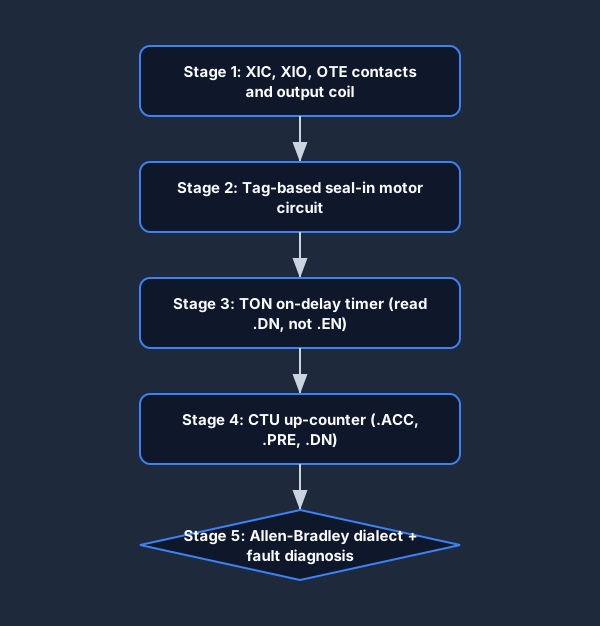
RSLogix 5000 tutorial — five beginner stages
1
Stage 1 — XIC, XIO, and OTE
Write your first rung: a normally-open XIC start contact and an OTE output coil. Then add a normally-closed XIO stop contact and watch the logic execute a scan cycle.
Build the classic three-wire motor circuit: Start_PB (XIC) in series with Stop_PB (XIO), with Motor_Run (OTE) sealing itself in around Start_PB via a parallel XIC branch.
Switch the editor to Allen-Bradley mode. Your rungs now use XIC/XIO/OTE notation with tag addresses. Then try a fault scenario to practice systematic troubleshooting.
Five stages from blank rung to fault diagnosis — all practisable in the browser.
Stage 2 — the three-wire motor seal-in, the first real RSLogix 5000 rung most technicians write.Stage 3 — a TON on-delay timer. The DN done bit turns on only when ACC reaches the preset.Stage 4 — a CTU up-counter. Each rising edge increments ACC; DN trips at the preset.The scan cycle: why RSLogix 5000 rungs solve top-to-bottom, left-to-right, every scan.
Key concepts
RSLogix 5000 instruction set — beginner reference
Instruction
Full name
What it does
XIC
Examine If Closed
Passes power when the bit is TRUE (1). The Allen-Bradley name for a normally-open contact.
XIO
Examine If Open
Passes power when the bit is FALSE (0). Normally-closed contact.
OTE
Output Energize
Sets the bit TRUE when the rung is TRUE. The coil.
OTL / OTU
Output Latch / Unlatch
Retentive set/reset pair. Stays set even after the rung goes FALSE.
TON
Timer On Delay
Accumulates time while the rung is TRUE. DN bit turns on at preset.
TOF
Timer Off Delay
Accumulates time while the rung is FALSE. DN turns on immediately; goes FALSE at preset.
CTU
Count Up
Increments ACC on each rising-edge pulse. DN at preset.
CTD
Count Down
Decrements ACC on each pulse. DN when ACC reaches zero.
The three symbols you read on almost every RSLogix 5000 rung: XIC, XIO, and OTE.
No install required
Follow this tutorial with nothing to install
Every other RSLogix 5000 tutorial asks you to download Studio 5000 first — a multi-gigabyte, Windows-only, licensed install before you can write a single rung. This one is different: the practice links above open a browser PLC simulator that speaks the Allen-Bradley XIC/XIO/OTE dialect, so you can build, run, and watch each rung scan on a Mac, a Chromebook, or any machine, then carry the skills straight into the real software when you reach it.
From blank browser tab to a graded RSLogix-style rung — no Windows VM, no Rockwell license.
Cross-links
Related on this site
RSLogix simulator — tool comparison page: what our simulator is and how it fits next to RSLogix 500 and Studio 5000 Emulate.
Studio 5000 tutorial — the Studio 5000 flavoured companion to this page (same underlying skills, Studio 5000 terminology).
PLC troubleshooting simulator — fault-finding practice for the wiring, logic, and runtime faults you will encounter on a real Logix controller.
Questions
RSLogix 5000 tutorial FAQ
RSLogix 5000 is the older name for what Rockwell Automation now calls Studio 5000 Logix Designer. It programs the ControlLogix and CompactLogix controller families using tag-based addressing. A beginner RSLogix 5000 tutorial typically starts with creating a project and adding a controller, then moves to writing ladder rungs with XIC, XIO, and OTE instructions, and adds timers (TON/TOF) and counters (CTU/CTD). You can practice all of those concepts here in the browser for free.
Yes — functionally identical. Rockwell rebranded RSLogix 5000 to Studio 5000 Logix Designer at version 21 (around 2014). If you open a job posting that says "RSLogix 5000" they mean the same ladder-based, tag-addressed programming environment. The instructions, controller families, and workflow are identical.
RSLogix 500 programs the older MicroLogix and SLC 500 controllers using file-based addressing like I:0/0 and T4:0. RSLogix 5000 (Studio 5000) programs the modern ControlLogix and CompactLogix families using tag-based addressing. The ladder instructions — XIC, XIO, OTE, timers, counters — are nearly identical; the addressing scheme is the main difference.
Great question — they are deliberately separate. The RSLogix simulator page (/rslogix-simulator) is about what our tool is and how it compares to Rockwell software. This page is a tutorial: a step-by-step learning path for someone who wants to build RSLogix 5000 proficiency. The simulator page answers "what tool should I use?"; this page answers "how do I learn RSLogix 5000?"
An RSLogix 5000 emulator tutorial typically covers setting up Studio 5000 Logix Emulate (Rockwell's licensed virtual controller), creating a controller configuration that matches the emulator, downloading a program, and going online to watch the scan cycle. You need Studio 5000 and a Windows machine for that. What we provide instead is a browser practice environment for the ladder logic itself — building the rung skills that make the emulator step easy when you get there.
Yes. Our Allen-Bradley dialect mode supports tag-style naming alongside the XIC/XIO/OTE instruction set. You can name tags like Start_PB, Motor_Run, and Timer_Delay and write the same scan-order logic you would write in RSLogix 5000, without a Rockwell install.
Not for the practice portions here. The RSLogix 5000 real software requires Windows; our browser simulator runs on Mac, Linux, and Chromebook. If you eventually want to program a real ControlLogix or CompactLogix you will need Windows and a Studio 5000 license, but you can build all the foundational ladder skills on any device first.
The everyday RSLogix 5000 instructions are: XIC (normally-open contact), XIO (normally-closed contact), OTE (output energize), OTL/OTU (latch/unlatch), TON (on-delay timer), TOF (off-delay timer), CTU/CTD (up/down counter), and the comparison instructions EQU, GRT, and LES. Tag members like Motor_Timer.DN and Motor_Timer.ACC are the Logix-platform version of the older T4:0.DN notation.
No fully free version of Studio 5000 Logix Designer exists for general use — it is a licensed, Windows-only product, and the FactoryTalk activation is usually provided by an employer. Rockwell offers paid license tiers (Mini, Lite, Standard, Full, Professional) and time-limited trials, but a student typically cannot get a free permanent copy. That is exactly why this tutorial pairs each stage with a free browser PLC simulator: you build the same XIC/XIO/OTE, timer, and counter skills first, then only need the real software once you have hardware to download to.
The classics: reading a timer's .EN enable bit instead of the .DN done bit (so the output fires immediately instead of after the delay); double-driving the same OTE coil on two rungs (the last scan wins, so the first one looks dead); forgetting that the accumulator resets the instant a TON rung goes false; and wiring a normally-closed field stop button to an XIC instead of an XIO. Each of these is much cheaper to make and fix in a browser simulator than online with a live ControlLogix.
Start your RSLogix 5000 / Studio 5000 learning path today.
No Windows VM. No Rockwell license. No install. Free to start.