OpenPLC is an open-source IEC 61131-3 runtime created by Thiago Alves and maintained by a community of industrial automation researchers and practitioners. It's genuinely excellent at what it does: executing standard IEC code on cheap hardware (Raspberry Pi, Arduino, ESP32, x86 Linux) with full source-code transparency.
It's also not a complete learning platform on its own. If you're trying to decide between OpenPLC and a paid simulator, the honest answer is: they solve different problems. This post explains which problem is yours.
What OpenPLC actually is
OpenPLC has two main pieces:
- OpenPLC Runtime — a soft PLC. Install on a Pi, Arduino, or Linux box. It executes compiled IEC 61131-3 programs (ladder, ST, SFC, FBD, IL) with real scan-cycle semantics.
- OpenPLC Editor — the IDE. Desktop application, free, supports the IEC 61131-3 languages, compiles to the runtime.
There's a third piece — OpenPLC Simulator — which is the runtime running in your browser for demonstration purposes. It's modest in scope.
What OpenPLC does not include:
- Machine physics models (traffic lights, conveyors, tank systems)
- Automated test cases with grading
- Interview prep tracks
- Per-scenario solution programs
- Portfolio PDF generation
- Multi-dialect editor (you use IEC only)
- Cohort management for instructors
Those aren't criticisms. They're scope. OpenPLC is a runtime; curriculum-led simulators are a learning platform.
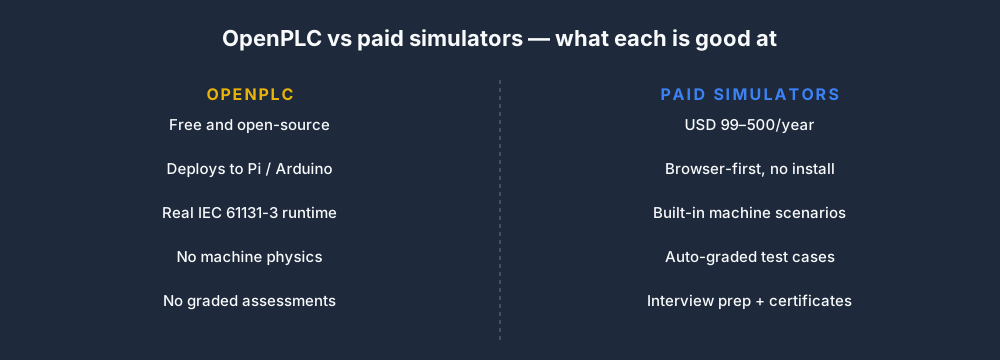
OpenPLC's biggest strength: deployment
Once your code works in OpenPLC, you can deploy it to a USD 50 Raspberry Pi wired to real sensors and see your ladder control real things. That's the single biggest thing OpenPLC does that browser simulators can't.
If your goal is "I want to automate my home workshop" or "I want to deploy my code on cheap hardware for a hobbyist project," OpenPLC is the answer. No paid simulator deploys to real hardware.
OpenPLC's biggest limitation: no guided curriculum
If you're starting from zero and don't already know ladder logic, OpenPLC won't teach you. There's no sequenced curriculum, no graded scenarios, no "here's what to learn next." You're on your own for structure.
Self-motivated experienced programmers treat this as freedom. Beginners usually treat it as frustration.
OpenPLC vs our paid simulator, head-to-head
| Dimension | OpenPLC | Our Pro plan |
|---|---|---|
| Cost | Free | USD 249/year |
| Runtime | Real IEC 61131-3 | Real IEC 61131-3 |
| Dialects | IEC only | IEC + A-B + Siemens + Delta |
| Machine scenarios | None (build your own) | 40 built-in |
| Graded tests | None | Auto-graded, pass/fail |
| Solutions visible | N/A | Yes, per scenario |
| Interview prep | None | 6 tracks with certificates |
| Deploys to hardware | Yes, Pi / Arduino | No |
| Install required | Yes | No (browser-only) |
| Curriculum | None | 18 lessons + 12 quizzes |
| Portfolio PDF | No | Yes |
OpenPLC wins on deployment and cost. Our simulator wins on everything curriculum-related. They're complementary, not competitive.
The hybrid stack most people should use
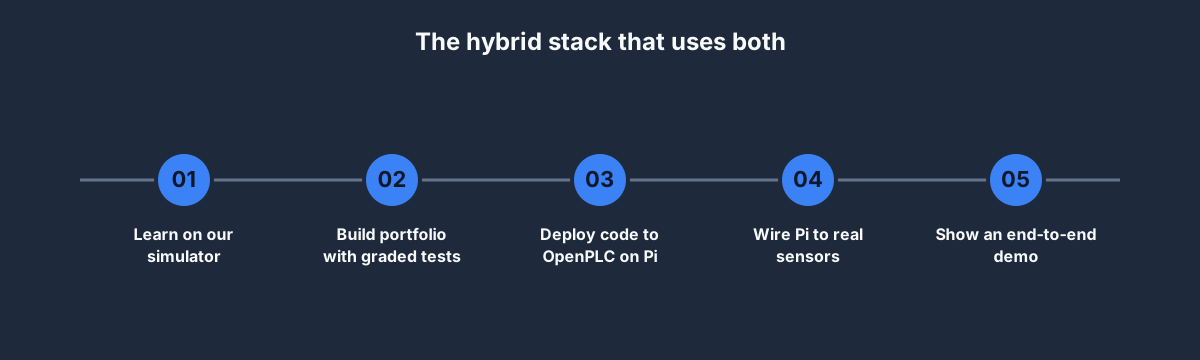
Five-step path that combines both tools:
- Learn on our simulator. Start with the free tier, move to Basic or Pro if you're serious. Build the ladder-logic and IEC fluency.
- Build portfolio with graded tests. Complete a focused scenario set, then use Pro portfolio export for the work you want employers to review.
- Deploy code to OpenPLC on a Pi. Install the runtime, compile one of your scenarios' solution programs against it, see it run on real hardware.
- Wire the Pi to sensors. Buttons, LEDs, a motor driver, a temperature sensor. The I/O stack is standard GPIO plus some cheap expansion boards.
- Show an end-to-end demo. A working physical project driven by your code. Record a video. Paste it into your CV.
Total cost: USD 99–249/year for the simulator + USD 80–150 for a Pi and basic components. Outperforms every vendor classroom on skill-per-dollar.
Who should skip the paid simulator

Five scenarios where OpenPLC alone is enough:
- You already know ladder logic and just want a runtime to deploy code on.
- You're a hobbyist building home-automation or maker projects.
- You're at an institution with literally zero software budget, and have an experienced instructor to supply the curriculum.
- Your end target is Pi / Arduino / ESP32 deployment rather than employment at a traditional plant.
- You prefer tinkering to structured learning — some people genuinely learn better by debugging OpenPLC than by passing auto-graded tests.
If any two of those are true, OpenPLC alone works. Otherwise, pair it with a structured simulator for the curriculum half.
Who should skip OpenPLC
- Complete beginners. Without the machine physics and graded tests, OpenPLC is an empty room with an excellent PA system. Not useful until you know the concepts.
- People targeting employment in traditional plants. The paid route (simulator + vendor classroom later) is faster.
- Cohorts that need admin tracking. OpenPLC has no teacher dashboard.
Other open-source alternatives
- Beremiz — the predecessor to OpenPLC's editor. Still maintained independently. Solid for serious open-source work.
- MatIEC — the IEC 61131-3 compiler that OpenPLC uses under the hood. Library, not an IDE.
- Mosaic (CDX Automation) — commercial but with a free community edition. Less polished than OpenPLC.
None of these are better choices than OpenPLC for most use cases. Stick with OpenPLC as the open-source reference.
How serious is the OpenPLC community
Active, international, and professional. The project is used in research papers, industrial cybersecurity tooling, and small-scale commercial deployments. The book "Introduction to Programmable Logic Controllers" and several university courses reference OpenPLC. If you contribute meaningful code, it's a resume line.
FAQ
Is OpenPLC really free?
Yes. Apache 2.0 license. Commercial use permitted. No hidden tiers.
Is OpenPLC as good as a commercial PLC runtime?
For learning and hobbyist use: yes. For production deployments in safety-critical or regulated industries: not certified, so no. Use commercial runtimes there.
Can OpenPLC replace Codesys?
Not directly. Codesys is a mature ecosystem with vendor partnerships (WAGO, Beckhoff) that ship Codesys-based hardware. OpenPLC is a runtime you deploy to commodity hardware. Different markets.
Does OpenPLC support Allen-Bradley or Siemens syntax?
No. OpenPLC is strictly IEC 61131-3. For A-B or Siemens syntax practice, use our dialect toggle.
Can I run a business on OpenPLC?
Technically yes. Practically, you'll want commercial support contracts for any real deployment — which OpenPLC doesn't directly sell, though consultants in the ecosystem do.
Where to start
- If you're new to PLCs: run the guided first program, then use the free tier and finish two beginner scenarios before comparing larger toolchains.
- If you're already fluent: install OpenPLC Editor and OpenPLC Runtime on a Pi. Compile the solution program from one of our scenarios. Deploy. Celebrate.
- Either way: combine the two. The simulator for curriculum, OpenPLC for deployment.
The two tools make each other more useful. Pick the entry point that matches your current level.