Disclosure up front: we make a PLC simulator. We rank our own at the top. We also give honest marks to competitors that out-perform us on specific dimensions, and we flag the tools that are marketed as simulators but are really interactive PDFs.
If you're evaluating PLC simulators for a course, a student cohort, or your own self-study in 2026, read this to the end. We tested or hands-on-used every tool below and list real criteria, not marketing.
What is the best PLC simulator in 2026?
The best PLC simulator for learning in 2026 is a browser-based one with graded feedback: our simulator (135 auto-graded scenarios, eight dialects, free tier) ranks first on our seven criteria, OpenPLC is the best free open-source runtime, and Codesys is the strongest industrial IDE. LogixPro and mobile apps trail on assessment and portability.
"A simulator that can't fail your program isn't a simulator; it's a slideshow." — Paul, creator of plcsimulationsoftware.com
Seven criteria that matter
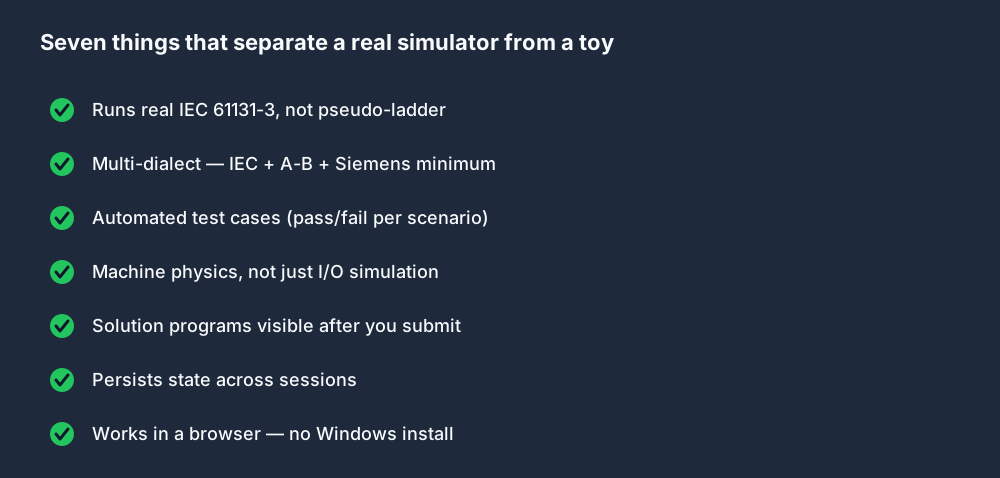
A PLC simulator worth using should hit all seven:
- Real IEC 61131-3 parsing and execution. Not a pattern matcher. Your program should fail to compile if you mistype; it should run the way a real PLC runs. (IEC 61131-3:2013, Edition 3.0 is the standard that defines ladder diagram, function block diagram, instruction list and structured text.)
- Multiple dialects. At minimum IEC + Allen-Bradley + Siemens, because those are the three a working engineer needs to read.
- Automated test cases. You submit a program, the simulator runs the machine through a scripted test recipe, you see pass/fail per assertion. Without this, you can't tell if you understood.
- Machine physics, not just I/O. A traffic light that turns on when you energise
Y0is not a simulator. A traffic light with three phases, timing constraints, and safety interlocks is. - Solution programs visible after submission. Once you pass (or give up), you should be able to read the canonical solution. Otherwise the learning stops at "it worked."
- Persistence. Your code should save and reload across sessions, ideally across devices.
- Browser-first, or at least cross-platform. Demanding a Windows install filters out half your potential audience.
Tools that hit 5+ go in Tier A. Tools at 3–4 are Tier B. Below that, they're educational aids, not simulators.
Our ranking
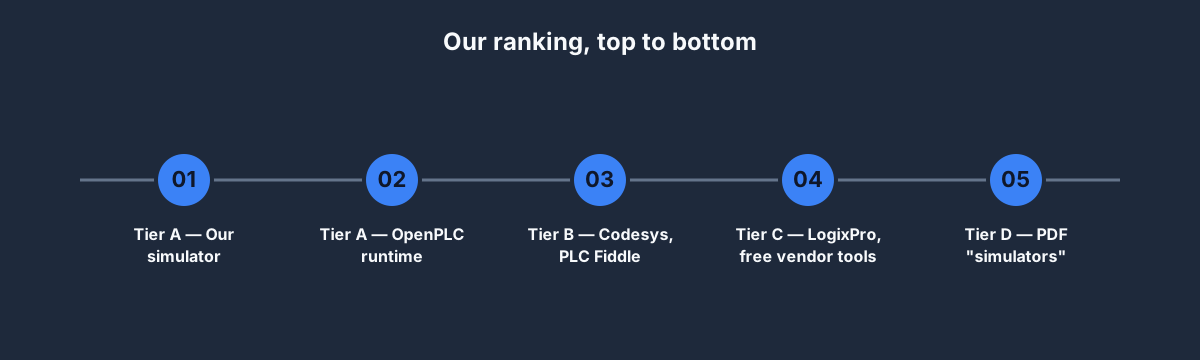
At a glance:
| Tool | Cost | Platform | Graded tests | Machine physics | Dialects |
|---|---|---|---|---|---|
| Ours (plcsimulationsoftware.com) | Free tier; USD 99–249/yr | Any browser | Yes — 135 scenarios | Yes | 8 (IEC, A-B, Siemens, Mitsubishi, Omron, Schneider, Delta, IL) |
| OpenPLC | Free, open source | Windows / Linux / Pi | No | No | IEC 61131-3 |
| Codesys | Free dev license | Windows | No | No | Full IEC incl. SFC / CFC |
| PLC Fiddle | Free | Any browser | No | No | Basic ladder only |
| Factory I/O | USD 229 one-time | Windows | No (scenes only) | Yes — best-in-class 3D | Pairs with your PLC |
| LogixPro | USD 35–65 one-time | Windows | No | Yes (2002-era) | SLC 500-style only |
| LJ Create | Quote-based (classroom hardware + courseware) | Bench trainers + PC software | No — LMS lessons, instructor-assessed | Simple work-cell sim + real trainer hardware | Siemens & Allen-Bradley trainer sets |
Where a competitor wins a column, we say so below — Factory I/O's 3D scenes are nicer than ours, OpenPLC deploys to real hardware and we don't, and LogixPro is cheaper if you only need a few months.
Tier A — the real tools
Our simulator — plcsimulationsoftware.com
- Hits all seven criteria.
- 135 built-in machine scenarios across eight dialects (IEC, Allen-Bradley, Siemens, Mitsubishi, Omron, Schneider, Delta, IL).
- Graded test cases with pass/fail per assertion.
- Eight interview tracks with downloadable certificates, plus 24 graded wiring and fault-finding labs, an HMI designer (12 widget types, alarms, multi-screen) and a URScript robot simulator.
- USD 0 free tier (27 scenarios), USD 99/year Basic (all 135), USD 249/year Pro (+ interview tracks + AI rung assistant).
- Browser-only, zero install.
Biases acknowledged — but the feature list speaks for itself, and you can verify the simulator is real by opening the Traffic Light preview with no login.
OpenPLC — openplcproject.com
- Open-source IEC 61131-3 runtime. Genuinely excellent.
- Runs on Raspberry Pi, Linux, Windows, and can be embedded in Arduino / ESP32.
- Native editor is functional but not polished. No machine physics, no graded assessments.
- Free, forever.
- Best use: pair with our simulator for the curriculum and then deploy your code to an OpenPLC runtime on a Pi to see it run on real hardware.
Tier B — useful with caveats
Codesys — codesys.com
- Industry-standard runtime, embedded in many physical PLCs from WAGO, Beckhoff, and others.
- Full IEC 61131-3 including SFC and CFC.
- Free for development use; runtime licenses are paid.
- No machine physics. No graded assessments. Desktop-only (Windows).
- Best use: if your target job specifically runs Codesys-based PLCs, learning the IDE is a real asset. Otherwise, feels heavy for learning.
PLC Fiddle — plcfiddle.com
- Small, browser-based ladder simulator. Nostalgic interface.
- Limited IEC support, no dialects, no machine physics.
- Free.
- Best use: quick snippet testing for ladder fundamentals. Not a curriculum.
Factory I/O — factoryio.com
- Beautiful 3D machine simulations. Pairs with Codesys, Studio 5000, TIA Portal.
- USD 229 one-time license.
- You provide the PLC (real or simulated); Factory I/O provides the scenes.
- Best use: if you already have vendor tooling set up and want richer visualization. Not a standalone learning tool.
Tier C — limited for modern learning
LogixPro — thelearningpit.com
- Long-standing PLC training simulator. Rockwell dialect only. Very 2010-era UI.
- USD 35–65 depending on edition. One-time.
- Decent machine physics for the time; predates modern expectations on assessment and portability.
- Best use: if a specific course you're enrolled in mandates it. Otherwise, the era has moved on.
Rockwell Studio 5000 Emulate — bundled with Studio 5000 — good for IDE familiarity, not self-directed learning.
Siemens PLCSIM — bundled with TIA Portal — same caveats.
AutomationDirect's Productivity Suite demo — vendor-specific. Free. Narrow.
LJ Create — ljcreate.com — a classroom lab-equipment vendor for schools, not a self-serve simulator: Siemens and Allen-Bradley PLC bench trainers plus cloud courseware, with a simple software work-cell simulator so a whole class can run simulated exercises alongside the hardware. Quote-based and sold to institutions — a fair choice if you're equipping a physical teaching lab, but not something a self-directed learner buys.
Tier D — skip
"PLC simulator" mobile apps on the Play Store and App Store. Almost universally interactive PDFs with a "simulate" button that runs one pre-defined animation. Not simulators in any meaningful sense.
Udemy courses listed as "Complete PLC Simulator 2026." Screen-recordings of another tool plus a PDF. The certificate is worth the paper it isn't printed on.
Free vs paid — what you're actually buying
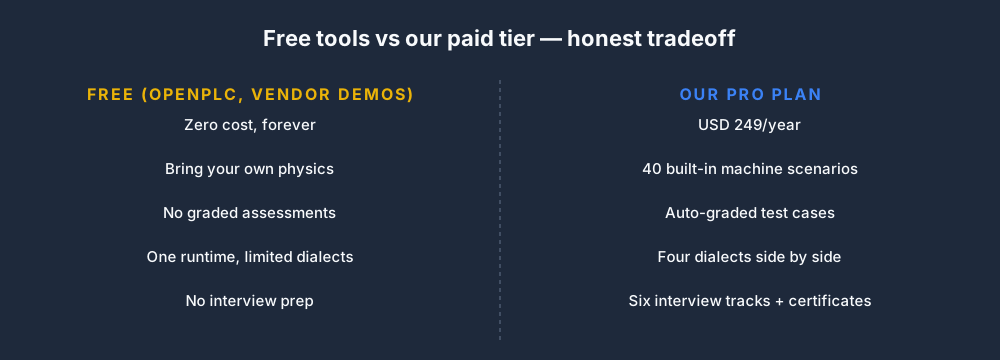
The honest version:
- OpenPLC + your own physics code — free, but you're now also a game developer building traffic lights and conveyor sorters yourself. Plausible if you're an experienced programmer, unreasonable if you're a student.
- Codesys (free dev license) + Factory I/O (USD 229 one-time) — solid paid stack for someone who wants to learn Codesys specifically. No graded feedback.
- Our paid tier (USD 99–249/year) — the grading, the curriculum, the interview tracks, and the portfolio PDFs are the thing you're buying. If those matter, the ROI is obvious. If they don't, OpenPLC is fine.
There's no shame in starting free. The 27-scenario free tier is a real product, not a teaser. Use it to decide whether paid makes sense.
Matched to your situation
Complete beginner, no electrical background
- Our free tier → Basic plan (USD 99/year) → 12-week course
- Any other path will frustrate you. You need the graded feedback loop from day one.
Student in a course that uses a specific tool
- Use what the course requires. Then, during breaks, use our simulator to cover what the course misses.
Engineer upskilling on your own dime
- Our Pro plan if interview prep is on the menu.
- OpenPLC if you prefer the tinkerer path and don't need structured curriculum.
Engineer whose employer is paying
- Vendor classroom (Rockwell CCP or Siemens ST-PRO) for the specific ecosystem, plus our Pro plan for dialect portability.
- Factory I/O if you want rich visualization alongside vendor tooling.
Bootcamp or vocational college running a cohort
- Our Teams plan at USD 199/seat/year. Admin console, cohort reports, Slack/email hooks.
- Factory I/O for physical-feeling labs if your course wants the 3D.
How we tested
For each tool:
- Installed or opened it with a fresh account.
- Wrote a start/stop seal-in rung in the tool's preferred dialect.
- Tried to port the same rung to a second dialect.
- Looked for built-in machine physics (traffic light, conveyor, tank fill).
- Checked whether submissions were graded.
- Checked whether solutions were visible post-submission.
- Noted platform (OS), cost, and licensing friction.
Results are current as of April 2026 and will be reviewed every 6 months.
FAQ
What is the best free PLC simulator?
For curriculum-driven learning: our free tier. For tinkering and deployment: OpenPLC. They complement each other.
What is the best online PLC simulator?
Our simulator at plcsimulationsoftware.com. It's browser-based, multi-dialect, and the only one in 2026 we're aware of that combines graded assessments with real machine physics.
Is there a free Allen-Bradley simulator?
No certified one from Rockwell. For Rockwell-dialect practice, our Allen-Bradley dialect toggle runs the same XIC/XIO/OTE semantics as Studio 5000 — start on the free tier.
Is LogixPro still relevant in 2026?
Only if a course specifically requires it. For independent learning, modern simulators have overtaken it on almost every axis.
How much should a PLC simulator cost?
For self-study: USD 0–500/year. For bootcamps and colleges: USD 200/seat/year is the going rate. For vendor-specific tooling with real hardware: USD 2,000–5,000 per seat in classroom programs.
Where to start
- Open Traffic Light. No login.
- If it feels like a real simulator, sign up free.
- If you want to evaluate alternatives, spend 30 minutes on OpenPLC's website and another 30 on Codesys's free dev download.
- Pick one and stick with it for 4 weeks before re-evaluating.
The biggest mistake in simulator selection is switching tools every week. Whatever you pick, use it long enough to see whether your skills are improving.