PLC Path
Ladder logic from zero — timers, counters, faults — across 9 learning dialects.
PLC certificate
Start the PLC Path →Free online PLC simulator: write ladder logic in your browser and watch a machine run it, no download. Guided lessons in Allen-Bradley, Siemens and 7 other PLC styles check your logic as you go, and certificates can be verified publicly. Try one program without an account. No install, no card.
$0 forever free·Pro unlocks the rest·Cancel anytime
Join 15600+ learners practicing PLC programming
No install. Works in any browser. · From the team at plcprogramming.io

Watch actual browser footage of PLC logic, live machines, guided learning, 3D automation, robot programming, wiring, and HMI practice. No concept mockups.
Try the simulator freeNo install. No credit card. Start with a real program.
Inside Pro
Real screens. 20 working engineering surfaces from ladder and 3D cells to HMI, robotics and connected commissioning.
Real product screens · no mock-ups
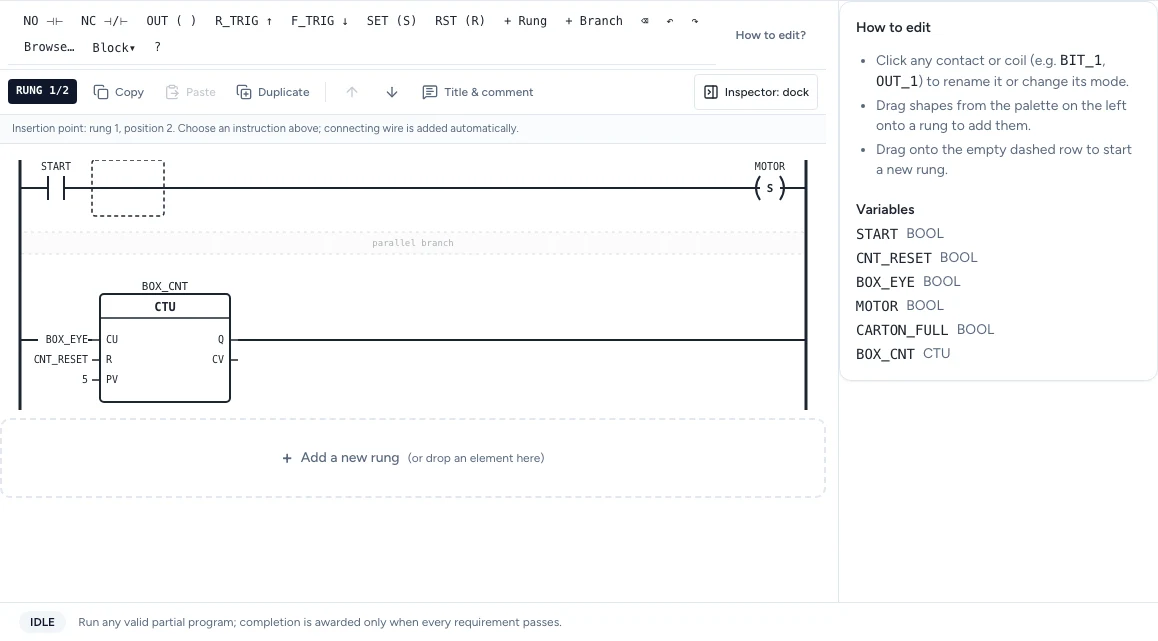
The PLC simulator steps through your ladder program in real time. Every contact, coil, and timer lights up exactly when it activates — so you can see the scan cycle in action, not just read about it.
VAR
  START AT %I0.0 : BOOL;
  STOP  AT %I0.1 : BOOL;
  MOTOR AT %Q0.0 : BOOL;
END_VAR

| START OR MOTOR AND /STOP | := MOTOR ;Compare the same validated motor seal-in program across IEC 61131-3, Allen-Bradley, Siemens SCL, Mitsubishi, Omron, KEYENCE KV, Schneider Unity, Delta, Instruction List. The syntax changes; the control logic stays familiar.
A structured path from absolute beginner to job-ready PLC programmer. Each lesson is paired with a live simulator exercise — you write real code against a real machine model.
Want the whole sequence as one course with graded labs and a verifiable certificate? See the online PLC programming course.
A random wiring fault is injected into a running simulation — a swapped NO/NC contact, a broken wire, a floating input. Your job is to find it using the scan-cycle highlight, cross-reference, and the variable table.
The same physical machine — a motor start/stop, a conveyor, a tank fill — taught in the syntax your actual employer uses. The supported learning set is IEC 61131-3, Allen-Bradley, Siemens SCL, Mitsubishi, Omron, KEYENCE KV, Schneider Unity, Delta, Instruction List. Vendor-style syntax teaches transferable patterns rather than full firmware emulation.
(* Press START → light comes on *)IF Start_PB THEN Run_Lamp := TRUE;END_IF;Showing 3 of 9 — see all 9 dialect tracks
An interactive lab where you drag wires through a real panel layout — DIN rails, contactors, photoeyes, safety relays — and trace physical faults with a virtual multimeter. Twenty-nine wiring lessons, nineteen fault scenarios.
Drag pushbuttons, lamps, gauges, tank bars, sliders and trends onto a canvas, bind each widget to a tag, and run it against a live simulated PLC — real scan cycle, real interlocks. Wire up a full alarm system and stitch multi-screen, SCADA-style projects together.
Write real robot code — URScript, ABB RAPID, KUKA KRL, FANUC TP — and run it on a simulated arm with real kinematics and live Havok physics. Jog, set waypoints, pick and place, drive the gripper, and learn collaborative-robot safety. No install. No robot. No vendor license.
Run the actual robot scene
This is the real Babylon renderer—not a mockup or prerecorded claim.
Orbit every model in the browser: conveyors, controls, robots, process equipment, street furniture and scenario props. These are the same PBR assets used by guided 3D scenarios and the Pro 3D Sandbox.
Public viewer is free. Guided 3D scenarios and composing and saving custom 3D scenes are Pro.
151 real-time factory components
Load the interactive viewer when you are ready to orbit the models.
Loads 3D only after your click
Each path is concept-first, then hands-on in the browser — progress-tracked and building to a verifiable certificate you can show an employer.
Ladder logic from zero — timers, counters, faults — across 9 learning dialects.
Operator screens on a live PLC — tags, alarms, multi-screen SCADA lines.
Real robot code on a simulated arm — frames, moves, pick-and-place, safety.
Four complementary product lines that take you from zero PLC knowledge to interview-ready — all in the browser.
Structured theory with embedded exercises — from scan-cycle basics to PID tuning.
Write real ladder logic against physics-driven machines. Automated test cases grade your solution.
Timed multiple-choice sets that test concepts before and after you work through scenarios.
Full mock interviews with Q&A rounds and live scenarios. Pass to earn a downloadable certificate.
This is recorded from the working simulator—not a conceptual mockup. See the editor, live I/O and industrial scenario respond together before you create an account.
Write ladder or structured text, run the scan, toggle live I/O and see the machine state respond.
Practice motors, tanks, conveyors, alarms and interlocks instead of watching a decorative animation.
Use checks, explanations and structured learning paths to move from a first rung to job-relevant control work.
No install. No card. Start with a working circuit.
Desktop PLC tools punish beginners with install friction, licensing, and one-vendor lock-in. We strip all of that out so you can focus on the logic.
A full PLC programming simulator that runs in any modern browser. No Windows-only install, no vendor runtime, no license keys. Write and test ladder logic from a Chromebook, a Mac, or a rusty lab PC and get identical behavior.
PLC programming simulator →One ladder logic source compiles against IEC 61131-3, Allen-Bradley (RSLogix-style), Siemens (TIA Portal-style), and Delta dialects. Practice the syntax your employer or certification body actually uses without juggling three separate tools.
Ladder logic simulator →Forty physics-backed scenarios across motor control, water & HVAC, packaging, material handling, safety, process, and food & beverage. Each runs a real scan cycle, drives an animated scene, and grades your program against scripted test cases.
Learn PLC programming →You write the logic. We handle the compiler, the scan loop, the physics, and the test report.
Use the in-browser editor. IEC 61131-3 Structured Text today; Allen-Bradley, Siemens, and Delta dialects also supported.
Your program compiles and starts driving the simulated I/O. Test cases track objectives and catch violations automatically.
A Phaser-rendered scene animates in real time — lamps, motors, photo-eyes, valves, limit switches respond to your logic.
Automated test cases mark each objective pass or fail. A score card tells you exactly where your logic fell short.
The same motor seal-in rung, expressed in each syntax your employer might use. Switch dialects without rewiring your mental model.
| START_PB OR RUN_BIT | AND NOT STOP_PB | := RUN_BIT ;
| RUN_BIT | := MOTOR_CONTACTOR ;Auto-advances every 3 seconds · click any dialect to jump directly
See all 9 dialects → full comparisonPractice graded PLC programs with briefings, automated tests and physics-driven machines. Start with 32 free-tier scenarios, then progress through guided industrial projects.
Browse the scenario catalog →This week’s featured challenge
Beginner 03 — Two switches (OR)
Top time: 00:00 by Jason Miller
Free browser sandboxes let you draw ladder logic but leave the learning to you. Video courses explain concepts. Vendor software locks you to one platform. We give you guided lessons that check your logic on real machines, in your browser, across every major dialect.
| Feature | PLC Simulator | Free browser sandboxes(e.g. PLC Fiddle, Rungs, plcIOsim) | Video courses(typical) | Vendor software(RSLogix / TIA Portal) |
|---|---|---|---|---|
| Browser-based | Yes | Yes | Yes | No |
| Guided lessons that check your logic | Yes | Limited | No | No |
| Allen-Bradley and Siemens styles | Yes | Limited | Limited | Limited |
| Real machine scenarios | Yes | Limited | Video only | No |
| Interview prep + certificates | Yes | No | No | No |
| Solution walk-throughs | Yes | Limited | No | No |
| PLC handbook PDF | Yes | No | No | No |
| No install needed | Yes | Yes | Yes | No |
| Practice scenarios | 170 | Varies | Varies | Bring your own |
| Starting paid price | $29/mo | Often free | Varies | Varies by vendor |
Comparison represents typical tools in each category. Features vary; check individual vendors.
A hands-on PLC practice library, interview portfolio, and reference handbook — for less than one hour of a controls engineer’s rate.
Sample the simulator — no card needed.
Working engineers and job candidates.
Training a class or team? Create a team free — bulk Pro at $199/seat/year.
See full pricing →Create a free account for 32 free-tier scenarios, or run one guided PLC program now without signing up. No credit card.
This PLC simulator is used by learners and engineers worldwide. No install, no vendor lock-in.
Core PLC simulator path
Compare the product scope, open the no-install workbench, study the instruction behavior and progress into structured practice.