PLC Simulator
RoboDK alternative · Learn first, free

A free, browser-based RoboDK alternative for learning robot programming

RoboDK is a powerful paid desktop tool for offline programming and simulation across many robot brands — built to generate real production programs. If what you actually need first is to learn robot programming, this is a free, zero-install browser simulator that teaches the fundamentals hands-on with real URScript, auto-graded lessons, and a certificate. Here is an honest look at which one fits you.

Honest note: this is not a replacement for RoboDK’s production offline programming. It does not do multi-brand OLP or generate real robot programs via post-processors. It is the free place to learn the fundamentals first.

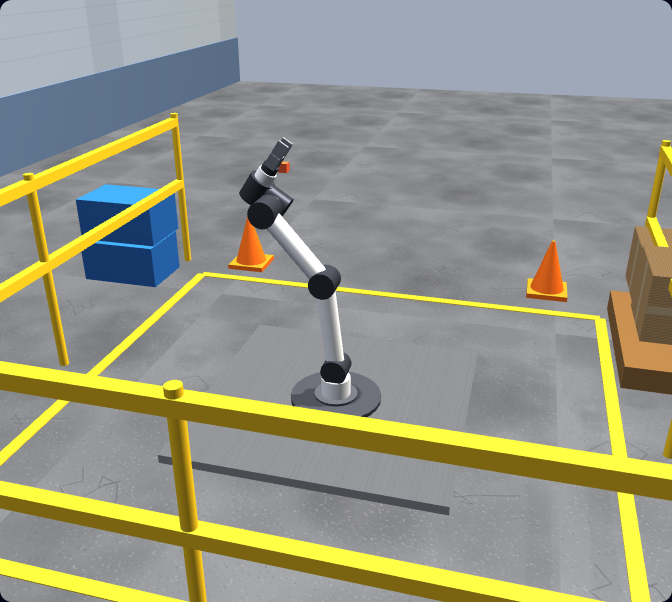
A UR-style six-axis robot arm standing in a 3D factory cell in the browser-based robot simulator, with a parts table, safety railing and pallet — a free, no-install way to learn robot programming as an alternative to desktop offline-programming software.

Opening honesty

We make one of the tools being compared.

We have tried to be fair to RoboDK — read the RoboDK side below before you form an opinion. In one sentence: RoboDK is the better tool if you need professional, multi-brand offline programming and real production code generation. Ours is the better tool if you want to learn the fundamentals of robot programming right now, on any device, for free, before you spend money on a production suite. They are complementary, not interchangeable.

Background

What RoboDK actually is

RoboDK is a commercial desktop application for offline programming (OLP) and simulation of industrial robots. You build a 3D model of your robot and work cell, plan motions and targets, simulate the program, and then generate the actual robot program that runs on real hardware. It supports a large library of robot brands and uses post-processors to translate a simulated program into each brand’s native code.

It is a professional production tool: integrators and manufacturers use it to design cells, validate reach and reachability, optimise paths, and program tasks like machining, welding, palletising, and pick-and-place without tying up the real robot. It runs on Windows, macOS, and Linux, and it is licensed software with a trial available. For current pricing and trial terms, check RoboDK’s own website — we do not quote competitor pricing here because it changes.

In short: RoboDK is excellent at what it is built for — multi-brand offline programming and generating real, deployable robot programs. That is exactly the part our simulator does not try to do.

The offline programming workflow RoboDK is built for: model the robot and work cell in 3D, plan paths, simulate, then post-process to generate real robot code for the controllerOffline-programming flow: write and simulate the robot program on a laptop, deploy it, then run it on the real robot.write & simulate(offline)deploytransferreal robot
RoboDK’s job: model the cell, plan paths, simulate, then post-process to deployable robot code — the production OLP workflow our learning simulator deliberately does not attempt.
Multi-brand robot languages RoboDK targets via post-processors: FANUC TP, ABB RAPID, KUKA KRL, Yaskawa, and Universal Robots URScript all generated from one programFour robot programming languages — URScript, ABB RAPID, KUKA KRL and FANUC TP — each expressing the same joint move, showing the concepts transfer across vendors.same move — four dialectsURScriptUniversal Robotsmovej(p1)RAPIDABBMoveJ p1KRLKUKAPTP P1TPFANUCJ P[1]
RoboDK’s post-processors target dozens of brands and languages — FANUC TP, ABB RAPID, KUKA KRL, URScript. Our simulator teaches one real language (URScript) whose concepts transfer to them all.

Who each is for

Two different jobs

The honest way to choose between these tools is to be clear about what you are trying to do. RoboDK is built to produce programs that run on real robots. We are built to teach you the thinking those programs rely on — before you ever touch a production tool or real hardware.

RoboDK is for you if…

  • You need to generate real programs for real robots.
  • You work across multiple robot brands and need post-processors.
  • You are designing or validating an actual work cell.
  • You are doing production tasks: machining, welding, palletising, deburring.
  • You already understand robot-programming fundamentals.
  • You are an integrator or manufacturer shipping to hardware.

Our simulator is for you if…

  • You are learning robot programming from the ground up.
  • You want to start for free, today, with no install.
  • You are on a Mac, Linux machine, Chromebook, or locked-down laptop.
  • You want guided, auto-graded lessons rather than a blank canvas.
  • You want to write real URScript and see it run under physics.
  • You want a certificate to show you have learned the fundamentals.

Fair comparison

RoboDK vs this browser simulator

This table compares the two on the dimensions that matter when you are choosing where to start. Note the focus difference: RoboDK is a production offline-programming suite; we are a learning environment. The right answer depends entirely on which job you are doing.

DimensionRoboDKThis simulator
Primary focusProduction offline programming & simulationLearning robot-programming fundamentals
InstallDesktop app (Windows, macOS, Linux)Runs in any modern browser — nothing to install
Price to startPaid licence (trial available)Free to start; Pro subscription for the full course
Robot brandsLarge multi-brand libraryUR-style six-axis arm with real URScript
Generates real robot programsYes — via post-processorsNo — it is for learning, not production code
Guided curriculumProfessional tool, not a courseGuided, auto-graded lessons
Auto-graded feedbackYou validate in simulation yourselfYes — tasks are scored against a goal
CertificateNoYes (Pro)
Best forIntegrators shipping to hardwareBeginners and learners building the basics

To be clear: we do not claim feature parity with RoboDK’s production capabilities. RoboDK does multi-brand offline programming and real code generation that this simulator deliberately does not attempt.

In the simulator

The fundamentals you build here — for free

These are the concepts every robot programmer relies on, whatever tool or brand they end up using. You do not just read about them — you write real URScript, run it on a simulated six-axis arm under physics, and get graded against a goal.

The six-axis arm you program in the free RoboDK alternative simulator, with joints J1 to J6, a gripper, and the tool centre pointA six-axis articulated robot arm with a base and a two-finger gripper, its six rotary joints labelled J1 through J6.J1J2J3J4J5J6TCP
A six-axis arm with a TCP.
World, base, and tool coordinate frames in the robot simulator — the foundation every offline-programming tool, RoboDK included, builds onTwo coordinate frames — a fixed base frame and a tool centre point (TCP) frame — each drawn with red X, green Y, and blue Z axis arrows.ZXYBASEZXYTCP
World, base & tool frames.
Joint versus linear motion taught in the simulator — a fast curved joint move compared with a straight Cartesian line, a decision identical in RoboDKTwo tool paths between the same two points: a curved joint move (movej) in cyan and a straight linear move (movel) in amber.ABmovej — joint arcmovel — straight line
Joint vs linear motion.

Frames & coordinate systems

World, base, and tool frames decide where the robot thinks it is — the foundation every OLP tool, RoboDK included, builds on.

Tool Centre Point (TCP)

Define the working point of your gripper or tool so the robot moves the right spot to the right place.

Joint vs linear motion

movej moves fast through joint space; movel keeps the tool on a straight Cartesian line. Knowing when to use each is core everywhere.

Waypoints & sequencing

Approach, act, retract — chaining points into a smooth, safe path is the same skill on any controller.

Digital I/O & grippers

Read inputs and set outputs to drive a gripper or signal a PLC — universal, only the instruction names change.

Payload, reach & safety

Configure payload, respect reach limits, and avoid collisions and over-force contact — the discipline production tools assume you have.

Honest recommendation

Use RoboDK for production. Use us to learn first.

If you need to generate real programs for real robots across multiple brands, you want a production offline-programming tool — RoboDK is a strong, professional choice and we are not pretending to replace it. But if you are still learning, paying for and wrestling with a production suite before you understand frames, TCP, motion types, and safety is the slow way round.

The faster path is to build the fundamentals where they are free and frictionless — in the browser, with guided, auto-graded lessons — and then move to a tool like RoboDK once those basics are second nature. When you do, you will be learning RoboDK’s interface, not learning to think like a robot programmer from scratch.

Need production OLP today?

If you are an integrator shipping to real, multi-brand hardware, a production tool like RoboDK is the right home for that work. Learn the fundamentals here first and it will go much faster.

Learning the basics?

Open a tab, write real URScript on a UR-style arm, and practise the exact concepts every OLP tool relies on — for free, with graded tasks, and a certificate when you finish.

The learning path before RoboDK: free fundamentals lessons, then the full Pro course, then a verifiable robot programming certificate to take into production OLP workA progression from lessons, through three completed checkmarks, to a certificate seal — learn then certify.lessonspass graded taskscertificate
Free fundamentals → full Pro course → a verifiable certificate — then graduate to a production tool like RoboDK with the basics already second nature.

Keep exploring

More robot programming resources

Questions

RoboDK alternative FAQ

If your goal is to learn robot programming, yes — this simulator is a free, browser-based alternative for the learning part. You write real URScript on a simulated six-axis arm, run guided auto-graded lessons, and practise the fundamentals (frames, the tool centre point, joint vs linear motion, waypoints, I/O, pick-and-place, payload, and safety) without installing anything or paying to start. To be straight with you, it is not a free clone of RoboDK’s production capabilities: it does not do multi-brand offline programming or generate real robot programs via post-processors. It is the place to build the skills first.

Learn the fundamentals first — free, in your browser.

Write real robot code in a tab — frames, TCP, motion, I/O, pick-and-place, and safety. No install, no robot, free to start. Then take those skills to a production tool like RoboDK.

Software evaluation field guide

RoboDK alternative: implementation, evidence and troubleshooting

Direct answer

RoboDK alternative becomes useful when it connects the robot brand, controller, task, cad, tooling, frames, collision need, post-processing need, budget and deployment outcome with learning and offline-programming features through paths, frames, i/o, code generation and target-controller verification, then proves the same approach, process and depart path evaluated with recorded frame and payload assumptions under normal, boundary, fault and recovery conditions. The objective is a repeatable engineering or learning result, not merely activity inside a page or tool.

This guide is written for robot learners, integrators and instructors comparing browser practice, offline programming, brand tools and multi-vendor simulation workflows. The intended result is specific: the evaluator can identify whether the job is learning, reach checking, path planning, post-processing, cell integration or controller validation and choose accordingly.

System map / 02

Six concepts that control the result

Treat these as connected checkpoints. Each checkpoint has an expected state, an observable state and a boundary to the next part of the system. That structure prevents a software indication from being mistaken for physical proof.

NODE 01observable

Define the operating contract

the robot brand, controller, task, CAD, tooling, frames, collision need, post-processing need, budget and deployment outcome. For robot programming and simulation software selection, record the initial condition, actor, requested change, observable result and stopping condition before selecting a tool or implementation.

NODE 02observable

Map the evidence path

learning and offline-programming features through paths, frames, I/O, code generation and target-controller verification. Separate request, internal state, output or service, physical or user-visible result and independent feedback so each boundary can be inspected.

NODE 03observable

Prove normal operation

the same approach, process and depart path evaluated with recorded frame and payload assumptions. Run more than one cycle from a known state and retain the values, timings or artifacts that demonstrate repeatability.

NODE 04observable

Exercise a boundary case

unsupported robot, post-processor, calibration, singularity, collision, licence and target-version limits. Choose minimum, maximum, simultaneous, delayed or restart conditions that reveal assumptions hidden by the happy path.

NODE 05observable

Diagnose a controlled fault

a geometry, frame, reach, path, code, connection or workflow mismatch. Preserve the first symptom, divide the system at a measurable boundary and change one condition only after predicting the result.

NODE 06observable

Transfer and hand over

the selected program verified in the official target tools and safeguarded cell. Restore normal state, remove temporary changes, repeat affected checks and document which claims remain limited to the learning environment.

Procedure / 03

A six-step practice and commissioning workflow

Run the steps in order the first time. Later, the same structure becomes a diagnostic loop: define the expected condition, observe the boundary, interpret the difference and choose one proving action.

  1. 01

    Write the acceptance case

    Convert the robot brand, controller, task, cad, tooling, frames, collision need, post-processing need, budget and deployment outcome into initial conditions, one stimulus and observable pass criteria.

    Evidence: Another person can repeat the case without guessing the intended result.

    Avoid: Using page completion or an animation as the acceptance criterion.

  2. 02

    Build the map

    Document learning and offline-programming features through paths, frames, i/o, code generation and target-controller verification and name who owns each state or decision.

    Evidence: Every request and result has a source, destination and useful inspection point.

    Avoid: Using the same value as command, status and independent feedback.

  3. 03

    Run the baseline

    Apply the same approach, process and depart path evaluated with recorded frame and payload assumptions from a clean start and record the expected evidence.

    Evidence: Repeated runs produce the same bounded result.

    Avoid: Changing several parameters before a baseline exists.

  4. 04

    Challenge assumptions

    Test unsupported robot, post-processor, calibration, singularity, collision, licence and target-version limits without changing the acceptance contract.

    Evidence: Limits, timing and restart behavior reach defined states.

    Avoid: Testing only one ideal sequence.

  5. 05

    Isolate one failure

    Introduce or analyse a geometry, frame, reach, path, code, connection or workflow mismatch and locate the first disagreement.

    Evidence: The proving action distinguishes the leading hypotheses.

    Avoid: Resetting, forcing or replacing before evidence is retained.

  6. 06

    Close the evidence loop

    Complete the selected program verified in the official target tools and safeguarded cell and repeat the affected regression cases.

    Evidence: An evaluation is complete when the same representative job is tested in each candidate and differences are recorded as evidence rather than inferred from feature labels.

    Avoid: Treating an acknowledged message or one successful rerun as handover.

Diagnostic matrix / 04

Symptoms, proving points and next actions

The table is a reasoning aid, not a parts-replacement chart. Preserve the initial symptom, inspect the named boundary and use the interpretation to choose the next controlled test. Site safety procedures and equipment manuals remain authoritative.

Diagnostic symptoms, inspection points, interpretations and next actions for RoboDK alternative: implementation, evidence and troubleshooting
Observed symptomInspectInterpretationNext proving action
The expected result is unclearRequirement, initial state, actor, stimulus, units and pass conditionThe evaluator, instructor and technical buyer may be solving different versions of the task.Rewrite one observable acceptance case before continuing.
Internal state changes but the outcome does notRequest, final owner, output or service boundary and independent feedbackA software or interface indication proves intent at one layer, not the complete outcome.Trace the first boundary after the changing state.
Normal case passes but an edge case failsLimits, timing, simultaneous events, reset and restart assumptionsThe implementation contains a hidden assumption exposed by the changed condition.Add the failed boundary as a permanent regression case.
The failure disappears after resetOriginal symptom, histories, diagnostics, timestamps and active causeReset changed evidence or state without proving the initiating cause.Reproduce under a controlled condition and preserve pre/post-event data.
Simulator and target disagreeModel boundary, software version, task timing, I/O behavior, data types and configurationA learning model and the intended target do not share one of the recorded assumptions.Reduce the case and verify against current target documentation.
The result cannot be explainedPrediction, observation, proving action, alternative hypotheses and limitationsActivity occurred but the evidence is not yet transferable or reviewable.Have the learner defend the signal path and repeat a changed case.

Product evidence / 05

What the browser practice can actually demonstrate

The public product surface exposes runnable examples, capability boundaries, pricing context and test-harness behavior that can be checked before a purchasing decision.

Where simulation stops

A learning simulator is not a drop-in RoboDK replacement for post-processors, calibration, controller connectivity, cell validation or production deployment.

Commissioning notebook / 06

Six cases that turn the concepts into evidence

Use these as written briefs rather than click-through instructions. For every case, state the expected condition before acting, retain the first useful observation and explain why the final result proves the requirement. A different program or component choice can still be correct when it produces the same bounded behavior and evidence.

Case 01

predict → observe → prove

Prove define the operating contract

Engineering context. the robot brand, controller, task, CAD, tooling, frames, collision need, post-processing need, budget and deployment outcome. For robot programming and simulation software selection, record the initial condition, actor, requested change, observable result and stopping condition before selecting a tool or implementation. Begin with a written normal condition and identify which request, state, physical result or communication value will provide independent confirmation. Do not begin by changing the configuration; the initial state is part of the evidence and should remain reproducible.

Controlled setup. Use the “Write the acceptance case” stage of the workflow: convert the robot brand, controller, task, cad, tooling, frames, collision need, post-processing need, budget and deployment outcome into initial conditions, one stimulus and observable pass criteria. The acceptance record should show this result: another person can repeat the case without guessing the intended result. Record initial conditions, the exact stimulus and the observation point so another learner can repeat the case without relying on your memory.

Fault challenge. Introduce or analyse “The expected result is unclear” as one bounded deviation. Inspect requirement, initial state, actor, stimulus, units and pass condition The working interpretation is that the evaluator, instructor and technical buyer may be solving different versions of the task. The next proving action is to rewrite one observable acceptance case before continuing. Change only one condition before observing the result, and preserve timestamps or measurements where timing matters.

Review and recovery. The most common trap here is using page completion or an animation as the acceptance criterion. After restoring the cause, repeat the normal case and at least one stop, timeout, disconnect or restart boundary relevant to this topic. Remove temporary forces and bypasses, return the model to a known state and retain the evidence that both operation and recovery are deliberate.

Explain it aloud: What should I learn first about robot programming and simulation software selection? A defensible short answer is: Start with the operating contract and evidence path: the robot brand, controller, task, cad, tooling, frames, collision need, post-processing need, budget and deployment outcome, followed by learning and offline-programming features through paths, frames, i/o, code generation and target-controller verification. Add advanced features only after the baseline is predictable.

Case 02

predict → observe → prove

Prove map the evidence path

Engineering context. learning and offline-programming features through paths, frames, I/O, code generation and target-controller verification. Separate request, internal state, output or service, physical or user-visible result and independent feedback so each boundary can be inspected. Begin with a written normal condition and identify which request, state, physical result or communication value will provide independent confirmation. Do not begin by changing the configuration; the initial state is part of the evidence and should remain reproducible.

Controlled setup. Use the “Build the map” stage of the workflow: document learning and offline-programming features through paths, frames, i/o, code generation and target-controller verification and name who owns each state or decision. The acceptance record should show this result: every request and result has a source, destination and useful inspection point. Record initial conditions, the exact stimulus and the observation point so another learner can repeat the case without relying on your memory.

Fault challenge. Introduce or analyse “Internal state changes but the outcome does not” as one bounded deviation. Inspect request, final owner, output or service boundary and independent feedback The working interpretation is that a software or interface indication proves intent at one layer, not the complete outcome. The next proving action is to trace the first boundary after the changing state. Change only one condition before observing the result, and preserve timestamps or measurements where timing matters.

Review and recovery. The most common trap here is using the same value as command, status and independent feedback. After restoring the cause, repeat the normal case and at least one stop, timeout, disconnect or restart boundary relevant to this topic. Remove temporary forces and bypasses, return the model to a known state and retain the evidence that both operation and recovery are deliberate.

Explain it aloud: How do I practise robot programming and simulation software selection effectively? A defensible short answer is: Use short cases with known initial conditions, a written prediction, one action and an observable result. Then alter a boundary or fault and explain why the evidence changed.

Case 03

predict → observe → prove

Prove prove normal operation

Engineering context. the same approach, process and depart path evaluated with recorded frame and payload assumptions. Run more than one cycle from a known state and retain the values, timings or artifacts that demonstrate repeatability. Begin with a written normal condition and identify which request, state, physical result or communication value will provide independent confirmation. Do not begin by changing the configuration; the initial state is part of the evidence and should remain reproducible.

Controlled setup. Use the “Run the baseline” stage of the workflow: apply the same approach, process and depart path evaluated with recorded frame and payload assumptions from a clean start and record the expected evidence. The acceptance record should show this result: repeated runs produce the same bounded result. Record initial conditions, the exact stimulus and the observation point so another learner can repeat the case without relying on your memory.

Fault challenge. Introduce or analyse “Normal case passes but an edge case fails” as one bounded deviation. Inspect limits, timing, simultaneous events, reset and restart assumptions The working interpretation is that the implementation contains a hidden assumption exposed by the changed condition. The next proving action is to add the failed boundary as a permanent regression case. Change only one condition before observing the result, and preserve timestamps or measurements where timing matters.

Review and recovery. The most common trap here is changing several parameters before a baseline exists. After restoring the cause, repeat the normal case and at least one stop, timeout, disconnect or restart boundary relevant to this topic. Remove temporary forces and bypasses, return the model to a known state and retain the evidence that both operation and recovery are deliberate.

Explain it aloud: What counts as proof of competence? A defensible short answer is: A repeatable artifact or system result plus an explanation of the signal path is stronger than time spent, screenshots or a copied answer. Physical competence requires separate supervised evidence.

Case 04

predict → observe → prove

Prove exercise a boundary case

Engineering context. unsupported robot, post-processor, calibration, singularity, collision, licence and target-version limits. Choose minimum, maximum, simultaneous, delayed or restart conditions that reveal assumptions hidden by the happy path. Begin with a written normal condition and identify which request, state, physical result or communication value will provide independent confirmation. Do not begin by changing the configuration; the initial state is part of the evidence and should remain reproducible.

Controlled setup. Use the “Challenge assumptions” stage of the workflow: test unsupported robot, post-processor, calibration, singularity, collision, licence and target-version limits without changing the acceptance contract. The acceptance record should show this result: limits, timing and restart behavior reach defined states. Record initial conditions, the exact stimulus and the observation point so another learner can repeat the case without relying on your memory.

Fault challenge. Introduce or analyse “The failure disappears after reset” as one bounded deviation. Inspect original symptom, histories, diagnostics, timestamps and active cause The working interpretation is that reset changed evidence or state without proving the initiating cause. The next proving action is to reproduce under a controlled condition and preserve pre/post-event data. Change only one condition before observing the result, and preserve timestamps or measurements where timing matters.

Review and recovery. The most common trap here is testing only one ideal sequence. After restoring the cause, repeat the normal case and at least one stop, timeout, disconnect or restart boundary relevant to this topic. Remove temporary forces and bypasses, return the model to a known state and retain the evidence that both operation and recovery are deliberate.

Explain it aloud: Why test faults and restart behavior? A defensible short answer is: Because a geometry, frame, reach, path, code, connection or workflow mismatch or unsupported robot, post-processor, calibration, singularity, collision, licence and target-version limits can expose assumptions that never appear during ideal startup and steady operation.

Case 05

predict → observe → prove

Prove diagnose a controlled fault

Engineering context. a geometry, frame, reach, path, code, connection or workflow mismatch. Preserve the first symptom, divide the system at a measurable boundary and change one condition only after predicting the result. Begin with a written normal condition and identify which request, state, physical result or communication value will provide independent confirmation. Do not begin by changing the configuration; the initial state is part of the evidence and should remain reproducible.

Controlled setup. Use the “Isolate one failure” stage of the workflow: introduce or analyse a geometry, frame, reach, path, code, connection or workflow mismatch and locate the first disagreement. The acceptance record should show this result: the proving action distinguishes the leading hypotheses. Record initial conditions, the exact stimulus and the observation point so another learner can repeat the case without relying on your memory.

Fault challenge. Introduce or analyse “Simulator and target disagree” as one bounded deviation. Inspect model boundary, software version, task timing, I/O behavior, data types and configuration The working interpretation is that a learning model and the intended target do not share one of the recorded assumptions. The next proving action is to reduce the case and verify against current target documentation. Change only one condition before observing the result, and preserve timestamps or measurements where timing matters.

Review and recovery. The most common trap here is resetting, forcing or replacing before evidence is retained. After restoring the cause, repeat the normal case and at least one stop, timeout, disconnect or restart boundary relevant to this topic. Remove temporary forces and bypasses, return the model to a known state and retain the evidence that both operation and recovery are deliberate.

Explain it aloud: Can browser practice replace official software or hardware? A defensible short answer is: No. It can build concepts and diagnostic reasoning. Exact firmware, I/O electrical behavior, networking, safety and commissioning require current official tools, documentation and target equipment.

Case 06

predict → observe → prove

Prove transfer and hand over

Engineering context. the selected program verified in the official target tools and safeguarded cell. Restore normal state, remove temporary changes, repeat affected checks and document which claims remain limited to the learning environment. Begin with a written normal condition and identify which request, state, physical result or communication value will provide independent confirmation. Do not begin by changing the configuration; the initial state is part of the evidence and should remain reproducible.

Controlled setup. Use the “Close the evidence loop” stage of the workflow: complete the selected program verified in the official target tools and safeguarded cell and repeat the affected regression cases. The acceptance record should show this result: an evaluation is complete when the same representative job is tested in each candidate and differences are recorded as evidence rather than inferred from feature labels. Record initial conditions, the exact stimulus and the observation point so another learner can repeat the case without relying on your memory.

Fault challenge. Introduce or analyse “The result cannot be explained” as one bounded deviation. Inspect prediction, observation, proving action, alternative hypotheses and limitations The working interpretation is that activity occurred but the evidence is not yet transferable or reviewable. The next proving action is to have the learner defend the signal path and repeat a changed case. Change only one condition before observing the result, and preserve timestamps or measurements where timing matters.

Review and recovery. The most common trap here is treating an acknowledged message or one successful rerun as handover. After restoring the cause, repeat the normal case and at least one stop, timeout, disconnect or restart boundary relevant to this topic. Remove temporary forces and bypasses, return the model to a known state and retain the evidence that both operation and recovery are deliberate.

Explain it aloud: How should progress be documented? A defensible short answer is: Keep the requirement, initial state, program or configuration, observed values, fault hypothesis, proving action, recovery result and a concise limitations statement.

Answer surface / 07

Questions people ask about RoboDK alternative

These concise answers define the operating, training and product boundaries most often missed in broad summaries. The full workflow and diagnostic table above provide the evidence behind them.

What should I learn first about robot programming and simulation software selection?

Start with the operating contract and evidence path: the robot brand, controller, task, cad, tooling, frames, collision need, post-processing need, budget and deployment outcome, followed by learning and offline-programming features through paths, frames, i/o, code generation and target-controller verification. Add advanced features only after the baseline is predictable.

How do I practise robot programming and simulation software selection effectively?

Use short cases with known initial conditions, a written prediction, one action and an observable result. Then alter a boundary or fault and explain why the evidence changed.

What counts as proof of competence?

A repeatable artifact or system result plus an explanation of the signal path is stronger than time spent, screenshots or a copied answer. Physical competence requires separate supervised evidence.

Why test faults and restart behavior?

Because a geometry, frame, reach, path, code, connection or workflow mismatch or unsupported robot, post-processor, calibration, singularity, collision, licence and target-version limits can expose assumptions that never appear during ideal startup and steady operation.

Can browser practice replace official software or hardware?

No. It can build concepts and diagnostic reasoning. Exact firmware, I/O electrical behavior, networking, safety and commissioning require current official tools, documentation and target equipment.

How should progress be documented?

Keep the requirement, initial state, program or configuration, observed values, fault hypothesis, proving action, recovery result and a concise limitations statement.

What should I do when the answer differs from a guide?

Check assumptions, version, units and initial state first. Reduce the case, compare one boundary at a time and prefer current primary documentation for target-specific behavior.

When is a robot programming and simulation software selection exercise finished?

An evaluation is complete when the same representative job is tested in each candidate and differences are recorded as evidence rather than inferred from feature labels.