You do not need a multi-gigabyte vendor download to start learning PLC programming. A handful of free simulators now run entirely in a browser, and a few more are free to install. You can write a real ladder rung, watch it scan, and debug a sequence without a license key or an industrial controller on your desk.
This guide compares the genuinely useful free options as of 2026 — what runs in a browser, what is free versus trial-only, and which one fits your goal. We are one of the tools on this list, so we will be upfront about it: where another simulator is the better pick for your use case, we say so.
If you also want paid, install-based trainers in the mix (LogixPro, Factory IO, and the vendor IDEs), read our broader roundup, Best PLC Simulator 2026. This post is specifically about free and online / no-install tools.
If you want to skip the roundup and test a rung immediately, open the free ladder logic simulator; its page explains the supported workflow and boundaries before you start.
What to look for in a free simulator
Before the table, here is what actually matters when you are starting out:
- Ladder logic support. Ladder (LD) is the most widely deployed PLC language. Almost any learner should be able to draw contacts and coils.
- Runs in a browser, no install. The fastest path from "curious" to "writing logic" is a URL. No admin rights, no Windows VM on a Mac, no license server.
- Free with no license key. Some "free" tools are time-limited trials. We flag those.
- Learning structure. A blank sandbox teaches you the editor; a sequence of graded exercises teaches you PLC programming. That difference matters a lot for beginners.
Comparison table
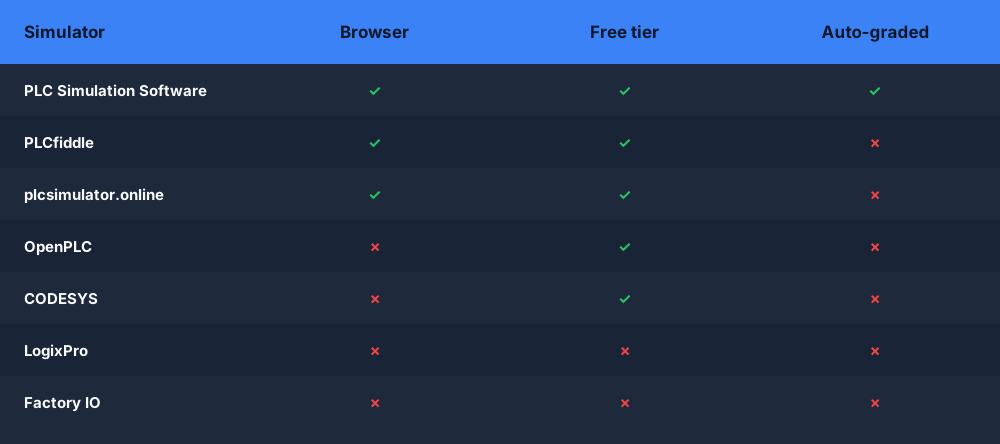
| Simulator | Browser-based? | Free tier | Ladder / ST support | Auto-graded exercises? | Best for |
|---|---|---|---|---|---|
| PLC Simulation Software (us) | Yes | Yes (free scenarios) | LD + ST | Yes | Structured, graded practice from zero |
| PLCfiddle | Yes | Yes | Ladder | No | Quick ladder sandbox / sharing snippets |
| plcsimulator.online | Yes | Yes | Ladder (sandbox-style) | No | Free browser doodling with ladder |
| OpenPLC | No (install / runtime) | Yes (open-source) | LD + ST + others (IEC 61131-3) | No | Real runtime on a Pi or PC, open-source |
| CODESYS | No (install IDE) | Yes (dev IDE) | LD + ST + all IEC langs | No | Industry-grade tooling, FBD/SFC, SoftPLC |
| LogixPro | No (Windows) | No — paid trainer | Ladder (RSLogix-style) | Built-in lab activities | Allen-Bradley RSLogix 500 look-and-feel |
| Factory IO | No (Windows) | No — trial only | Connects to a PLC (3D process) | No (it is the process, not the logic) | 3D process visualization |
Claims above reflect the tools as of 2026. Free tiers and feature sets change — always check the current site before you commit time.
The simulators, one by one
PLC Simulation Software (this site)
Runs in the browser with nothing to install. You write real ladder logic — and structured text — against a live machine model, and the scenarios are auto-graded: the simulator runs your program through defined test cases and tells you pass or fail, the same way an instructor would. The free tier gives you a set of scenarios and structured beginner lessons. Its wedge is the graded, guided path rather than a blank canvas. The trade-off: it is a learning environment, not a drop-in replacement for a vendor IDE you will use on the plant floor.
PLCfiddle
A free, browser-based ladder sandbox — think of it as a "fiddle" for PLC logic, in the spirit of JSFiddle. You drop contacts and coils onto rungs and watch them simulate, and you can share a snippet by URL. Great for a fast experiment or to illustrate a rung to someone. There is no graded curriculum, so you supply your own learning structure.
plcsimulator.online
A free, browser-based ladder simulator aimed at letting you sketch and run logic without an install. It is sandbox-style: useful for free practice and seeing a rung scan, but it does not walk you through a structured course or grade your work. Check the current site for the exact feature set, as these lightweight tools evolve.
OpenPLC
OpenPLC is a free, open-source PLC project — an editor plus a runtime you can deploy to a Raspberry Pi, an Arduino-class board, or a plain PC acting as a SoftPLC. It supports the IEC 61131-3 languages including ladder and structured text. It is not a browser sandbox: you install the editor and runtime. If you want to control real I/O cheaply or understand how a runtime actually executes a program, OpenPLC is excellent and genuinely free.
CODESYS
CODESYS is the free development IDE behind a large share of the industrial market — many vendors ship CODESYS-based runtimes. The IDE is free to download and gives you all five IEC 61131-3 languages (LD, ST, FBD, SFC, IL) plus a software PLC for simulation. It is professional-grade and a great way to learn the toolchain used in industry. The trade-off for a beginner: it is a heavy Windows install with a steeper learning curve, and there is no guided, graded curriculum out of the box.
LogixPro — note: not free
LogixPro is a popular Allen-Bradley-style ladder trainer that mimics the RSLogix 500 environment, with built-in lab simulations (traffic lights, batch mixing, and so on). It is a paid Windows product, not a free or online tool — we include it because people searching "free PLC simulator" often have LogixPro in mind. If you specifically want the RSLogix look-and-feel, it is worth knowing about, but budget for the license.
Factory IO — note: trial only
Factory IO is a 3D factory simulation: you build a virtual conveyor, sorter, or palletiser and drive it from a PLC. It is impressive for visualizing a real process, but it is a paid product with a time-limited trial, and it is the process side — you still need a PLC or SoftPLC to provide the logic. Not a free online ladder simulator, but the best pick if 3D process visualization is your goal.
What makes a free simulator actually useful for learning
A simulator that just gives you a blank editor teaches you one thing well: the editor. That is genuinely valuable — sandboxes like PLCfiddle and plcsimulator.online are great for trying an idea fast or sharing a rung.
But "I drew a rung and it lit up" is not the same as "I can solve a control problem." The gap is structure and feedback:
- Structured practice means a sequence — start/stop seal-in, then a timer, then an interlock, then a counter — so you build skills in a sensible order instead of staring at an empty canvas wondering what to try.
- Auto-grading means the simulator runs your logic against defined test cases and tells you whether it actually works, including the edge cases you would not think to test yourself. That is the difference between thinking your motor starter is correct and knowing it handles the stop-while-running case.
This is our deliberate wedge — graded, guided scenarios — and it is why we built the PLC ladder logic simulator the way we did. It is not a knock on the sandboxes; it is a different job. If you already know what you are doing, a sandbox is faster. If you are learning from zero, graded practice gets you there with fewer wrong turns.
Which should you pick?
By use case:
- Absolute beginner, want to learn properly → Start with a structured, graded tool in the browser so you get feedback as you go. Our free scenarios are built exactly for this. Once the fundamentals click, branch out.
- Just want to doodle a rung right now → A browser sandbox like PLCfiddle is the fastest no-account option.
- Allen-Bradley / RSLogix learner → LogixPro mirrors that environment closely (paid). For free practice of the same ladder concepts, use a browser simulator first, then move to the vendor tooling.
- Siemens learner → No free Siemens-specific browser simulator exists; learn ladder and structured text fundamentals in a free simulator, then practice the TIA Portal workflow in Siemens' own software.
- Want a 3D process to control → Factory IO (trial), driven by a SoftPLC such as CODESYS or OpenPLC.
- Want a real, free, open-source runtime → OpenPLC, especially if you want to drive real I/O on a Raspberry Pi.
There is no single "best" — the right tool depends on whether you are learning fundamentals, mirroring a specific vendor, or visualizing a process. For a wider list that also covers the paid trainers and vendor IDEs side by side, see Best PLC Simulator 2026.
Start in your browser, right now
If you want structured, auto-graded ladder practice with nothing to install, you can start in the browser this minute. Write real ladder logic against a live machine model, run it, and get told whether it passes — the free tier includes a set of scenarios to work through.
Try the free, auto-graded scenarios in your browser. No install. No license key. Write real ladder logic against a live machine model and get instant pass/fail feedback.