The first time you open an industrial control panel, it can look like a bowl of spaghetti. Dozens of wires, terminal strips running down both sides, relays and contactors stacked in rows, a DIN rail that seems to have no particular logic. But control panels follow a consistent structure — once you see it, you cannot unsee it. Everything makes sense.
This guide covers the fundamentals of control panel wiring from a PLC technician's perspective: the 24V control power system, the difference between control and power circuits, how relays and contactors work and when you use each, motor starters, terminal block conventions, and the five mistakes that make beginner wiring dangerous or unreliable.
24V DC Control Power
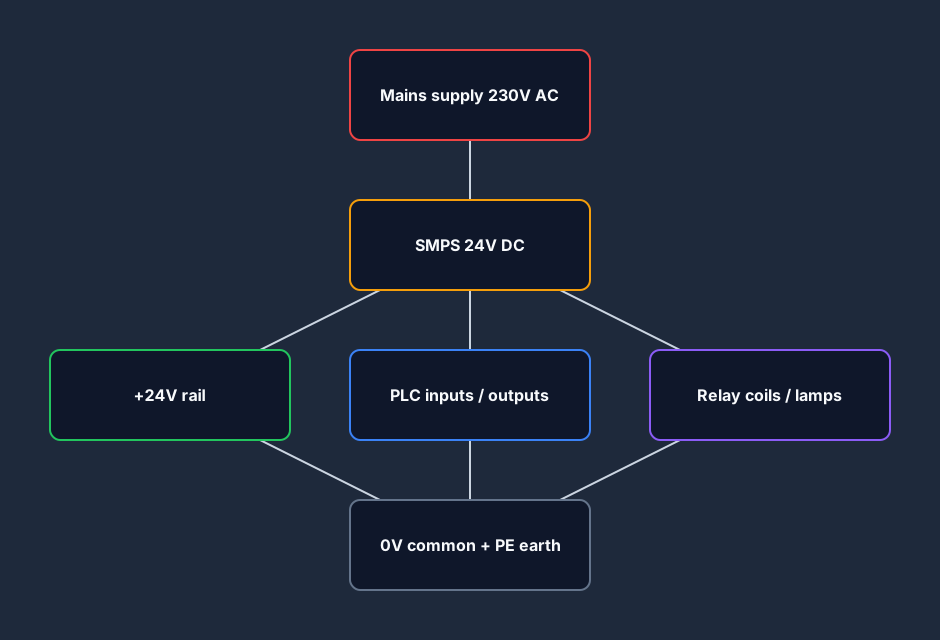
Almost every modern industrial control panel runs the control circuit on 24 volts DC. You will also see panels with 120V AC control circuits, particularly on older equipment in North America, but 24V DC has become the default for new builds because it is safer to work on, compatible with PLC I/O cards, and accepted by most sensors, relays, and indicators without additional voltage conversion.
The 24V supply comes from a switched-mode power supply (SMPS) mounted on the DIN rail. It takes the incoming mains voltage (230V AC single-phase in most of the world, or 120V in North America) and outputs a regulated 24V DC rail. The SMPS has a +24V terminal and a 0V (common) terminal. Everything in the control circuit either connects between these two rails or connects to a common reference through one of them.
Why 24V matters for PLC technicians:
- PLC digital input cards run at 24V. When a pushbutton or limit switch closes, it connects 24V to the input terminal. When it is open, the input terminal floats at 0V. This is the standard NPN/PNP sensing voltage.
- Most sensors — proximity sensors, photoelectric sensors, pressure switches — are powered from the 24V rail and output a 24V signal.
- A technician fault-finding on a 24V circuit can use a simple multimeter probe to check voltage without significant shock risk. Working on a live 24V DC panel is low-hazard compared to poking around live 415V AC motor terminals.
The 0V rail is typically connected to the panel earth (protective ground) at one point only. This single-point earth avoids earth loops that cause noise on sensitive analog signals.
Control Circuit vs Power Circuit
This is the most important structural concept in a control panel, and it is the one most often glossed over in basic tutorials.
A control panel contains two electrically distinct circuits:
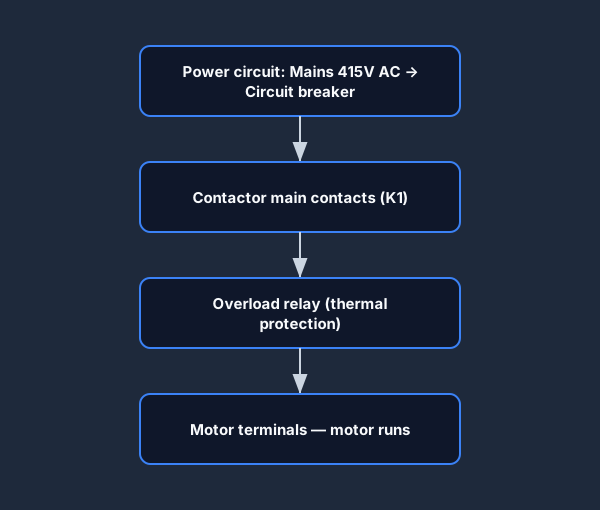
The power circuit carries mains-level voltage (typically 415V AC three-phase or 230V AC single-phase) to the load — the motor, the heating element, the actuator. This circuit runs through the circuit breaker, the contactor main contacts, and the overload relay on its way to the motor. It handles high current. It is wired in large-cross-section cable: 2.5mm², 4mm², 6mm² or larger depending on the motor rating.
The control circuit carries the 24V DC (or 120V AC on older panels) signals that tell the power circuit what to do. When the operator presses Start, a 24V signal energises the contactor coil. The contactor's main contacts — in the power circuit — snap closed and the motor runs. The control circuit handles milliamps, not amps. It is wired in small, flexible cable: typically 0.75mm² or 1.0mm².
Why this distinction matters: when you are fault-finding, you trace the control circuit first. If the contactor is not pulling in, you check whether the contactor coil has 24V on it. If it does, the contactor has failed. If it does not, you trace back through the control circuit — the timer output, the relay contact, the PLC output — to find where the signal stopped.
Never trace a fault in the power circuit first. The power circuit is simple: cable, overload, contactor, motor. If the power circuit is broken, the symptom is the motor does not turn despite the contactor being energised. The control circuit is where 90% of faults live.
Relays and Contactors
Both relays and contactors are electromagnetic switching devices. They use a coil to generate a magnetic field that opens or closes contacts. The difference is scale.
Relays
A relay is a small electromagnetic switch with contacts rated for low current — typically 5A to 10A at 24V DC or 250V AC. Relays are used in control circuits to:
- Isolate PLC outputs from field devices (a PLC output card typically sinks or sources only 0.5A; a relay lets it switch a coil or motor rated at higher current).
- Multiply one signal into several parallel actions (one output driving five relay coils through the relay's multiple contacts).
- Provide galvanic isolation between PLC circuits and higher-voltage field circuits.
- Create interlock logic in hard-wired safety circuits.
A typical DIN-rail relay in a control panel is a plug-in unit: the base mounts on the rail, the relay clicks into the base. When the coil burns out, you pull the relay out and plug in a replacement without rewiring. This is a routine maintenance action — keep spare relays.
Contactors
A contactor is the heavy-duty version. It is designed to switch motor loads — 3-phase at full current, repeatedly, over thousands of operating cycles. A contactor for a 7.5 kW motor might be rated at 22A, with contacts robust enough to handle the inrush current when the motor starts.
Contactors have main contacts in the power circuit (these switch the motor) and auxiliary contacts in the control circuit (used for seal-in rungs and interlocks). When you wire a motor start/stop circuit in a control panel, the contactor auxiliary contact in parallel with the Start button is what creates the seal-in. This is the panel-wiring equivalent of the ladder logic seal-in rung you write in the PLC.
Motor Starters
A motor starter is a contactor combined with an overload relay. The overload relay protects the motor from sustained overcurrent — if the motor draws more than its rated full load current for longer than the thermal model allows, the overload trips, the control circuit opens, and the motor stops before it burns out.
A direct-on-line (DOL) motor starter is the simplest: contactor + overload + control circuit. The motor goes from stopped to full speed in one step. Star-delta starters, soft starters, and VFDs (variable frequency drives) are more sophisticated starting methods for larger motors, but the DOL starter is the foundation. For the detailed comparison of when a DOL starter is sufficient versus when a VFD is warranted, see motor starter vs VFD.
Insider note: the overload relay has a test trip button and a reset button. Before commissioning a starter, manually trip the overload with the test button and confirm the control circuit opens and the motor cannot start. This confirms your overload contact wiring is correct before putting live current through the motor.
Terminal Blocks and Wire Numbers
Terminal Blocks
Terminal blocks are the junction points between wires. In a control panel, they perform two jobs:
-
Field termination: field cables from sensors, pushbuttons, and actuators outside the panel terminate on a terminal block. Inside the panel, shorter wires run from those terminals to the PLC I/O cards, relays, and other devices.
-
Wire management: terminal blocks force a structured layout. Each wire enters the panel at a numbered terminal, and you can trace a signal by following the terminal numbers on the wiring diagram.
Common types you will encounter:
- Spring-clamp terminals (Phoenix Contact, Wago): tool-free wiring, vibration-proof, fastest to install. Standard on new builds.
- Screw terminals: traditional, reliable, requires a screwdriver. Still common in maintenance environments.
- Fused terminals: built-in fuse holder for protecting individual circuits. Used where a sensor or device needs its own protection without a separate fuse block.
- Disconnect terminals (isolation terminals): allow individual circuits to be disconnected without cutting wires. Used in maintenance-intensive applications.
Wire Numbers
Every wire in a properly built panel has a number, printed on a heat-shrink or push-on ferrule at both ends. The wire numbers appear on the wiring diagram. When you pick up a wire and read 125, you go to the wiring diagram, find 125, and immediately know what it does and where the other end goes.
Panels without wire numbers are a maintenance nightmare. You have seen it: a panel where someone has added relays over the years, the wiring diagram was never updated, and now there are a dozen mystery wires. Tracing a fault becomes a two-hour archaeological dig.
If you are ever tasked with building a new panel, wire-number every single conductor before you terminate it. Two minutes per wire now saves four hours in fault-finding later.
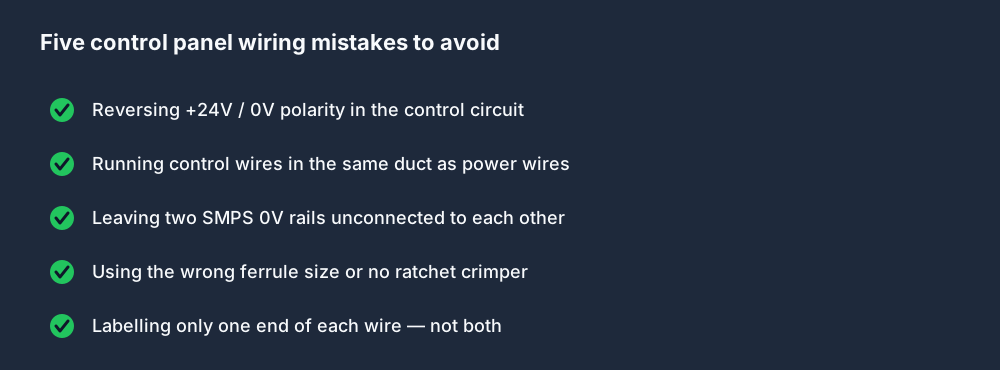
The Five Wiring Mistakes Beginners Make
1. Reversing the control circuit polarity
On a 24V DC control circuit, the convention is that the switched side of the circuit (the side the relay coil, lamp, or PLC input card connects to) is +24V. The 0V common runs to the other terminal. If you wire it backwards — 0V through the switches and +24V to the common — the circuit still works, but the PLC input card reads the input differently, and some cards only accept current in one direction (NPN or PNP sourcing/sinking). Get the polarity convention right from the start.
2. Mixing control circuit wiring in the power circuit cable duct
Control circuit wires (24V, signal-level) must not run in the same cable duct as power circuit wires (415V AC). Induced voltage from the power conductors gets onto the control wiring and causes spurious input signals, EMC problems, and noise on analog inputs. Keep them separated by at least one empty duct lane, or use a dedicated screened cable duct for the control wiring.
3. Sharing a 0V return rail across multiple power supply circuits
If you have two SMPS units in a panel — say one for PLC power and one for field devices — their 0V rails must be connected together at one point (and earthed at one point only). If you leave the 0V rails floating separately and a field device cable fault introduces a current path between them, you create a voltage offset on the signal rails that corrupts every analog input in the panel.
4. Under-rating ferrules and not using a ferrule tool
Every wire end terminating in a spring-clamp or screw terminal should have a crimp ferrule on the stripped end. Ferrules prevent stray copper strands from bridging adjacent terminals (which causes a short the moment the door closes and nobody can figure out why). Using the wrong-size ferrule and a general-purpose plier gives a weak, inconsistent crimp. Use a ratchet ferrule crimper; they are not expensive and the crimp quality is night-and-day better.
5. Not labeling wires at both ends
One ferrule, labeled at one end only. The other end of the wire is in the back of the cabinet or in a conduit and you have no idea where it goes. This is the single most common beginner shortcut, and it causes the most pain during commissioning and fault-finding. Label both ends. Every time.
Connecting This to PLC Programming
Control panel wiring and PLC programming are not separate skills — they are two halves of the same problem. The ladder logic in the PLC mirrors the control circuit in the panel. When you write a seal-in rung in ladder, you are implementing in software what the electrician implements in hardware with the contactor auxiliary contact. When you write a normally-closed stop contact in ladder, you are replicating the normally-closed stop button contact wired in series in the control circuit.
This is why understanding wiring makes you a better PLC programmer, and understanding ladder logic makes you a faster fault-finder. You can trace a fault from the HMI alarm screen → PLC output rung → contactor coil terminal → contactor main contacts → motor terminal. Each step is readable if you know the language of both the panel and the program.
Practice the Concepts Now
The Electrical Foundations lessons on this platform cover 24V control power, control vs power circuit design, relay and contactor operation, and reading electrical line diagrams — the complete foundation for panel wiring. The first two lessons are free.
Start the Electrical Foundations track free →
For a deeper walk through PLC wiring simulation including fault scenarios, see the PLC wiring simulator guide.
Frequently Asked Questions
What voltage does a control panel run at?
Modern industrial control panels typically use 24V DC for the control circuit — the circuit that carries signals between pushbuttons, sensors, PLC I/O, and relay coils. The power circuit, which drives motors and other high-power loads, runs at mains voltage — 415V AC three-phase or 230V AC single-phase depending on the country and application.
What is the difference between a relay and a contactor in a control panel?
A relay is a small electromagnetic switch rated for low-current control circuit use — typically 5–10A. A contactor is a heavy-duty electromagnetic switch designed to handle motor load currents (22A, 40A, 63A and above) and repeated switching cycles. A motor starter combines a contactor with an overload relay to drive and protect a motor.
What are terminal blocks used for in a panel?
Terminal blocks provide structured connection points between wires. They allow field cables from external sensors and actuators to terminate cleanly inside the panel, with numbered terminals that correspond to the wiring diagram. Terminal blocks make tracing, fault-finding, and maintenance significantly faster than direct wiring to device terminals.
Why do control wires need to be separated from power wires?
Power circuit wires carrying 415V AC induce electromagnetic interference (EMI) into adjacent cables. Control and signal wiring running alongside power wiring picks up this noise as spurious voltages, which causes false PLC input signals, analog reading errors, and intermittent faults that are difficult to diagnose. Separate cable ducts prevent the problem entirely.
How do I read a control panel wiring diagram?
Control panel wiring diagrams use a standard format: the left rail is the live supply rail (24V DC or 120V AC), the right rail is the common/neutral. Contacts, coils, lamps, and other devices are drawn between the rails in horizontal rungs. Each rung represents one control function. Trace a fault by following the rung from left to right: each contact must be closed for current to flow to the coil at the right.
Build the panel wiring foundation with the Electrical Foundations track. 24V control power, control vs power circuit, relay vs contactor, reading line diagrams — the first two lessons are free, no credit card required.
