
The fastest way to learn PLC programming is to read worked examples — a clear problem statement, the I/O list, the ladder solution, and the reason it behaves the way it does. Once you have seen the same handful of patterns a few times, you start recognizing them inside every real machine program you open.
This post walks through eight classic PLC programming examples in ladder logic. Each one is a building block you will reuse for the rest of your career: seal-in, interlock, timer, counter, sequence, and analog level control. Every example below is also a runnable, auto-graded scenario in the simulator, so you can type the rung in yourself and have it checked against a live machine model.
If you want bare exercise prompts to solve on your own first, see the PLC practice problems page. This post is the opposite: full solutions with explanations.
How to read the ladder diagrams
A ladder program runs between two vertical rails. Each horizontal rung has input contacts on the left and an output coil on the right. [ Contact ] is normally-open (true when its bit is on); [/Contact] is normally-closed (true when its bit is off). Contacts in series are an AND; contacts stacked in parallel are an OR.
|--[Input]--[/Input2]--( Output )--|
That rung reads: "Output is on when Input is on AND Input2 is off."
Example 1: Motor Start/Stop with Seal-In
Problem. A motor must start when the operator presses a momentary Start button and keep running after the button is released. It must stop when a Stop button is pressed.
I/O list.
- I0.0 — Start pushbutton (normally-open, momentary)
- I0.1 — Stop pushbutton (normally-closed wiring)
- Q0.0 — Motor contactor
Solution.
|--[Start]--+--[/Stop]--( Motor )--|
|--[Motor]--+
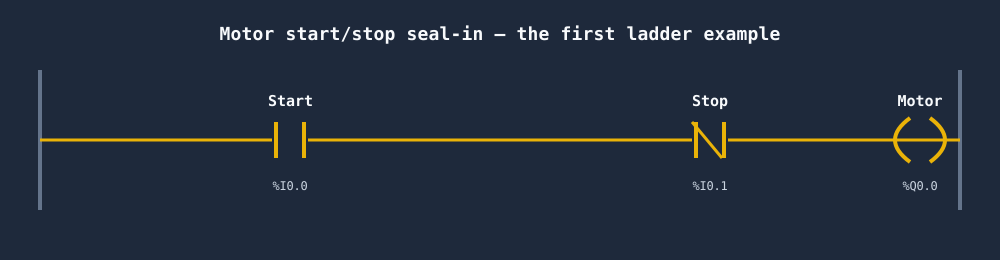
Why it works. The Start contact and the Motor contact are in parallel — an OR. Pressing Start energises Motor for one scan; on the next scan the Motor contact (now true) holds the rung true on its own. This parallel feedback is the seal-in (or latch). The normally-closed Stop contact is in series, so when Stop is pressed it breaks the rung and the seal-in drops out. Note that Stop is wired normally-closed in the field but appears as [/Stop] so the rung is true during normal running — a fail-safe so a broken Stop wire stops the motor.
Example 2: Forward/Reverse Motor with Interlock
Problem. A motor can run forward or reverse. Pressing Forward must never let Reverse energise at the same time (that would short the contactors), and vice versa.
I/O list.
- I0.0 — Forward pushbutton
- I0.1 — Reverse pushbutton
- I0.2 — Stop pushbutton (normally-closed)
- Q0.0 — Forward contactor
- Q0.1 — Reverse contactor
Solution.
|--[Fwd]--+--[/Stop]--[/Rev]--( Fwd )--|
|--[Fwd]--+

|--[Rev]--+--[/Stop]--[/Fwd]--( Rev )--|
|--[Rev]--+
Why it works. Each direction is its own seal-in rung. The trick is the cross interlock: the Forward rung contains a normally-closed Reverse contact ([/Rev]), and the Reverse rung contains a normally-closed Forward contact ([/Fwd]). If Reverse is already running, [/Rev] is open and Forward physically cannot energise. The two outputs are mutually exclusive by construction, not by operator discipline. Add hardware contactor interlocks too — software alone should never be the only guard against a phase-to-phase short.
Example 3: Start/Stop with Run Indicator Lamp
Problem. Add a pilot lamp that is lit whenever the motor is running.
I/O list.
- I0.0 — Start, I0.1 — Stop (normally-closed)
- Q0.0 — Motor
- Q0.1 — Run lamp
Solution.
|--[Start]--+--[/Stop]--( Motor )--|
|--[Motor]--+

|--[Motor]-----------( Lamp )--|
Why it works. The first rung is the seal-in from Example 1. The second rung simply mirrors the Motor coil's state to the lamp: one normally-open Motor contact drives the Lamp coil. Driving the lamp from the output bit (rather than the Start button) guarantees the indicator reflects what the motor is actually doing, including after a Stop. This "echo a coil to an indicator" pattern is everywhere in real panels.
Example 4: On-Delay Timer (Motor Runs 5s After Start)
Problem. When Start is pressed, the motor must wait 5 seconds, then run. Stop cancels everything immediately.
I/O list.
- I0.0 — Start, I0.1 — Stop (normally-closed)
- T1 — on-delay timer (TON), preset 5 s
- Q0.0 — Motor
Solution.
|--[Start]--+--[/Stop]--( Run )--|
|--[Run]----+

|--[Run]----( TON T1, PT=5s )--|

|--[T1.DN]--( Motor )--|
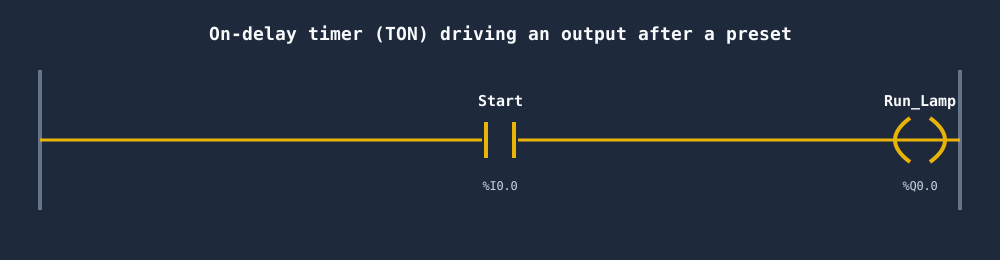
Why it works. A control relay Run seals in the operator command. While Run is true, the TON timer T1 accumulates time. A TON (timer-on-delay) sets its Done bit T1.DN only after its input has been true continuously for the preset 5 seconds. The third rung uses T1.DN to energise the Motor. If Stop is pressed, Run drops, the timer input goes false, the accumulator resets to zero, and the motor stops. The 5-second delay restarts cleanly on the next press. See Timers in PLC programming: TON, TOF, TP explained for the full timer reference.
Example 5: Counter — Stop a Conveyor After 10 Parts
Problem. A photo-eye counts parts on a conveyor. After 10 parts, stop the conveyor. A Reset button clears the count and restarts.
I/O list.
- I0.0 — Run/Start (normally-open, sealed)
- I0.1 — Part sensor (photo-eye, pulses once per part)
- I0.2 — Reset pushbutton
- C1 — count-up counter (CTU), preset 10
- Q0.0 — Conveyor
Solution.
|--[Sensor]--( CTU C1, PV=10 )--|

|--[Reset]---( RES C1 )--|

|--[Start]--+--[/C1.DN]--( Conveyor )--|
|--[Conveyor]--+
Why it works. A CTU (count-up) increments its accumulator on each rising edge of the Sensor contact — one count per part, regardless of how long the photo-eye stays blocked. When the accumulated count reaches the preset of 10, the counter's Done bit C1.DN turns on. The conveyor rung is a seal-in gated by the normally-closed [/C1.DN], so the moment the tenth part is counted, C1.DN opens the rung and the conveyor stops. The Reset button fires a RES instruction that zeroes the counter, dropping C1.DN and allowing the conveyor to seal in again. More on counters in Counters in PLC programming: CTU, CTD, CTUD.
Example 6: Traffic Light Sequence (Chained Timers)
Problem. Drive a single traffic light through Green (5 s) → Yellow (2 s) → Red (5 s), repeating forever while the system is enabled.
I/O list.
- I0.0 — Enable switch
- T1, T2, T3 — TON timers (5 s, 2 s, 5 s)
- Q0.0 Green, Q0.1 Yellow, Q0.2 Red
Solution.
|--[Enable]--[/T3.DN]--( TON T1, PT=5s )--|

|--[T1.DN]----------( TON T2, PT=2s )--|

|--[T2.DN]----------( TON T3, PT=5s )--|

|--[Enable]--[/T1.DN]--------( Green )--|

|--[T1.DN]--[/T2.DN]--------( Yellow )--|

|--[T2.DN]--[/T3.DN]--------( Red )--|
Why it works. This is a timer chain. T1 runs first; when it's done, T1.DN starts T2; when T2 is done, T2.DN starts T3. The output rungs slice the timeline using windows between Done bits: Green is on from start until T1 finishes ([Enable]--[/T1.DN]), Yellow lives in the gap between T1 done and T2 done, and Red fills the gap between T2 done and T3 done. The very first timer's input includes [/T3.DN], so when the final timer completes, T1's input briefly drops, the whole chain resets, and the cycle repeats. It is a self-restarting sequencer built entirely from on-delay timers.
Example 7: Tank Fill/Drain with Level Switches
Problem. Keep a tank between a low and a high level. When the level drops to the Low switch, open the fill valve. When it rises to the High switch, close it. The pump should not chatter around a single setpoint.
I/O list.
- I0.0 — Low-level float switch (true when liquid is at/below low)
- I0.1 — High-level float switch (true when liquid is at/above high)
- Q0.0 — Fill valve
Solution.
|--[Low]----+--[/High]--( Fill )--|
|--[Fill]---+
Why it works. This is a seal-in used as hysteresis (deadband). The level falling to the Low switch trips [Low] and energises Fill. Once filling starts, the liquid rises off the Low switch — but the parallel [Fill] contact seals the valve open, so it keeps filling. The valve only closes when the level reaches the High switch and the normally-closed [/High] contact opens the rung. Because the start condition (Low) and stop condition (High) are different physical levels, the valve cycles between two setpoints instead of chattering on and off at one. Swap the contacts to build the drain-down version.
Example 8: Star-Delta Starter Timing
Problem. Start a large motor in star (wye) to limit inrush current, then after 6 seconds transition to delta for full running torque.
I/O list.
- I0.0 — Start, I0.1 — Stop (normally-closed)
- T1 — TON, preset 6 s
- Q0.0 — Main contactor, Q0.1 — Star contactor, Q0.2 — Delta contactor
Solution.
|--[Start]--+--[/Stop]--( Main )--|
|--[Main]---+

|--[Main]---( TON T1, PT=6s )--|

|--[Main]--[/T1.DN]--[/Delta]--( Star )--|

|--[T1.DN]--[/Star]----------( Delta )--|
Why it works. The Main contactor seals in on Start. Immediately, Star energises through [Main]--[/T1.DN] (timer not yet done) and the TON begins counting. After 6 seconds T1.DN turns on: the Star rung's [/T1.DN] opens (dropping Star) while the Delta rung's [T1.DN] closes (picking up Delta). The cross interlocks [/Delta] and [/Star] guarantee Star and Delta are never closed together — closing both at once would short the windings. The brief mechanical gap as one contactor drops before the other picks up is intentional; on real hardware you add a short delay or hardware interlock to make the transition break-before-make.
Patterns you just learned
Look back and you'll see the same primitives repeating:
- Seal-in / latch — Examples 1, 3, 5, 7, 8. Parallel feedback contact holds an output on.
- Cross interlock — Examples 2 and 8. Each output blocks its opposite with a normally-closed contact.
- Echo to indicator — Example 3. Mirror an output bit to a lamp.
- Timer gate — Example 4. A Done bit enables an output after a delay.
- Timer windows — Example 6. Stack Done bits to carve a sequence out of time.
- Counter gate — Example 5. A counter's Done bit stops a process at a count.
- Hysteresis — Example 7. Different start and stop conditions create a deadband.
Almost every discrete machine program is a combination of these. Master the seven patterns and you can read — and write — the majority of industrial ladder logic.
More example problems to practice
The eight worked solutions above cover the core patterns. Here are ten more classic problems to build on your own — each names the problem and the key instruction or approach, but leaves the ladder for you to figure out.
- Alarm with acknowledge. A fault input must latch an alarm output and a flashing beacon until an operator presses Acknowledge, even if the fault clears first. Use a latch/unlatch (SET/RES) pair: the fault SETs the alarm bit; only the Ack button RESets it.
- Flashing beacon. Make an output blink at roughly 1 Hz while a system is enabled. Build an oscillator from two on-delay timers that re-trigger each other — T1's Done bit resets T2 and starts the off phase, and T2's Done bit resets T1, producing a square wave you gate onto the lamp.
- Pump alternation. Two pumps feed one duty; on each new call the other pump should lead so runtime is shared. Toggle a "lead pump" bit on the rising edge of the run request (a one-shot flipping a latch), then route the call to Pump A or Pump B based on that bit.
- Conveyor jam detection. A conveyor must trip if its photo-eye stays blocked too long. Run a TON watchdog timer off the blocked sensor; if the Done bit fires before the sensor clears, latch a jam fault and stop the conveyor.
- Bottle reject. A reject station must kick out a bad bottle several positions downstream of the inspection sensor. Use a shift register clocked by the index/encoder pulse: load a 1 into the register when a reject is detected, shift it along with the product, and fire the reject solenoid when the bit reaches the reject position.
- Parking-lot full counter. Track how many cars are inside a lot and light a FULL sign at capacity. Use a count-up/count-down (CTUD): the entry sensor counts up, the exit sensor counts down, and the accumulator reaching the preset drives the FULL output.
- Three-floor elevator call logic. Latch a call request from each floor button, then drive Up or Down by comparing the called floor against the current floor. Clear each call's latch when the car arrives at and levels with that floor.
- Oven temperature on/off with hysteresis. Hold an oven near setpoint without the heater chattering. Compare the analog temperature against a low and a high threshold (e.g. setpoint −2° and +2°): turn the heater on below the low limit and off above the high limit — the same seal-in/deadband idea as the tank example, done with comparison instructions.
- Hand/Off/Auto selector. A three-position selector chooses manual run, off, or automatic control of an output. OR a "Hand" branch (operator runs it directly) with an "Auto" branch (the automatic logic runs it), and let the Off position break both — a clean way to mix manual override with sequence control.
- Single-button start/stop toggle. One pushbutton must start the motor on the first press and stop it on the next. Detect the rising edge with a one-shot, then use it to toggle a latch (XOR the one-shot against the current state, or SET/RES gated by the motor's own bit) so each press flips the output.
Every one of these can be built and auto-graded in the simulator — type the ladder, press run, and the grader checks it against a live machine model. Browse the full set on the scenarios page.
Frequently asked questions
What is a simple PLC program example?
The classic first example is a motor start/stop with a seal-in: a normally-open Start contact and a normally-closed Stop contact drive a Motor coil, with a Motor contact in parallel with Start to "seal in" and hold the motor on after the button is released. It demonstrates contacts, a coil, an OR branch, and latching in one rung.
How do I practice PLC programming?
The fastest way is to work through real scenarios and check your answer against test cases. Build classic examples — motor seal-in, on-delay timer, count-to-ten conveyor, traffic light sequence — and run them. In this simulator each example is auto-graded in the browser, so you get instant pass/fail feedback without owning a PLC or installing vendor software.
What are the basic PLC programming exercises for beginners?
Good starter exercises, in order: a normally-open/normally-closed contact driving a lamp, a motor start/stop with seal-in, a forward/reverse interlock, a TON on-delay timer, a CTU count-up counter that stops at a preset, and a simple timed traffic-light sequence. These cover contacts, coils, latching, timers, and counters — the foundation of almost every PLC program.
What is the easiest PLC programming language to learn?
Ladder logic is the easiest PLC language for most beginners because its graphical rungs mirror relay wiring and make the logic visible without prior coding experience. Once you are comfortable with ladder, Structured Text (a Pascal-like text language) is the natural next step for maths and complex state machines.
Run and check these yourself
Reading solutions is step one. The logic only sticks once you've typed a rung, hit run, and watched a coil energise (or watched the grader reject a missing seal-in contact). Every example above maps to a real scenario in the simulator:
- Browse the full library on the scenarios page.
- Want prompts without solutions? Try the PLC practice problems.
- Go deeper on the building blocks: PLC timers and PLC counters.
Run and auto-grade every example above — free, in your browser. No install, no license, no Allen-Bradley or Siemens hardware required. Type the ladder, press run, and get instant feedback against a live machine model.