When you are learning PLC programming without access to a $5,000 hardware controller, a simulator is the only way to get the hands-on practice that builds real skill.
The best PLC simulator for students is the one you will actually use. That means it must be free or affordable, start quickly without complex installation, support real IEC 61131-3 syntax, and give you feedback on whether your program is correct. This comparison covers six options across browser-based, desktop, and open-source categories.
What Makes a Good Training Simulator?
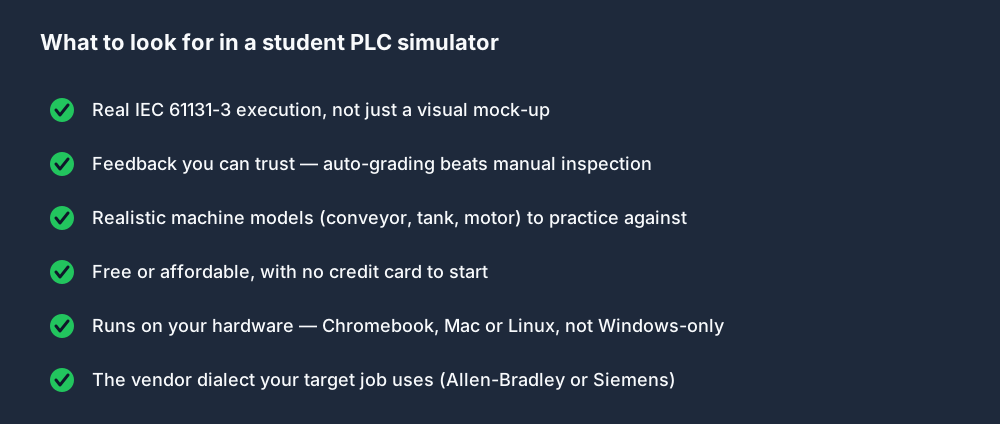
Before comparing tools, here are the criteria that matter for learning:
- Real language support — does it execute actual IEC 61131-3 ladder logic or structured text, or just simulate it visually?
- Feedback mechanism — how do you know if your program is correct? Auto-grading is better than manual inspection.
- Machine models — practicing against a realistic machine model (conveyor, tank, motor) builds more transferable skill than testing against abstract I/O.
- Cost and accessibility — can you start without a credit card, a Windows machine, or a VPN?
- Vendor-specific syntax — if you are preparing for a job that uses Allen-Bradley or Siemens, does the tool support those dialects?
Use these five as a checklist when you try any tool below.
Browser-Based: PLC Simulator (plcsimulationsoftware.com)
Best for: IEC 61131-3 learning with auto-graded scenarios, interview preparation, multi-dialect practice.
This browser-based simulator executes real IEC 61131-3 ladder logic and structured text inside the browser — no install, no runtime download. It includes:
- 40 auto-graded machine simulation scenarios (traffic light, motor control, conveyor, tank fill, PID temperature, batch mixing, packaging machinery, and more).
- 55 learning modules spanning PLC fundamentals, ladder logic, wiring, HMI, communications, troubleshooting and process control.
- 12 quizzes.
- 6 interview preparation tracks with hands-on coding exercises.
- Three dialects: IEC 61131-3, Allen-Bradley (RSLogix-style), Siemens (TIA Portal-style).
Free tier: one guided first program without an account, then 27 source-tagged practice records with a free account; visible access can vary by entitlement and rollout. No credit card or trial clock. Basic is USD 12/month and Pro is USD 29/month.
Pros: Instant start, works on any device (Chromebook, Linux, Mac), auto-graded feedback, structured curriculum, multi-vendor dialects. Cons: Browser-only (no export to physical hardware directly from the simulator editor).
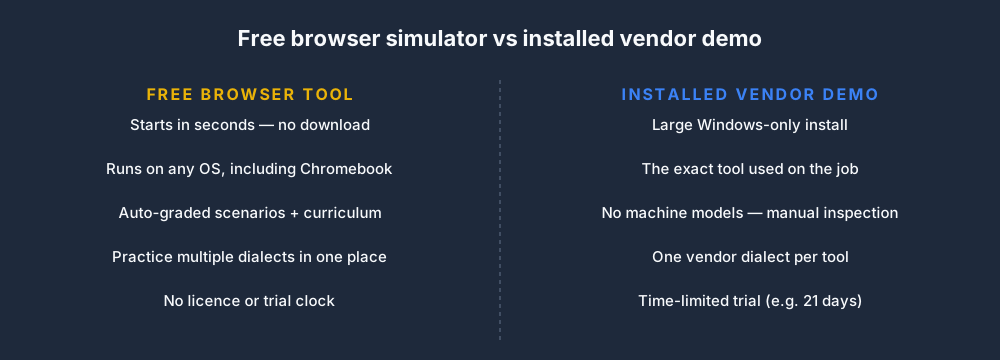
The trade-off between a free browser tool and an installed vendor demo (like the TIA Portal trial below) comes down to speed-to-start versus using the exact production tool:
OpenPLC
Best for: Free, open-source, runs on Raspberry Pi.
OpenPLC is an open-source IEC 61131-3 runtime that runs on Windows, Linux, macOS, and Raspberry Pi. The editor (OpenPLC Editor) supports ladder logic, structured text, function block diagram, instruction list, and SFC.
- Cost: Free.
- Install: Windows and Linux installers available. Raspberry Pi version runs on Pi hardware.
- Language support: Full IEC 61131-3.
- Machine models: None built-in — you write programs and run them against a software runtime, inspecting variables manually.
- Export to hardware: Yes — OpenPLC Runtime runs on Arduino Mega, Raspberry Pi, and industrial hardware.
Pros: Truly free, connects to real hardware (Raspberry Pi, Arduino), closest to the IEC standard. Cons: No guided curriculum, no auto-graded scenarios, requires installation and setup.
Codesys
Best for: Professional-grade IEC 61131-3 development, most transferable to real Codesys-compatible hardware.
Codesys is the de facto standard IEC 61131-3 development environment, used by hundreds of hardware vendors including Wago, Beckhoff (partial), and many others. The Codesys development environment (IDE) is free; the Soft PLC runtime has a free tier for development.
- Cost: IDE free; runtime has limitations in free tier.
- Install: Windows only (IDE).
- Language support: Full IEC 61131-3.
- Machine models: None — you write programs and simulate against a soft PLC.
- Export to hardware: Yes — to any Codesys-compatible controller.
Pros: Industry standard, large community, full IEC 61131-3 support, exportable to real hardware. Cons: Windows-only IDE, steep learning curve for beginners, no guided machine simulations.
LogixPro 500
Best for: Allen-Bradley-style ladder simulation on Windows.
LogixPro is a desktop Windows application that simulates Allen-Bradley ladder logic against animated machine models (bottle filler, traffic light, silo, process simulator). It is widely used in North American vocational training programs.
- Cost: ~$50 one-time purchase (check vendor for current pricing).
- Install: Windows only.
- Language support: Allen-Bradley-style ladder (not IEC 61131-3 standard).
- Machine models: Several built-in: bottle filler, process simulator, traffic light, silo.
Pros: Animated machine models are engaging for beginners, Allen-Bradley-specific syntax, widely used in North American TVET programs. Cons: Windows only, paid ($50), not IEC-standard syntax, no structured text or FBD, older interface.
PLC-Fiddle (plc-fiddle.com)
Best for: Quick single-rung experimentation without any install.
PLC-Fiddle is a free browser tool for sketching and running small ladder diagrams. It is useful for experimenting with basic rung logic.
- Cost: Free.
- Language support: Basic ladder diagram.
- Machine models: None.
- Feedback: Visual — you watch contact states change.
Pros: No install, instant, good for quick logic checks. Cons: No machine models, no auto-grading, no structured curriculum, no function blocks, limited for serious learning.
Siemens TIA Portal Trial
Best for: Siemens-specific learning.
Siemens offers a 21-day trial of TIA Portal, their official development environment for S7-1200 and S7-1500. The full environment supports all IEC 61131-3 languages with Siemens extensions, hardware configuration, and simulation via S7-PLCSIM.
- Cost: Free 21-day trial; full license is several thousand dollars.
- Install: Windows only, large download.
- Language support: Full IEC 61131-3 + Siemens extensions.
- Machine models: None — PLCSIM simulates hardware I/O.
Pros: The real tool, full Siemens dialect, professional-grade. Cons: Windows only, complex install, 21-day trial limit, no machine models in PLCSIM.
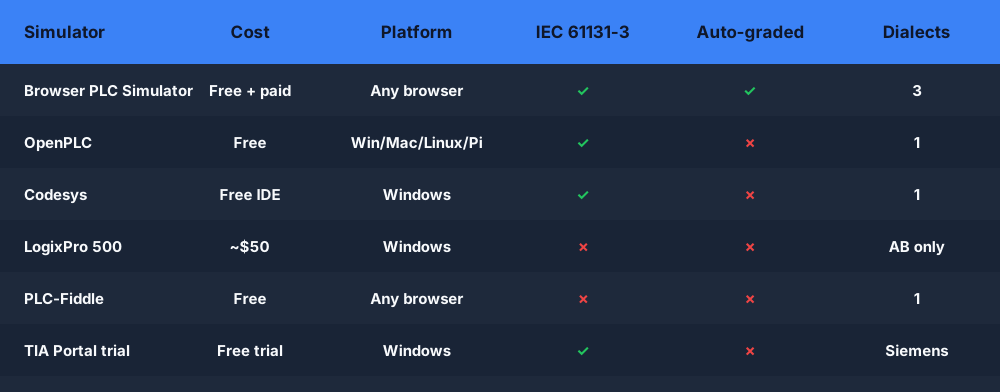
Comparison Summary
| Tool | Cost | Platform | IEC 61131-3 | Machine Models | Auto-grading | Good for |
|---|---|---|---|---|---|---|
| PLC Simulator | Free tier + paid | Browser (any) | Learning coverage | 140 published records | Yes | Structured learning, multi-dialect |
| OpenPLC | Free | Win/Linux/macOS/RPi | Full | None | No | Hardware practice, open-source |
| Codesys | Free IDE | Windows | Full | None | No | Professional development |
| LogixPro | ~$50 | Windows | AB-style only | Several | No | AB-specific beginners |
| PLC-Fiddle | Free | Browser | Basic LD | None | No | Quick logic checks |
| TIA Portal Trial | Free trial | Windows | Full + Siemens | None | No | Siemens-specific learning |
The biggest practical difference for a student is how long it takes to get from "I want to practice" to writing your first rung. Browser tools open in a tab; vendor IDEs need a Windows install first:
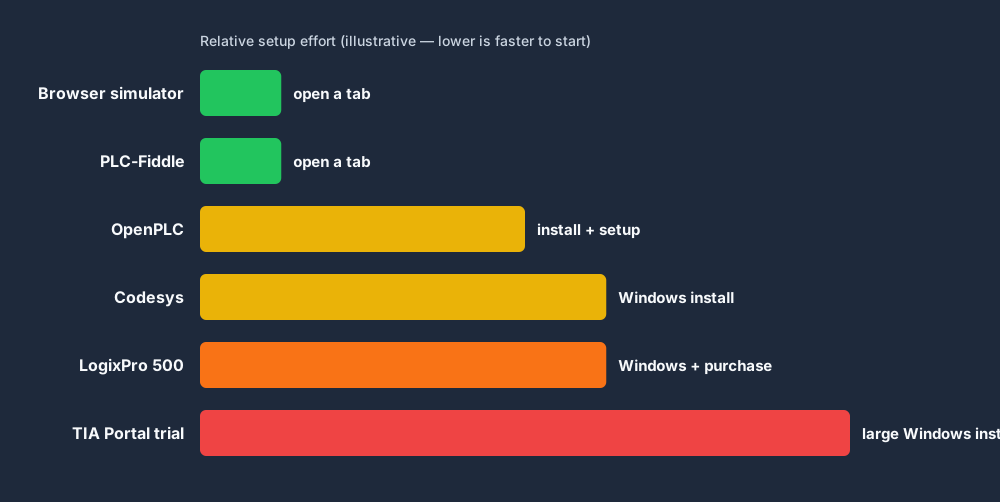
Setup effort above is illustrative and relative — not a measured benchmark.
Recommendation by Situation
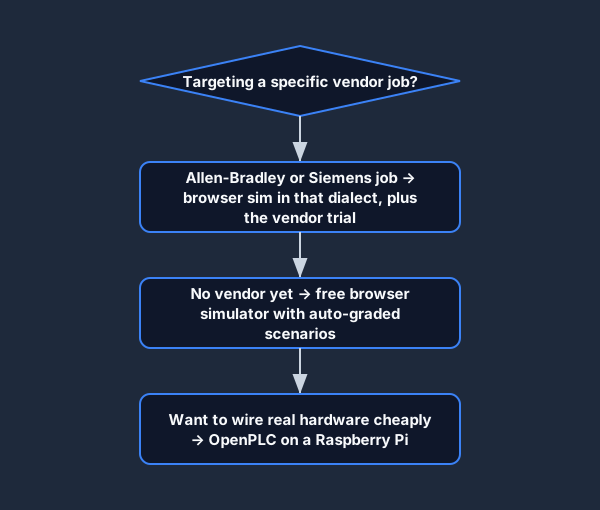
- Complete beginner, no hardware → Start with the browser-based PLC Simulator. Auto-graded scenarios give you immediate, objective feedback on every program you write.
- Want to connect to real hardware cheaply → OpenPLC on a Raspberry Pi 4 ($75).
- Preparing for an Allen-Bradley job → PLC Simulator (AB dialect) + Studio 5000 trial when available.
- Preparing for a Siemens job → PLC Simulator (Siemens dialect) + TIA Portal trial.
- Enrolled in a North American vocational program → Check if LogixPro is included; supplement with a browser simulator for structured text practice.
The most important thing is to write programs, run them, and iterate. Passive reading builds context; hands-on coding builds skill.

Start the PLC fundamentals lesson or go directly to the Traffic Light scenario — both are free.
Practice this yourself in the simulator — 3 scenarios free. No install. No credit card. Write real ladder logic against a live machine model in your browser.
