If you are learning Allen-Bradley PLCs, the naming is genuinely confusing. RSLogix 500, RSLogix 5000, Studio 5000 — they sound almost identical, but they are not interchangeable. Picking the wrong one to learn means downloading the wrong software for the wrong hardware.
Short answer: RSLogix 500 and RSLogix 5000 are two different programs for two different PLC families. RSLogix 5000 was later renamed Studio 5000. So "RSLogix 500 vs 5000" and "RSLogix 5000 vs Studio 5000" are actually two separate questions. Let's clear both up.
For the legacy SLC 500 and MicroLogix side specifically, use the RSLogix 500 free-options guide to separate legitimate access paths, compatibility and learning alternatives from unsafe download claims.
The Two Questions Hiding in One Search
People type "rslogix 500 vs 5000" expecting one answer, but there are two things to untangle:
- RSLogix 500 vs RSLogix 5000 — two distinct software packages for two distinct hardware lines.
- RSLogix 5000 vs Studio 5000 — the same product, just a rename that happened in 2012.
Get those two facts straight and the rest of the Rockwell software landscape falls into place.
RSLogix 500: The Older SLC and MicroLogix World
RSLogix 500 is Rockwell's programming software for the SLC 500 and MicroLogix controller families. These are older, smaller, fixed-architecture PLCs that have been installed in factories since the 1990s. RSLogix 500 is now sold under the name RSLogix 500 / Micro depending on the bundle, but the engine and the addressing model are unchanged.
The defining feature of RSLogix 500 is its data-table (file-based) addressing. Memory is organized into numbered files by data type:
N7:0— integer file 7, word 0B3:0/2— binary file 3, word 0, bit 2T4:0— timer file 4, timer 0 (with.ACCand.PREmembers)I:1/0— input slot 1, bit 0O:2/3— output slot 2, bit 3
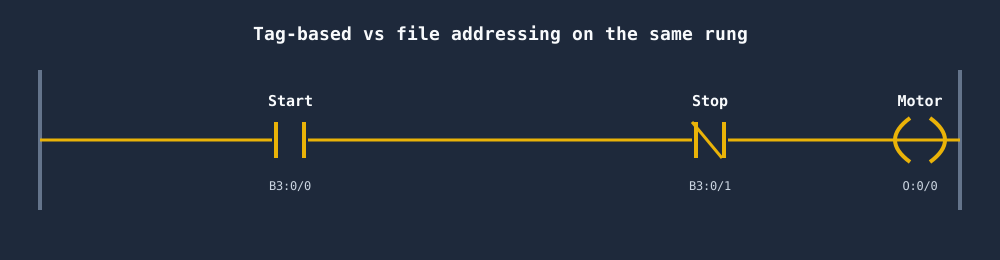
You do not name your variables. You reference fixed memory locations, and you keep a separate symbol/description list to remember what each address means. A motor seal-in in RSLogix 500 looks like this:
|--[ I:1/0 ]--[/ I:1/1 ]--+--( O:2/0 )--|
|--[ O:2/0 ]--------------+
Here I:1/0 is the Start pushbutton, I:1/1 is the normally-closed Stop, and O:2/0 is the motor output that seals itself in. Functional, but every tag is a raw address.
RSLogix 5000 / Studio 5000: The ControlLogix World
RSLogix 5000 is the programming software for the Logix platform — ControlLogix (large, rack-based) and CompactLogix (smaller, integrated). In 2012, Rockwell renamed RSLogix 5000 to Studio 5000 Logix Designer starting at version 21. Same product lineage, new name and a unified "Studio 5000" environment that also hosts View Designer, the Logix Emulate tool, and other modules.
So if you see "RSLogix 5000" in an old tutorial and "Studio 5000" in a new one, they are the same software family. Version 20 and earlier carry the RSLogix 5000 name; version 21 and later are Studio 5000.
The headline difference from RSLogix 500 is tag-based addressing. Instead of N7:0, you create a named tag like Motor_Running of type BOOL, or a structured tag like Conveyor1.Speed of type REAL. The same seal-in becomes readable on its own:
|--[ Start_PB ]--[/ Stop_PB ]--+--( Motor_Run )--|
|--[ Motor_Run ]---------------+
Tags can be arrays, user-defined types (UDTs), and Add-On Instructions (AOIs) — none of which exist in the RSLogix 500 data-table model. This is the single biggest practical difference between the two environments.
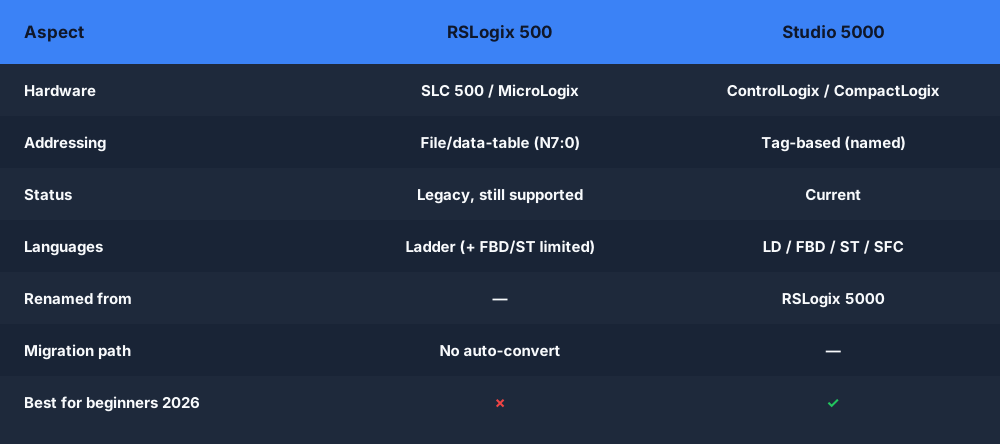
Side-by-Side Comparison
| RSLogix 500 | RSLogix 5000 / Studio 5000 | |
|---|---|---|
| Target hardware | SLC 500, MicroLogix | ControlLogix, CompactLogix |
| Addressing model | Data-table / file-based (N7:0, B3:0, T4:0) | Tag-based (Motor_Run, Conveyor1.Speed) |
| Data structures | Fixed files by type | Tags, arrays, UDTs, AOIs |
| Languages | Mostly ladder (limited FBD/ST) | Ladder, FBD, ST, SFC |
| Era | 1990s onward, legacy | 2000s onward, current |
| Name today | RSLogix 500 / Micro | Studio 5000 Logix Designer (v21+; was RSLogix 5000) |
| Still installed? | Widely, in older lines | Standard for new builds |
| Project file | .RSS | .ACD |
When You'll Still See RSLogix 500 in the Field
RSLogix 500 is not dead. SLC 500 and MicroLogix controllers are everywhere in plants that were commissioned in the 1990s and 2000s and never had a reason to be ripped out. A working machine is a working machine — plenty of facilities run SLC 500 racks on lines that have not had a fault in fifteen years.
That means maintenance and controls technicians still open RSLogix 500 regularly. If your job involves keeping older equipment running, you will need to read N7:0-style addressing whether you like it or not. Note, though, that the SLC 500 platform has reached end-of-life for new sales, so the field is gradually shrinking — you maintain it, you don't design new lines around it.
Migration Direction
The migration only goes one way: SLC 500 / MicroLogix → ControlLogix / CompactLogix. When a plant modernizes, it moves off RSLogix 500 and onto Studio 5000. Rockwell even ships conversion tooling to help translate an SLC 500 .RSS project into a Logix .ACD project, remapping the old file addresses into tags.
You will never migrate the other direction. Nobody takes a tag-based ControlLogix program and downgrades it to a data-table SLC. So the skills you build in Studio 5000 are the forward-looking ones.
The Licensing and Cost Barrier
Here is the catch that frustrates every beginner: both RSLogix 500 and Studio 5000 are paid, licensed Rockwell software. They are not free downloads. Studio 5000 in particular is gated behind an activation and is sized for professional engineering use, not casual learning. RSLogix 500 is cheaper than Studio 5000 but still licensed.
That creates a real chicken-and-egg problem: you want to learn Allen-Bradley ladder logic, but you cannot legally practice on the actual software without a license — and you do not have a license because you are still learning.
This is exactly why a browser-based simulator is useful before you ever touch Rockwell's licensed tools. You can practice the same tag-based, ladder-logic thinking that Studio 5000 uses — contacts, coils, seal-in rungs, timers, counters — without an install, an activation, or a Rockwell license. Our RSLogix simulator and Studio 5000 emulate alternative let you do that directly in the browser, and the broader Allen-Bradley PLC simulator covers the addressing conventions both environments use.
Which Should a Beginner Learn in 2026?
Learn Studio 5000 first. It is the platform for all new Allen-Bradley work, it uses the modern tag-based model that every current job posting expects, and the concepts transfer to CompactLogix and ControlLogix — the controllers you will actually be asked to program on new projects.
But don't ignore RSLogix 500 entirely. If you are targeting a maintenance or controls technician role, you will absolutely encounter SLC 500 and MicroLogix equipment, and being able to read N7:0 / B3:0 / T4:0 addressing is a genuine, hireable skill. You don't need to master RSLogix 500 — you need to recognize it and navigate a data-table project when a legacy line goes down.
A practical order for 2026:
- Learn ladder logic fundamentals — contacts, coils, seal-in, timers, counters. These are identical concepts in both environments.
- Learn the tag-based model in Studio 5000 — tags, UDTs, arrays. This is where new work lives.
- Learn to read RSLogix 500 data-table addressing — enough to maintain legacy SLC 500 / MicroLogix lines.
Notice that step 1 is the foundation under both. The ladder logic itself — the rung structure, the logic flow, the seal-in pattern — is the same whether the tag is called Motor_Run or O:2/0. Master the logic first and the addressing model is just a notation difference.
|--[Start]--[/Stop]--+--( Motor )--|
|--[Motor]-----------+
That rung is the same idea in RSLogix 500 and in Studio 5000. Get fluent in that, and switching between Rockwell environments is a matter of learning where the addresses live, not relearning how PLCs think.
Frequently asked questions
What is the difference between RSLogix 500 and Studio 5000?
RSLogix 500 programs the older SLC 500 and MicroLogix controllers using file/data-table addressing (for example N7:0, B3:0, T4:0). Studio 5000 Logix Designer programs the newer ControlLogix and CompactLogix controllers using tag-based addressing with named tags. They target different hardware families and use different addressing models, so they are not interchangeable.
Is RSLogix 500 still used?
Yes. RSLogix 500 is still widely used to maintain the large installed base of SLC 500 and MicroLogix PLCs running in industry. New projects generally use Studio 5000 and ControlLogix/CompactLogix, but maintenance and controls technicians still need to read and edit RSLogix 500 programs in the field.
Can RSLogix 500 programs be converted to Studio 5000?
There is no one-click conversion. Because RSLogix 500 uses file/data-table addressing and Studio 5000 uses tag-based addressing, migrating a program means re-creating the logic and re-mapping the data structure, usually as part of a hardware upgrade from SLC 500/MicroLogix to CompactLogix/ControlLogix. The ladder concepts carry over even though the project does not.
What is the difference between RSLogix 5000 and Studio 5000?
They are the same product line. RSLogix 5000 was renamed Studio 5000 Logix Designer starting at version 21. So "RSLogix 5000" and "Studio 5000" refer to the same tag-based programming environment for ControlLogix/CompactLogix — only the name changed. This is different from RSLogix 500, which is a separate, older product for SLC 500/MicroLogix.
Which should a beginner learn in 2026?
For new work, learn Studio 5000 and tag-based addressing — it is what most modern Allen-Bradley projects use. It is still worth being able to read RSLogix 500 file addressing because maintenance roles frequently touch legacy SLC 500 and MicroLogix systems. You can practice Allen-Bradley-style ladder logic free in the browser before sitting in front of either licensed package.
Practice Allen-Bradley-style ladder logic free, in your browser. No Rockwell license. No install. No credit card. Write real ladder against a live machine model and build the fundamentals that carry across both RSLogix 500 and Studio 5000.