If you have searched "FactoryTalk View download" in the last five minutes, you already know where this goes: Rockwell's website, a license enquiry form, a distributor page, a software activation process that assumes you work for a company that already has a FactoryTalk license server. There is no clean free trial you can spin up on your laptop this evening.
This guide is the honest version. It explains what FactoryTalk View actually is, which flavour you would realistically encounter on the job, what it costs, and — most practically — which HMI concepts you can learn right now without any Rockwell license at all. Because the skills that make someone competent in FactoryTalk View are transferable concepts, not software-specific wizardry.
What FactoryTalk View Actually Is
FactoryTalk View is Rockwell Automation's HMI software family. It creates the operator screens you see on plant floors — the pushbuttons, indicator lamps, numeric displays, trend graphs, and alarm banners that let a person run a machine without writing PLC code on the fly.
There are three variants, and they are genuinely different products:
FactoryTalk View Machine Edition (ME) runs on a dedicated Allen-Bradley PanelView terminal or PanelView Plus display. It is a single-machine, standalone HMI. The project lives on the terminal; when the operator taps a button on screen, that button writes a tag in the CompactLogix or ControlLogix connected to it. ME is the product most apprentices and controls technicians encounter first.
FactoryTalk View Studio is the development environment — the software you install on your PC to design and configure either ME or SE applications. When someone says "I need FactoryTalk View Studio," they mean the authoring tool, not the runtime itself.
FactoryTalk View Site Edition (SE) is the multi-machine, networked, server-based version. A single SE server can display data from dozens of PLCs, support multiple thin-client operator stations, and integrate with FactoryTalk Historian for data logging. SE is plant-level SCADA, not panel HMI. Most beginners will not touch SE until they are well into a controls engineering role.
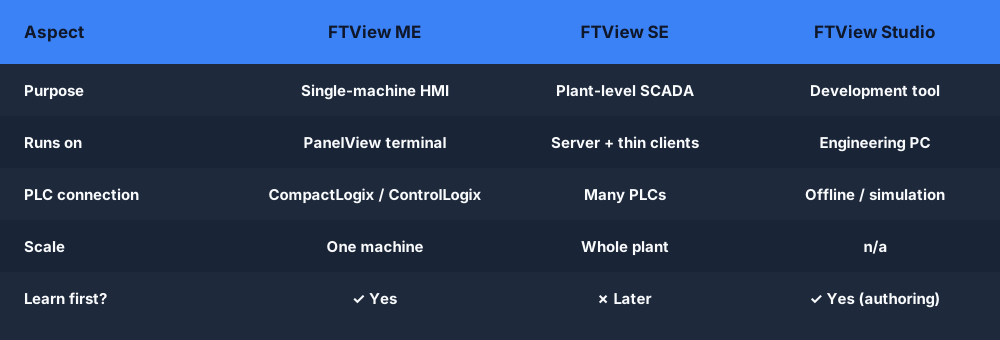
If you are just starting out, focus on ME concepts. They transfer to SE and to every other HMI platform you will ever use.
The Download Situation
Let's address the elephant in the room.
FactoryTalk View Studio is commercial software. The full version requires a FactoryTalk Activation license. Rockwell does offer a limited demo mode — "browse mode" — but it disables downloading to PanelView hardware and places other restrictions. Getting even the demo requires downloading the FactoryTalk Services Platform first, which is a substantial install, and then registering for a Rockwell account.
For a company engineer with an existing ActivationManager server on the network, this is routine. For an individual learner with no Rockwell infrastructure, it is a significant barrier before you have typed a single tag name.
There is no FactoryTalk View download equivalent to Siemens' free S7-1200/TIA Portal trial or the free CODESYS runtime. Rockwell gates its tooling tightly.
This is not a criticism. Rockwell builds enterprise-grade industrial software; they are not in the business of free consumer tools. But it does mean that chasing a free FactoryTalk View download as your primary learning strategy will cost you a lot of time and friction before you accomplish anything.
The smarter path: learn the underlying HMI concepts first. Once you understand screens, tags, alarms, and navigation, sitting down in front of FactoryTalk View ME on a real panel at a new job is a matter of learning which menus the familiar concepts live in — not learning HMI from scratch under time pressure.
The Concepts That Transfer Everywhere
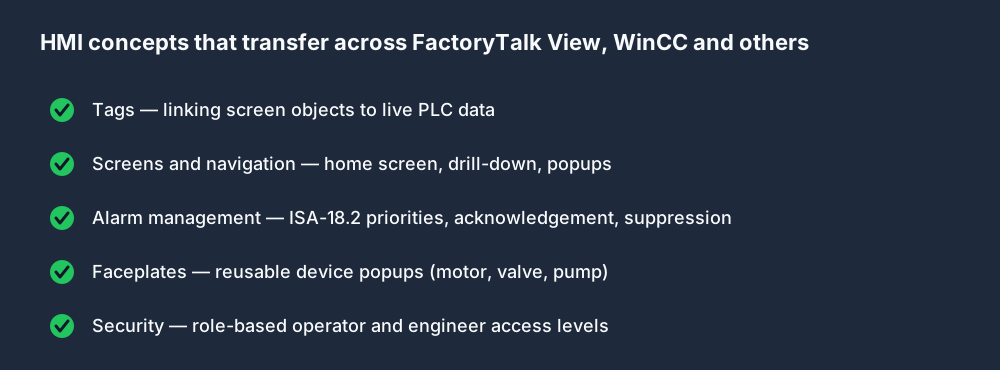
Every HMI platform — FactoryTalk View, Siemens WinCC, Weintek, Ignition, Inductive Automation — is built on the same five concepts. Master these and the specific software is just UX.
Tags and Tag Databases
An HMI reads and writes values from a PLC by referencing tags. In FactoryTalk View ME, you create a tag database that links screen objects to ControlLogix or CompactLogix tags. A numeric display showing tank level is linked to Tank_Level_PV. A Start button writes 1 to Conveyor_Run_Cmd when pressed.
The tag is the bridge between the graphical object and the live PLC data. This concept is identical in every modern HMI platform. Tag names, data types, and update rates differ; the architecture does not.
Screens and Display Navigation
An HMI project is a set of screens: a main overview, individual machine screens, an alarm screen, a setpoint screen. Navigation between screens uses display triggers — pressing a button calls a Go To Display action. In FactoryTalk View ME, you define these in the object's property panel.
Understanding screen hierarchy — which screen is the home screen, how drill-down navigation works, how popup windows handle temporary inputs — is a transferable design skill. An experienced HMI developer can lay out a logical screen structure on any platform because the information architecture is the same.
Alarm Management
Alarms in FactoryTalk View ME are configured against tag limits or discrete bit states. When Tank_High_Level goes TRUE, a high-level alarm triggers, appears on the alarm banner, and requires operator acknowledgement before it clears. ISA-18.2 defines the standard for alarm management; FactoryTalk View implements it.
The ISA-18.2 principles — alarm rationalisation, consequence descriptions, alarm priorities, suppression rules — are vendor-neutral. Learning them once means your alarm configuration will be competent on FactoryTalk View, WinCC, and Ignition alike.
Faceplates and Embedded Displays
In FactoryTalk View ME, a faceplate is a reusable popup that shows all relevant information about a device — a motor: run status, fault, speed, HOA switch state, runtime hours. You build it once and call it from any motor on any screen. This component-based thinking is standard across every HMI platform.
Security and User Levels
HMI screens typically restrict certain actions by user level. An operator can start and stop a machine but cannot modify setpoints. A technician can adjust a PID setpoint. An engineer can modify recipes. FactoryTalk View ME handles this through FactoryTalk Security, which integrates with Windows Active Directory in networked applications.
The concept — role-based access, with escalating permissions — is standard. The implementation differs by platform.
A Realistic Learning Path
Here is what an effective path to FactoryTalk View competence looks like for someone starting from zero:
-
Learn ladder logic first. An HMI is useless if you do not understand the PLC program it is connected to. A FactoryTalk View ME screen can display
Conveyor_Running, but you need to know what that tag means in the context of a seal-in rung, an interlock, and a fault logic block. -
Learn HMI concepts vendor-neutrally. Screens, tags, alarms, navigation, faceplates, security. These do not change between Rockwell and Siemens.
-
Get hands-on with any HMI tool you can access. Weintek's EasyBuilder Pro has a free simulator mode. Inductive Automation's Ignition has an unlimited developer trial. CODESYS has an HMI runtime. These let you build real screens against a real PLC simulation and understand the development cycle.
-
Apply the concepts in FactoryTalk View when you have access — either at a company, at a training lab, or through a Rockwell authorized training center. At this point, you are translating concepts you know into a specific tool's UI, which takes hours, not weeks.
What to Practice Right Now
The practical gap you can close today is ladder logic and AB-dialect familiarity. Every FactoryTalk View ME project ties back to a ControlLogix or CompactLogix tag database. The tags that your HMI reads and writes are the tags in your PLC program. If you do not understand tag-based addressing, seal-in rungs, timer and counter outputs, and basic fault logic, your HMI knowledge will always be shallow.
Practice Allen-Bradley-style ladder logic free in your browser — no Rockwell license required. Work through motor start/stop, conveyor control, and timer-based sequences using AB tag-based dialect. When you sit down in front of a real CompactLogix project, you will recognize the tags your HMI needs to connect to.
Try the Allen-Bradley simulator free →
Frequently Asked Questions
What is FactoryTalk View used for?
FactoryTalk View is Rockwell Automation's HMI software for building operator interfaces on plant floors. The Machine Edition (ME) runs on dedicated PanelView terminals connected to Allen-Bradley PLCs. The Site Edition (SE) is a networked, multi-machine version for plant-level supervision.
Is FactoryTalk View free to download?
No. FactoryTalk View Studio requires a FactoryTalk Activation license. Rockwell offers a limited demo mode but there is no open free trial equivalent. Access is typically through a company license or a Rockwell-authorised training provider.
What is the difference between FactoryTalk View ME and SE?
ME (Machine Edition) is a standalone HMI for a single machine, running on a PanelView terminal. SE (Site Edition) is a networked, server-based system supporting multiple machines and multiple operator stations. Most controls technicians encounter ME first.
Do I need FactoryTalk View to learn HMI programming?
No. The core skills — tags, screens, alarms, navigation, security levels — are vendor-neutral. Learning them on any modern HMI platform, including browser-based simulators and free tools like Ignition developer mode, builds transferable competence that applies directly to FactoryTalk View.
What Allen-Bradley PLC does FactoryTalk View ME connect to?
FactoryTalk View ME typically connects to CompactLogix and ControlLogix processors over EtherNet/IP. The HMI references tags defined in the Studio 5000 Logix Designer project file. Understanding that tag database is the foundation of any FactoryTalk View ME application.
Practice the skills FactoryTalk View ME requires — free, in your browser. No Rockwell license. No Windows VM. Write real tag-based Allen-Bradley ladder logic against live machine simulations and build the foundation that makes HMI work make sense.