Siemens dominates European and Asian industrial automation the way Allen-Bradley dominates North America. If you're aiming at a controls role at a European OEM, a pharma plant, or any process industry in Germany, Switzerland, India, or China, Siemens PLC training is not optional — it's the ticket.
This post is the practitioner's view: what the Siemens-run classroom delivers, what the free alternatives actually contain, and a 10-week self-study plan that turns you into someone who can walk into a TIA Portal project and be productive on day one.
The Siemens landscape in 2026
Before you pay for anything, know the hardware and software map:
- S7-300, S7-400 — legacy but still everywhere in existing plants. Programmed in STEP 7 Classic (V5.x). Siemens has end-of-lifed the tooling but plants keep running.
- S7-1200 — the small-to-mid controller. This is what most training materials target because it's cheap and the learning curve is shortest.
- S7-1500 — the high-end performance line. Replaces S7-300/400 for new projects. More function-block capability, higher clock speed, Profinet-first.
- S7-1500F — the functional-safety (fail-safe) variant. SIL3 capable, used wherever safety-instrumented systems matter.
- TIA Portal — the unified IDE. Replaces STEP 7 Classic, WinCC, and SIMATIC Manager. Every current Siemens training assumes you're in TIA.
- PROFINET — Siemens' fieldbus protocol. Real-time Ethernet with its own device profiles.
- SCL — Siemens' structured text. Close to IEC 61131-3 ST but with Siemens-specific extensions.
- LAD, FBD, STL — ladder, function-block diagram, and statement list. STL is Siemens' assembly-like textual language; LAD is the ladder most people write; FBD is common for PID.
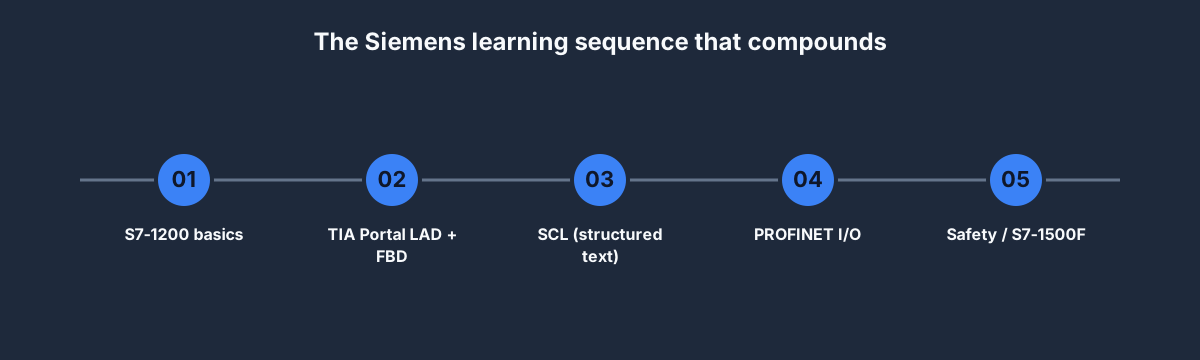
If a job posting lists "TIA Portal, S7-1500, SCL, PROFINET," those are the five things you need. Everything else in the Siemens universe is regional or niche.
The 10-week self-study path
Weeks 1–2: S7-1200 and TIA Portal fundamentals
Install TIA Portal — the free TIA Portal V18 Basic trial is 21 days, which is enough for this phase. Plenty of YouTube walkthroughs cover install + license activation.
Cover:
- Creating a project, adding an S7-1200 CPU, organizing blocks
- Data blocks (DBs), function blocks (FBs), functions (FCs), organization blocks (OBs)
- The symbol-based addressing convention —
"Start_PB"wrapped in quotes, notI0.0 - The cyclic OB (OB1) and how it maps to the scan cycle
Practice in our simulator with the Siemens dialect toggle before you run out of trial days.
Weeks 3–4: LAD + FBD — writing real programs
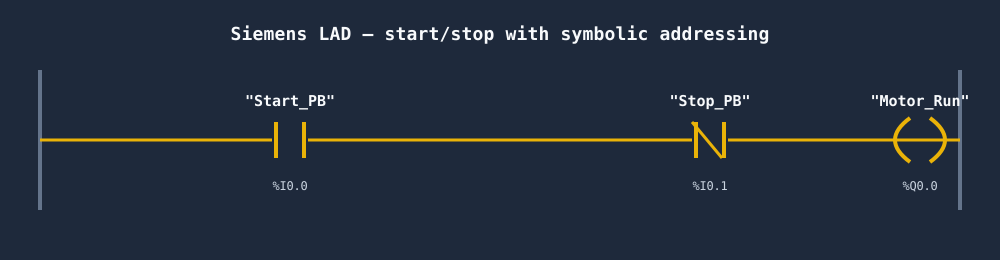
Ladder in Siemens notation looks like our other dialects but with quoted symbolic tags. The key rungs you need fluent:
- Start/stop with seal-in (as shown above)
- Forward/reverse with explicit interlock
- TON / TOF timers with retentive behavior flags
- CTU / CTD counters with preset loading
Our basic PLC programming post lists the 20 rungs to learn — port the top 5 to Siemens LAD this fortnight.
Weeks 5–6: SCL (structured text)
If you only ever write LAD, you'll plateau at junior level. SCL unlocks math, string handling, parsing, and anything algorithmic that would take 40 rungs in ladder.
Key idioms to learn:
FOR,WHILE,CASE— control flowREGION ... END_REGION— folding blocks for readable code- Calling FBs inline with positional and named parameters
- Accessing DB members with dotted syntax:
"RecipeDB".Temp_Setpoint
Our ladder vs structured text post has the comparison table.
Weeks 7–8: PROFINET + I/O configuration
You can't avoid PROFINET on Siemens projects. Cover:
- IO-Devices vs IO-Controllers
- GSDML files — what they are, where to get them
- PROFINET class A/B/C conformance — what the classes mean in practice
- Configuring a remote I/O rack (ET 200SP) and consuming its data
No hardware? TIA Portal's simulator (PLCSIM) handles the basics. Our PLC and SCADA training post walks the fieldbus concepts.
Weeks 9–10: Safety / S7-1500F (optional)
Skip unless you're aiming at a safety specialist role.
- F-CPU vs standard CPU — the execution model differences
- F-blocks — pre-certified safety function blocks
- SIL 2 vs SIL 3 target selection
- PROFIsafe over PROFINET
See our PLC certification guide for the TÜV FSE credential.
Classroom (ST-PRO1) vs self-study
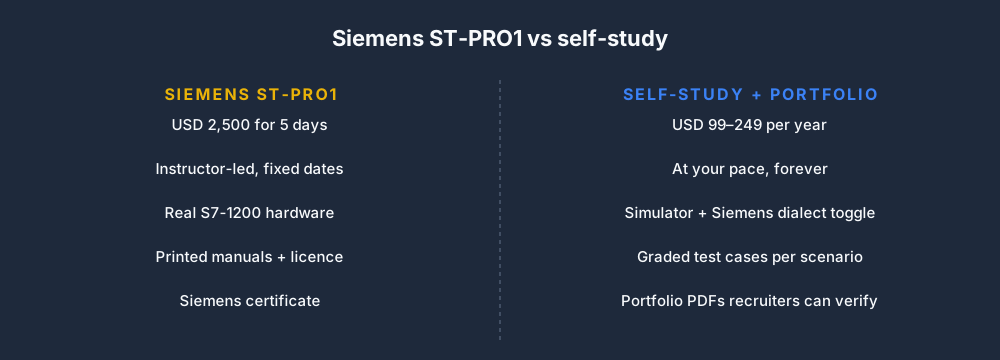
The Siemens-run ST-PRO1 TIA Portal Programming 1 course is five days, roughly USD 2,500 depending on region and whether hardware is included. If your employer is paying, it's worth taking for the hardware access alone. If you're self-funding, you'll get better ROI from ten weeks at our Pro plan plus USD 200 for a used S7-1200 starter kit on eBay once you're past fundamentals.
The classroom strengths:
- Real hardware in your hands for a week
- A Siemens instructor who's debugged the weird edge cases
- A Siemens certificate that German employers recognize
- Forced-immersion pace
The self-study strengths:
- You retry until it clicks, instead of moving on at the instructor's pace
- You build a portfolio (not a certificate) that hiring managers can verify
- You can afford to go deeper on SCL and PROFINET than a 5-day course can
- USD 2,250 stays in your savings account
Most students we've observed benefit from self-study first, then taking the Siemens classroom as a concentrated capstone rather than an introduction.
Free Siemens resources worth your time
- SIOS / Siemens Industry Online Support — the official documentation hub. Huge, occasionally messy, but authoritative. Your first stop for any SCL function question.
- TIA Portal V18 21-day trial — enough to complete Weeks 1–2 of this plan.
- PLCSIM (inside TIA Portal) — simulates an S7-1200 without hardware.
- YouTube: RealPars and DIY Mechatronics channels — excellent Siemens walkthroughs, especially for TIA Portal UI.
Skip the Udemy "Complete Siemens course" listings — they're usually outdated (V14 / V15 screenshots) and the certificate signal is near zero.
What a Siemens-ready CV looks like
Hiring managers at German OEMs want to see:
- A TIA Portal project on GitHub or a public URL. Doesn't have to be complex; it has to be readable.
- Mention of S7-1200 AND S7-1500 — breadth signals you didn't just do one tutorial.
- SCL code, not just LAD. SCL fluency is a hiring filter.
- PROFINET I/O configuration evidence, even if small.
- One safety-adjacent project if you're aiming at automotive or process (e-stop monitoring, two-hand control, light curtain integration).
Our Siemens PLC simulator lander covers the browser-side practice path.
FAQ
Is there free Siemens PLC training online?
Yes — Siemens publishes official "Getting Started" PDFs on SIOS, their YouTube channel has walkthroughs, and the TIA Portal trial can support basic training. For browser practice without a trial clock, our free tier includes the first six core learning lessons per dialect plus source-tagged practice records; exact exercise availability varies by entitlement and rollout.
How long does Siemens PLC training take?
10 weeks at 8 hours per week to reach entry-level. 5 days (ST-PRO1) for a concentrated classroom hit. 6 months to become genuinely fluent across S7-1200, S7-1500, and TIA Portal's corners.
What's the best Siemens PLC training course?
Siemens-run: ST-PRO1 then ST-PRO2 if your employer pays. Self-funded: our Pro plan plus a used S7-1200 for hardware time. Budget: SIOS docs, YouTube, and the free tier.
Do I need to know German for Siemens training?
No. All official Siemens courses and documentation are available in English. The biggest job market (Germany) conducts technical interviews in English routinely — language is rarely the gate.
Is TIA Portal hard to learn?
The UI is busy and opinionated. The first week feels overwhelming. By week two you'll know where things live. Most people find TIA Portal harder to navigate than Studio 5000 but more powerful once learned.
Where to start
- Sign up free and switch the dialect toggle to Siemens on Motor Start/Stop.
- Download the TIA Portal V18 21-day trial and follow the official "Getting Started with S7-1200" PDF.
- Work Weeks 1–2 of the plan above inside the trial.
- By Week 3, come back to our simulator for graded scenarios — trial clock keeps ticking, grading doesn't.
10 weeks, under USD 250, into a Siemens role that pays north of USD 80,000 in most markets. That's the offer.