Search "WinCC tutorial" and you will find content covering four or five different products, often without telling you which one it is about. Some tutorials show WinCC inside TIA Portal. Others show a standalone WinCC application with its own project manager. Others mention WinCC OA, WinCC Unified, or the old WinCC Flexible. If you are new to Siemens HMI and trying to find a place to start, the naming alone is a genuine obstacle.
This guide untangles the WinCC family once and for all — explains what each product is, which ones a beginner should care about, and what underlying HMI skills transfer regardless of which flavour you end up using.
The WinCC Family: Four Products, One Brand Name
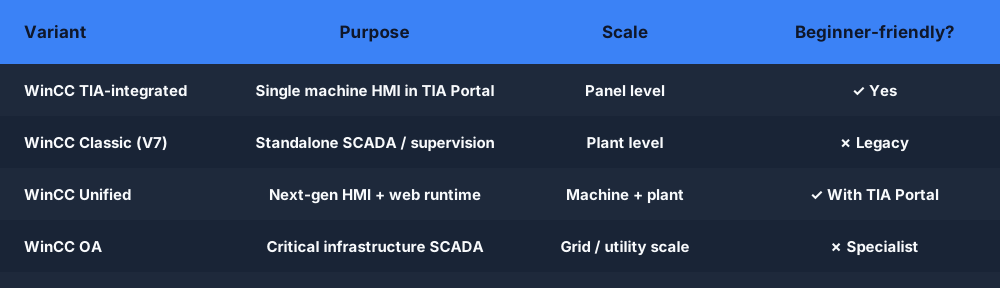
Siemens has used the WinCC name for a long time across several distinct products. Here is what each one actually is:
WinCC Classic (WinCC V7 and earlier)
The original WinCC is a standalone SCADA and HMI platform. It runs on a Windows PC, connects to Siemens PLCs via S7 protocol (or OPC), and provides operator screens for plant supervision. In its full form, WinCC Classic is a server-client SCADA system — a WinCC server acquires data and distributes it to operator stations.
WinCC V7 is still widely installed in production plants that were built in the 2000s and 2010s. Maintenance technicians encounter it regularly. New projects are less likely to use it unless there is a strong reason to stay on the Classic architecture.
WinCC Unified
WinCC Unified is Siemens' next-generation HMI runtime, designed from scratch to run on modern hardware (including the Unified Comfort Panels) and to be configured entirely inside TIA Portal. It uses a web-based runtime, which means operator screens can be accessed in a browser on a PC or mobile device without a dedicated runtime install.
WinCC Unified is the strategic direction for Siemens HMI going forward. New machine-level and plant-level HMI projects on current S7-1500 and SIMATIC PC hardware increasingly use Unified.
WinCC Open Architecture (WinCC OA)
WinCC OA is an entirely different product — it is a large-scale, enterprise SCADA platform built for critical infrastructure. Power plants, substations, water treatment networks, rail signaling systems. It uses its own scripting language (CAPL), its own distributed database architecture, and its own client-server model. It is not related to WinCC Classic or Unified in any meaningful technical sense; Siemens acquired it and kept the brand.
Unless you are specifically pursuing infrastructure SCADA roles, WinCC OA is not where a beginner should start.
WinCC in TIA Portal (TIA-integrated HMI)
For the S7-1200 and smaller-scale applications, Siemens offers Basic Panels and Comfort Panels configured directly in TIA Portal using WinCC TIA (also called WinCC integrated). This is the most accessible entry point for a beginner because TIA Portal's free trial includes support for the Basic Panel HMI configuration — you can build a simple operator screen in the same project as your S7-1200 PLC program.
This is the variant most commonly shown in online tutorials aimed at beginners, and the one most likely to be your first real experience with Siemens HMI.
Which One Should a Beginner Care About?
For most people learning Siemens PLC and HMI for the first time:
Start with WinCC TIA-integrated (TIA Portal + Basic/Comfort Panel). It is the easiest to access, the most commonly taught, and directly integrates with S7-1200 and S7-1500 programming. TIA Portal has a trial version that covers S7-1200 and Basic Panel configuration — the one realistic free entry point Siemens offers.
Understand WinCC Classic if your job involves maintaining legacy plants. V7 is everywhere in facilities installed before 2018. You do not need to build new applications in it, but you need to navigate an existing project, add an alarm, or modify a tag binding.
Learn WinCC Unified when you move into new machine builds or plant-level work on current hardware. It is the future, but it is also more complex and assumes you already understand HMI fundamentals.
Leave WinCC OA alone unless you specifically pursue critical infrastructure SCADA. It is a specialist product with a steep learning curve and a narrow job market.
The Concepts That Transfer Across All of Them
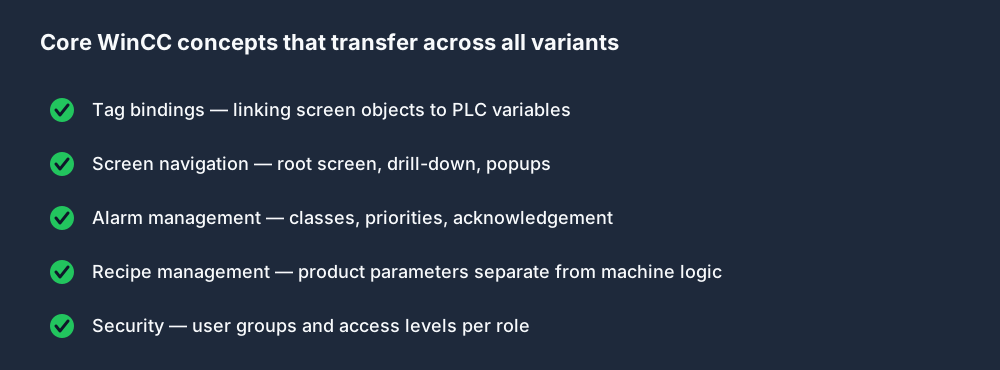
Here is the useful truth: the skills that make you competent in any WinCC variant are not WinCC-specific. They are generic HMI concepts that apply equally to FactoryTalk View, Ignition, Weintek, and anything else.
Tags and Process Variable Bindings
Every WinCC variant links screen objects to PLC data through tags. In WinCC TIA, a tag references a variable in your S7-1200 program — %M10.0 mapped to Motor_Running. A lamp on screen checks that tag and shows green when it is TRUE. This binding model is the core of every HMI platform.
Screen Design and Navigation
HMI projects are sets of screens: an overview, machine screens, alarm views, parameter screens. In WinCC TIA, you define a root screen and link others via button navigation. Understanding which screen your operator sees first, how they drill down to a fault, and how they return to the overview is a design skill that transfers entirely.
Alarm Configuration
WinCC handles alarms through a dedicated alarm class system. You define alarm bits in the PLC, assign them alarm text, priorities, and groups in WinCC, and they surface on the alarm screen with acknowledgement state and timestamps. The ISA-18.2 alarm management standard underpins this — that standard is platform-agnostic.
Recipe and Parameter Management
Many machines store product-specific parameters — fill volumes, temperatures, cycle times — as recipes. WinCC supports recipe management: an operator selects "Product A," the recipe writes the correct setpoints to the PLC. Learning how recipes separate product data from machine logic is a skill that transfers directly.
HMI Security
WinCC uses user groups and access levels to restrict screen actions. An operator can run the machine. A supervisor can change setpoints. An engineer can access configuration screens. The concept — role-based access with appropriate escalation — is identical across all WinCC variants and across vendor platforms.
Where to Start Practically
The genuine free option from Siemens is TIA Portal with the STEP 7 Basic license, which includes support for S7-1200 programming and Basic Panel HMI configuration. You can download it from the Siemens software portal, register a free mySupport account, and work through a complete S7-1200 + KTP700 Basic project.
The limitation: Basic Panel configuration in TIA Portal is useful for learning the concept, but the screens are simple. Full Comfort Panel and WinCC Unified functionality requires a WinCC license.
The underlying competence — ladder logic, tag management, fault logic, the PLC program structure that HMI connects to — is the same whether you are configuring a Basic Panel or a full WinCC Unified application. Getting that foundation right is the most time-efficient investment.
For Siemens-dialect ladder logic practice without a TIA Portal install, you can work through the same fundamental scenarios — motor control, conveyor interlocks, timer-based sequences — using a browser-based Siemens-style simulator. The addressing (%I0.0, %Q0.0, %M10.0), the tag naming conventions, and the logic structures you practice there transfer directly into any TIA Portal project.
Practice Siemens-style ladder logic free in your browser →
A Practical Example: Motor Start/Stop Screen
To make this concrete: a typical WinCC TIA exercise builds a screen with a Start button, a Stop button, and a Motor Running indicator lamp. In TIA Portal:
- In the PLC program, you write a motor seal-in rung:
%I0.0(Start) in parallel with%Q0.0(Motor), in series with normally-closed%I0.1(Stop), driving%Q0.0. - In the HMI project, you create a button object, set its
Pressevent to write1to%M0.0(Start_Cmd), and configure a corresponding coil in the ladder. - A lamp object reads
%Q0.0and shows green or gray based on the tag state. - An alarm is configured: if
%M10.0(Motor_Fault) goes TRUE, an alarm text "Motor fault — check overload relay" appears on the alarm banner.
This pattern — PLC logic, HMI tag binding, alarm configuration — is the foundational WinCC workflow. Every more complex application is built on it.
Frequently Asked Questions
What is WinCC used for?
WinCC is Siemens' HMI and SCADA software family. It creates operator interfaces that display PLC data and allow operators to control machines. Different variants exist for different scales: from single-machine panels (WinCC TIA integrated) to plant-wide supervision (WinCC Classic/Unified) to critical infrastructure SCADA (WinCC OA).
What is the difference between WinCC and TIA Portal?
TIA Portal is Siemens' unified engineering environment covering PLC programming, HMI configuration, drive setup, and more. WinCC is the HMI component within TIA Portal. When you configure an S7-1200 and a Basic Panel in the same TIA Portal project, the HMI portion is WinCC TIA-integrated. They are not separate tools — WinCC is an integrated module inside TIA Portal.
Is WinCC free?
TIA Portal with STEP 7 Basic (for S7-1200) includes support for Basic Panel HMI configuration at no cost with a registered Siemens account. Full WinCC Unified, WinCC Comfort, and WinCC Classic licenses are commercial products. There is no fully-featured free version of WinCC outside the Basic Panel tier.
What is WinCC Unified?
WinCC Unified is Siemens' next-generation HMI runtime, replacing WinCC Flexible and designed to work on Unified Comfort Panels and PC-based operator stations. It uses a web-based runtime architecture, supports configuration entirely within TIA Portal, and is the strategic direction for new Siemens HMI projects on current hardware.
What is the difference between WinCC and WinCC OA?
WinCC (Classic, Unified, TIA-integrated) is Siemens' standard industrial HMI and SCADA product line for manufacturing and discrete automation. WinCC OA is a separate, large-scale SCADA platform acquired by Siemens and aimed at critical infrastructure — power grids, water networks, transport. They share a brand name but are architecturally unrelated products.
Practice Siemens-style ladder logic free, right now. No TIA Portal install. No Siemens license. Work through motor control, conveyor sequences, and timer-based logic using Siemens-dialect syntax — the foundation every WinCC project sits on.