If you search plc programming course, you'll hit a wall of community colleges offering 40-hour evening classes for USD 1,800 plus textbooks, online academies selling 60-hour video libraries that are mostly PowerPoint slides, and vendor-run bootcamps that cost the same as a small car. None of them let you write and run real ladder logic against a simulated machine on day one.
This is the course we wish existed when we were learning. Twelve weeks, one browser tab, zero hardware, nine learning dialects. The schedule below curates 40 machine scenarios from a larger catalog so you finish with working programs and assessed interview-track evidence rather than a passive attendance badge.
Who this course is for
PLC programming attracts three kinds of learners, and the course below works for all three:
- Career switchers coming from IT, robotics, or a trade who want to move into industrial automation. If that's you, plan for 8–12 hours per week over the full 12 weeks.
- Electrical or mechatronics students treating this as supplementary to a degree program. You can compress the timeline to 6 weeks because the ladder-logic intuition arrives faster when you already understand relays.
- Working maintenance techs who need to read and modify existing code. You don't need the full 12 weeks — jump to Weeks 3–4 (ladder logic, timers, counters) and Weeks 9–10 (dialects) and you'll be fluent in the code your plant is running.
If you're none of the above — say, a hobbyist who bought a Click or a Click PLUS and wants to automate their garage — the course still works, just skip the "interview prep" material in Week 11.
Prerequisites
Honestly, not much. If you can:
- Follow an "if the button is pressed, the light turns on" sentence
- Keep track of three timers counting down at once
- Read a schematic — or be willing to learn in a weekend
…you're ready. We'll teach the rest. If you want a running start, spend an hour on our what-is-a-PLC plain-English guide and another on how to read ladder logic.
You do not need:
- A PLC on your desk
- Any particular operating system
- Electrical engineering background
- A credit card for the free tier
The roadmap
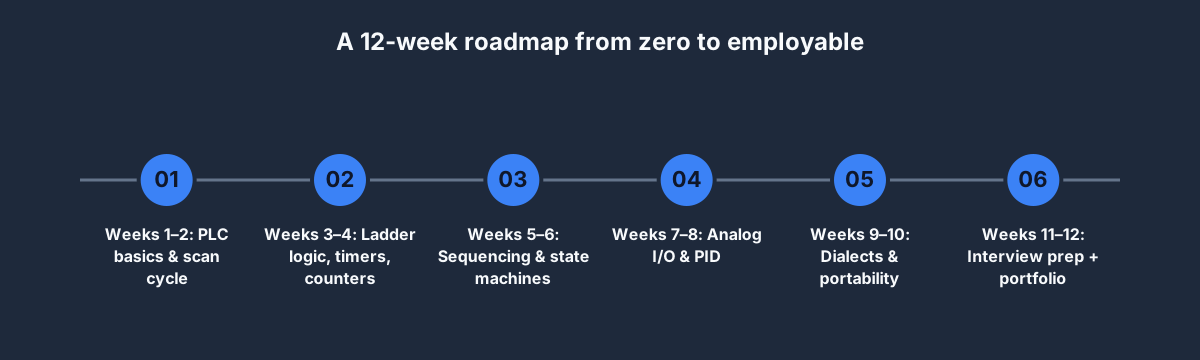
Each block below is a two-week sprint. Every sprint has a concept half (lessons + quiz) and a hands-on half (2–4 scenarios with auto-graded test cases). Nothing is gated behind video completion metrics — you progress by submitting a program that passes the tests, which is the only metric that matters on the job.
Weeks 1–2: PLC basics and the scan cycle
Before you write a single rung you need to know what the machine is actually doing sixty times a second. The scan cycle — input read → solve logic → output write → repeat — is the mental model that explains every weird behavior you'll encounter later. Skip this and you'll be debugging phantom race conditions for months.
Work through:
- Lesson 1: What a PLC is, and why it isn't just a microcontroller in a bigger box
- Lesson 2: Scan cycle, input image table, output image table
- Quiz: Fundamentals
- Scenario: Traffic Light (free tier, ~20 minutes)
- Scenario: Motor Start / Stop (free tier, ~25 minutes)
The Traffic Light scenario looks trivial but teaches you seal-in latching and sequencing with three timers. When you can explain to a stranger why SET and RESET coils are used instead of retentive outputs, you've internalised scan-cycle thinking. We go deep on the scan cycle in our dedicated explainer if your first pass doesn't click.
Weeks 3–4: Ladder logic, timers, and counters
This is where 80% of your day-to-day work lives. Every ladder rung you ever write is a variation on the rung below:
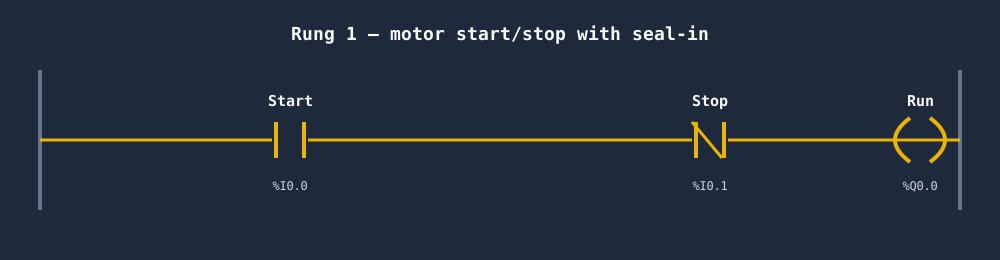
That rung is five symbols: two contacts, one coil, two rails. Read it left to right: "if the Start button is pressed AND the Stop button is not pressed, energise the Run coil." The seal-in trick — where Run's own contact latches it ON after the operator releases Start — is the foundation for every latch-style circuit you will ever debug.
Cover:
- Lesson 3: Contacts, coils, and the hidden power of seal-in rungs
- Lesson 4: Timers (TON, TOFF, TP) and the three states you must distinguish
- Lesson 5: Counters (CTU, CTD, CTUD) and why "reset" is sometimes evil
- Scenarios: Jog-Run Motor, Garage Door Controller, Pump Alternation
Our timers in PLC programming deep-dive is the single best reference you'll find on when to reach for TON vs TP vs OFF-delay. Bookmark it.
Weeks 5–6: Sequencing and state machines
Real machines don't have one rung. A bottling line has six phases — idle, infeed, fill, cap, label, discharge — and transitions between them. You need a disciplined way to model that.
We'll cover:
- Lesson 6: From stacked timers to explicit phase variables
- Lesson 7: SET / RESET coils vs non-retentive coils
- Scenarios: CIP Sequence Controller, Chemical Dosing Control, Pneumatic Press Cycle
Students routinely hit a wall here because their first instinct — one giant IF-THEN-ELSE ladder — works for three states and collapses under its own weight at five. The cure is a PHASE integer variable and one rung per transition. Week 6 teaches the pattern until it's reflex.
Weeks 7–8: Analog I/O and PID
Most sensors don't return "on" or "off" — they return 0–10 V or 4–20 mA, which your PLC scales into a real number. PID loops turn those numbers into smooth control of temperature, flow, or position.
- Lesson 8: Scaling 4–20 mA to engineering units
- Lesson 9: PID terms in plain English — what P, I, and D actually do
- Scenarios: PID Temperature, Tank Fill Station, Fermentation Temperature Control
PID is the most-feared, least-difficult topic in PLC programming. Our PID control for PLCs article explains the tuning method we use — the one that works on 95% of loops without Ziegler-Nichols wizardry.
Weeks 9–10: Dialects and portability
Every vendor speaks almost-but-not-quite the same language. Allen-Bradley's XIC is IEC's LD. Siemens writes A for AND. You don't need to master all four — but a working programmer can read any of them and port between them.
- Lesson 10: IEC 61131-3 — the Rosetta Stone
- Lesson 11: RSLogix 5000 / Studio 5000 — the A-B world
- Lesson 12: TIA Portal — the Siemens world
- Re-do selected scenarios in several of the nine learning dialects (our dialects comparison post is the handbook)
A portable programmer earns more. A single-vendor programmer gets pigeonholed into a regional salary band.
Weeks 11–12: Interview prep and portfolio
The last two weeks convert competence into a job offer.
- Lesson 13: How to answer "walk me through a project"
- Lesson 14: The 10 questions every interviewer asks
- Scenario: Two-Hand Control (Safety)
- Scenario: E-Stop & Reset
- Scenario: Vertical Lift Conveyor (the "portfolio scenario" — a multi-rung, multi-phase program you'll talk about in every interview)
Our common PLC interview questions post has 25 real ones with model answers. Work through it after you finish the Two-Hand Control scenario — the safety-interlock discussion comes up in every serious interview.
What "course complete" means
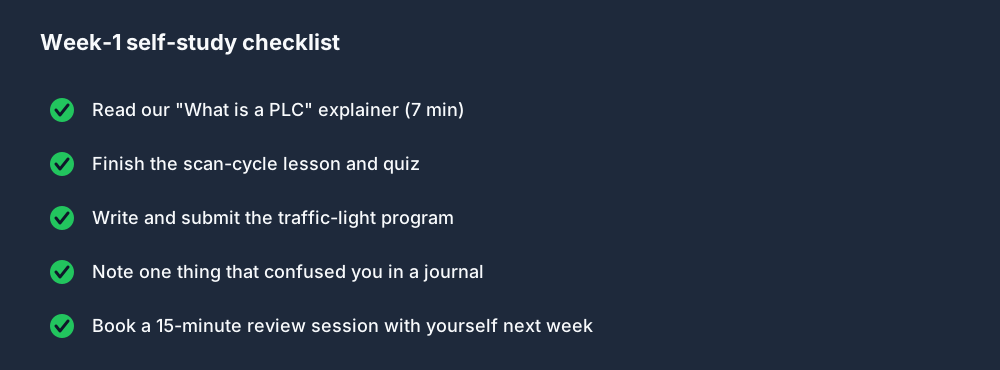
A finished Week-1 looks like the checklist above — five concrete outputs, not "I watched five hours of video." Run that pattern for every week.
By the end of the 12 weeks you will have:
- Written and submitted the 40 scenarios curated in this plan, all passing their automated test cases
- Earned 6 downloadable interview-track certificates (Junior Maintenance, Controls Engineer I, Packaging Specialist, Process Controls, Safety Fundamentals, Junior Siemens)
- A public portfolio PDF per completed scenario, suitable for pasting into a cover letter
- Familiarity with multiple vendor-style formats across the platform's nine learning dialects — useful syntax practice, not a claim of full vendor-runtime emulation
How this compares to the alternatives
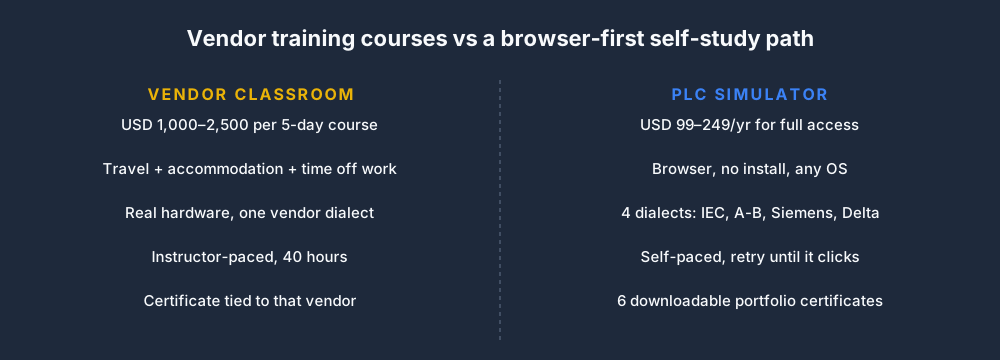
We'll put it plainly: vendor training is excellent if your employer is paying for it and you need a piece of paper with Rockwell's or Siemens' logo on it. For everyone else — students, career switchers, hobbyists, and engineers upskilling on their own dime — the economics only make sense if you value certificate-of-attendance more than hands-on repetition.
A 40-hour vendor course gives you roughly 20 hours of hands-on practice once you net out setup, introductions, breaks, and Q&A. Our 12-week self-study plan budgets 8 hours a week of hands-on practice — that's 96 hours, nearly 5× more reps, at about 5% of the cost.
If "it's on my CV that I attended Rockwell training" is load-bearing for your job search, take the vendor course. If "I can sit down at an unknown PLC tomorrow and ship working code" is what you need, self-study with a simulator wins.
"What about free courses on YouTube or Udemy?"
They're fine for watching passively on a lunch break. They fail as a primary course because:
- No auto-grading. You watch, nod, and move on. You never find out that your program deadlocks on test case 3 because test case 3 doesn't exist.
- No portability. Most YouTube courses demo one vendor's free tier (usually Factory I/O or Codesys) — which locks you into that dialect before you know what a dialect is.
- No interview prep. The courses stop at "here's a PID loop." They don't tell you what a hiring manager is actually going to ask.
Use YouTube for specific topics — a single motor-starter video is gold — but not as your course of record.
FAQ
How long does this course take?
12 weeks at ~8 hours per week for beginners. Faster if you already have an electrical background — we've seen students compress the material into 6 weeks.
Do I need to buy a PLC?
No. Everything runs in the browser. The simulator executes IEC 61131-3 ladder and structured text the same way a real Allen-Bradley or Siemens PLC does — your skills transfer directly when you sit in front of physical hardware.
Is there a certificate?
Yes — six of them. Each interview track in the Pro plan ends with a downloadable PDF certificate. They show your name, the track, and the scenarios you passed. Not a regulator-recognised qualification, but enough to anchor a CV entry.
What's the job outlook?
In North America and Europe, mid-level PLC programmers earned USD 85,000–120,000 in 2025 according to Indeed's controls-engineer data. Demand is rising because of reshoring and older engineers retiring. If you finish this course and assemble a portfolio, you are employable.
How much does this cost?
The Free tier currently includes 27 practice scenarios and the first 6 core lessons per dialect. Basic is USD 12/month or USD 99/year and expands access to 60 Free/Basic scenarios plus the full 12-lesson core curriculum. Pro is USD 29/month or USD 249/year for all 140 published scenarios, all nine dialect tracks, interview tracks, AI assistance and portfolio exports. See full pricing for the live entitlement list.
Where to start
If you're reading this and serious:
- Sign up free, no card required. You'll have access to Traffic Light and Motor Start / Stop immediately.
- Open Traffic Light in a new tab.
- Use the hints panel when you get stuck — we wrote it specifically for first-timers.
- When you pass the test cases, open Motor Start / Stop.
- By the time you've passed both, you'll know whether this is for you. Upgrade to Basic and work the 12-week plan.
Twelve weeks is nothing. A PLC career is decades. The only way this doesn't work is if you never start.