TL;DR: RS-485 is a hardware standard — it defines the electrical signal levels, cable type, and connector rules for a two-wire serial bus. Modbus RTU is a communication protocol — it defines the message format, addressing, and data model that rides on top of that cable. They are different layers. Modbus RTU almost always runs on RS-485 wiring, which is why they are constantly conflated — but RS-485 can carry other protocols (PROFIBUS DP, BACnet MS/TP, DMX), and Modbus can run over TCP/IP on Ethernet (Modbus TCP). You must know both layers to wire and debug the bus correctly.
This is the most common confusion in industrial wiring, and it has real consequences. Engineers who treat "Modbus" and "RS-485" as synonyms struggle to understand why two RS-485 devices using different protocols refuse to talk to each other, or why swapping cable types affects their Modbus network. Separating the two concepts takes about five minutes and fixes a category of confusion permanently.
The OSI Model in One Paragraph
Industrial communication protocols are organized in layers — a simplified version of the OSI model. The bottom layer is the physical layer: electrical voltages, cable impedance, connector type. The next layer is the data link layer: how bits are framed, how devices take turns on the wire, how errors are detected. Above that are the protocol layers: addressing, message format, request/response structure.
RS-485 lives at the physical layer. Modbus RTU lives at the data link and application layers. You cannot swap them because they solve different problems.
What RS-485 Is
RS-485 (also called EIA-485 or TIA-485) is an electrical standard published by the Telecommunications Industry Association. It defines:
- Differential signaling: the signal is carried as a voltage difference between two conductors (A and B, or + and −). Because both conductors travel in the same cable, common-mode noise affects both equally — and the difference cancels it. This noise immunity is why RS-485 works over hundreds of metres in an industrial environment full of VFD interference.
- Voltage levels: a differential voltage greater than +200 mV is logic 1; less than −200 mV is logic 0. Levels outside ±6V are outside the specification.
- Multiple drivers: RS-485 supports up to 32 unit loads per segment. Modern "1/8 unit load" transceivers allow up to 256 devices.
- Distance: up to 1200 metres at 100 kbit/s. Speed and distance trade off: 12 Mbit/s requires cables under 100m.
- Topology: daisy-chain (each device taps off the main cable run). Star topology causes reflections and is not recommended without impedance-matched hub equipment.
- Termination: 120 Ω resistors at each end of the cable run to absorb reflections. The most common wiring mistake is placing termination at every device instead of only at the two ends.
RS-485 says nothing about how data is encoded, what a message looks like, or who talks when. That is the protocol's job.
What Modbus RTU Is
Modbus RTU is an application-layer protocol that defines:
- Addressing: each device (slave) has a unique address from 1 to 247. Address 0 is broadcast.
- Master/slave model: one master initiates all transactions; slaves only respond when addressed. There is no spontaneous reporting.
- Message frame: address byte, function code byte, data bytes, and a 2-byte CRC for error detection.
- Function codes: 03 (read holding registers), 04 (read input registers), 01 (read coils), 05 (write single coil), 06 (write single register), 16 (write multiple registers). These are the codes you configure in your PLC communication setup.
- Register model: data is organized in 16-bit holding registers (read/write), input registers (read-only), discrete coils (1-bit output), and discrete inputs (1-bit input).
- Timing: RTU framing uses silence gaps (3.5 character times between messages) to delimit frames — no explicit start/end delimiter bytes.
Modbus RTU needs a physical layer to run on. Almost always that physical layer is RS-485. But Modbus RTU can also run on RS-232 for point-to-point connections, and Modbus TCP runs the same register model over TCP/IP on Ethernet.
The Relationship
Application layer:  [ Modbus RTU message — address, function, data, CRC ]
Physical layer:     [ RS-485 wire — A/B differential pair, 120Ω termination ]
When you connect a Modbus RTU slave (a VFD, a power meter, a temperature controller) to a PLC's RS-485 port, you are using both layers simultaneously:
- The RS-485 layer handles the electrical transmission — voltage levels, cable impedance, noise rejection.
- The Modbus RTU layer handles the message format — which register to read, how many registers, what the response means.
Troubleshooting the wiring (no signal on the bus, signal corruption, reflections) is RS-485 troubleshooting. Troubleshooting the data (wrong register values, function code errors, slave not responding to the right address) is Modbus troubleshooting.
Side-by-Side Comparison
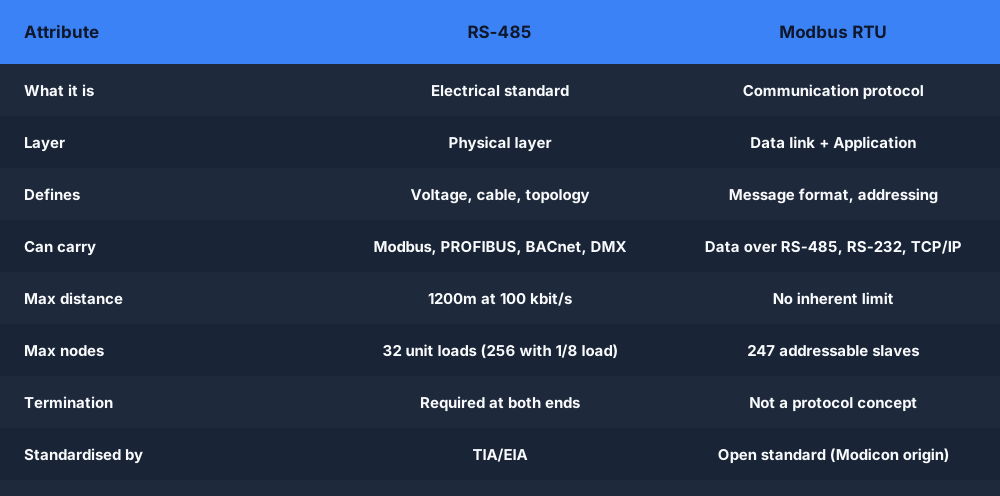
| RS-485 | Modbus RTU | |
|---|---|---|
| What it is | Electrical standard | Communication protocol |
| Layer | Physical layer | Data link + Application layer |
| Defines | Voltage levels, cable, topology | Message format, addressing, register model |
| Can carry | Modbus RTU, PROFIBUS DP, BACnet MS/TP, DMX, others | Data over RS-485, RS-232, or TCP/IP |
| Max distance | 1200m at 100 kbit/s | No inherent limit (depends on physical layer) |
| Max nodes | 32 unit loads (256 with 1/8 load devices) | 247 addressable slaves |
| Termination | Required at both ends | Not a protocol concept — physical layer requirement |
| Standardized by | TIA/EIA | Originally Modicon; now an open standard |
| Speed | Up to 10 Mbit/s | Typically 9,600–115,200 baud in the field |
Wiring a Modbus RS-485 Network Correctly

The daisy-chain topology is mandatory. You run a single two-wire cable from the master, through each slave in sequence, to the last slave. Each slave taps off the main run.
Termination: 120 Ω resistors go only at the two ends of the physical cable — at the master and at the last slave. Do not place termination at intermediate devices. Every extra termination resistor halves the bus impedance and loads the driver.
Bias resistors: on a quiet bus (no one transmitting), RS-485 line voltage is undefined. Some master units include pull-up/pull-down bias resistors to hold the A line high and B line low during idle. If your bus shows spurious characters or never truly idles, missing bias resistors are a common cause.
Cable: shielded twisted pair (STP) with 120 Ω characteristic impedance. Ground the shield at one end only (at the master or at the panel-end connection) to avoid ground loops.
Polarity: RS-485 uses A and B designations, and vendors are not consistent about which is "+" and which is "−". If the bus does not respond at all but wiring looks correct, swap A and B — reversed polarity is a common commissioning mistake.
The wiring lab RS-485 Modbus wiring walks through the daisy-chain setup, termination placement, and how to diagnose a bus that will not communicate.
Why This Confusion Causes Real Problems
Scenario 1: An engineer orders a "Modbus RS-485 sensor" and receives a device whose datasheet shows RS-485 physical specs but PROFIBUS DP framing. Both are RS-485 — incompatible protocols, same wire.
Scenario 2: A technician replaces an RS-485 cable with a "better" cable that is not 120 Ω characteristic impedance. The Modbus bus develops intermittent errors that only appear above 9600 baud. The cable is the RS-485 physical layer problem; the Modbus layer is fine.
Scenario 3: A panel builder terminates every device with a 120 Ω resistor because "Modbus needs termination." The bus works with one device but fails with five because the driver is overloaded by five termination resistors in parallel. This is a physical layer error — an RS-485 wiring error, not a Modbus protocol error.
In every case, knowing which layer you are troubleshooting saves time.
Frequently Asked Questions
Q: Is RS-485 the same as Modbus?
A: No. RS-485 is the electrical wiring standard (physical layer). Modbus RTU is the protocol (data layer). Modbus RTU almost always runs on RS-485 cable, which is why people treat them as the same — but RS-485 can also carry PROFIBUS DP, BACnet MS/TP, and other protocols. Saying "RS-485" tells you how the cable is wired; saying "Modbus RTU" tells you how the messages are formatted.
Q: Can I run Modbus on regular Ethernet cable?
A: Modbus TCP runs Modbus over a standard Ethernet connection (RJ-45, Cat 5e) using TCP/IP on port 502. The register model and function codes are the same as Modbus RTU, but the physical layer is Ethernet. So yes — Modbus can run on Ethernet cable, but that form is called Modbus TCP, not Modbus RTU.
Q: How many devices can I put on a Modbus RS-485 bus?
A: Modbus RTU supports up to 247 slave addresses (1–247). RS-485 supports up to 32 unit loads on a standard segment (256 with 1/8 unit-load transceivers). In practice, segment length and baud rate are the limiting factors before you reach device count limits. Most Modbus RS-485 networks in the field have 2 to 20 devices.
Q: What is the maximum baud rate for Modbus RTU over RS-485?
A: Modbus RTU has no inherent speed limit — the specification leaves baud rate to the implementation. RS-485 hardware supports up to 10 Mbit/s. In practice, 9600 and 19200 baud are most common in the field for stability over longer cable runs; 115200 baud is common for panel-internal short-distance wiring. Above 115200, RS-485 cable quality becomes critical.
Practice reading Modbus registers in a PLC program with the Modbus register read scenario — it runs in the browser and auto-grades your ladder logic against a simulated RS-485 Modbus slave.
