A P&ID — piping and instrumentation diagram — is the single document a controls technician will reference more than any other. It shows every instrument, every valve, every piece of process equipment, and how they are all connected. If you can read a P&ID confidently, you can walk into any plant and understand the process before you touch a single wire.
A P&ID is a schematic of a process system showing all pipes, process equipment, instrumentation (sensors and final elements), and the control logic connecting them, drawn to the ISA-5.1 standard. It is not drawn to scale and it is not a physical layout drawing. It is a functional map.
Most tutorials on this topic come from the oil and gas world — they are correct but heavy. This guide is written for automation technicians and PLC programmers working in manufacturing, water treatment, food processing, and general industry. The symbols are the same; the context is yours.
Why Every PLC Technician Needs to Read P&IDs
You will encounter a P&ID at every stage of a controls career:
- Commissioning: the P&ID tells you which instrument connects to which I/O point before you wire anything.
- Fault-finding: "the pressure transmitter on the discharge of pump P-101 is reading high" means nothing unless you can find PT-101 on the drawing.
- Programming: the tag names on the P&ID become the tag names in your PLC. FIC-201 in the drawing becomes
FIC201.PVin your ladder or structured text. - Modification: before you add an instrument or change a loop, you mark up the P&ID first. The drawing is the authority.
Electricians who have worked only on discrete wiring sometimes find P&IDs intimidating because they mix piping, instruments, and signals on the same sheet. Once you recognize the four categories of symbols, it becomes readable quickly.
The Four Categories of Symbols
Every P&ID symbol belongs to one of four groups.
1. Process Equipment
Tanks, vessels, pumps, compressors, heat exchangers, filters. These are drawn as simple outlines — a circle for a tank, a triangle or impeller shape for a pump. They carry a tag like TK-101 (tank 101) or P-101 (pump 101). The equipment tag tells you what it is; the P&ID shows you how it connects to everything else.
You do not need to memorize these shapes in advance. Any plant will have a legend sheet (sometimes called a symbol key or index) at the front of the drawing set. Always find that sheet first.
2. Process Lines
Horizontal and vertical lines represent pipes. Line style tells you what is flowing:
- Solid thick line — main process pipe.
- Dashed line — minor or instrument connection.
- Double line — insulated pipe.
- Dotted line — electrical or pneumatic signal.
Arrows show flow direction. Where two pipes cross without connecting, one line has a small jog over the other. Where they connect, you see a filled dot or a tee.
3. Instrumentation Symbols — The Circles and Hexagons
This is where most beginners get stuck. Every instrument on a P&ID is drawn as a shape with a two- or three-part tag inside it.
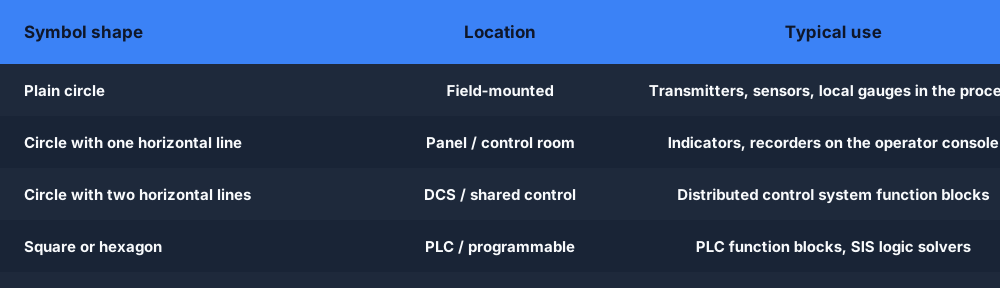
The shape tells you where the instrument is located:
| Symbol shape | Meaning |
|---|---|
| Plain circle | Field-mounted instrument (physical device in the field) |
| Circle with horizontal line | Panel-mounted instrument (in the control room) |
| Circle with double horizontal line | DCS/computer function |
| Square or hexagon | PLC or programmable function |
An instrument that spans both field and control room — for example a transmitter in the field connected to an indicator in the control panel — shows both shapes connected by a vertical line.
4. Control Valves and Final Elements
Valves are drawn as a bowtie (two triangles meeting at a point). A globe valve, butterfly valve, and ball valve each have a slightly different shape, but they all start from the bowtie. The actuator sits on top: a circle for a pneumatic actuator, a square for an electric one.
A control valve — one that modulates from fully closed to fully open under PLC or DCS command — will have a signal line running to it from a controller bubble. That signal line is how you know the valve is automated, not manual.
The Tag-Letter System — Decoding Every Instrument Tag
The most important skill in reading a P&ID is decoding instrument tags. Every tag follows the ISA-5.1 convention:
[First letter] [Modifier] [Subsequent letters] - [Loop number]
For example: FIC-201 means:
- F — Flow (first letter = measured variable)
- I — Indicating (the instrument has a display)
- C — Controller (it performs control action)
- 201 — Loop number 201
First Letters (Measured Variable)
| Letter | Measured variable |
|---|---|
| F | Flow |
| P | Pressure |
| T | Temperature |
| L | Level |
| A | Analysis (e.g. pH, conductivity) |
| E | Voltage (electrical) |
| I | Current (electrical) |
| S | Speed or frequency |
| V | Vibration or viscosity |
| W | Weight or force |
Subsequent Letters (Function)
| Letter | Function |
|---|---|
| T | Transmitter — converts the process signal to a standard signal (4–20 mA) |
| I | Indicator — local display |
| C | Controller — computes a control output |
| R | Recorder |
| E | Primary element (sensor in the process) |
| V | Final element (control valve) |
| A | Alarm |
| H | High |
| L | Low |
| S | Switch |
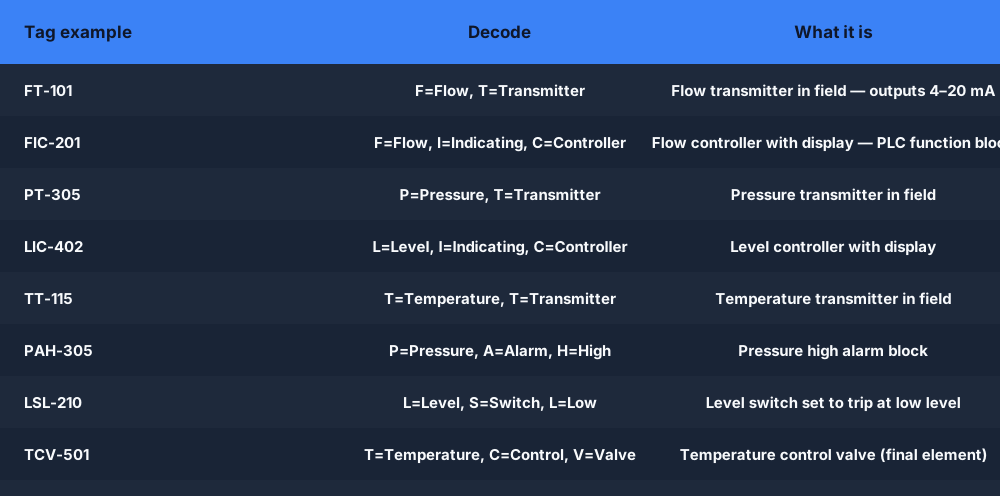
Put them together and you can decode any tag in seconds:
| Tag | Reads as |
|---|---|
| FT-101 | Flow Transmitter, loop 101 |
| FIC-201 | Flow Indicating Controller, loop 201 |
| PT-305 | Pressure Transmitter, loop 305 |
| LIC-402 | Level Indicating Controller, loop 402 |
| TT-115 | Temperature Transmitter, loop 115 |
| PAH-305 | Pressure Alarm High, loop 305 |
| LSL-210 | Level Switch Low, loop 210 |
| TCV-501 | Temperature Control Valve, loop 501 |
Once this table is in your head, a P&ID stops being a mystery and starts being a specification document you can read and mark up in the field.
Practice tip: open the tank-fill scenario in the simulator — it is built from exactly this kind of level-control loop. Read the logic and try to map what you see back to the P&ID symbols above.
Worked Example 1: A Pump Discharge Pressure Loop
The simplest loop to start with is a pressure measurement on a pump outlet — you will see this on nearly every process plant.
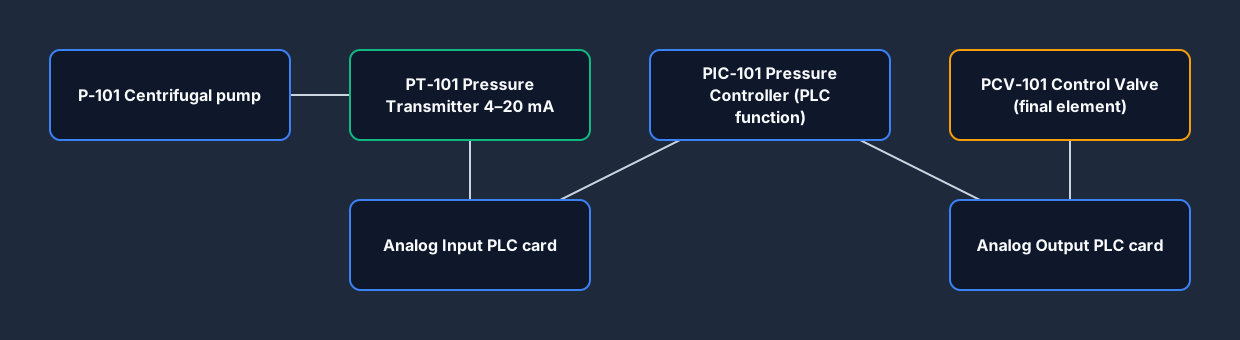
Reading this drawing left to right:
- P-101 — Centrifugal pump. Process fluid enters from the left and discharges to the right.
- PT-101 — Pressure Transmitter. Physically tapped into the discharge line; converts pipe pressure to a 4–20 mA signal. The dashed line shows this signal going up to the control room.
- PIC-101 — Pressure Indicating Controller. This is a PLC or DCS function block (shown as a hexagon here, meaning it runs in the control system). It receives the 4–20 mA signal from PT-101, compares it to the operator setpoint, and computes a valve position.
- PCV-101 — Pressure Control Valve. The controller output (another 4–20 mA or pneumatic signal, shown dashed) drives this valve. When discharge pressure rises above setpoint, the controller opens the bypass or throttles the outlet to reduce it.
What a PLC programmer sees from this drawing:
- One analog input: PT-101 → PLC analog input card, channel [X]. Scale 4–20 mA to 0–700 kPa (or whatever the process range is from the datasheet).
- One PID function block: PIC-101. The analog input is the PV; the setpoint comes from an operator HMI setpoint tag; the output goes to an analog output.
- One analog output: PIC-101 output → PLC analog output card → I/P converter → PCV-101 positioner.
That is the complete I/O list entry for this loop: one AI, one AO, and a PID block.
Worked Example 2: A Tank Level Loop
Level control is one of the most common loops in process plants — every storage tank, buffer vessel, and reactor needs it. This example shows a filled-tank loop typical of a chemical dosing or water treatment process.
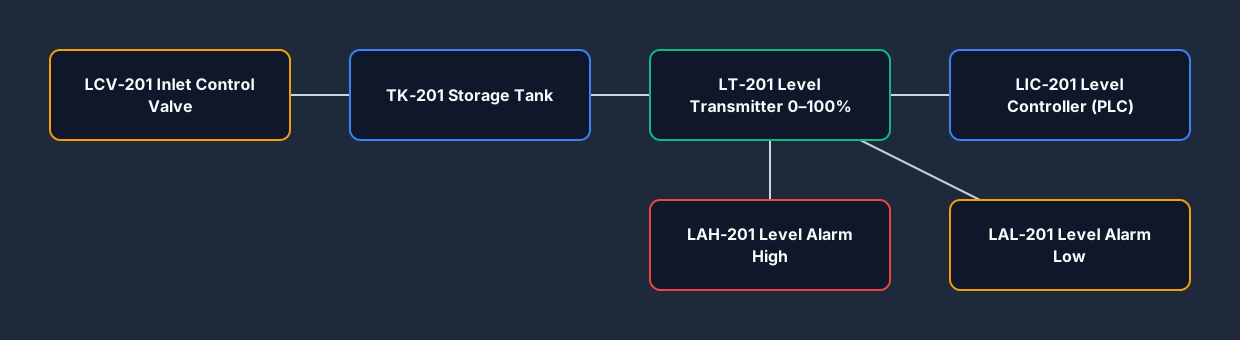
Reading the drawing:
- TK-201 — Storage tank. Fluid enters from the top-left (inlet with LCV-201) and exits from the bottom-right (outlet with a manual isolation valve).
- LT-201 — Level Transmitter. A guided-wave radar or differential-pressure transmitter mounted on the side of the tank. Outputs 4–20 mA proportional to level 0–100%.
- LIC-201 — Level Indicating Controller. PLC function that computes the inlet valve position to maintain the operator's level setpoint.
- LCV-201 — Level Control Valve. Modulating inlet valve driven by LIC-201. When the tank is low, the valve opens; when it approaches the high setpoint, the valve throttles closed.
- LAH-201 — Level Alarm High. A software alarm block (or a discrete level switch) that triggers when LT-201 exceeds the high-level limit. This may annunciate on the HMI and start a pump or close a valve automatically.
- LAL-201 — Level Alarm Low. Triggers below the low-level limit to warn of a supply shortage before the tank runs dry.
The I/O list from this drawing:
| Tag | Type | Description |
|---|---|---|
| LT-201 | Analog Input | Tank level, 4–20 mA, 0–3 m |
| LCV-201 | Analog Output | Inlet valve position, 4–20 mA |
| LAH-201 | Digital Output | High level alarm to HMI |
| LAL-201 | Digital Output | Low level alarm to HMI |
Notice how the P&ID gives you the entire I/O list for this loop before you write a single line of code. That is exactly how it is used on a real project.
Try the tank-fill scenario now: Tank Fill — Level Control Scenario. It mirrors this exact loop — a level transmitter, an inlet valve, and high/low alarms. Write the ladder logic, run it, and the auto-grader checks your work instantly.
From P&ID to PLC I/O List
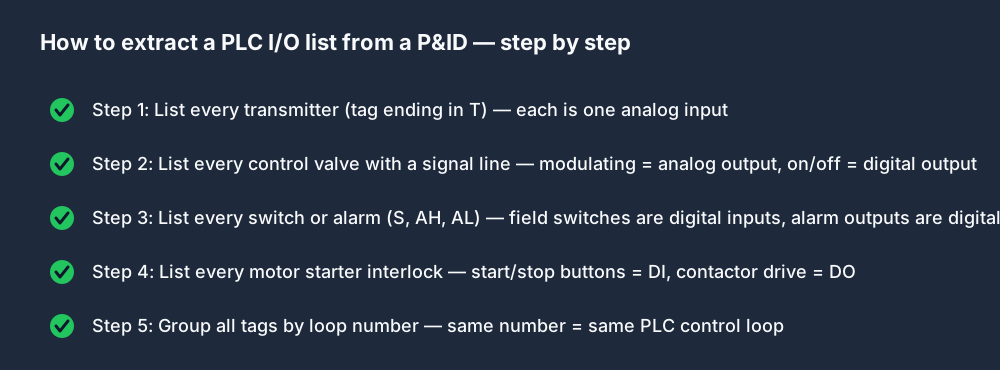
Turning a P&ID into an I/O list is a mechanical process once you know the symbols. Here is the method:
- List every transmitter (tag ending in T) — each is an analog input. Note the loop number, measurement range, and signal type (4–20 mA is almost always standard).
- List every control valve (tag containing V with a signal line) — each is an analog output if it is a modulating valve, or a digital output if it is an on/off solenoid.
- List every switch (tag containing S or A) — these are digital inputs or digital outputs. A field-mounted switch (LSH, PSL) is a digital input. An alarm output to a panel lamp is a digital output.
- List every motor starter interlock — the start/stop push-buttons and the overload relay contact are digital inputs; the contactor drive is a digital output.
- Group by loop number — all tags with the same loop number (e.g., all -201 tags) belong to the same control loop in your PLC program.
A real P&ID will have dozens of loops across multiple sheets. The method above applied sheet by sheet produces a complete I/O schedule that drives your panel design, cabinet layout, and PLC program structure.
Common Beginner Mistakes on P&IDs
Mistaking a transmitter for a controller. FT-101 is a Flow Transmitter — it measures and sends the signal. FIC-101 is the Flow Indicating Controller — it lives in the PLC and computes the valve position. They are different devices on different parts of the drawing.
Ignoring the signal line type. A solid line is a pipe. A dashed or dotted line is a signal. Confusing the two means you will miss that a valve is controlled, not manual.
Not reading the legend sheet. Every plant has custom symbols or deviations from ISA-5.1. The legend is the ground truth. Read it before you read the first process sheet.
Assuming the loop number is sequential. Loop 201 does not mean there are 200 loops before it. Loop numbers are assigned by instrument discipline or area, not in order of importance. Loop 1001 might be a more critical instrument than loop 3.
Frequently Asked Questions
Q: What is the difference between a P&ID and a PFD?
A: A Process Flow Diagram (PFD) shows the high-level process — the major equipment and the main flow paths — without detail on instrumentation or minor connections. It is used early in design. A P&ID is the detailed engineering document: every instrument, every valve, every connection, including all control signals. In controls work you will spend your time on P&IDs, not PFDs.
Q: What does FT, PT, LT, TT mean on a P&ID?
A: These are ISA-5.1 instrument tags. The first letter is the measured variable: F=Flow, P=Pressure, L=Level, T=Temperature. The second letter T always means Transmitter — a field device that converts the measurement to a 4–20 mA signal. So FT-101 is Flow Transmitter loop 101, PT-305 is Pressure Transmitter loop 305.
Q: What does the horizontal line through a circle mean on a P&ID?
A: A plain circle (no line) is a field-mounted instrument — physically located in the process. A circle with one horizontal line through the middle is a panel-mounted or board-mounted instrument, typically in the control room or a local panel. A circle with two horizontal lines (or a square) indicates a shared control function running in a DCS or PLC. This tells you where the device physically lives and how it is accessed.
Q: How do I build an I/O list from a P&ID?
A: List every transmitter (tag ending in T) as an analog input, every modulating control valve as an analog output, every on/off solenoid as a digital output, and every field switch (LSH, PSL, etc.) as a digital input. Group items by loop number — all tags ending in -201, for example, belong to the same PLC control loop.
Q: Do I need to know the ISA-5.1 standard by heart?
A: Not at first. The tag-letter table in this guide covers 95% of what you will see on most plants. Keep a copy of the tag-letter decoder on your phone when you are working from an unfamiliar drawing set. Over time, the common tags (PT, TT, LT, FT, FIC, LIC, TCV, PCV) become automatic.
Q: What is a P&ID used for in PLC programming?
A: The P&ID is the source document for building a PLC I/O list. Every instrument tag maps to a physical I/O channel. Every control loop (FIC, LIC, TIC) maps to a PID function block in the PLC. Tag names on the P&ID typically become the tag names in the PLC program, so the drawing and the code stay in sync.
The next step after reading a P&ID is writing the control logic it describes. The tank-fill scenario in the simulator is free, runs in your browser, and auto-grades your ladder logic against a live machine model — no install, no hardware.
Start the tank-fill scenario →
Want to practise reading before you write logic? The piping and instrumentation diagram viewer lets you click through four sample drawings and decode each instrument tag, with no account needed. The Drawings and Documentation track then adds graded loop-tracing exercises, and blueprint reading for technicians covers the mechanical drawing side.