Every PLC programmer eventually has to scale a 4–20 mA signal. It looks straightforward until you hit the 4 mA offset trap and your readings are 25% off at zero. Or you write the scale rung for a temperature transmitter and the PID loop immediately runs to one rail. Or you send a valve command and the valve opens backwards.
This post shows four fully worked analog examples with the complete mathematics at each step. Not "use a scale block" — the actual numbers, where they come from, and why.
Analog input PLC programming converts a raw electrical signal (typically 4–20 mA or 0–10 V) from a transmitter into an engineering unit value your logic can work with. The conversion is a linear mapping. Getting it right is a five-minute calculation. Getting it wrong corrupts every downstream decision the PLC makes.
When the scaled result must be copied into another tag or destination register, use the PLC MOV instruction reference to check source and destination types, conversion behavior and what happens on every enabled scan.

Before the Examples: Understanding the Signal Chain
Every analog measurement follows the same path from sensor to PLC tag.
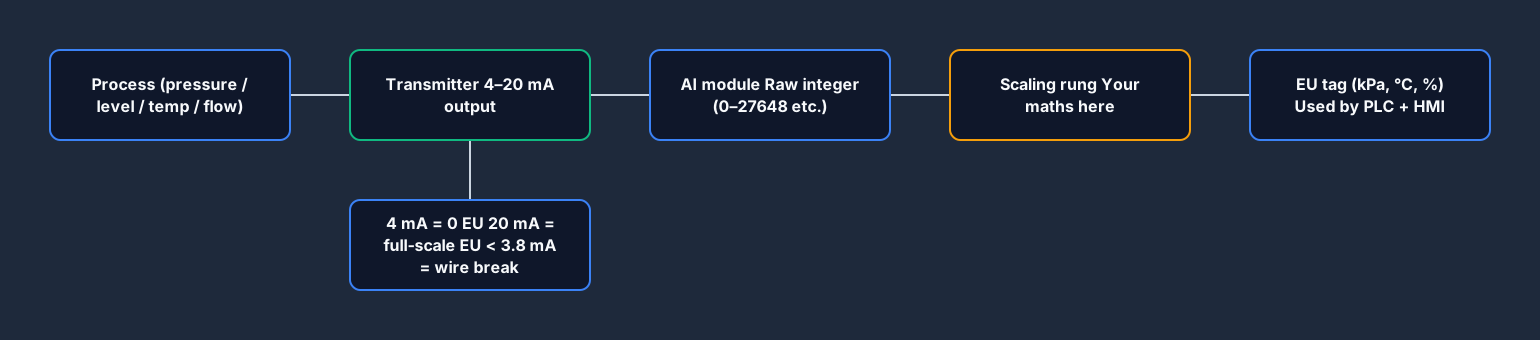
- The process — a physical quantity: pressure, level, temperature, flow, position.
- The transmitter — a device that measures the process and converts it to a standard electrical signal. The industrial standard is 4–20 mA (two-wire current loop). Pneumatic instruments still use 3–15 PSI. Voltage signals (0–10 V, 0–5 V, ±10 V) are common in machine-builder applications.
- The analog input card — converts the electrical signal to a binary integer. The resolution and integer range depend on the PLC model and card:
- Siemens SM 1231: 4–20 mA maps to raw 5530–27648 (scaled in hardware to the 4 mA live zero).
- Allen-Bradley 1769-IF4: 4–20 mA maps to raw 3277–16383 (or 6242–31208 in some modules at 14-bit — check your module manual).
- Many modules also offer 0–32767 for 0–20 mA or raw 0–27648 for the full 0–20 mA span.
- Your scaling rung — converts the raw integer to engineering units (e.g. kPa, °C, %, L/min).
- The engineering unit tag — the value your control logic, PID block, and HMI display all use.
The scaling step is entirely your responsibility. The PLC reads the raw integer; it has no idea the transmitter measures pressure or that 20 mA means 700 kPa. You write that relationship into the program.
The 4 mA Offset — Why You Cannot Ignore It
This is the mistake that catches most beginners. A 4–20 mA transmitter does not start at zero. At zero process value (e.g. 0 kPa, 0°C, 0% level), the transmitter outputs 4 mA, not 0 mA. At full scale, it outputs 20 mA.
Why? Two reasons. First, 4 mA provides loop power to the transmitter; 0 mA would mean no power. Second, the 4 mA live zero lets you distinguish between a transmitter at zero (4 mA) and a broken wire (0 mA). This is called wire break detection — if your input reads below 3.8 mA, the loop is broken, not at zero.
If you scale from 0 mA to 20 mA instead of 4 mA to 20 mA, your zero reading will be 25% below the actual zero. On a 0–100 kPa transmitter, you will read −25 kPa at zero pressure. Your PID loop will drive the valve hard open trying to bring the PV up to setpoint when the process is actually at zero. This happens more than you would think.
Example 1: Pressure Transmitter — 4–20 mA to PSI
Scenario: A pressure transmitter measures discharge pressure on a pump. Range: 0–100 PSI. Signal: 4–20 mA. The PLC is Allen-Bradley CompactLogix with a 1769-IF4 module configured for 4–20 mA input, raw range 3277–16383.
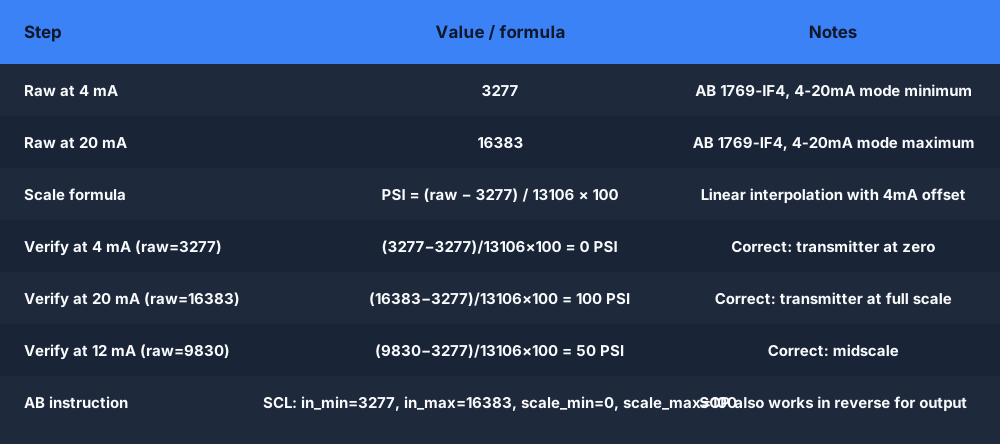
Step 1: Identify the raw counts at 4 mA and 20 mA.
For the 1769-IF4 in 4–20 mA mode:
- 4 mA → raw = 3277
- 20 mA → raw = 16383
Step 2: Write the linear scale formula.
EU = (raw - raw_min) / (raw_max - raw_min) * (EU_max - EU_min) + EU_min
Substituting the known values:
Pressure_PSI = (raw - 3277) / (16383 - 3277) * (100 - 0) + 0
Pressure_PSI = (raw - 3277) / 13106 * 100
Step 3: Verify at the boundary values.
At 4 mA (raw = 3277):
Pressure_PSI = (3277 - 3277) / 13106 * 100 = 0 PSI ✓
At 20 mA (raw = 16383):
Pressure_PSI = (16383 - 3277) / 13106 * 100 = 13106 / 13106 * 100 = 100 PSI ✓
At 12 mA (raw = 9830, exactly midscale):
Pressure_PSI = (9830 - 3277) / 13106 * 100 = 6553 / 13106 * 100 = 50 PSI ✓
In Allen-Bradley ladder logic, the SCL (Scale with Parameters) instruction does this directly:
SCL Pressure_Raw
    Input min: 3277
    Input max: 16383
    Scaled min: 0.0
    Scaled max: 100.0
    Dest: Pressure_PSI
Wiring note: The 1769-IF4 is a two-wire loop-powered input. Connect the transmitter positive terminal to the AI+ terminal, negative to AI−. The module provides the 24 VDC loop supply. If the transmitter is four-wire (separately powered), connect only the current signal terminals and leave the loop supply open.
Practice this: the wiring-06-analog-input scenario walks you through reading an analog input in the simulator. Write the scaling rung and the auto-grader checks your output is correct at three test points.
Example 2: Tank Level — 4–20 mA to Percentage
Scenario: A guided-wave radar level transmitter measures water level in a storage tank. Range: 0–4 metres. Signal: 4–20 mA. The PLC is Siemens S7-1200 with an SM 1231 AI module. Siemens maps 4–20 mA to raw integers 5530–27648.
Step 1: Identify the raw counts.
- 4 mA → raw = 5530
- 20 mA → raw = 27648
Step 2: Scale to percentage (0–100%), not metres.
Percentage is more useful in the PLC logic because your high and low alarm limits and the PID setpoint can all be expressed in % without knowing the tank height.
Level_Pct = (raw - 5530) / (27648 - 5530) * 100
Level_Pct = (raw - 5530) / 22118 * 100
Step 3: Scale to metres separately (for display only).
Level_m = Level_Pct / 100 * 4.0
Keep engineering-unit conversions downstream of the raw scaling. Scale once to a common unit (percent or the primary EU), then derive everything else from that.
In Siemens TIA Portal, the NORM_X and SCALE_X function blocks handle this cleanly:
NORM_X:
    MIN := 5530
    VALUE := MD100  (raw integer from AI)
    MAX := 27648
    OUT := MD104    (0.0 to 1.0 normalised)

SCALE_X:
    MIN := 0.0
    VALUE := MD104
    MAX := 100.0
    OUT := MD108    (Level_Pct: 0.0 to 100.0)
Or, using the older S7-300/400 FC105 SCALE block directly with engineering units.
Alarm limits are easy once you have percentage:
(* High level alarm — 85% *)
IF Level_Pct >= 85.0 THEN
    LAH_Tank := TRUE;
END_IF;

(* Low level alarm — 15% *)
IF Level_Pct <= 15.0 THEN
    LAL_Tank := TRUE;
END_IF;
This is exactly what you would find on the P&ID as LAH-201 and LAL-201. See how to read a P&ID for the full tag-letter context.
Try the tank-fill scenario: Tank Fill Level Control. It has a level input that exercises this exact scale-to-percent pattern, with high and low limits the auto-grader checks.
Example 3: Temperature Control with Deadband
Scenario: A PT100 RTD temperature transmitter monitors a process vessel. The transmitter is a two-wire 4–20 mA transmitter configured for a range of 0–200 °C. The PLC must hold temperature at 80 °C using on/off control with a ±2 °C deadband (hysteresis). Siemens S7-1200, SM 1231 AI.
Step 1: Scale the raw input to °C.
Temp_C = (raw - 5530) / (27648 - 5530) * (200.0 - 0.0) + 0.0
Temp_C = (raw - 5530) / 22118 * 200.0
Verify: at 12 mA (raw = 16589, which is 5530 + half of 22118):
Temp_C = (16589 - 5530) / 22118 * 200 = 11059 / 22118 * 200 = 100.0 °C
At 20 mA (raw = 27648):
Temp_C = (27648 - 5530) / 22118 * 200 = 22118 / 22118 * 200 = 200.0 °C ✓
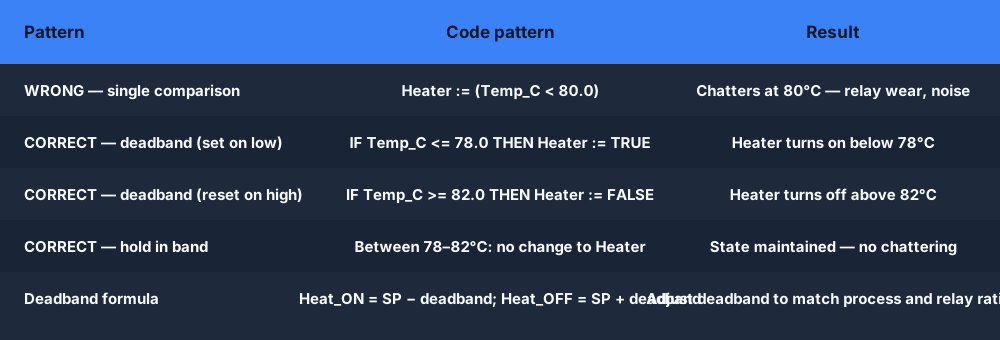
Step 2: Define deadband limits.
SP      := 80.0;    (* Setpoint: 80°C *)
Deadband := 2.0;    (* ±2°C *)
Heat_ON  := SP - Deadband;   (* 78.0°C *)
Heat_OFF := SP + Deadband;   (* 82.0°C *)
Step 3: Write the on/off control logic in Structured Text.
IF Temp_C <= Heat_ON THEN
    Heater_Output := TRUE;    (* Below 78°C: heater ON *)
END_IF;
IF Temp_C >= Heat_OFF THEN
    Heater_Output := FALSE;   (* Above 82°C: heater OFF *)
END_IF;
(* Between 78–82°C: maintain previous state (hysteresis) *)
This is the correct deadband pattern. The mistake beginners make is using a single comparison:
(* WRONG — causes rapid chattering at exactly 80°C *)
Heater_Output := (Temp_C < 80.0);
The wrong version turns the heater on and off every scan when the temperature is within measurement noise of 80 °C. The deadband version holds the current state in the band, so the heater cycles slowly.
Insider knowledge: RTD-based transmitters are more accurate and stable than thermocouple transmitters over the 0–200 °C range, but they require a dedicated transmitter or an RTD input card. Many S7-1200 AI modules have a built-in RTD input type (SM 1231 TC/RTD variants), so you can connect the PT100 directly without a separate transmitter and the module does the linearisation. In that case you read an integer that is already in 0.1 °C units (e.g. 1234 = 123.4 °C) and scale accordingly — read the module manual for the specific scaling factor.
Try the temperature scenario: PID Temperature Control uses a temperature process variable that exercises exactly this scaling and control pattern.
Example 4: Valve Percentage Output — Analog Output
Analog inputs get the attention, but analog outputs have their own scaling trap. When your PID controller says "open the valve 60%", you need to convert that percentage to the raw integer the analog output card sends to the valve positioner.
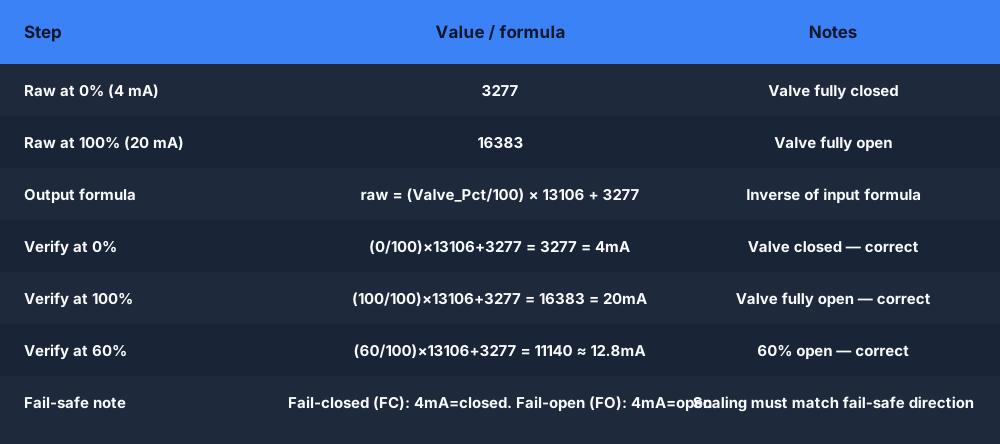
Scenario: A modulating control valve with a pneumatic positioner takes a 4–20 mA signal. 4 mA = fully closed (0%), 20 mA = fully open (100%). Allen-Bradley 1769-OF4 analog output module: 0% maps to raw 3277, 100% maps to raw 16383.
The formula — inverse of the input scaling:
raw_out = (Valve_Pct / 100) * (raw_max - raw_min) + raw_min
raw_out = (Valve_Pct / 100) * (16383 - 3277) + 3277
raw_out = (Valve_Pct / 100) * 13106 + 3277
Verify:
- At 0%: raw = (0/100) × 13106 + 3277 = 3277 → 4 mA ✓ (valve closed)
- At 100%: raw = (100/100) × 13106 + 3277 = 16383 → 20 mA ✓ (valve fully open)
- At 60%: raw = (60/100) × 13106 + 3277 = 7863 + 3277 = 11140 → 12.8 mA (valve at 60%) ✓
In Allen-Bradley ladder, the SCP (Scale to Raw) instruction handles the output direction:
SCP Valve_Pct
    Input min: 0.0
    Input max: 100.0
    Scaled min: 3277
    Scaled max: 16383
    Dest: Valve_AO_Raw
Write Valve_AO_Raw to the analog output module channel.
The fail-safe position trap: always know which direction your valve fails — fails open (FO) or fails closed (FC). For a pneumatic valve:
- Fail-closed (FC, spring-to-close): 4 mA = closed, 20 mA = open. Standard for most process safety applications. If the signal wire breaks (0 mA, below 4 mA), the valve spring closes it — which is usually safe.
- Fail-open (FO, spring-to-open): 4 mA = open, 20 mA = closed. Used where losing flow is the hazard (cooling water to a reactor, for example). A wire break opens the valve — which is safe for that specific process.
If you scale a fail-open valve as if it were fail-closed, your PLC will drive it completely backwards. The process sees 0% valve open when you command 100%, and vice versa. This happens, and it is embarrassing to diagnose because the ladder logic looks correct.
Try the analog output: the wiring-07-analog-output scenario exercises the output scaling direction — write the rung that converts a percentage command to the correct raw output count and confirm the grader passes at all three test points.
Scaling Summary — Both Directions
All four examples reduce to the same two formulas.
Input (transmitter → engineering units):
EU = (raw - raw_min) / (raw_max - raw_min) * (EU_max - EU_min) + EU_min
Output (engineering units → raw counts):
raw = (EU - EU_min) / (EU_max - EU_min) * (raw_max - raw_min) + raw_min
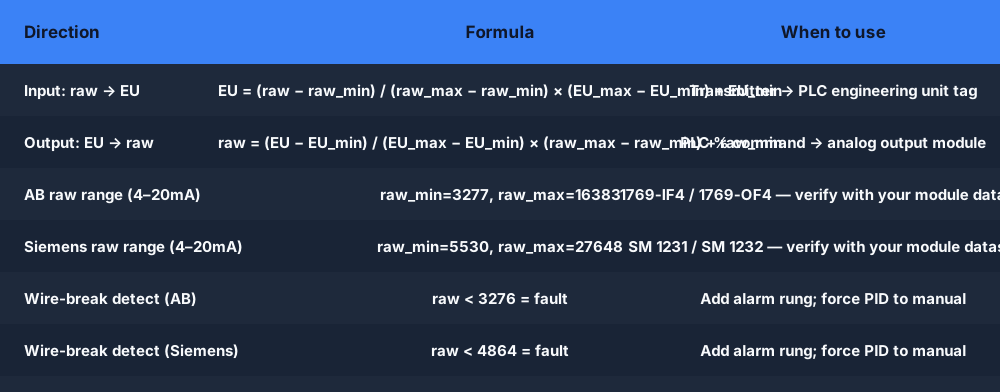
The only differences between Examples 1–4 are the values you plug in. Build a function block or function that takes raw_min, raw_max, eu_min, eu_max as parameters and call it for every analog channel. Never type the raw count numbers into rungs directly — when you swap to a different module with a different raw range, you change one parameter in the function block, not twenty rungs.
Dialect Note: Allen-Bradley vs Siemens Raw Ranges
This table trips up engineers who move between platforms:
| Signal | Allen-Bradley 1769-IF4 | Siemens SM 1231 |
|---|---|---|
| 0–20 mA (full) | 0 → 32767 | 0 → 27648 |
| 4–20 mA (live zero) | 3277 → 16383 | 5530 → 27648 |
| 0–10 V | 0 → 32767 | 0 → 27648 |
| Wire-break detect | < 3276 | < 4864 |
The numbers are different. Both are correct for their respective modules. The formula is the same; only raw_min and raw_max change. Check the specific module datasheet — even within one vendor, different generation modules have different conventions.
Frequently Asked Questions
Q: How do I scale a 4-20mA signal in a PLC?
A: Use the linear scale formula: EU = (raw − raw_min) / (raw_max − raw_min) × (EU_max − EU_min) + EU_min. For Allen-Bradley 1769-IF4, raw_min = 3277 and raw_max = 16383. For Siemens SM 1231, raw_min = 5530 and raw_max = 27648. The 4 mA live zero means never use 0 as raw_min — that is the 4 mA offset trap that causes a 25% error at zero.
Q: Why does my PLC analog input read a negative value at zero process?
A: You are scaling from 0 instead of 4 mA. A 4–20 mA transmitter outputs 4 mA at zero process value, not 0 mA. If you set raw_min to 0, your formula treats 4 mA as 25% of the span — so at zero process (4 mA), your engineering unit calculation gives a negative number. Use the correct raw_min for your module (3277 for AB 1769-IF4, 5530 for Siemens SM 1231).
Q: What raw counts does a Siemens S7-1200 SM 1231 produce for 4-20mA?
A: The Siemens SM 1231 maps 4 mA to raw integer 5530 and 20 mA to raw integer 27648. The scale formula is: EU = (raw − 5530) / (27648 − 5530) × (EU_max − EU_min) + EU_min. A reading below raw 4864 typically indicates a wire-break fault.
Q: What is the 4mA offset in 4-20mA instrumentation?
A: A 4–20 mA transmitter starts at 4 mA (not 0 mA) at zero process value. This live zero serves two purposes: the 4 mA provides loop power to the two-wire transmitter; and any reading below about 3.8 mA indicates a broken wire (wire-break detection). Scale the input starting from 0 mA and your zero reading will be 25% below the actual zero in engineering units.
Q: How do I convert a PID output percentage to an analog output count?
A: Use the output scaling formula: raw = (EU / EU_max) × (raw_max − raw_min) + raw_min. For an Allen-Bradley 1769-OF4 driving a 4–20 mA modulating valve: raw = (Valve_Pct / 100) × (16383 − 3277) + 3277. At 0% output this gives 3277 (4 mA, valve closed); at 100% it gives 16383 (20 mA, valve fully open). Confirm the valve fail-safe direction before testing.
Q: What is the difference between 4-20mA and 0-10V analog signals in PLCs?
A: Both are standard industrial analog signals, but they behave differently. 4–20 mA is a current loop — immune to voltage drops over long cable runs (200 metres reads the same as 2 metres). 0–10 V is a voltage signal susceptible to cable resistance and noise over distance. Use 4–20 mA for field instruments; 0–10 V is common for short panel-internal connections like VFD speed references. The PLC scaling maths is the same; the raw count ranges differ.
Q: Why does my analog reading jump around when nothing in the process is changing?
A: Three common causes: electrical noise (transmitter cable parallel to power cables — cross at 90° or use shielded cable); cable shield grounded at both ends (ground loop — ground at the control panel end only); or sensor noise amplified by the derivative term in a PID. Add a first-order filter in the PLC: filtered = filtered * 0.9 + raw * 0.1 per scan. Check the wiring before touching the PLC code.
The fastest way to get analog scaling right is to write it, run it, and see what the auto-grader says. The wiring-06-analog-input and wiring-07-analog-output scenarios are free — no install, no hardware, instant grading.