Most engineers learn PLC programming five times before they ever wire a contactor. Online programming simulators are everywhere; online wiring simulators were not — until recently. This is a builder's-view guide for learners who want to practice panel wiring and physical-fault diagnosis in the browser, what you can teach yourself with online tools, and where simulation hits its honest ceiling.

This guide covers:
- Why panel wiring is hard to practice
- What an online wiring tutor can teach you
- What it can't replace
- The 11 wiring fundamentals every PLC tech should know
- The 8 fault scenarios you should be able to diagnose
- How to practice deliberately
- FAQ
1. Why panel wiring is hard to practice
Panel wiring sits in an awkward middle — too physical for the textbook, too expensive for the home lab. A bare-bones single-seat bench (a small PLC, a 24 VDC supply, a din-rail, a handful of relays, a contactor, two photoeyes, an E-stop, ferrules, a crimper, a multimeter) lands at roughly USD 700 in components if you shop carefully and accept a no-name PLC. Double that for two seats so you can teach somebody. Quadruple it for any kind of classroom. None of those numbers include the time you spend sourcing parts that don't ship in the same box.
Employer-provided training is rarer than the recruiting copy suggests. The companies that do run their own programs are large enough to amortise a dedicated training cell; everyone else hands you a multimeter on day one and hopes you read the schematic correctly. If you're between jobs, self-funding a career switch, or trying to teach a junior on a project budget, the bench-cost wall is real and it is the single biggest reason wiring skill lags programming skill in the field.
Paper diagrams are the usual fallback, and they fail in a specific way. You can read a schematic for an hour, convince yourself you understand it, and discover at the bench that you wired the photoeye sourcing instead of sinking. The feedback gap is too long. You don't find out you got it wrong until smoke or a tripped breaker tells you, by which point the lesson is contaminated with adrenaline and you've potentially damaged a card. A simulator with terminal-by-terminal grading closes that loop to seconds: you connect a wire, the tutor immediately tells you whether the polarity is right, and if it isn't you can probe with a virtual multimeter and watch the voltages disagree with your mental model.
That feedback loop is the whole pitch. The real-world panel — fluorescent-lit, humming, with a contactor chattering somewhere two cabinets over and a phone ringing in the office — is not a great place to learn. It is a great place to test what you've already learned. Simulation moves the learning to where it belongs: somewhere quiet, where mistakes are free.
2. What an online wiring tutor can teach you
A well-built browser tutor closes most of the gap that paper-only study leaves open. Specifically, it gives you four capabilities that are hard to get any other way short of a real bench:
-
Terminal-by-terminal grading. Every wire you drop is checked against the canonical solution the moment you place it. You don't get a single pass/fail at the end of the lesson; you get per-connection feedback as you build, the same way a senior tech would lean over your shoulder and grunt when you got something wrong. Wrong polarity? Flagged. Wrong terminal block? Flagged. Reused a tag-name that's already on another rail? Flagged.
-
Multimeter intuition. A good tutor gives you a virtual multimeter that behaves like a real Fluke — DC volts, AC volts, continuity, and resistance. You probe the same way you would in the field: one lead on common, one lead on the test point, read the value, decide what it means. The point isn't the multimeter itself; the point is the habit of predicting the reading before you take it. Simulators are unusually good at training that habit because there's no time pressure and no consequence for being wrong.
-
Safety-circuit topology. Wiring an E-stop loop, a safety relay, and dual-channel monitoring correctly is non-negotiable in industrial work and easy to get subtly wrong on paper. The tutor gives you a topology you can build, break, and rebuild as many times as it takes to internalise the pattern.
-
Schematic-to-physical translation. This is the skill the textbook can't teach: looking at a printed schematic and finding the equivalent terminals on a real-looking panel render. Every lesson in the tutor pairs a schematic view with a physical panel view, and grading happens on the physical side. By the end of the track you stop translating consciously — you read the schematic and your eye lands on the right ferrule.
Compared to paper-only study, the gain is mostly in retention and transfer. Reading a schematic teaches you to recognize a pattern; wiring it teaches you to produce the pattern. The first is recognition memory, which fades fast; the second is procedural memory, which doesn't. After eight or ten lessons of building from schematic to physical, you stop having to think about which side of the photoeye is the brown wire. That's the gain.
If you want to feel what this is like before reading further, Lesson 1 — 24 VDC power supply and grounding — is the free starting lesson and takes most learners about 20 minutes. It's the single most useful 20 minutes you can spend if you've never wired a panel before, because every subsequent lesson assumes you can produce a clean, grounded 24 VDC rail without thinking about it.
3. What it can't replace
A simulator is not a panel and pretending otherwise will produce a tech who fumbles their first real cabinet. The split is worth drawing out plainly — what the browser tutor genuinely teaches, and what stays the exclusive domain of real hardware.
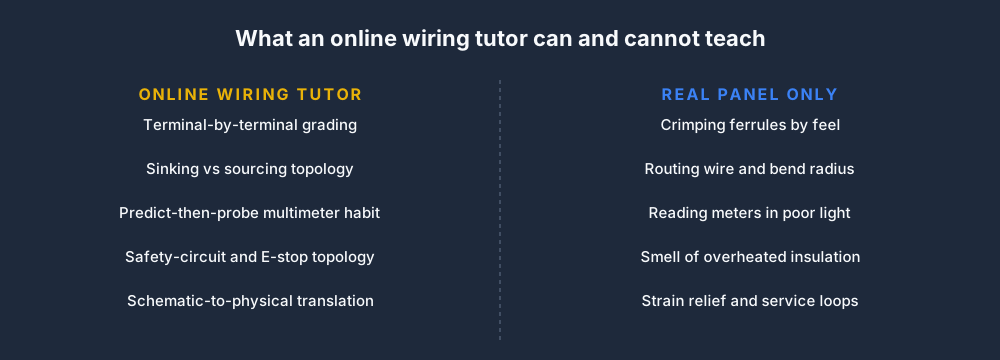
There are at least four things only physical practice can teach you:
-
Crimping ferrules. A ferrule that's crimped too loose pulls out under vibration; one that's crimped too tight strips the strands and causes intermittent contact six months later in a hot panel. Getting the feel right is a hands-and-tool skill. No simulator will ever teach it. Buy a crimper and a bag of ferrules and practice on scrap wire — it's the cheapest part of the bench setup and the most important.
-
Routing wires through a real panel. Bend radius, strain relief, separating power from signal, leaving service loops, planning so the door can close without crushing a cable — these are spatial skills that require a physical cabinet. The tutor will teach you which terminal goes where; the panel itself will teach you how to get the wire there without the next tech cursing you.
-
Reading multimeters in poor lighting. Every shop has a corner where the light is bad and the panel is at an angle, and you will end up working in that corner. Holding probes steady, keeping a finger off the metal tip, finding the right scale on a meter you can barely see — these are field habits that only build with field practice.
-
The smell of overheated insulation. This is a serious point dressed up as a joke. Experienced techs detect a problem by smell, sound, and the warmth of a cabinet door before the meter ever comes out. A simulator can't replicate any of that. The first time you smell PVC starting to cook you'll remember it; you have to be there for it.
Use the simulator for the first 50–100 hours of fundamentals. Use it to internalise the patterns, the topology, the predict-then-probe habit. Then get on real hardware as soon as you can — a benchtop trainer at a community college, a junior position that lets you shadow a senior, a friend's home automation project, anything. The simulator gets you to competent at the basics; the panel gets you to useful in the field. Don't overclaim in either direction.
4. The 11 wiring fundamentals every PLC tech should know
If you want a reference for the physical components before you start wiring — DIN rail, terminal blocks, contactors, and circuit protection — the control panel wiring basics guide covers the hardware side in detail.
These are the lessons in the wiring track, in the order they're taught. Each one is a self-contained scenario with terminal-by-terminal grading, a virtual multimeter, and a canonical solution you can study after you've finished. Try Wiring 1 free — the rest unlock with a Pro account.
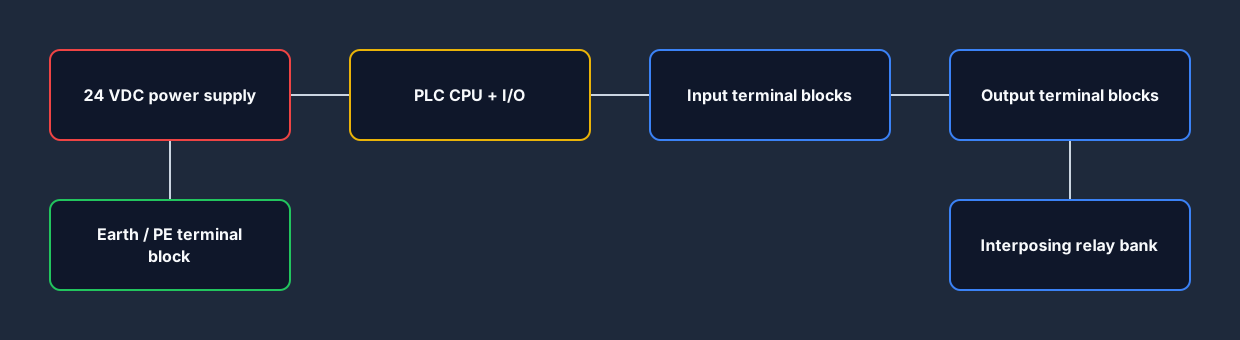
Before the individual lessons, it helps to picture how the components sit on the DIN rail — supply on the left, PLC in the middle, terminal blocks and relays on the right.
-
24 VDC power supply & grounding. The foundation lesson. You wire mains in, connect the supply's L/N/PE, bring 24 V+ and 0 V out to the rail, and tie the chassis ground to the panel earth. Sounds trivial; gets it wrong about half of the time on the first try because students forget the grounding bond between 0 V and PE.
-
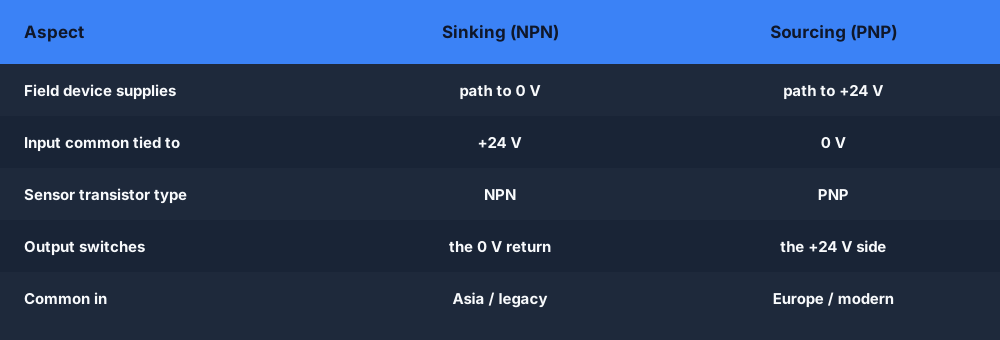
Sourcing vs. sinking inputs. The single biggest source of confusion in PLC wiring. You learn the convention — sourcing inputs expect the field device to supply current, sinking inputs expect it to sink current — and wire each variant against a PNP and an NPN photoeye. By the end you can predict the polarity from the input card's label without thinking.
The table below is the cheat sheet that finally makes sinking versus sourcing click — for both inputs and outputs.
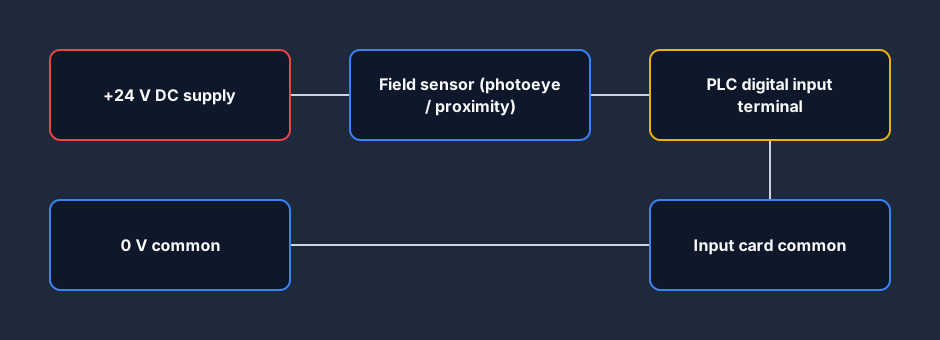
- Digital input wiring. Pushbutton, limit switch, photoeye, proximity switch — the four digital input devices you'll see most often. You wire each one to a discrete input card and use the multimeter to verify the on-state and off-state voltages match the card's spec.
The basic input topology is the same every time: the +24 V supply feeds the field device, the device's output lands on the PLC input terminal, and the input card's common returns to 0 V.
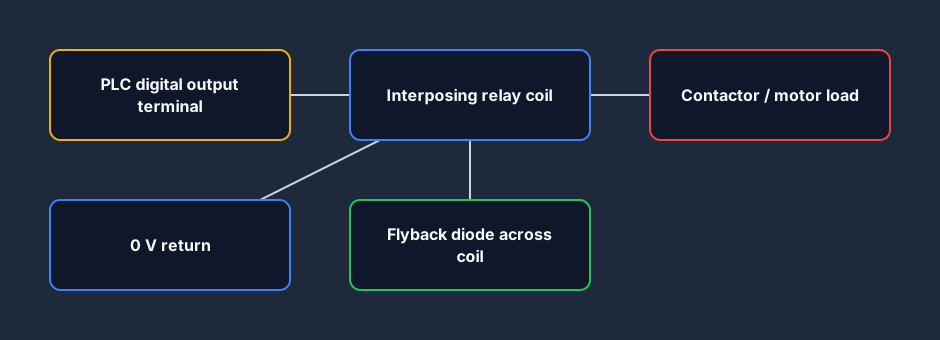
- Digital output wiring. Relay coil, contactor coil, indicator lamp, solenoid valve — the four digital output loads you'll see most often. You learn flyback diodes for inductive loads, the difference between sourcing and sinking outputs, and why you don't drive a contactor directly from a 24 V output card without an interposing relay.
On the output side the card switches a small interposing relay coil — protected by a flyback diode — and that relay's contact carries the real load to the contactor.
-
Pull-up and pull-down resistors. Most PLC inputs have internal pull-ups or pull-downs you don't see, but the moment you wire a 3-wire sensor or a logic-level signal you'll need to reason about them explicitly. The lesson walks you through both topologies and shows what a floating input looks like on the multimeter.
-
Analog input. 4–20 mA current loop and 0–10 V voltage input. You wire a temperature transmitter to an analog input card, scale the raw counts to engineering units, and use the multimeter to verify the loop current at the expected setpoint.
-
Analog output. 4–20 mA out to a control valve, 0–10 V out to a VFD. You learn the difference between a passive and an active loop, why the VFD's analog input ground has to be tied to the PLC's analog common, and how to verify the output without a real load.
-
Safety circuit. Dual-channel E-stop, safety relay (Pilz or equivalent), reset button, and a contactor. You wire the loop, verify both channels open when the E-stop is pressed, and prove the reset behavior matches IEC 60204-1. This is the lesson everyone wants to skip; it's the lesson nobody should.
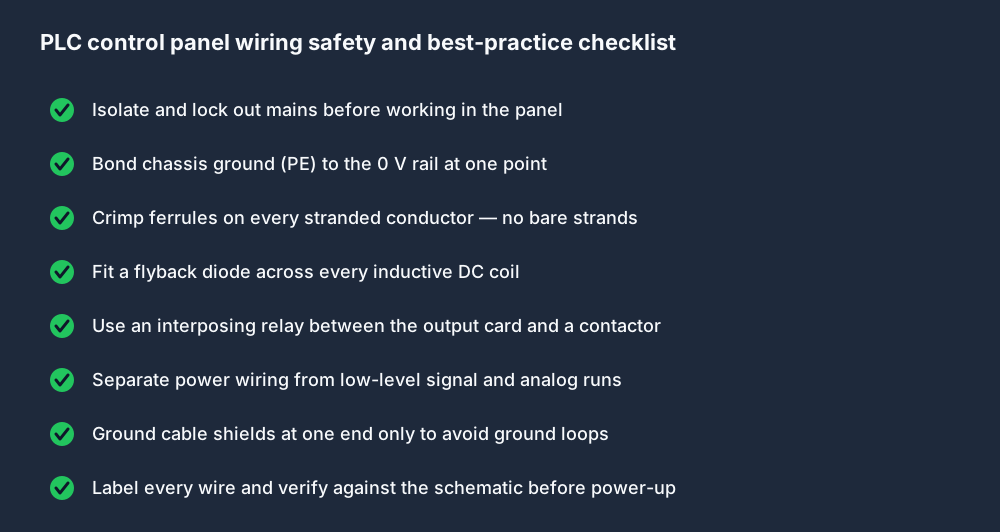
Across every one of these lessons the same safety and best-practice habits apply. Keep this checklist beside you whenever you work in a real panel.
-
RS-485 / Modbus. Two-wire half-duplex serial: A and B lines, terminating resistors, biasing, shield grounding at one end only. You wire a Modbus RTU loop between the PLC and a simulated VFD and verify communication with a virtual scanner.
-
Ethernet/IP. Industrial Ethernet wiring — shielded RJ45, cable categories, switch versus daisy-chain topology, and the IP addressing conventions for an Allen-Bradley network. The lesson is short on theory and long on physical layout because that's where the field problems actually are.
-
Quadrature encoder. A and B channels, optional Z (index) channel, differential versus single-ended outputs, and the high-speed counter input on the PLC. You wire a 1024-PPR encoder, verify the count direction, and learn why a noisy encoder cable next to a VFD line is the first place to look when the count drifts.
Eleven lessons, roughly an hour each at a deliberate pace, and you've covered the wiring patterns that show up in 90% of industrial panels.
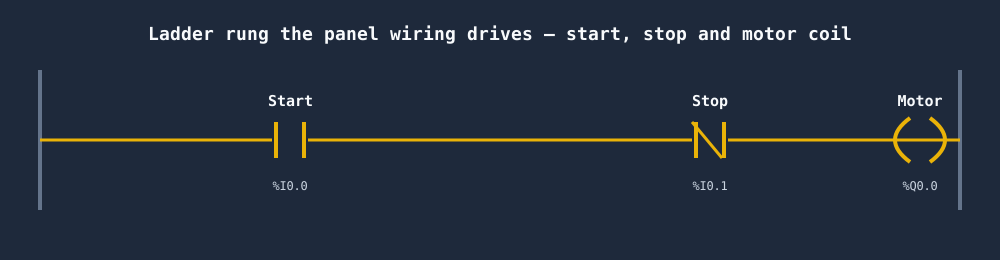
All that wiring exists to serve a few lines of logic. A wired start button, a wired stop button, and a wired motor output come together in a rung like this — the contacts are your inputs, the coil is your output.
5. The 8 fault scenarios you should be able to diagnose
The wiring lessons teach you to build correctly. The fault scenarios teach you to find what someone else built incorrectly — which, in the field, is most of the work. Each scenario drops you into a panel that's already wired but broken in a specific, known way. Your job is to find the fault, prove it with the multimeter, and fix it.
-
Photoeye polarity reversal (NPN/PNP confusion). A previous installer wired a PNP sensor as if it were NPN. The input never registers high. You probe the input terminal, see it sitting at 24 V regardless of the sensor state, and deduce the polarity is inverted. The lesson teaches you to predict what the input voltage should be in each state before you measure — the moment that prediction beats reality you've found the fault. Try fault scenario 1.
-
Relay contact swap (NO/NC mismatch). A normally-closed contact has been wired into a circuit that expected normally-open behavior. The contactor energises when the safety circuit is broken instead of when it's complete. You trace the circuit on the schematic, find the relay, probe across each contact, and identify the swap. Teaches you to read a schematic against a panel rather than from memory.
-
Rail short to terminal block. A piece of stripped wire is touching the 24 V rail and a 0 V terminal somewhere downstream of the supply, drawing the supply into current limit and pulling the rail voltage down. You measure the rail at the supply, measure it again at the far end of the panel, see the voltage drop, and walk the panel until you find the offending strand. Teaches voltage-drop tracing — a real field skill.
-
Broken supply wire to PLC. A loose ferrule has lost continuity to the PLC's 24 V terminal. The PLC is dark. You start at the supply, prove it's healthy, and walk forward until you find the open. Teaches the discipline of starting at the source rather than the symptom.
-
Broken return wire to contactor. The contactor coil's 0 V return is open. The output card thinks it's energising the coil — the LED on the card is lit — but the contactor doesn't pull in. You measure the output terminal (24 V, as expected), measure the coil terminal (also 24 V, which is the giveaway), and trace the return path until you find the break. Teaches you that an output card's LED proves nothing about the load.
-
Broken sensor signal wire. A 3-wire photoeye's signal wire has a hairline break under the cable gland. The sensor's brown and blue wires read healthy; the black signal wire reads as floating. The lesson teaches you the value of probing all three wires of a 3-wire sensor before declaring it good, even when two of them look fine.
-
Stuck NPN photoeye. The sensor's output transistor has failed shorted to common. The input reads as constantly active. You probe the sensor's signal terminal with the sensor unblocked and see 0 V where you expected 24 V. The fault is in the sensor itself, not the wiring — and recognizing that the wiring is correct is half the skill.
-
Relay alarm stuck on. An interposing relay's contact has welded closed. The alarm output stays energised even after the alarm condition clears. You isolate the relay, prove the coil is de-energising correctly, prove the contact is staying closed mechanically, and replace the relay. Teaches you to distinguish a control-circuit fault from a power-circuit fault.
Eight scenarios is enough to cover the four fault patterns you'll see most in the field — wrong polarity, wrong topology, broken conductor, failed component — at least twice each. Get fluent on these before you book your first commissioning trip.
6. How to practice deliberately
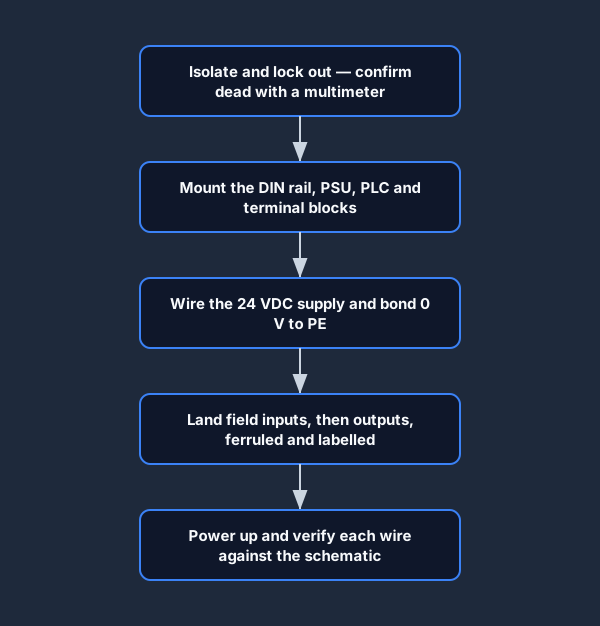
Hours alone don't make a tech. Deliberate practice — focused, predictive, and reflective — does. It also helps to follow the same disciplined sequence every time you wire a panel, on the bench or in the sim.
Three habits worth building from your very first lesson:
One lesson per session, with the multimeter open. Don't try to grind through three lessons in an evening. Pick one, sit with it, finish it, then close the laptop. Take a break. The next day, before you start the new lesson, re-do the previous one from memory without looking at the solution. If you can't, you didn't learn it the first time — go back. This is the single biggest difference between learners who finish the track in a month and remember nothing, and learners who take three months and remember it five years later.
Predict before you check. Before every multimeter probe, say the expected reading out loud. "I'm going to put the red lead on input 3 and the black lead on 0 V common, and I expect 24 volts because the photoeye is unblocked." Then probe. If the reading matches, you've reinforced your model. If it doesn't, the gap between prediction and reality is a hole in your understanding — close it before you move on. This habit is what separates a tech who can troubleshoot from a tech who can only follow procedures.
Re-do the failures. When you get a lesson wrong — wired the polarity backwards, missed a ground bond, picked the wrong terminal — don't just fix the bad wire and move on. Reset the entire lesson and rewire it from scratch. The first attempt embedded the wrong pattern; the second embeds the right one. You want the right pattern to be the more recent, more reinforced memory. Spaced repetition does the rest.
A reasonable cadence is one lesson per evening, three or four evenings a week, with a re-do session every Saturday morning where you pick three random completed lessons and rebuild them blind. Eight weeks of that and the full wiring track is in your hands the way a guitar player has chord shapes — automatic, no conscious thought, available under stress. That's the goal. The track index is the place to plan your sessions and track your progress; bookmark it.
7. FAQ
Is the wiring tutor free?
The foundation labs are free to start. The advanced motor-control, instrumentation, safety, communications and fault-finding labs require a Pro account.
Can I practice on my phone?
The lab works on tablets but is cramped on phones. Recommended minimum: 1024 px wide screen with a mouse or trackpad. Wiring is a precision-pointer task; thumbs on a 6-inch screen will frustrate you within ten minutes.
How long does the full track take?
About 8–12 hours of focused practice for the wiring lessons, plus another 4–6 hours for the fault scenarios. Slower if you're learning the underlying control theory at the same time, faster if you've wired panels before and you're using the tutor as a refresher.
Will this prepare me for a PLC technician certification?
It builds prerequisite skills (control wiring, fault diagnosis, schematic reading) that show up in many certifications. For certification-specific prep see our PLC certification guide.
What's the difference between a wiring simulator and a wiring tutor?
A simulator is an open-ended tool — you wire whatever you want, no graded objectives. A tutor is structured: each lesson has a defined goal, progressive hints, a multimeter, and per-connection grading. The product covered here is a tutor.
If you've read this far you already know whether the tool fits your brain. Start with Lesson 1 free; if it clicks, the rest of the track is twenty dollars and a couple of focused months away. The only way this doesn't work is if you don't start.
Last updated 2026-04-29. Project R — the wiring tutor — shipped in April 2026.