PLC platforms often express the same control idea with different instruction names, address formats, and editor conventions. The fastest way to understand those differences is to hold the logic constant.
This guide uses one motor start/stop seal-in program across the nine learning dialects currently runnable in our simulator: IEC 61131-3, Allen-Bradley, Siemens SCL, Mitsubishi, Omron, KEYENCE KV, Schneider Unity, Delta, and Instruction List.

Scope note: these are educational parser and runtime subsets for learning transferable PLC logic. They do not emulate every vendor instruction, controller firmware behavior, project-file format, or hardware fault. Validate production work in the target vendor environment and on the real controller.
Compare Them in the Product
You can follow this article with the actual runnable examples:
- Open the dialect comparison bench.
- Choose Seal-In (Motor Start/Stop).
- Switch dialects while keeping the inputs, output, and control objective unchanged.
- Then open the matching curriculum track and complete its first six lessons free.
The examples below come from the same reference-program source used by our cross-dialect tests, rather than decorative pseudo-code written only for this article.
At a Glance
| Learning track | Typical notation in this simulator | Output form | Best reason to practice it |
|---|---|---|---|
| IEC 61131-3 | Named variables with %I / %Q declarations | := | Build a vendor-neutral mental model |
| Allen-Bradley | XIC, XIO, OTE with tags | OTE | Learn Logix-style rung vocabulary |
| Siemens SCL / STL | A, AN, O, = with symbolic names | = | Read Siemens-oriented boolean networks |
| Mitsubishi | LD, ANI, OR, OUT | OUT | Practice device-style mnemonic logic |
| Omron | LD, OR, AND NOT, OUT | OUT | Read Omron-oriented instruction sequences |
| KEYENCE KV | LD, ANB, OR, OUT with R relays | OUT | Practice KV STUDIO-style relay logic |
| Schneider Unity | IEC-style LD, ANDN, ST | ST | Practice Modicon-oriented IEC patterns |
| Delta | LD, ANI, OR, OUT with X / Y devices | OUT | Practice Delta DVP-style device logic |
| Instruction List | LD, OR, ANDN, ST | ST | Maintain and interpret legacy IL programs |
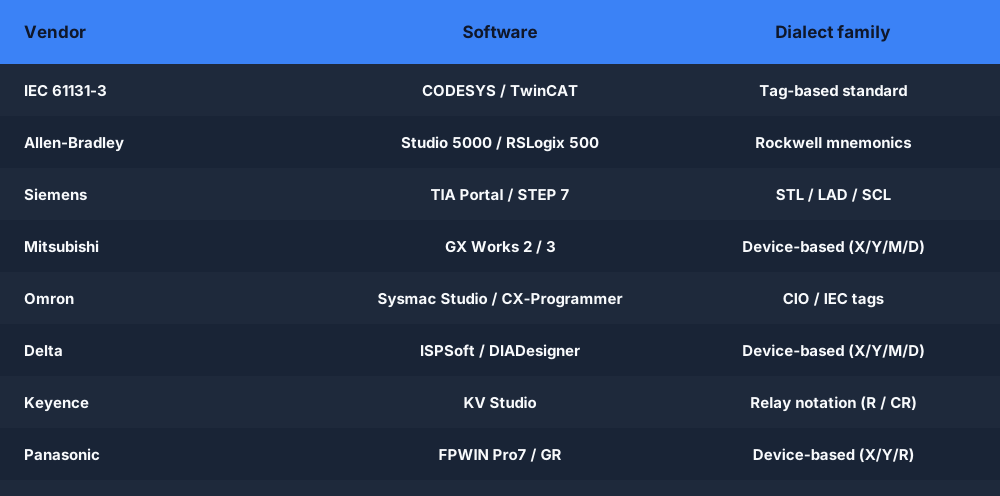
The Control Problem
The program has three important ideas:
STARTrequests the motor to run.STOPbreaks the run condition.- The
MOTORoutput is fed back through an OR path, creating the seal-in afterSTARTis released.
In ladder, that feedback is normally drawn as a parallel contact. In mnemonic or text formats, the same branch becomes an OR.
1. IEC 61131-3
Learning focus: named variables, explicit declarations, and portable boolean structure.
VAR
  START AT %I0.0 : BOOL;
  STOP  AT %I0.1 : BOOL;
  MOTOR AT %Q0.0 : BOOL;
END_VAR

| START OR MOTOR AND /STOP | := MOTOR ;
Read it left to right: START or the existing MOTOR state may establish the run request, while /STOP must remain true. The declarations make the physical I/O mapping visible without burying the logic in raw addresses.
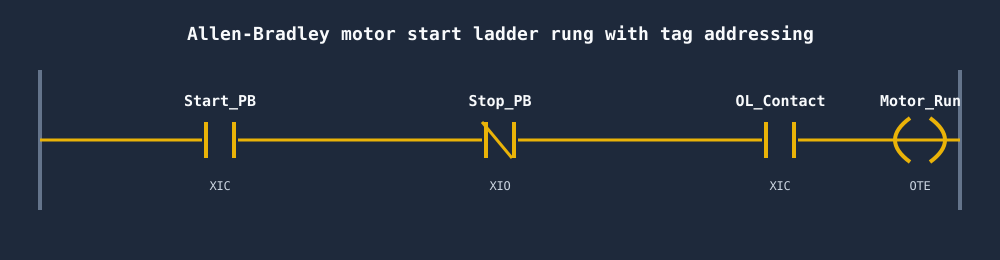
2. Allen-Bradley
Learning focus: Logix-style contact and coil mnemonics.
TAG START I:0/0 BOOL
TAG STOP  I:0/1 BOOL
TAG MOTOR O:0/0 BOOL

XIC START OR XIC MOTOR AND XIO STOP OTE MOTOR
XIC checks for a true bit, XIO checks for a false bit, and OTE writes the rung result to the output. The important transfer rule is that the instruction describes the bit test—not the physical shape of the push-button.
3. Siemens SCL / STL
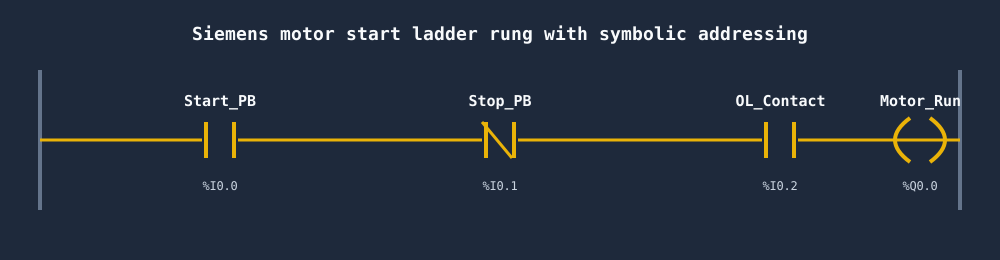
Learning focus: boolean networks using Siemens-oriented A, AN, O, and assignment forms.
VAR
  START AT %I0.0 : BOOL;
  STOP  AT %I0.1 : BOOL;
  MOTOR AT %Q0.0 : BOOL;
END_VAR

      A     START
      O     MOTOR
      AN    STOP
      =     MOTOR
A contributes an AND condition, O adds the seal-in OR path, AN adds an inverted condition, and = assigns the result. The simulator teaches the reasoning pattern; it is not a replacement for TIA Portal or PLCSIM.
4. Mitsubishi
Learning focus: compact device-oriented mnemonic logic.
VAR
  START AT %I0.0 : BOOL;
  STOP  AT %I0.1 : BOOL;
  MOTOR AT %Q0.0 : BOOL;
END_VAR

LD   START
OR   MOTOR
ANI  STOP
OUT  MOTOR
The seal-in structure remains obvious: load the start condition, OR the motor feedback, AND the inverse stop condition, then write the output. The curriculum uses a controlled subset for transferable practice rather than claiming full GX Works compatibility.
5. Omron
Learning focus: Omron-oriented boolean instruction sequences.
VAR
  START AT %I0.0 : BOOL;
  STOP  AT %I0.1 : BOOL;
  MOTOR AT %Q0.0 : BOOL;
END_VAR

LD      START
OR      MOTOR
AND NOT STOP
OUT     MOTOR
The two-word AND NOT form is the most visible difference in this example. The logic is otherwise the same load–OR–stop–output sequence.
6. KEYENCE KV
Learning focus: KV STUDIO-style mnemonic logic using KEYENCE relay and data-memory devices.
VAR
  START AT %I0.0 : BOOL;
  STOP  AT %I0.1 : BOOL;
  MOTOR AT %Q0.0 : BOOL;
END_VAR

LD   R000
OR   R500
ANB  R001
OUT  R500
R000 is the start input in this exercise, R001 is the stop input, and R500 is both the motor output and its seal-in feedback contact. ANB is the inverse-contact form in this tested KV subset. The simulator also supports MR internal relays, DM data memory, TMR timers, counters, SET/RES, and core arithmetic inside the documented learning boundary.
KEYENCE's public KV Nano specifications describe R relay, MR relay, DM data-memory, timer, and counter areas, while its own controller FAQ demonstrates LD MR000 and OUT MR100 mnemonic form. Exact capacity and I/O allocation vary by KV model, so production addresses must be checked against the target controller and KV STUDIO project.
7. Schneider Unity
Learning focus: IEC-oriented accumulator logic associated with Unity Pro and Control Expert workflows.
VAR
  START AT %I0.0 : BOOL;
  STOP  AT %I0.1 : BOOL;
  MOTOR AT %Q0.0 : BOOL;
END_VAR

LD   START
OR   MOTOR
ANDN STOP
ST   MOTOR
Here ANDN applies the negated stop condition and ST stores the result. Schneider-specific learning lives inside an IEC-shaped mental model, which makes this a useful bridge from vendor-neutral fundamentals.
8. Delta
Learning focus: DVP-oriented X, Y, M, T, C, and D devices with Delta-style mnemonics.
LD   X0
OR   Y0
ANI  X1
OUT  Y0
X0 is the start input, X1 is the stop input in this exercise, and Y0 is both the motor output and its seal-in feedback. The browser parser translates the supported device addresses and executes the rung so you can test the behavior.
9. Instruction List
Learning focus: reading accumulator-style IL found in legacy systems.
VAR
  START AT %I0.0 : BOOL;
  STOP  AT %I0.1 : BOOL;
  MOTOR AT %Q0.0 : BOOL;
END_VAR

LD   START
OR   MOTOR
ANDN STOP
ST   MOTOR
Instruction List was deprecated in the third edition of IEC 61131-3, but technicians still encounter it on installed equipment. Learning it is most valuable for maintenance, migration, and troubleshooting—not as the default choice for a new system.
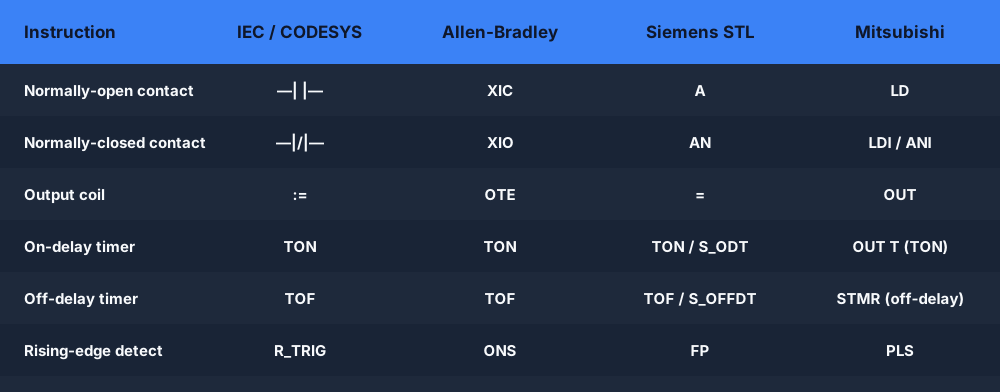
The Translation Pattern
Do not memorize eight programs independently. Translate four roles:
| Logical role | IEC | Allen-Bradley | Siemens | Mitsubishi | Omron | KEYENCE | Schneider / IL | Delta |
|---|---|---|---|---|---|---|---|---|
| Begin with a true condition | direct expression | XIC | A | LD | LD | LD | LD | LD |
| Add the seal-in path | OR | branch / OR | O | OR | OR | OR | OR | OR |
| Require the stop bit to be false | NOT / / | XIO | AN | ANI | AND NOT | ANB | ANDN | ANI |
| Write the motor result | := | OTE | = | OUT | OUT | OUT | ST | OUT |
This table is a learning map, not a complete instruction equivalence chart. Timer data structures, edge behavior, type conversion, scan semantics, and controller-specific instructions need separate treatment.
What Transfers—and What Does Not
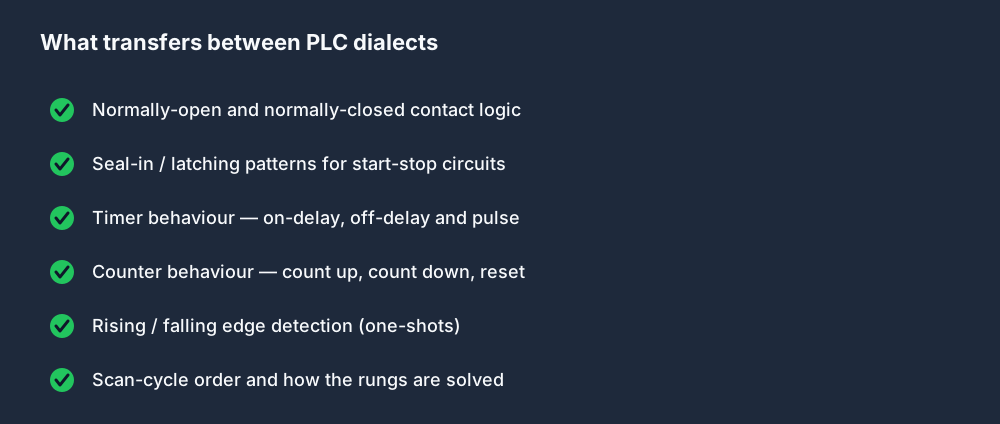
Transfers well
- Boolean series and parallel logic
- Seal-in and interlock patterns
- Scan-cycle reasoning
- Timer and counter intent
- Edge detection and one-shot concepts
- Safe naming, comments, and I/O documentation
Must be re-validated on the target platform
- Exact instruction names and operands
- Timer and counter time bases
- Address allocation and retained memory
- Task scheduling and scan order
- Fault handling and startup state
- Vendor project files, libraries, and firmware behavior
Which Track Should You Learn First?
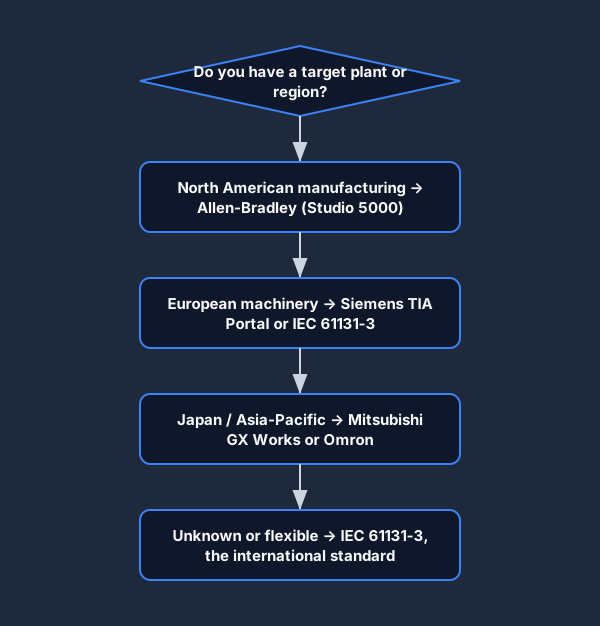
- No target controller yet: start with IEC 61131-3 to learn the control model.
- North American Logix environment: start with Allen-Bradley.
- Siemens plant or machine builder: start with Siemens SCL / STL.
- MELSEC equipment: start with Mitsubishi.
- Omron-equipped packaging or machine line: start with Omron.
- KEYENCE KV equipment or sensor-heavy OEM machinery: start with KEYENCE KV.
- Modicon / Control Expert environment: start with Schneider Unity.
- Delta DVP equipment: start with Delta.
- Maintaining legacy code: add Instruction List after one modern track.
If you are changing platforms, work through the same three exercises in both tracks: button-to-light, motor seal-in, and an on-delay timer. That gives you a controlled comparison of contacts, branches, outputs, addresses, and time handling before you tackle larger programs.
A Practical Cross-Dialect Exercise
- Run the seal-in program in your primary track.
- Turn
STARTon for one scan and confirmMOTORstays on. - Activate
STOPand confirm the seal breaks. - Switch to a second dialect without changing the expected behavior.
- Explain which token performs each of the four roles in the translation table.
- Rebuild the same circuit visually in the ladder editor using a parallel contact.
That final explanation is the real learning test. If you can identify the roles without relying on a memorized code block, you can move between PLC families much faster.
Make the comparison executable. Open the tested seal-in reference, switch all nine learning formats, then continue into the track that matches your equipment.