
PLC Simulator
PLC field notesdialects

PLC Dialect Cheat Sheet: TON, R_TRIG, TOF Across 8 Dialects

Side-by-side TON, R_TRIG, and TOF idioms across 8 PLC dialects — IEC, Allen-Bradley, Siemens, Mitsubishi, Schneider, Delta, Omron, IL.

PLC Simulation Software12 min read

PLC dialect cheat sheet comparing TON, R_TRIG and TOF idioms across 8 PLC dialects

Three of the most-searched PLC programming questions come down to the same thing: "how do I write a TON in Mitsubishi?", "what is the Allen-Bradley R_TRIG syntax?", "how does a TOF work in Siemens?" The logic is identical across all vendors. The notation is not. This reference gives you the canonical idiom for each, dialect by dialect, with the actual code.

The snippets below are sourced from the simulator's curriculum starters and briefings for lessons 7 (R_TRIG), 8 (TON), and 9 (TOF). You can work through each lesson interactively at /learn/dialects/<dialect>/<lesson> — the links are included in each section.


TON — On-Delay Timer

A TON (timer on-delay) starts counting when its input goes TRUE. Its output (the done bit, .Q) goes TRUE only if the input has been TRUE continuously for at least the preset duration. If the input drops before the preset elapses, the accumulator resets to zero. This is the standard "delay-before-action" building block — warn before starting a conveyor, debounce a noisy sensor, hold an alarm state for a minimum time.

Every dialect in the curriculum has a native on-delay timer. The differences are in the call shape and, importantly, in the preset units.

IEC 61131-3

VAR
  ENABLE   AT %I0.0 : BOOL;
  WARN_LAMP AT %Q0.0 : BOOL;
  T_WARN   : TON;
END_VAR

T_WARN(IN := ENABLE, PT := T#3s);

WARN_LAMP := T_WARN.Q;

T#3s is a typed TIME literal — the unit is on the page, which makes misreading the preset substantially harder. T_WARN is a named function-block instance; you can have many timers without any risk of address collision.

Allen-Bradley (Studio 5000 / RSLogix)

TAG ENABLE   I:0/0 BOOL
TAG WARN_LAMP O:0/0 BOOL
TAG T_WARN   TON

TON T_WARN IN:ENABLE PT:3000

XIC T_WARN.Q OTE WARN_LAMP

PT is in milliseconds — 3000 means 3 seconds. The instance is declared as a TON tag. The done bit is read as T_WARN.Q, which you examine with a standard XIC contact.

Siemens (TIA Portal SCL)

VAR
  ENABLE   AT %I0.0 : BOOL;
  WARN_LAMP AT %Q0.0 : BOOL;
  T_WARN   : TON;
END_VAR

T_WARN(IN := ENABLE, PT := T#3s);

WARN_LAMP := T_WARN.Q;

Siemens SCL in TIA Portal (S7-1200/1500) uses the same IEC-compatible function-block call. The named-argument form IN := and PT := with a T# literal is standard across IEC-compliant environments.

Mitsubishi (GX Works — IL mnemonics)

VAR
  ENABLE   AT %I0.0 : BOOL;
  WARN_LAMP AT %Q0.0 : BOOL;
  T_WARN   : TON;
END_VAR

LD  X0
OUT T1 K30

LD  T1
OUT Y0

Mitsubishi has no TON function block. Instead, T1 is a numbered timer device. OUT T1 K30 drives the timer's IN from whatever is on the rung — here LD X0 (ENABLE) — and sets a preset of K30. On the default 100 ms timer base, K30 = 30 × 100 ms = 3 seconds. The timer's done bit is read as a plain contact: LD T1. The classic gotcha: K30 is 3 seconds, not 30 seconds and not 30 milliseconds. The unit is a memorised convention, not something the syntax tells you.

Schneider (Unity Pro / EcoStruxure — SCL)

VAR
  ENABLE   AT %I0.0 : BOOL;
  WARN_LAMP AT %Q0.0 : BOOL;
  T_WARN   : TON;
END_VAR

T_WARN(IN := ENABLE, PT := T#3s);

WARN_LAMP := T_WARN.Q;

Unity Pro and EcoStruxure both support IEC 61131-3 Structured Text. The TON call is identical to the IEC form.

Delta (WPLSoft — IL mnemonics)

LD  X0
TMR T1 K30

LD  T1
OUT Y0

Delta's TMR instruction is the timer call — syntactically equivalent to Mitsubishi's OUT T<n> for this purpose. K30 is again 30 × 100 ms = 3 seconds on the default 100 ms base. The done bit is read as LD T1.

Omron (CX-Programmer — IL mnemonics)

VAR
  ENABLE   AT %I0.0 : BOOL;
  WARN_LAMP AT %Q0.0 : BOOL;
  T_WARN   : TON;
END_VAR

LD      ENABLE
TIM 1 #30

LD      T1
OUT     WARN_LAMP

Omron uses TIM as the timer instruction. The preset uses a # prefix (#30) rather than a K prefix, but the base is still 100 ms — so #30 = 3 seconds. The done-bit contact is T1.

Instruction List (IEC IL)

VAR
  ENABLE   AT %I0.0 : BOOL;
  WARN_LAMP AT %Q0.0 : BOOL;
  T_WARN   : TON;
END_VAR

CAL T_WARN(IN := ENABLE, PT := T#3s)

LD   T_WARN.Q
ST   WARN_LAMP

IEC IL uses CAL to call a function block with named arguments, then LD/ST to move the output to a coil.

TON Quick Reference

Reference tableSwipe
DialectTimer callPreset formatDone-bit read
IEC 61131-3T_WARN(IN := ENABLE, PT := T#3s)Typed TIME literalT_WARN.Q
Allen-BradleyTON T_WARN IN:ENABLE PT:3000Integer millisecondsT_WARN.Q (via XIC)
Siemens SCLT_WARN(IN := ENABLE, PT := T#3s)Typed TIME literalT_WARN.Q
MitsubishiOUT T1 K30K × 100 msLD T1
SchneiderT_WARN(IN := ENABLE, PT := T#3s)Typed TIME literalT_WARN.Q
DeltaTMR T1 K30K × 100 msLD T1
OmronTIM 1 #30# × 100 msLD T1
Instruction ListCAL T_WARN(IN := ENABLE, PT := T#3s)Typed TIME literalT_WARN.Q (via LD/ST)

At a glance, the same on-delay timer in every dialect:
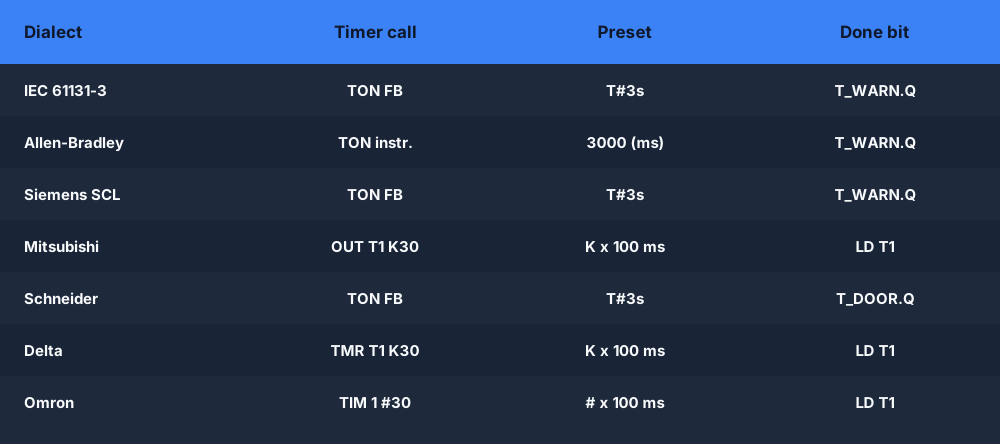
Comparison table of the TON on-delay timer call, preset format and done-bit read across PLC dialects

Practice TON across all dialects: IEC lesson 8, Allen-Bradley lesson 8, Siemens lesson 8, Mitsubishi lesson 8, Delta lesson 8, Omron lesson 8.


R_TRIG — Rising-Edge Detector

An R_TRIG (rising-edge trigger) produces a one-scan TRUE pulse the moment its input transitions from FALSE to TRUE. Even if the input stays TRUE for multiple scans, the output is only TRUE on the first scan of that transition. This is the building block for counting events, incrementing registers on a single button-press, and preventing double-triggers on held inputs.

IEC, Allen-Bradley, Siemens, Schneider, and Instruction List all expose R_TRIG as a named function-block instance with a .Q output. Mitsubishi, Delta, and Omron have no atomic rising-edge instruction. In those dialects, the one-shot is synthesised from two rungs and a history bit.

Edge detection is where vendor naming diverges most — R_TRIG/F_TRIG in IEC, ONS/OSR in Allen-Bradley, and P/N edge contacts in Siemens:
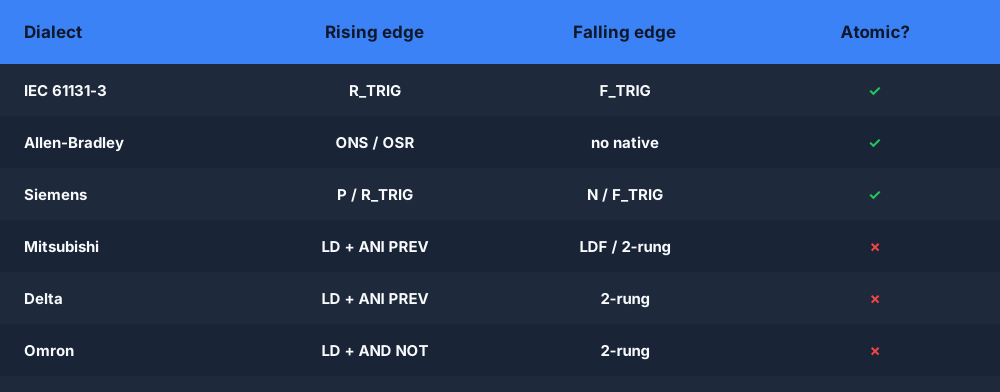
Comparison table of rising and falling edge detection — R_TRIG F_TRIG vs ONS OSR vs P N edge contacts across PLC dialects

IEC 61131-3

VAR
  BUTTON      AT %I0.0 : BOOL;
  COUNT_PULSE AT %Q0.0 : BOOL;
  EDGE_DET    : R_TRIG;
END_VAR

EDGE_DET(CLK := BUTTON);

| EDGE_DET.Q | := COUNT_PULSE ;

Declare EDGE_DET as an R_TRIG instance, call it with CLK := BUTTON, read the pulse via EDGE_DET.Q. The function block manages the history bit internally.

Allen-Bradley (Studio 5000 / RSLogix)

TAG BUTTON      I:0/0 BOOL
TAG COUNT_PULSE O:0/0 BOOL
TAG EDGE_DET    R_TRIG

R_TRIG EDGE_DET CLK:BUTTON

XIC EDGE_DET.Q OTE COUNT_PULSE

TAG EDGE_DET R_TRIG declares the instance. The instruction R_TRIG EDGE_DET CLK:BUTTON calls it. XIC EDGE_DET.Q OTE COUNT_PULSE reads the done bit on a standard rung.

Siemens (TIA Portal SCL)

VAR
  BUTTON      AT %I0.0 : BOOL;
  COUNT_PULSE AT %Q0.0 : BOOL;
  EDGE_DET    : R_TRIG;
END_VAR

EDGE_DET(CLK := BUTTON);

COUNT_PULSE := EDGE_DET.Q;

Same IEC-compatible form as the IEC starter. Siemens TIA Portal supports R_TRIG natively.

Mitsubishi (GX Works — synthesised from primitives)

Mitsubishi GX-IL has no R_TRIG instruction. The synthesis: a rising edge of BUTTON is the scan where BUTTON is TRUE and its previous-scan value (PREV_BTN) is FALSE.

VAR
  BUTTON      AT %I0.0 : BOOL;
  COUNT_PULSE AT %Q0.0 : BOOL;
  PREV_BTN    AT %M0.0 : BOOL;
END_VAR

; Rung 1: pulse = BUTTON AND NOT (previous BUTTON)
LD   X0
ANI  PREV_BTN
OUT  Y0

; Rung 2: capture this scan's BUTTON into PREV_BTN for the next scan
LD   X0
OUT  PREV_BTN

Rung order is load-bearing. The pulse rung must execute while PREV_BTN still holds the previous scan's value. If you write rung 2 first, PREV_BTN already matches X0 by the time the pulse comparison runs, and COUNT_PULSE never fires. ANI is the AND-inverse (AND NOT) instruction.

Schneider (Unity Pro / EcoStruxure — SCL)

VAR
  BUTTON      AT %I0.0 : BOOL;
  COUNT_PULSE AT %Q0.0 : BOOL;
  EDGE_DET    : R_TRIG;
END_VAR

EDGE_DET(CLK := BUTTON);

COUNT_PULSE := EDGE_DET.Q;

Unity Pro SCL supports R_TRIG natively with the standard IEC call form.

Delta (WPLSoft — synthesised from primitives)

Delta WPLSoft has no R_TRIG instruction. The synthesis pattern is mnemonic-for-mnemonic identical to Mitsubishi:

VAR
  BUTTON      AT %I0.0 : BOOL;
  COUNT_PULSE AT %Q0.0 : BOOL;
  PREV_BTN    AT %M0.0 : BOOL;
END_VAR

; Rung 1: pulse = BUTTON AND NOT (previous BUTTON)
LD   X0
ANI  PREV_BTN
OUT  Y0

; Rung 2: latch this scan's BUTTON into PREV_BTN (must come AFTER rung 1)
LD   X0
OUT  PREV_BTN

Same two-rung structure, same ANI for AND-NOT, same scan-order constraint.

Omron (CX-Programmer — synthesised from primitives)

Omron CX-Programmer has no R_TRIG instruction. Same two-rung approach, but Omron uses symbolic variable names and AND NOT (two words) rather than ANI:

VAR
  BUTTON      AT %I0.0 : BOOL;
  COUNT_PULSE AT %Q0.0 : BOOL;
  PREV_BTN    AT %M0.0 : BOOL;
END_VAR

; Rung 1: pulse = BUTTON AND NOT (previous BUTTON)
LD       BUTTON
AND NOT  PREV_BTN
OUT      COUNT_PULSE

; Rung 2: refresh the history bit AFTER the pulse rung has fired
LD   BUTTON
OUT  PREV_BTN

The logic is identical to Mitsubishi and Delta. The surface forms differ: AND NOT instead of ANI, symbolic names instead of device addresses.

Instruction List (IEC IL)

VAR
  BUTTON      AT %I0.0 : BOOL;
  COUNT_PULSE AT %Q0.0 : BOOL;
  EDGE_DET    : R_TRIG;
END_VAR

CAL EDGE_DET(BUTTON)

LD   EDGE_DET.Q
ST   COUNT_PULSE

R_TRIG Quick Reference

Reference tableSwipe
DialectMechanismKey instructionHistory bit managed by
IEC 61131-3Native FBEDGE_DET(CLK := BUTTON)FB internals
Allen-BradleyNative FBR_TRIG EDGE_DET CLK:BUTTONFB internals
Siemens SCLNative FBEDGE_DET(CLK := BUTTON)FB internals
MitsubishiSynthesisedLD X0 / ANI PREV_BTN / OUT Y0M-device relay (M0)
SchneiderNative FBEDGE_DET(CLK := BUTTON)FB internals
DeltaSynthesisedLD X0 / ANI PREV_BTN / OUT Y0M-device relay (M0)
OmronSynthesisedLD BUTTON / AND NOT PREV_BTN / OUT COUNT_PULSEWork-bit relay
Instruction ListNative FBCAL EDGE_DET(BUTTON)FB internals

The defining behaviour of any rising-edge detector — a single one-scan pulse per FALSE→TRUE transition, no matter how long the input is held:
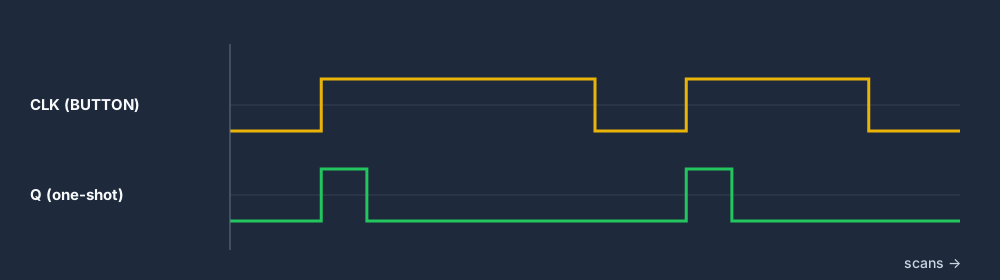
R_TRIG rising-edge one-shot timing diagram showing a single-scan Q pulse on each rising edge of CLK

In ladder, the synthesised one-shot is a normally-open input contact in series with a normally-closed history bit:
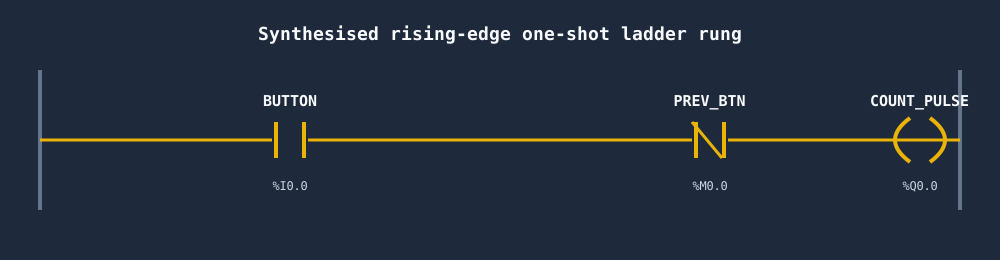
Ladder rung for a synthesised rising-edge one-shot with a BUTTON contact and a normally-closed PREV_BTN history bit driving COUNT_PULSE

Practice R_TRIG across all dialects: IEC lesson 7, Allen-Bradley lesson 7, Siemens lesson 7, Mitsubishi lesson 7, Delta lesson 7, Omron lesson 7.


TOF — Off-Delay Timer

A TOF (timer off-delay) works the inverse of a TON. When its input goes TRUE, its output goes TRUE immediately. When the input drops to FALSE, the output stays TRUE for the full preset duration before going FALSE. If the input returns to TRUE during the hold window, the timer resets and the output remains TRUE — no gap in output. This pattern is used wherever you need a hold-open window: an automatic door that stays open for 5 seconds after the last person passes, a lubrication pump that runs for 10 seconds after the machine stops, a fan that keeps running after the motor cuts out.

IEC, Allen-Bradley, Siemens, Schneider, and Instruction List all expose TOF as a named function-block instance. Mitsubishi, Delta, and Omron synthesise TOF from three rungs: a self-sealing latch, an output mirror, and a conditionally-gated on-delay timer.

IEC 61131-3

VAR
  OCCUPANCY AT %I0.0 : BOOL;
  DOOR_OPEN AT %Q0.0 : BOOL;
  T_DOOR    : TOF;
END_VAR

T_DOOR(IN := OCCUPANCY, PT := T#5s);

| T_DOOR.Q | := DOOR_OPEN ;

Declare T_DOOR as TOF, call with IN := and PT := T#5s. The .Q output is TRUE as long as OCCUPANCY has been TRUE recently — it drops 5 seconds after the last FALSE-to-TRUE-back-to-FALSE transition.

Allen-Bradley (Studio 5000 / RSLogix)

TAG OCCUPANCY I:0/0 BOOL
TAG DOOR_OPEN O:0/0 BOOL
TAG T_DOOR    TOF

TOF T_DOOR IN:OCCUPANCY PT:5000

XIC T_DOOR.Q OTE DOOR_OPEN

PT:5000 is 5 000 milliseconds = 5 seconds.

Siemens (TIA Portal SCL)

VAR
  OCCUPANCY AT %I0.0 : BOOL;
  DOOR_OPEN AT %Q0.0 : BOOL;
  T_DOOR    : TOF;
END_VAR

T_DOOR(IN := OCCUPANCY, PT := T#5s);

DOOR_OPEN := T_DOOR.Q;

Mitsubishi (GX Works — synthesised from three rungs)

GX-IL has no TOF instruction. The synthesis uses a self-sealing M-device latch, a native on-delay timer T0 (100 ms base, K50 = 5 seconds), and three rungs.

VAR
  OCCUPANCY AT %I0.0 : BOOL;
  DOOR_OPEN AT %Q0.0 : BOOL;
  LATCH     AT %M0.0 : BOOL;
END_VAR

; Rung 1: latch = (LATCH AND NOT T0.Q) OR OCCUPANCY
LD   M0
ANI  T0
OR   X0
OUT  M0

; Rung 2: DOOR_OPEN mirrors the latch
LD   M0
OUT  Y0

; Rung 3: T0 runs only when LATCH is on AND OCCUPANCY has gone away
LD   M0
ANI  X0
OUT  T0 K50

How the three rungs interact: while OCCUPANCY (X0) is TRUE, the OR X0 in rung 1 forces LATCH on regardless of T0. When OCCUPANCY drops, the latch self-seals via LD M0 until T0's done bit rises and the ANI T0 breaks it. Rung 3 starts T0 counting only when LATCH is on AND OCCUPANCY is off — the ANI X0 gate is critical. Without it, T0 would start counting the moment OCCUPANCY went TRUE, T0's done bit would rise mid-presence, and ANI T0 in rung 1 would break the latch seal while the person is still in the doorway.

Schneider (Unity Pro / EcoStruxure — SCL)

VAR
  OCCUPANCY AT %I0.0 : BOOL;
  DOOR_OPEN AT %Q0.0 : BOOL;
  T_DOOR    : TOF;
END_VAR

T_DOOR(IN := OCCUPANCY, PT := T#5s);

DOOR_OPEN := T_DOOR.Q;

Delta (WPLSoft — synthesised from three rungs)

Delta WPLSoft has no TOF instruction. Structure identical to Mitsubishi; the only difference is TMR T0 K50 instead of OUT T0 K50 on rung 3.

VAR
  OCCUPANCY AT %I0.0 : BOOL;
  DOOR_OPEN AT %Q0.0 : BOOL;
  LATCH     AT %M0.0 : BOOL;
END_VAR

; Rung 1: latch = (LATCH AND NOT T0.Q) OR OCCUPANCY
LD   M0
ANI  T0
OR   X0
OUT  M0

; Rung 2: DOOR_OPEN mirrors the latch
LD   M0
OUT  Y0

; Rung 3: TMR runs only during the off-delay window
LD   M0
ANI  X0
TMR  T0 K50

TMR is Delta's timer instruction; K50 is 50 × 100 ms = 5 seconds. Otherwise the pattern is mnemonic-for-mnemonic the same as Mitsubishi.

Omron (CX-Programmer — synthesised from three rungs)

Omron CX-Programmer has no TOF instruction. Same three-rung structure; differences are symbolic variable names, AND NOT (two words), and TIM 0 #50 for the timer call (# prefix, still 100 ms base).

VAR
  OCCUPANCY AT %I0.0 : BOOL;
  DOOR_OPEN AT %Q0.0 : BOOL;
  LATCH     AT %M0.0 : BOOL;
END_VAR

; Rung 1: latch = (LATCH AND NOT TIM0.Q) OR OCCUPANCY
LD       LATCH
AND NOT  TIM0
OR       OCCUPANCY
OUT      LATCH

; Rung 2: DOOR_OPEN mirrors the latch
LD   LATCH
OUT  DOOR_OPEN

; Rung 3: TIM 0 runs only when LATCH is on AND OCCUPANCY has gone away
LD       LATCH
AND NOT  OCCUPANCY
TIM      0 #50

Note: TIM0 (no space) on rung 1 is the contact reference for the done bit; the timer call on rung 3 is the two-token form TIM 0 #50.

Instruction List (IEC IL)

VAR
  OCCUPANCY AT %I0.0 : BOOL;
  DOOR_OPEN AT %Q0.0 : BOOL;
  T_DOOR    : TOF;
END_VAR

CAL T_DOOR(IN := OCCUPANCY, PT := T#5s)

LD   T_DOOR.Q
ST   DOOR_OPEN

TOF Quick Reference

Reference tableSwipe
DialectMechanismPresetOutput
IEC 61131-3Native FBPT := T#5sT_DOOR.Q
Allen-BradleyNative FBPT:5000 (ms)T_DOOR.Q (via XIC)
Siemens SCLNative FBPT := T#5sT_DOOR.Q
Mitsubishi3-rung synthesis (latch + mirror + gated TON)OUT T0 K50 (K × 100 ms)M0 latch → Y0
SchneiderNative FBPT := T#5sT_DOOR.Q
Delta3-rung synthesis (latch + mirror + gated TMR)TMR T0 K50 (K × 100 ms)M0 latch → Y0
Omron3-rung synthesis (latch + mirror + gated TIM)TIM 0 #50 (# × 100 ms)LATCHDOOR_OPEN
Instruction ListNative FBPT := T#5sT_DOOR.Q (via LD/ST)

Native function block in four dialects, three-rung latch synthesis in the other three:
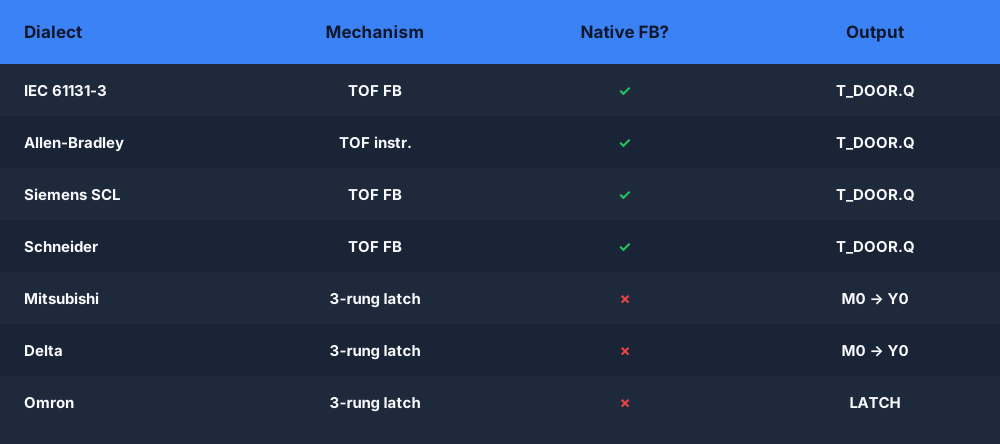
Comparison table of the TOF off-delay timer as a native function block versus a three-rung latch synthesis across PLC dialects

Practice TOF across all dialects: IEC lesson 9, Allen-Bradley lesson 9, Siemens lesson 9, Mitsubishi lesson 9, Delta lesson 9, Omron lesson 9.


The Synthesis Pattern — Why It Matters

The three dialects that synthesise R_TRIG and TOF — Mitsubishi, Delta, and Omron — collectively cover a large share of the Asia-Pacific market. If you work in Japanese, South-East Asian, or Australian manufacturing, you will encounter these platforms. Understanding the synthesis patterns does two things.

First, it gives you a transferable mental model. An R_TRIG function block is just a pair of rungs with a history bit. A TOF function block is a self-sealing latch, an output mirror, and a conditionally-gated on-delay timer. When you understand the decomposition, you can reconstruct it in any dialect — or debug it when someone else's implementation has a subtle scan-order error.

Second, it gives you insight into why scan order is not a stylistic preference. In the Mitsubishi and Delta R_TRIG synthesis, swapping the two rungs means the history bit is updated before the comparison, and the pulse never fires. In the TOF synthesis, removing the ANI X0 gate from rung 3 means the timer starts counting during occupancy, not after it — and the output drops mid-presence. These are not edge cases. They are the core of what makes PLC programming different from writing a function in Python.

Beyond Timers — Counters and Latches

The same naming divergence applies to the other two instruction families you reach for constantly. Counters (CTU up, CTD down) are largely consistent across IEC-style dialects but become numbered devices in Mitsubishi:
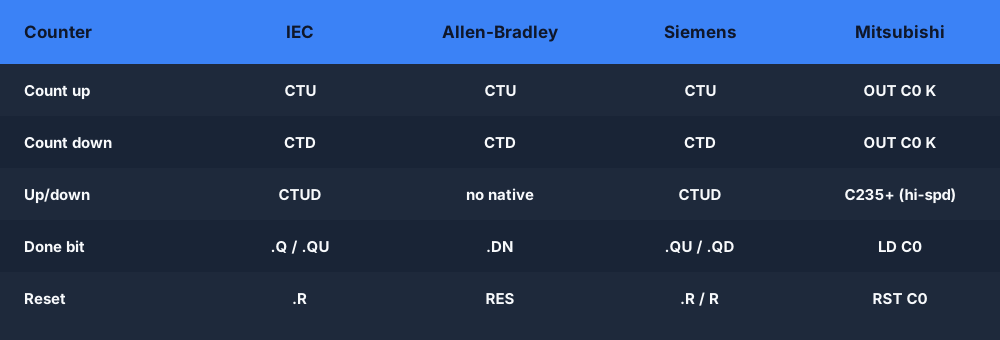
Comparison table of CTU up-counter and CTD down-counter instructions across IEC, Allen-Bradley, Siemens and Mitsubishi

Set, reset and latch operations are the other family worth keeping on hand — note that Allen-Bradley uses OTL/OTU rather than the IEC S/R coils:
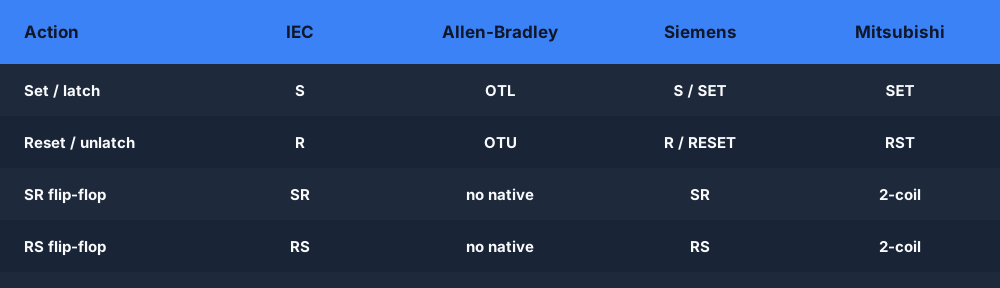
Comparison table of set, reset and latch instructions across IEC, Allen-Bradley, Siemens and Mitsubishi PLC dialects

Using This Cheat Sheet

A few habits keep you from the classic cross-dialect mistakes when reading these tables:
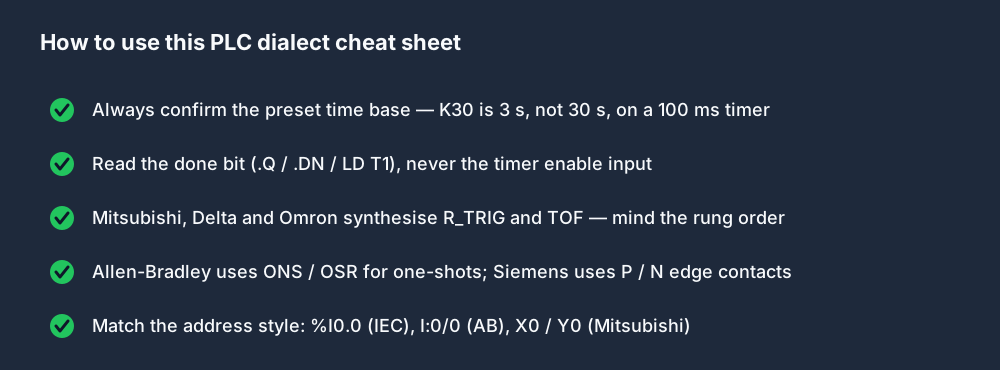
Checklist of tips for reading the PLC dialect cheat sheet — time base, done bit, synthesised instructions and address styles

Where to Learn

The Coding Tutor covers all three primitives — TON in lesson 8, R_TRIG in lesson 7, TOF in lesson 9 — across all eight dialects. Each lesson gives you a scenario, a starter, and a live I/O model that grades your solution.

Open the Coding Tutor →

The dialect comparison matrix shows how all eight dialects render the same program side by side — a useful companion to the per-lesson practice.
ShareX / TwitterLinkedIn

From reading to running logic

Practice this yourself in the simulator

Start with guided PLC practice in your browser. No install and no credit card required.

Start practising free

Continue learning

Related field notes

All articles
coding tutor
dialects

Q3 Launch: 8 PLC Dialects, 96 Lessons, Free in Your Browser

The Coding Tutor is live — 96 hands-on lessons across 8 PLC dialects, all browser-based and free. Same physical scenario, eight different ways to write the logic.

7 min read
allen bradley
rockwell

RSLogix 5000 Tutorial: Your First ControlLogix Project in One Afternoon

A step-by-step RSLogix 5000 (now Studio 5000 Logix Designer) tutorial for complete beginners. Create a project, add I/O, build a tag database, write a start/stop rung with XIC/XIO/OTE, wrap it in an Add-On Instruction, and download to an emulator. No prior Rockwell experience required.

10 min read
siemens
tia portal

TIA Portal Tutorial: Your First S7-1200 Program in One Sitting

A complete TIA Portal tutorial for newcomers — install, configure an S7-1200, write a start/stop rung in LAD, add a small SCL function block, and run everything in PLCSIM. No hardware required, 21-day trial is enough.

9 min read

Software evaluation field guide

PLC dialect cheat sheet for TON, R_TRIG and TOF: implementation, evidence and troubleshooting

Direct answer

PLC dialect cheat sheet for TON, R_TRIG and TOF becomes useful when it connects target controller, software version, language, instance storage, time base, enable behavior, done output, edge memory, reset, prescan, download and restart semantics with source intent through vendor instruction and owned state to scan-by-scan outputs, elapsed value, surrounding rung behavior and machine consequence, then proves ton delay-on, rising-edge pulse and tof delay-off cases executed at before, exact and after-preset boundaries under normal, boundary, fault and recovery conditions. The objective is a repeatable engineering or learning result, not merely activity inside a page or tool.

This guide is written for pLC programmers translating timer and edge-detection intent between IEC function blocks, Allen-Bradley instructions and Siemens programming conventions. The intended result is specific: the reader can compare names without assuming semantic equivalence, identify the state each instruction owns and build target-specific boundary tests before migration.

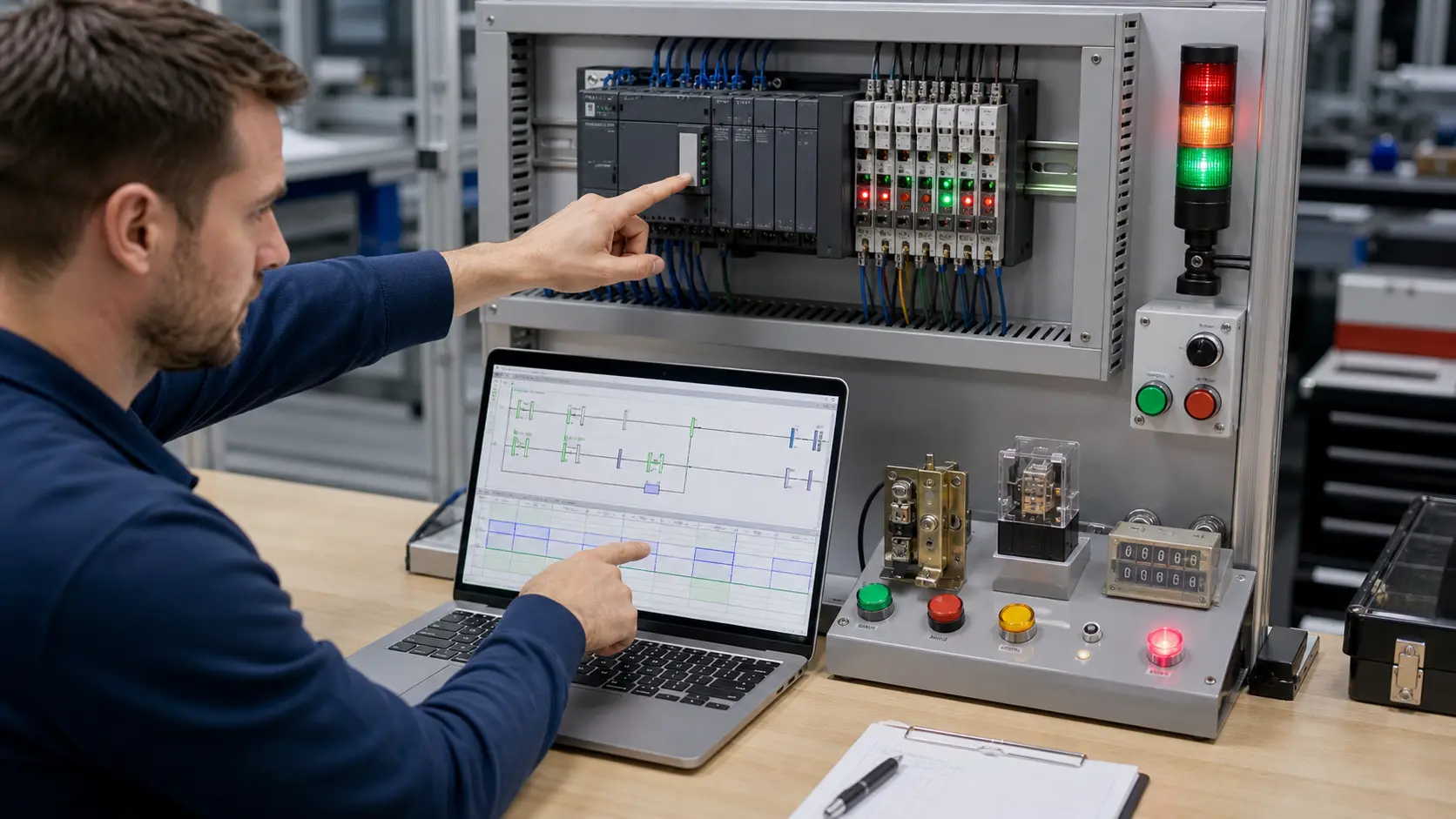
an automation engineer correlating ladder logic, scan timing, PLC I/O and a controlled test result at a debug bench while studying TON, one-shot and TOF behavior across IEC, Allen-Bradley and Siemens dialects
The physical context keeps TON, one-shot and TOF behavior across IEC, Allen-Bradley and Siemens dialects tied to declared inputs, owned decisions, observable results and evidence that another person can verify.

System map / 02

Six concepts that control the result

Treat these as connected checkpoints. Each checkpoint has an expected state, an observable state and a boundary to the next part of the system. That structure prevents a software indication from being mistaken for physical proof.

NODE 01observable

Define the operating contract

target controller, software version, language, instance storage, time base, enable behavior, done output, edge memory, reset, prescan, download and restart semantics. For TON, one-shot and TOF behavior across IEC, Allen-Bradley and Siemens dialects, record the initial condition, actor, requested change, observable result and stopping condition before selecting a tool or implementation.

NODE 02observable

Map the evidence path

source intent through vendor instruction and owned state to scan-by-scan outputs, elapsed value, surrounding rung behavior and machine consequence. Separate request, internal state, output or service, physical or user-visible result and independent feedback so each boundary can be inspected.

NODE 03observable

Prove normal operation

TON delay-on, rising-edge pulse and TOF delay-off cases executed at before, exact and after-preset boundaries. Run more than one cycle from a known state and retain the values, timings or artifacts that demonstrate repeatability.

NODE 04observable

Exercise a boundary case

held input, false-to-true edge, repeated call, skipped call, reset, retentive state, online edit, restart and task-period variation. Choose minimum, maximum, simultaneous, delayed or restart conditions that reveal assumptions hidden by the happy path.

NODE 05observable

Diagnose a controlled fault

a mnemonic, parameter, instance, time-base, scan-order, reset, retention or restart mismatch. Preserve the first symptom, divide the system at a measurable boundary and change one condition only after predicting the result.

NODE 06observable

Transfer and hand over

the translated logic verified in the current official target environment and on safeguarded representative hardware. Restore normal state, remove temporary changes, repeat affected checks and document which claims remain limited to the learning environment.

Procedure / 03

A six-step practice and commissioning workflow

Run the steps in order the first time. Later, the same structure becomes a diagnostic loop: define the expected condition, observe the boundary, interpret the difference and choose one proving action.

  1. 01

    Write the acceptance case

    Convert target controller, software version, language, instance storage, time base, enable behavior, done output, edge memory, reset, prescan, download and restart semantics into initial conditions, one stimulus and observable pass criteria.

    Evidence: Another person can repeat the case without guessing the intended result.

    Avoid: Using page completion or an animation as the acceptance criterion.

  2. 02

    Build the map

    Document source intent through vendor instruction and owned state to scan-by-scan outputs, elapsed value, surrounding rung behavior and machine consequence and name who owns each state or decision.

    Evidence: Every request and result has a source, destination and useful inspection point.

    Avoid: Using the same value as command, status and independent feedback.

  3. 03

    Run the baseline

    Apply ton delay-on, rising-edge pulse and tof delay-off cases executed at before, exact and after-preset boundaries from a clean start and record the expected evidence.

    Evidence: Repeated runs produce the same bounded result.

    Avoid: Changing several parameters before a baseline exists.

  4. 04

    Challenge assumptions

    Test held input, false-to-true edge, repeated call, skipped call, reset, retentive state, online edit, restart and task-period variation without changing the acceptance contract.

    Evidence: Limits, timing and restart behavior reach defined states.

    Avoid: Testing only one ideal sequence.

  5. 05

    Isolate one failure

    Introduce or analyse a mnemonic, parameter, instance, time-base, scan-order, reset, retention or restart mismatch and locate the first disagreement.

    Evidence: The proving action distinguishes the leading hypotheses.

    Avoid: Resetting, forcing or replacing before evidence is retained.

  6. 06

    Close the evidence loop

    Complete the translated logic verified in the current official target environment and on safeguarded representative hardware and repeat the affected regression cases.

    Evidence: An evaluation is complete when the same representative job is tested in each candidate and differences are recorded as evidence rather than inferred from feature labels.

    Avoid: Treating an acknowledged message or one successful rerun as handover.

Diagnostic matrix / 04

Symptoms, proving points and next actions

The table is a reasoning aid, not a parts-replacement chart. Preserve the initial symptom, inspect the named boundary and use the interpretation to choose the next controlled test. Site safety procedures and equipment manuals remain authoritative.

Diagnostic symptoms, inspection points, interpretations and next actions for PLC dialect cheat sheet for TON, R_TRIG and TOF: implementation, evidence and troubleshooting
Observed symptomInspectInterpretationNext proving action
The expected result is unclearRequirement, initial state, actor, stimulus, units and pass conditionThe evaluator, instructor and technical buyer may be solving different versions of the task.Rewrite one observable acceptance case before continuing.
Internal state changes but the outcome does notRequest, final owner, output or service boundary and independent feedbackA software or interface indication proves intent at one layer, not the complete outcome.Trace the first boundary after the changing state.
Normal case passes but an edge case failsLimits, timing, simultaneous events, reset and restart assumptionsThe implementation contains a hidden assumption exposed by the changed condition.Add the failed boundary as a permanent regression case.
The failure disappears after resetOriginal symptom, histories, diagnostics, timestamps and active causeReset changed evidence or state without proving the initiating cause.Reproduce under a controlled condition and preserve pre/post-event data.
Simulator and target disagreeModel boundary, software version, task timing, I/O behavior, data types and configurationA learning model and the intended target do not share one of the recorded assumptions.Reduce the case and verify against current target documentation.
The result cannot be explainedPrediction, observation, proving action, alternative hypotheses and limitationsActivity occurred but the evidence is not yet transferable or reviewable.Have the learner defend the signal path and repeat a changed case.

Product evidence / 05

What the browser practice can actually demonstrate

The public product surface exposes runnable examples, capability boundaries, pricing context and test-harness behavior that can be checked before a purchasing decision.

Where simulation stops

Mnemonic similarity does not prove identical timing, edge, reset, retentive, data-block or scan behavior; the exact controller family and software version govern.

Commissioning notebook / 06

Six cases that turn the concepts into evidence

Use these as written briefs rather than click-through instructions. For every case, state the expected condition before acting, retain the first useful observation and explain why the final result proves the requirement. A different program or component choice can still be correct when it produces the same bounded behavior and evidence.

Case 01

predict → observe → prove

Prove define the operating contract

Engineering context. target controller, software version, language, instance storage, time base, enable behavior, done output, edge memory, reset, prescan, download and restart semantics. For TON, one-shot and TOF behavior across IEC, Allen-Bradley and Siemens dialects, record the initial condition, actor, requested change, observable result and stopping condition before selecting a tool or implementation. Begin with a written normal condition and identify which request, state, physical result or communication value will provide independent confirmation. Do not begin by changing the configuration; the initial state is part of the evidence and should remain reproducible.

Controlled setup. Use the “Write the acceptance case” stage of the workflow: convert target controller, software version, language, instance storage, time base, enable behavior, done output, edge memory, reset, prescan, download and restart semantics into initial conditions, one stimulus and observable pass criteria. The acceptance record should show this result: another person can repeat the case without guessing the intended result. Record initial conditions, the exact stimulus and the observation point so another learner can repeat the case without relying on your memory.

Fault challenge. Introduce or analyse “The expected result is unclear” as one bounded deviation. Inspect requirement, initial state, actor, stimulus, units and pass condition The working interpretation is that the evaluator, instructor and technical buyer may be solving different versions of the task. The next proving action is to rewrite one observable acceptance case before continuing. Change only one condition before observing the result, and preserve timestamps or measurements where timing matters.

Review and recovery. The most common trap here is using page completion or an animation as the acceptance criterion. After restoring the cause, repeat the normal case and at least one stop, timeout, disconnect or restart boundary relevant to this topic. Remove temporary forces and bypasses, return the model to a known state and retain the evidence that both operation and recovery are deliberate.

Explain it aloud: Are IEC TON and Allen-Bradley TON instructions equivalent? A defensible short answer is: They express a similar on-delay intent, but instance data, enable behavior, status bits, time representation, reset and restart semantics must be checked on the exact platform.

Case 02

predict → observe → prove

Prove map the evidence path

Engineering context. source intent through vendor instruction and owned state to scan-by-scan outputs, elapsed value, surrounding rung behavior and machine consequence. Separate request, internal state, output or service, physical or user-visible result and independent feedback so each boundary can be inspected. Begin with a written normal condition and identify which request, state, physical result or communication value will provide independent confirmation. Do not begin by changing the configuration; the initial state is part of the evidence and should remain reproducible.

Controlled setup. Use the “Build the map” stage of the workflow: document source intent through vendor instruction and owned state to scan-by-scan outputs, elapsed value, surrounding rung behavior and machine consequence and name who owns each state or decision. The acceptance record should show this result: every request and result has a source, destination and useful inspection point. Record initial conditions, the exact stimulus and the observation point so another learner can repeat the case without relying on your memory.

Fault challenge. Introduce or analyse “Internal state changes but the outcome does not” as one bounded deviation. Inspect request, final owner, output or service boundary and independent feedback The working interpretation is that a software or interface indication proves intent at one layer, not the complete outcome. The next proving action is to trace the first boundary after the changing state. Change only one condition before observing the result, and preserve timestamps or measurements where timing matters.

Review and recovery. The most common trap here is using the same value as command, status and independent feedback. After restoring the cause, repeat the normal case and at least one stop, timeout, disconnect or restart boundary relevant to this topic. Remove temporary forces and bypasses, return the model to a known state and retain the evidence that both operation and recovery are deliberate.

Explain it aloud: What is the Siemens equivalent of R_TRIG or an Allen-Bradley one-shot? A defensible short answer is: Siemens environments support rising-edge detection patterns, but the correct instruction and memory ownership depend on the language, controller family and software version.

Case 03

predict → observe → prove

Prove prove normal operation

Engineering context. TON delay-on, rising-edge pulse and TOF delay-off cases executed at before, exact and after-preset boundaries. Run more than one cycle from a known state and retain the values, timings or artifacts that demonstrate repeatability. Begin with a written normal condition and identify which request, state, physical result or communication value will provide independent confirmation. Do not begin by changing the configuration; the initial state is part of the evidence and should remain reproducible.

Controlled setup. Use the “Run the baseline” stage of the workflow: apply ton delay-on, rising-edge pulse and tof delay-off cases executed at before, exact and after-preset boundaries from a clean start and record the expected evidence. The acceptance record should show this result: repeated runs produce the same bounded result. Record initial conditions, the exact stimulus and the observation point so another learner can repeat the case without relying on your memory.

Fault challenge. Introduce or analyse “Normal case passes but an edge case fails” as one bounded deviation. Inspect limits, timing, simultaneous events, reset and restart assumptions The working interpretation is that the implementation contains a hidden assumption exposed by the changed condition. The next proving action is to add the failed boundary as a permanent regression case. Change only one condition before observing the result, and preserve timestamps or measurements where timing matters.

Review and recovery. The most common trap here is changing several parameters before a baseline exists. After restoring the cause, repeat the normal case and at least one stop, timeout, disconnect or restart boundary relevant to this topic. Remove temporary forces and bypasses, return the model to a known state and retain the evidence that both operation and recovery are deliberate.

Explain it aloud: What should I learn first about TON, one-shot and TOF behavior across IEC, Allen-Bradley and Siemens dialects? A defensible short answer is: Start with the operating contract and evidence path: target controller, software version, language, instance storage, time base, enable behavior, done output, edge memory, reset, prescan, download and restart semantics, followed by source intent through vendor instruction and owned state to scan-by-scan outputs, elapsed value, surrounding rung behavior and machine consequence. Add advanced features only after the baseline is predictable.

Case 04

predict → observe → prove

Prove exercise a boundary case

Engineering context. held input, false-to-true edge, repeated call, skipped call, reset, retentive state, online edit, restart and task-period variation. Choose minimum, maximum, simultaneous, delayed or restart conditions that reveal assumptions hidden by the happy path. Begin with a written normal condition and identify which request, state, physical result or communication value will provide independent confirmation. Do not begin by changing the configuration; the initial state is part of the evidence and should remain reproducible.

Controlled setup. Use the “Challenge assumptions” stage of the workflow: test held input, false-to-true edge, repeated call, skipped call, reset, retentive state, online edit, restart and task-period variation without changing the acceptance contract. The acceptance record should show this result: limits, timing and restart behavior reach defined states. Record initial conditions, the exact stimulus and the observation point so another learner can repeat the case without relying on your memory.

Fault challenge. Introduce or analyse “The failure disappears after reset” as one bounded deviation. Inspect original symptom, histories, diagnostics, timestamps and active cause The working interpretation is that reset changed evidence or state without proving the initiating cause. The next proving action is to reproduce under a controlled condition and preserve pre/post-event data. Change only one condition before observing the result, and preserve timestamps or measurements where timing matters.

Review and recovery. The most common trap here is testing only one ideal sequence. After restoring the cause, repeat the normal case and at least one stop, timeout, disconnect or restart boundary relevant to this topic. Remove temporary forces and bypasses, return the model to a known state and retain the evidence that both operation and recovery are deliberate.

Explain it aloud: How do I practise TON, one-shot and TOF behavior across IEC, Allen-Bradley and Siemens dialects effectively? A defensible short answer is: Use short cases with known initial conditions, a written prediction, one action and an observable result. Then alter a boundary or fault and explain why the evidence changed.

Case 05

predict → observe → prove

Prove diagnose a controlled fault

Engineering context. a mnemonic, parameter, instance, time-base, scan-order, reset, retention or restart mismatch. Preserve the first symptom, divide the system at a measurable boundary and change one condition only after predicting the result. Begin with a written normal condition and identify which request, state, physical result or communication value will provide independent confirmation. Do not begin by changing the configuration; the initial state is part of the evidence and should remain reproducible.

Controlled setup. Use the “Isolate one failure” stage of the workflow: introduce or analyse a mnemonic, parameter, instance, time-base, scan-order, reset, retention or restart mismatch and locate the first disagreement. The acceptance record should show this result: the proving action distinguishes the leading hypotheses. Record initial conditions, the exact stimulus and the observation point so another learner can repeat the case without relying on your memory.

Fault challenge. Introduce or analyse “Simulator and target disagree” as one bounded deviation. Inspect model boundary, software version, task timing, I/O behavior, data types and configuration The working interpretation is that a learning model and the intended target do not share one of the recorded assumptions. The next proving action is to reduce the case and verify against current target documentation. Change only one condition before observing the result, and preserve timestamps or measurements where timing matters.

Review and recovery. The most common trap here is resetting, forcing or replacing before evidence is retained. After restoring the cause, repeat the normal case and at least one stop, timeout, disconnect or restart boundary relevant to this topic. Remove temporary forces and bypasses, return the model to a known state and retain the evidence that both operation and recovery are deliberate.

Explain it aloud: What counts as proof of competence? A defensible short answer is: A repeatable artifact or system result plus an explanation of the signal path is stronger than time spent, screenshots or a copied answer. Physical competence requires separate supervised evidence.

Case 06

predict → observe → prove

Prove transfer and hand over

Engineering context. the translated logic verified in the current official target environment and on safeguarded representative hardware. Restore normal state, remove temporary changes, repeat affected checks and document which claims remain limited to the learning environment. Begin with a written normal condition and identify which request, state, physical result or communication value will provide independent confirmation. Do not begin by changing the configuration; the initial state is part of the evidence and should remain reproducible.

Controlled setup. Use the “Close the evidence loop” stage of the workflow: complete the translated logic verified in the current official target environment and on safeguarded representative hardware and repeat the affected regression cases. The acceptance record should show this result: an evaluation is complete when the same representative job is tested in each candidate and differences are recorded as evidence rather than inferred from feature labels. Record initial conditions, the exact stimulus and the observation point so another learner can repeat the case without relying on your memory.

Fault challenge. Introduce or analyse “The result cannot be explained” as one bounded deviation. Inspect prediction, observation, proving action, alternative hypotheses and limitations The working interpretation is that activity occurred but the evidence is not yet transferable or reviewable. The next proving action is to have the learner defend the signal path and repeat a changed case. Change only one condition before observing the result, and preserve timestamps or measurements where timing matters.

Review and recovery. The most common trap here is treating an acknowledged message or one successful rerun as handover. After restoring the cause, repeat the normal case and at least one stop, timeout, disconnect or restart boundary relevant to this topic. Remove temporary forces and bypasses, return the model to a known state and retain the evidence that both operation and recovery are deliberate.

Explain it aloud: Why test faults and restart behavior? A defensible short answer is: Because a mnemonic, parameter, instance, time-base, scan-order, reset, retention or restart mismatch or held input, false-to-true edge, repeated call, skipped call, reset, retentive state, online edit, restart and task-period variation can expose assumptions that never appear during ideal startup and steady operation.

Answer surface / 07

Questions people ask about PLC dialect cheat sheet for TON, R_TRIG and TOF

These concise answers define the operating, training and product boundaries most often missed in broad summaries. The full workflow and diagnostic table above provide the evidence behind them.

Are IEC TON and Allen-Bradley TON instructions equivalent?

They express a similar on-delay intent, but instance data, enable behavior, status bits, time representation, reset and restart semantics must be checked on the exact platform.

What is the Siemens equivalent of R_TRIG or an Allen-Bradley one-shot?

Siemens environments support rising-edge detection patterns, but the correct instruction and memory ownership depend on the language, controller family and software version.

What should I learn first about TON, one-shot and TOF behavior across IEC, Allen-Bradley and Siemens dialects?

Start with the operating contract and evidence path: target controller, software version, language, instance storage, time base, enable behavior, done output, edge memory, reset, prescan, download and restart semantics, followed by source intent through vendor instruction and owned state to scan-by-scan outputs, elapsed value, surrounding rung behavior and machine consequence. Add advanced features only after the baseline is predictable.

How do I practise TON, one-shot and TOF behavior across IEC, Allen-Bradley and Siemens dialects effectively?

Use short cases with known initial conditions, a written prediction, one action and an observable result. Then alter a boundary or fault and explain why the evidence changed.

What counts as proof of competence?

A repeatable artifact or system result plus an explanation of the signal path is stronger than time spent, screenshots or a copied answer. Physical competence requires separate supervised evidence.

Why test faults and restart behavior?

Because a mnemonic, parameter, instance, time-base, scan-order, reset, retention or restart mismatch or held input, false-to-true edge, repeated call, skipped call, reset, retentive state, online edit, restart and task-period variation can expose assumptions that never appear during ideal startup and steady operation.

Can browser practice replace official software or hardware?

No. It can build concepts and diagnostic reasoning. Exact firmware, I/O electrical behavior, networking, safety and commissioning require current official tools, documentation and target equipment.

How should progress be documented?

Keep the requirement, initial state, program or configuration, observed values, fault hypothesis, proving action, recovery result and a concise limitations statement.