Most people who want to learn PLC programming start the same way: they buy a PLC (or find one at work), open the programming software, and follow a YouTube tutorial. Three hours later they have a motor running and feel like they understand PLCs.
Then they try to write a slightly different program and hit a wall.
This is the fundamental gap in self-directed PLC learning: you learn to copy examples, but not to construct solutions. A structured curriculum is designed to close that gap — but it requires more upfront investment.
Here is an honest comparison.
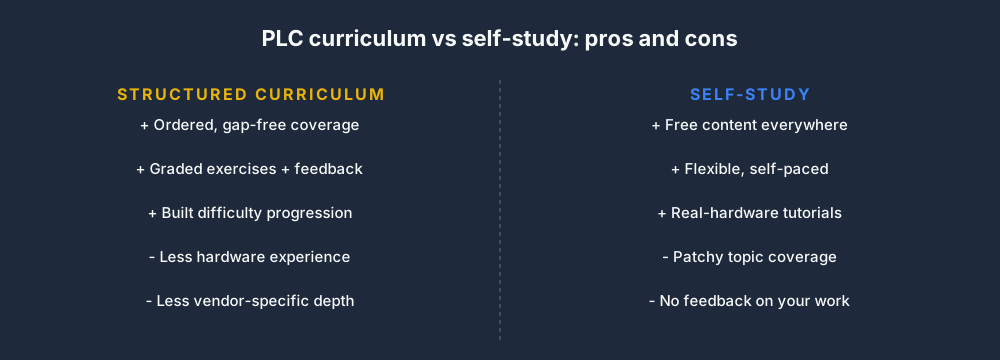
The two approaches pull in different directions — one trades structure for cost, the other cost for structure.
Self-Study: What You Get
Access to free content: YouTube, vendor application notes, plcprogramming.io articles, Reddit's r/PLC, and forum posts cover an enormous range of PLC topics. Almost any specific technique you want to learn has a tutorial somewhere.
Flexible pace: You go faster on things you understand, slower on things you do not. No schedule, no syllabus.
Real hardware emphasis: Most YouTube tutorials are recorded against real PLCs with real I/O. Watching someone physically wire a sensor and check a signal with a multimeter teaches skills you cannot get from a simulator.
What self-study misses:
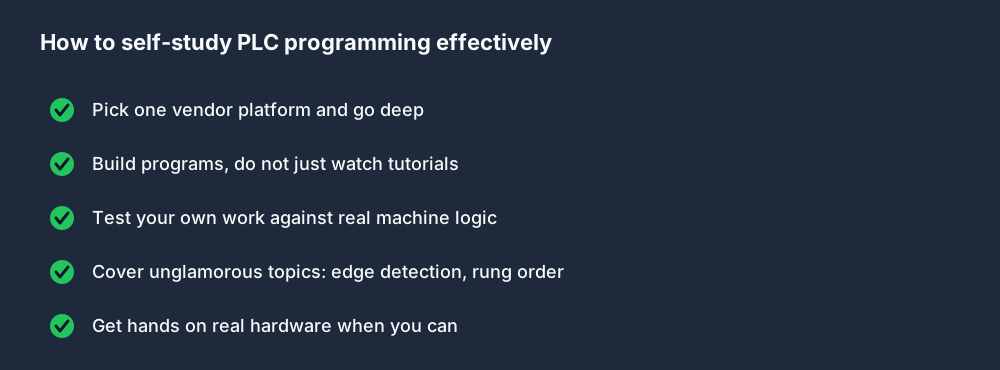
- Systematic coverage — you will learn the techniques that appear in tutorials you happen to watch. Obscure but important topics (edge detection, rung order effects, force mode safety) rarely get made into tutorials because they are not visually compelling.
- Feedback on your work — watching a video does not tell you whether your understanding is correct. You can misunderstand a concept entirely and have no way of knowing.
- Structured difficulty progression — random YouTube tutorials are written at random difficulty levels. Moving from "basic motor start/stop" to "PID loop with fault injection" is a big jump, and most tutorials do not bridge it.
Structured Curriculum: What You Get
Ordered coverage: A well-designed curriculum introduces concepts in the order that builds understanding — scan cycle before rung order, timers before sequencers, analog I/O before PID.
Active learning: The curriculum in the simulator pairs every explanation with a graded exercise. You do not just read about seal-in rungs — you write one, run it against a machine simulation, and get pass/fail feedback on whether it works correctly.
Error correction: Automated test cases catch misunderstandings before they become habits. If you write a program that technically runs but has a latent rung-order bug, the test cases will fail it.
What structured curriculum misses:
- Hardware skills — a browser-based simulator will never replace the experience of physically wiring an I/O card, finding a loose terminal with a multimeter, or commissioning a machine that has real consequences for failure.
- Vendor-specific depth — a general curriculum covers concepts that apply to all PLCs. Deep knowledge of Studio 5000's AOI system, Siemens's PROFINET configuration, or Mitsubishi's motion module requires vendor documentation and vendor-specific practice.
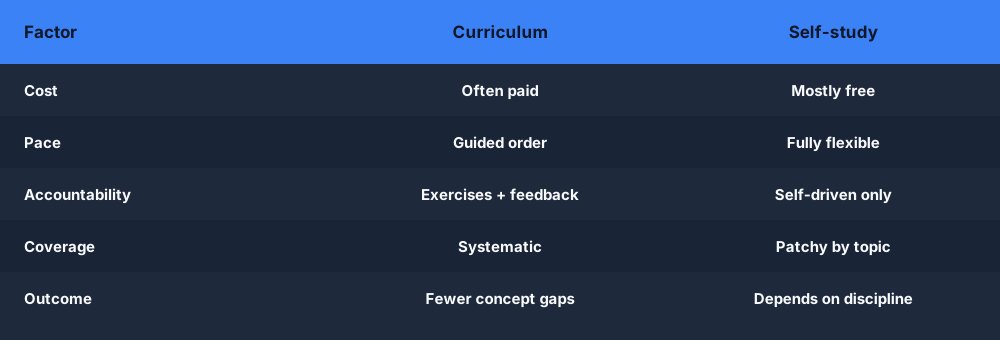
Curriculum vs Self-Study at a Glance
Across the factors that actually decide how fast you progress, the trade-offs line up like this:
The Fastest Path to Job-Ready
Based on what works for most learners:
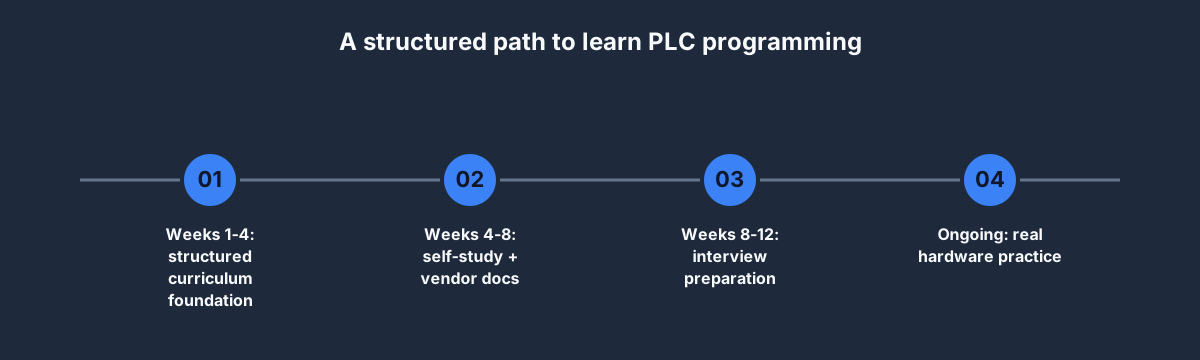
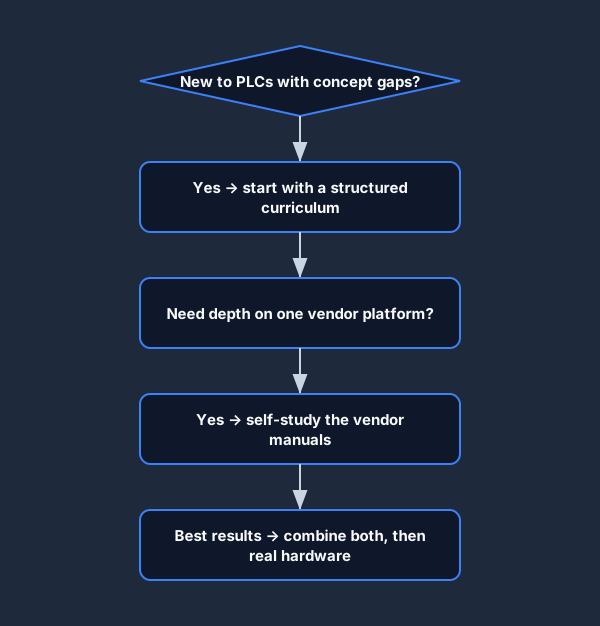
Stage 1 (weeks 1–4): Structured curriculum Complete a structured curriculum — ideally one with live exercises — to build the conceptual foundation. The 12-lesson curriculum in the simulator covers this foundation. This ensures you do not develop gaps in fundamental concepts.
Stage 2 (weeks 4–8): Self-directed practice + vendor documentation Once you have the foundation, target your self-study at the specific platform(s) your target employer uses. Download the programming manual, work through the application notes, and build programs that mirror real machines you have read about.
Stage 3 (weeks 8–12): Interview preparation Complete structured interview tracks at your target seniority level. The interview preparation module includes both question-style rounds and live simulator exercises at different difficulty levels.
Stage 4 (ongoing): Real hardware access Find opportunities to program real hardware — a training rig at a college, a community project, or a side project with a low-cost starter PLC (Siemens LOGO!, Delta DVP series, or a used Allen-Bradley MicroLogix are affordable entry points). Real hardware skills compound everything you learned in simulation.
Not sure where to start? This decision flow points most learners to the right first step.
A Note on Learning Speed
"How long does it take to learn PLC programming?" is the most common question and the one with the least useful answer. It depends on your background (an electrician learns faster than a software engineer on some topics, slower on others), how much time per week you invest, what "learned" means to you, and what specific application you are learning for.
The honest answer for someone with no automation background, investing 10 hours per week:
- Capable of writing basic motor control and timing programs: 4–6 weeks
- Capable of working independently on maintenance tasks: 3–6 months
- Capable of leading a new installation project: 12–24 months of practical experience
Structured learning and self-study both contribute. Neither is sufficient alone.
Whichever side you lean on, a few habits make self-directed practice far more effective.
Starting Points
- Free starting point: First 6 lessons of the curriculum — no card required
- Self-study starting point: PLC programming fundamentals guide + the scan cycle explained
- Interview-track starting point: Interview overview — preview available free
Start the structured curriculum — free. First 6 lessons with live exercises, scan-cycle highlight, and automated test cases. No install.
