Every PLC programmer makes these mistakes at least once. The experienced ones make them, realize what happened, and never repeat them. The ones who struggle keep making them without understanding why.
This guide covers the five mistakes that account for the majority of "the program looks right but the machine behaves wrong" problems. Each one has a clear explanation and a fix you can apply in the simulator right now.

Here are all five at a glance before we dig into each one.

Mistake 1: Confusing XIC and XIO (or LD and LDI)
This is the number-one beginners mistake and it is embarrassingly common even among people who have been programming for months.
The problem: Using a normally-open (NO) contact where a normally-closed (NC) contact is needed, or vice versa.
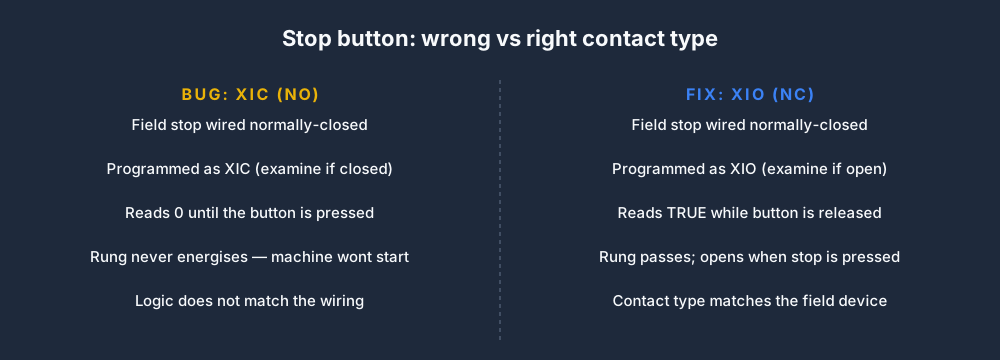
The classic example: Stop buttons are wired normally-closed in most industrial standards. A physical stop button that is not being pressed sends a continuous 24V signal — which a normally-closed contact represents as "logic TRUE, rung can pass." When you press the stop button, the circuit opens, 24V drops away, and the normally-closed contact in the program changes to FALSE, breaking the rung and stopping the machine.
If you wire a stop button normally-closed but program it as an XIC (normally-open, examine if closed), the rung will fail to energise when the stop button is not pressed, because the XIC contact is looking for a closed circuit and the stop button's signal reads as 0 (no current) before it is pressed.
The difference between the buggy and correct version comes down to a single contact type:
Here is what the buggy rung looks like — the normally-closed stop is wrongly drawn as a normally-open contact in series with the Run coil:
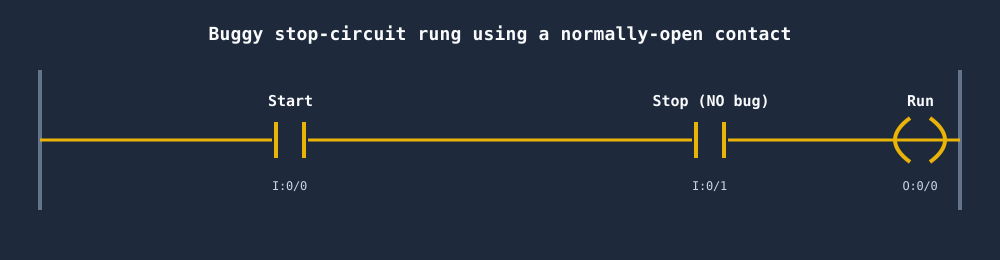
The fix is to swap that middle contact to a normally-closed (XIO) instruction so it reads TRUE while the stop button is released.
The fix: Remember the phrase: "Wire NC for safety, program NC contact to match." When you see a field device wired normally-closed, use XIO (Allen-Bradley) or ANI/LDI (Mitsubishi/IEC) for that contact in your ladder rung.
Try it in the simulator: The scan-cycle highlight will show you the exact contact state causing the failure. Use slow mode and watch each contact light up (or not).
Mistake 2: Rung Order Bugs (Scan-Cycle Order Matters)
The problem: The scan executes rungs from top to bottom in a single pass. A bit that is set by a coil on rung 10 is visible to contacts on rungs 11–N in the same scan. But rungs 1–9 have already executed — they will not see the new value until the next scan.
The classic example:
(* Rung 1 — reads MyBit, which is FALSE this scan *)
LD  MyBit
OUT Y0        (* Y0 stays OFF *)

(* Rung 2 — sets MyBit TRUE *)
LD  X0
OUT MyBit
In this program, Y0 will always be one scan behind X0. When X0 goes TRUE, MyBit becomes TRUE on rung 2 — but rung 1 already ran with the old FALSE value. Next scan, rung 1 will see MyBit as TRUE and Y0 will energise.
You can see the one-scan lag clearly on a timing diagram: X0 and MyBit go high together, but Y0 trails them by a full scan.
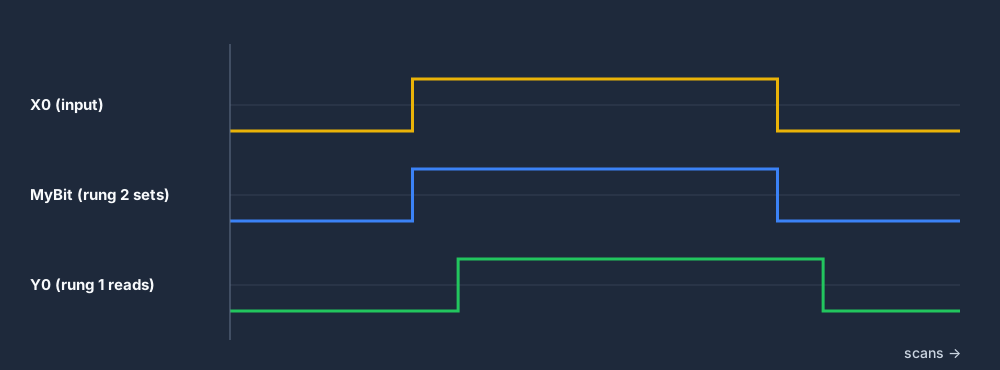
The fix: Reorder the rungs so the producer (the rung that sets a bit) appears before the consumer (the rung that reads that bit). If you cannot reorder (because of a more complex dependency), acknowledge the one-scan delay explicitly in your program comments.
In the simulator: Enable the scan-cycle highlight and step through the program in slow mode. You will see exactly which scan set the bit and which scan consumed it. This is documented in the PLC scan cycle lesson.
Mistake 3: Misusing Latch (SET/OTL) Coils
The problem: Using a SET coil where you meant to use a standard output coil, then wondering why you cannot turn the output off.
How SET/OTL works: A SET coil is a latching output. Once it receives one scan where its input rung is TRUE, it energises and stays energised even after the input goes FALSE. The only way to de-energise it is with an explicit RST (Mitsubishi/IEC) or OTU (Allen-Bradley) instruction.
The classic mistake: Programming a motor start using SET without providing a matching RESET rung. The motor starts when you press the start button — and cannot be stopped by your stop logic because your stop circuit targets a standard OTE coil that is not the latch coil.
The fix: Always pair SET with RST. If you are using latch coils, draw out the full rung set before coding: where does the latch get set? Where does it get reset? Can both conditions occur simultaneously, and if so, which takes priority?
Simpler alternative: Use a standard seal-in rung (standard OTE coil with a parallel contact on the same output) rather than SET/RST for straightforward start/stop circuits. It is easier to follow for the maintenance technician reading your program six months later. The seal-in rungs post goes into this in detail.
Mistake 4: Timer Preset and Resolution Errors
The problem: The timer runs for the wrong duration because the programmer confused preset units with time units.
Allen-Bradley example: TON timers use T#5S format for 5 seconds. But many beginners type PRE: 5000 thinking that means 5000 milliseconds = 5 seconds. In fact, the AB timer preset is in milliseconds by default for older formats (PLC-5/SLC), but Tag-based TON in Logix uses the T#... format directly. Mixing these up gives timers that run 1000× too long or too short.
Mitsubishi example: OUT T0 K50 with a 100ms resolution timer (T0–T199) means 50 × 100ms = 5 seconds. But OUT T200 K50 with a 10ms resolution timer (T200+) means 50 × 10ms = 500ms — ten times shorter than expected.
The fix:
- Always check the timer resolution documentation for your specific PLC model and timer device range.
- Use the
T#format in Logix-family ABs — it forces you to express the time in explicit units. - In Mitsubishi, add a comment next to every timer with its calculated time:
(* T200 K50 = 500ms *). - Test your timers with a stopwatch in the commissioning checklist.
In the simulator: The curriculum's Timers & Counters lesson covers timer formats across all 9 dialects.
Mistake 5: Ignoring Edge Detection (One-Shot Instructions)
The problem: Using a continuous contact where you need to detect a single rising edge, causing the output to activate many times per button press.
The classic example: A pushbutton increments a counter. You wire the button's contact directly to the CTU coil input. Because the button press lasts many scans (a human finger press is 200–500ms; at a 10ms scan that is 20–50 scans), the counter increments 20–50 times per button press instead of once.
The fix: Use an edge-detection instruction:
- Allen-Bradley:
OSR(one-shot rising) orONS(one-shot) - Mitsubishi:
PLS(pulse output, active for exactly one scan) - IEC 61131-3:
R_TRIGorF_TRIGfunction blocks
These instructions produce a TRUE output for exactly one scan when the input transitions from FALSE to TRUE (or TRUE to FALSE). Everything downstream sees a single clean pulse regardless of how long the button stays pressed.
(* IEC example *)
R_TRIG_0(CLK := Start_PB);
IF R_TRIG_0.Q THEN
    Counter := Counter + 1;
END_IF;
How the Simulator Helps You Avoid All Five
Each mistake has a tell-tale symptom on the machine and a specific fix — here they are side by side:
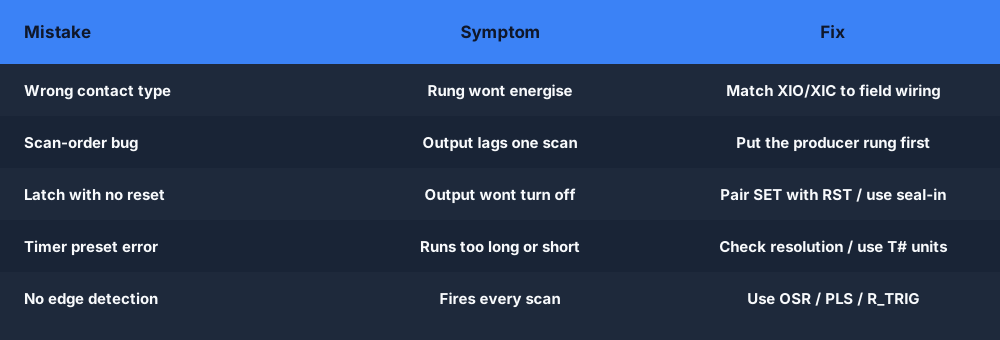
The scan-cycle highlight is the fastest tool for catching all five of these mistakes:
- Wrong contact type — you can watch the contact state in real time and compare it to the physical device state.
- Rung order bugs — step through one scan in slow mode and watch the bit values update.
- Latch coil issues — watch the latch state persist across scans and see exactly when (or if) the reset condition fires.
- Timer errors — watch the timer accumulator increment and compare it against what you expected.
- Edge detection problems — watch the one-shot bit go TRUE for exactly one scan frame.
Practice correcting all five in the free curriculum — the exercises are designed to surface these exact bugs.
Run through this quick review before you download your program to the controller:

Catch these mistakes before they reach the plant floor. The simulator's scan-cycle highlight shows you the state of every contact, coil, and timer — in real time, in your browser.