Mitsubishi PLCs dominate Japanese manufacturing, have strong positions across South-East Asia, and appear regularly in European packaging and machinery. If your local job market runs Mitsubishi, you need GX Works3 fluency — and the path is surprisingly accessible because the free IDE and cheap used hardware make it one of the lowest-cost vendor stacks to learn.
This post is the orientation. For the broader strategy of learning multiple dialects, see our PLC dialects comparison post.
The Mitsubishi landscape
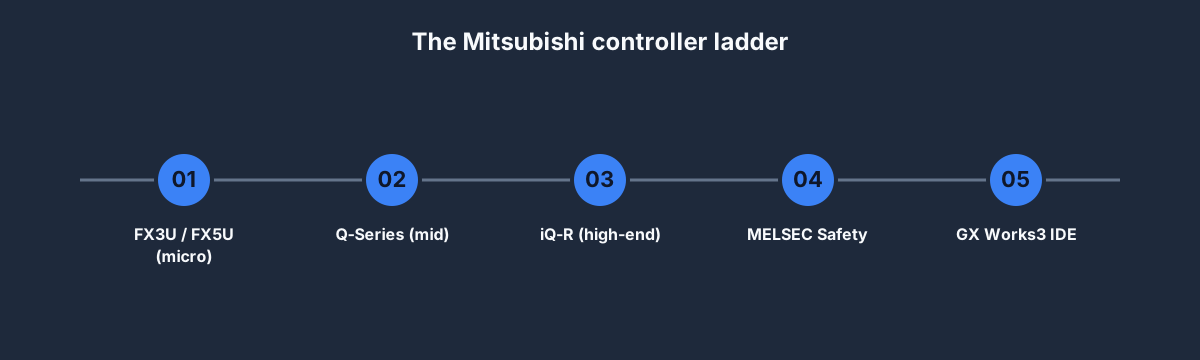
- FX3U / FX5U — micro-PLCs, brick format, typical for packaging machines and machine-tool axes. FX3U is legacy; FX5U is the 2020+ generation.
- Q-Series — mid-range modular, still widely installed.
- iQ-R — the modern high-end platform; PLCs, motion controllers, safety, and process control all in one chassis. What Mitsubishi pushes for new projects.
- MELSEC Safety — SIL3-capable safety controllers.
- GX Works3 — the unified IDE for FX5U and iQ-R.
- GX Works2 — legacy IDE for FX3U and Q-Series. Many existing plants still run this.
If you're self-studying, pick FX5U + GX Works3 as the primary path. It covers the modern convention and lets you open most legacy Q-Series projects with a bit of effort.
Key addressing conventions
Mitsubishi's addressing is its own thing — a bit of a shock to engineers coming from Rockwell or Siemens.
- X prefix — inputs.
X0,X1, etc. - Y prefix — outputs.
Y0,Y1, etc. - M prefix — internal bits (auxiliary relays).
- D prefix — data registers (word-sized).
- T prefix — timers.
- C prefix — counters.
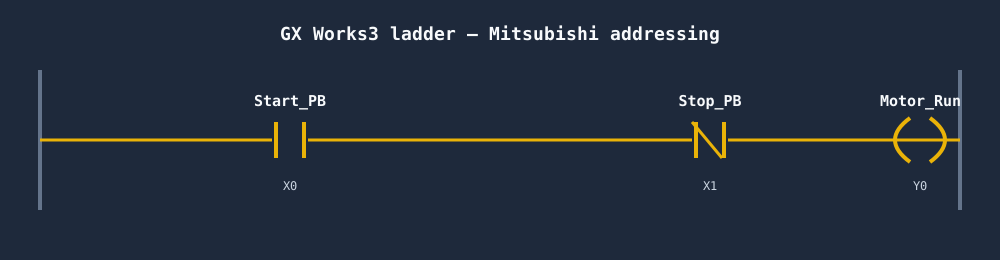
So the start/stop rung above reads: X0 (Start) AND NOT X1 (Stop) → Y0 (Motor). No prefix punctuation, no Local:1:I.Data.0, no %I0.0. Short and flat.
The 6-week self-study path
Weeks 1–2: GX Works3 basics + FX5U
Download GX Works3 (free with registration from Mitsubishi Electric). Install on Windows. Create a new project targeting an FX5U-32MR/ES.
- Configure I/O
- Define labels (Mitsubishi's term for tagged variables)
- Write the start/stop rung
- Use GX Works3's simulator to test without hardware
Port the 20 basic rungs to Mitsubishi addressing. Notice how the compact X0/Y0/M100 syntax reads quickly once you're used to it.
Weeks 3–4: Data handling + function blocks
Mitsubishi's IEC 61131-3 function-block support is solid in GX Works3. Build:
- A motor-control function block with Start/Stop/Run parameters
- A data-logger FB that samples temperature every second into a ring buffer
- A sequencer FB that walks through phases
This is where GX Works3 feels modern rather than 1990s-era (which GX Works2 does).
Weeks 5–6: CC-Link IE Field + motion (optional)
CC-Link IE Field is Mitsubishi's fieldbus. If your target role involves remote I/O or motion, spend this block on it.
- CC-Link IE TSN (the 2020+ successor with time-sensitive networking)
- Configuring a remote I/O head + slice I/O
- Basic motion with MR-J5 servo drives
Skip for basic maintenance or controls roles.
Free and cheap resources

- GX Works3 — free download after Mitsubishi registration. Full featured.
- GX Works2 — free, needed for some legacy FX3U and Q-Series projects.
- Mitsubishi Factory Automation YouTube — official getting-started content.
- Used FX3U on eBay — USD 100–200. Runs on GX Works2.
- Used FX5U — USD 300–500 used, USD 500–800 new. Runs on GX Works3.
- Automation24 and Inductive Automation's community forums — independent coverage.
Where our simulator fits
The browser simulator runs IEC 61131-3 semantics. Mitsubishi's modern controllers (FX5U, iQ-R) support IEC 61131-3 natively via labels and structured text. So: the code you learn in our simulator ports to Mitsubishi almost verbatim; the addressing (X0, Y0, M100) is Mitsubishi-specific and best learned in GX Works3.
For fundamentals — scan cycle, seal-in, timer patterns, state machines — our simulator wins on cost and feedback speed. For IDE fluency, pair it with GX Works3's own simulator mode.
Is Mitsubishi worth specializing in?
Depends on geography and industry, same as Omron:
- Japan: yes, huge installed base.
- South-East Asia, Australia, India: yes, strong penetration.
- North America: limited except in packaging and machine tools.
- Europe: limited except in specific OEM equipment.
If your local market runs Mitsubishi, learn it as primary. Otherwise, it's a useful second vendor that broadens your scope.
FAQ
Is GX Works3 free?
Yes, free to download from Mitsubishi Electric after registration. Full-featured for learning use.
What's the difference between GX Works2 and GX Works3?
GX Works2 is the legacy IDE for FX3U and Q-Series. GX Works3 is the modern IDE for FX5U and iQ-R. Projects don't port automatically — you can open GX Works2 projects in GX Works3 but conversion isn't always clean. Learn GX Works3 first.
Is Mitsubishi PLC training widely available?
In Japan, Korea, and Taiwan: yes, with vendor classrooms and many private academies. Elsewhere: thinner, mostly online and self-study.
How long does it take to learn Mitsubishi PLCs?
6 weeks at 8 hours/week for entry-level FX5U/GX Works3 competence. 3–4 months for Q-Series / iQ-R depth.
Can I learn Mitsubishi without hardware?
Yes. GX Works3's built-in simulator covers basic execution. For fundamentals, use our browser simulator — the IEC skills port directly.
Where to start
- Decide if your target job market runs Mitsubishi. If not, learn Rockwell or Siemens first.
- If yes: download GX Works3, sign up for our free simulator, and start with the basic PLC programming post.
- Port the rungs to GX Works3 using Mitsubishi's X/Y/M/D addressing.
- Buy a used FX3U or FX5U for hardware time once you've written 10 scenarios.
6 weeks, USD 200–500 end-to-end. Entry to a specialist vendor that's valuable wherever it's in demand.
Mitsubishi, GX Works, GX Works3, FX, FX3U, FX5U, Q-Series, and iQ-R are trademarks of Mitsubishi Electric Corporation. This article is not affiliated with or endorsed by Mitsubishi Electric Corporation.