TL;DR: A direct-on-line (DOL) motor starter fault lives in one of three zones: the contactor coil circuit (A1–A2), the overload relay (95–96 NC contact), or the control circuit on the PLC output side. Match the symptom to the zone before touching anything. Measure voltage at the contactor coil terminals while the PLC output is commanded ON — that single measurement isolates whether the problem is in the coil circuit or the PLC output side. Never reset an overload without diagnosing why it tripped.
A motor that will not start is one of the most common faults in any plant. The good news is that a DOL motor starter circuit is simple enough to diagnose in under ten minutes with a multimeter and a basic understanding of how the circuit is wired. The mistake most people make is starting at the wrong end — poking at the motor before they have confirmed whether the contactor ever pulled in.
This guide covers the three fault zones, the correct measurement sequence, and the overload relay checklist that prevents you from re-injuring a tripped motor.
The Three Fault Zones
Every DOL motor starter has three zones of potential failure. Your first job is to identify which zone the fault is in. That decision determines which measurements you make and in what order.
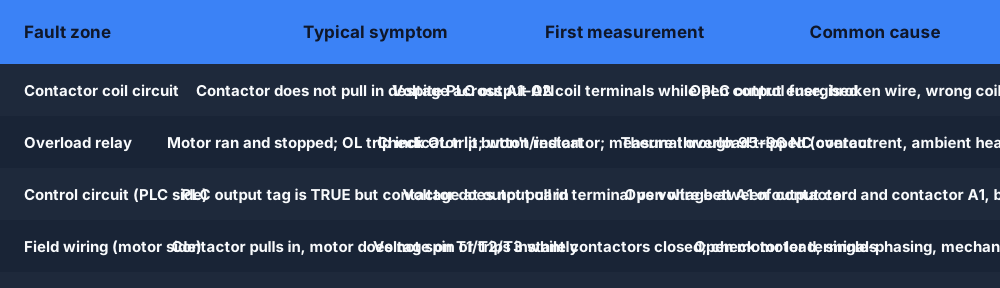
| Fault zone | Typical symptom | First measurement | Common cause |
|---|---|---|---|
| Contactor coil circuit | Contactor does not pull in despite PLC output ON | Voltage across A1–A2 coil terminals while PLC output energised | Open control fuse, broken wire, wrong coil voltage |
| Overload relay | Motor ran and stopped; OL trip indicator lit; won't restart | Check OL trip button/indicator; measure through 95–96 NC contact | Thermal overload tripped (overcurrent, ambient heat, single-phasing) |
| Control circuit (PLC side) | PLC output tag is TRUE but contactor does not pull in | Voltage at output card terminal vs voltage at A1 of contactor | Open wire between output card and contactor A1, blown output fuse |
| Field wiring (motor side) | Contactor pulls in, motor does not spin or trips instantly | Voltage on T1/T2/T3 while contactor closed; check motor terminals | Open motor lead, single-phasing, mechanical jam |
Zone 1: The Contactor Coil Circuit
The contactor coil circuit runs from the control supply (24 VDC, 110 V AC, or 230 V AC depending on your panel), through any control fuses, through the overload relay NC contact (terminals 95–96), to the A1 coil terminal, and back through the coil to A2 on the return rail.
Diagnostic sequence
- Command the PLC output ON (or use the manual test on the output card).
- Measure voltage between A1 and A2 on the contactor:
- Correct coil voltage present (e.g. 24 V DC): The coil is receiving its supply and should pull in. If the contactor still does not pull in, the coil itself is open or the mechanical armature is seized.
- Zero volts: The supply circuit is broken somewhere upstream of A1.
- If zero volts at A1–A2, half-split from the supply rail toward A1:
- Measure at the output side of the control fuse — voltage present means the fuse is good, break is further downstream.
- Measure at the 95–96 OL contact — voltage present at 95 (input side) but absent at 96 (output side) means the OL contact is open (tripped or faulty).
- Measure at A1 — voltage at A1 but absent at A2 means A2 or the return rail connection is the break.
Contactor coil failure
If the correct voltage is present at A1–A2 and the contactor still does not pull in:
- The coil may be open-circuit — measure coil resistance between A1 and A2 with the power off. An open coil reads OL (infinite resistance). For 24 VDC contactors, coil resistance is typically 200–1000 Ω. For 110 V AC, expect 500–2000 Ω.
- The mechanical armature may be seized — press the manual override button on the contactor body (if fitted) to confirm whether the mechanical mechanism moves freely.
- The coil voltage may be too low — a supply voltage below 85% of rated coil voltage can prevent reliable pull-in.
Zone 2: The Overload Relay
The overload relay is the most common reason a motor runs and then stops. Its NC contact (95–96) is wired in series in the control circuit — when it trips, the contactor drops out regardless of the PLC command.
Never reset the overload without diagnosing why it tripped
Resetting and restarting without understanding the cause often results in another trip within minutes — or in motor winding damage if the cause is a developing fault.
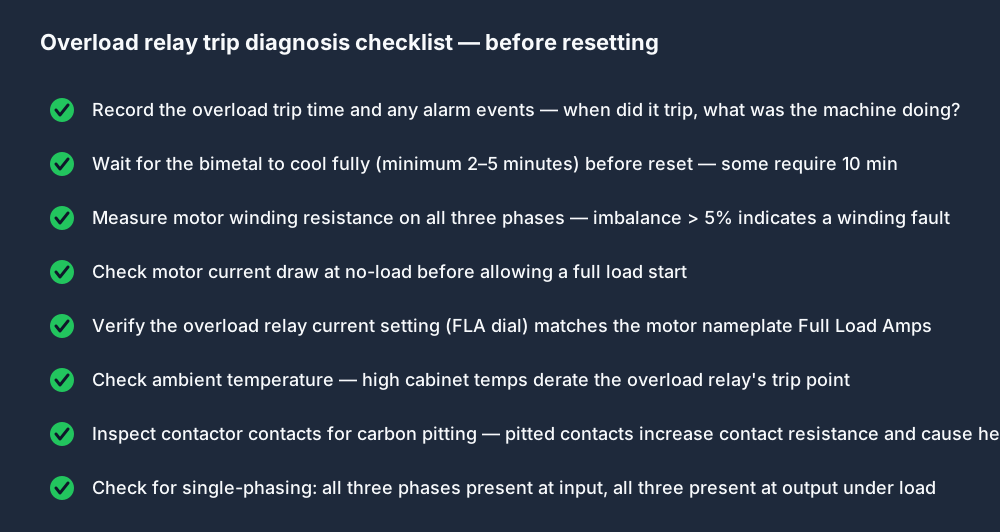
Before touching the reset button:
- Record the context: What was the machine doing when it tripped? What load? How long had it been running? First start of the day or mid-cycle?
- Wait for the bimetal to cool: Thermal overloads need a minimum 2–5 minutes before they will reset (some need 10 minutes). Pressing the reset button immediately after a trip often has no effect.
- Measure motor winding resistance on all three phases: Check R-S, S-T, and T-R between the motor terminals with the motor disconnected. Imbalance greater than 5% between phases indicates a developing winding fault. A phase-to-phase short reads near-zero resistance.
- Check no-load current: After a successful reset, allow the motor to run uncoupled or on minimum load and measure current on all three phases with a clamp meter. Current should be below the FLA (Full Load Amps) on the nameplate.
- Verify the FLA setting: The overload relay FLA dial must be set to the motor's nameplate FLA. A setting 10% too low causes nuisance tripping on normal starts.
- Check ambient temperature: Bimetal overload relays derate their trip point at elevated ambient temperatures. A relay set correctly at 20 °C may trip prematurely at 40 °C. Electronic overload relays typically compensate for this; bimetal relays do not.
- Inspect contactor contacts: Pitted or eroded contacts increase contact resistance, which causes additional heating at the contacts. Contact pitting visible on inspection is a reason to replace the contactor and check why the contacts burned.
- Check for single-phasing: Confirm all three phases are present at the input terminals (L1/L2/L3) and at the output terminals (T1/T2/T3) while the contactor is closed and the motor is running. Single-phasing — one phase open while the other two carry load — causes the motor to draw 1.7× its normal current on the remaining two phases and triggers the overload within minutes.
Electronic vs thermal overload relays
Modern electronic overload relays (Siemens 3RU, Schneider TeSys D electronic, ABB EF series) add capabilities that bimetal relays do not have:
- Phase-loss detection — trips immediately on single-phasing instead of waiting for thermal accumulation
- Ground fault detection — identifies current imbalance between phases as an earth fault
- Remote reset — the OL contact state can be read back to the PLC, and the reset can be commanded from the PLC output
- Current logging — the relay can report the pre-trip current history to a diagnostic port
For modern panels, electronic overload relays are strongly preferred. They reduce the false-positive trip rate and provide much more diagnostic information when a genuine fault occurs.
Zone 3: The Control Circuit (PLC Output Side)
The PLC output card drives a voltage onto its output terminal. That voltage travels through a wire (and often through an output fuse, a safety relay contact, or a master control relay contact) before arriving at the contactor A1 terminal.

The classic PLC output fault
The PLC tag is TRUE, the output card LED is lit, but the contactor does not pull in.
This is always a break in the wiring between the output card terminal and the contactor A1 terminal. The measurement sequence:
- Measure voltage at the output card terminal (while the output is ON):
- Correct voltage: the card is working. Break is downstream.
- Zero volts: check the output card supply fuse for that output group. Check the common (COM) terminal is connected.
- Trace toward A1. If there is an output fuse in the circuit, check voltage at the downstream side of the fuse.
- If there is a safety relay or master control relay in the path, check voltage at its output contact.
- Measure at A1 of the contactor.
Every zero-volt reading narrows the break to the segment immediately upstream of that measurement point.
When the output card LED does not match the tag state
If the PLC tag is TRUE but the output card LED is not lit, the output card has either a faulty output transistor/relay, a blown internal fuse on that channel, or a wiring problem on the common return terminal. Check the card's channel fuse (many output cards have per-channel fuses accessible from the front) before condemning the card.
Zone 4: Field Wiring (Motor Does Not Spin After Contactor Closes)
If the contactor pulls in correctly but the motor does not run, or trips the overload immediately, the fault is in the field wiring or the motor itself.
Immediate measures:
- Measure voltage on T1, T2, T3 at the contactor output terminals while the contactor is closed.
- All three phases present: the contactor output is healthy. Fault is in the cable to the motor or in the motor.
- One or more phases missing at T1/T2/T3: the contactor has an open main contact. Replace the contactor.
- Measure voltage at the motor terminal box.
- All three phases present, motor not turning: mechanical jam, seized bearings, or failed motor. Check manually for rotation.
- One or more phases missing: break in the cable between the contactor and the motor terminal box.
- Check motor terminal connections are tight. Terminations that have backed out under vibration are a common field cause of single-phasing.
Relationship to PLC Logic
A motor starter fault can appear to be a PLC logic fault when it isn't. The symptom is the same — motor does not start — but the diagnosis is different.
Use the wiring lab at /learn/wiring/lessons/wiring-12-motor-starter to practice tracing the full circuit from PLC output card through the control fuse, through the OL relay NC contact (95–96), to the A1 coil terminal and back through A2. The lab injects faults at any point in the chain and asks you to use the half-split method to isolate the break.
For the PLC ladder side of motor control — the start/stop seal-in rung, the forward/reverse interlock, and the jog rung — see the motor control PLC page. Understanding how the ladder logic generates the output signal makes the field troubleshooting faster because you know exactly what the PLC is trying to do when you pick up the multimeter.
For the fundamental difference between a relay and a contactor — current ratings, contact types, auxiliary contacts — see relay vs contactor. For the difference between a DOL motor starter and a variable-frequency drive circuit (VFD bypass configurations, when the overload relay is replaced by the drive), see motor starter vs contactor.
Frequently Asked Questions
Q: Why does my motor contactor not pull in even though the PLC output is ON?
A: Three common causes in order of frequency: (1) the overload relay has tripped and its NC contact 95–96 is open — check for the trip indicator and reset after diagnosis; (2) there is a break in the wiring between the PLC output card terminal and the contactor A1 terminal — measure voltage at A1 while the output is ON; (3) the control fuse for the contactor coil circuit has blown — check fuse continuity. Measure voltage at A1–A2 while the output is ON; that single reading tells you whether the problem is in the coil circuit (voltage present, coil faulty) or upstream (zero volts, circuit broken).
Q: Can I reset the overload relay immediately after it trips?
A: Not reliably, and not safely without diagnosis. A thermal overload bimetal needs 2–10 minutes to cool before the mechanism can reset. More importantly, resetting without knowing why it tripped risks burning the motor. Check motor winding resistance on all three phases, verify FLA dial setting, check for single-phasing, and inspect contactor contacts before pressing the reset button.
Q: How do I know if the contactor coil is burned out?
A: De-energise the circuit, then measure the resistance between A1 and A2. A healthy coil reads a few hundred ohms (24 VDC coil) to a few kilohms (110 V AC coil). An open coil reads OL (infinite resistance) on the meter. A short-circuit coil reads near-zero resistance. If the coil is open or shorted, replace the contactor — coils are not field-repairable.
Q: What does 95-96 mean on an overload relay?
A: Terminals 95 and 96 are the normally-closed (NC) auxiliary contact on a standard IEC overload relay. In normal (not tripped) state, the contact is closed and allows current to flow from 95 to 96 — completing the control circuit to the contactor coil. When the overload trips, the bimetal mechanism opens this contact, breaking the coil circuit and dropping out the contactor. On the same relay, terminals 97–98 are the normally-open (NO) auxiliary contact used to signal the fault back to a PLC digital input.
Q: Why does the motor trip on overload within 30 seconds even with no load?
A: Single-phasing is the most likely cause — one of the three power phases is missing at the motor terminals, forcing the motor to draw 1.7× normal current on the remaining two phases. Check voltage on L1, L2, L3 at the contactor input while running, then on T1, T2, T3 at the contactor output. A single missing phase at the output with all three present at the input indicates an open main contact in the contactor.
Practice the full contactor circuit diagnosis in the browser with the motor starter wiring lab — faults are injected at different points in the control circuit and you use the virtual multimeter and half-split method to find each one. When you are ready to work without the visible fault picker, the electrical troubleshooting simulator adds concealed faults, scored diagnoses and saved evidence records.
For the systematic 7-step PLC fault-finding method that applies across all four fault families, read the PLC fault-finding guide.
