PLC Simulator
Free PLC training

PLC Training Online — Learn the Logic by Running It

Follow a structured PLC logic training path through lessons, quizzes and a live browser simulator. The beginner curriculum is free with no card or download; the full scenario library and assessed interview-track certificates are paid.

Join 9000+ learners practicing PLC programming

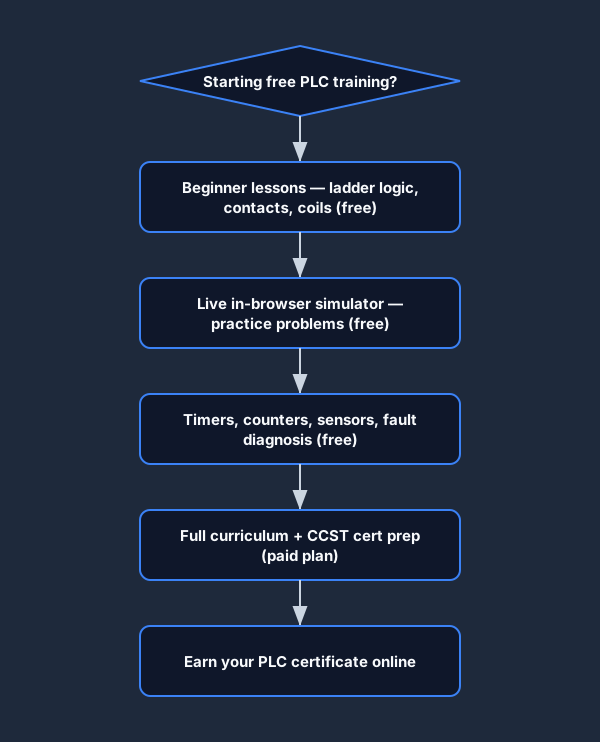
free plc training learning path from beginner to certificate
From first rung to PLC certificate — the full learning path.
Real free plc training footage

See this exact skill in the working simulator.

Watch the real browser product respond to the task on this page, then try the same practical workflow yourself. No slides, concept mockups, install, or credit card.

Try this in the browser
Free PLC Training — Build and Run Your First Program

Build practical evidence

Free training should move from explanation to observable machine behavior

The learning sequence connects ladder logic, 24 VDC wiring, motor control, sensors and fault isolation so a beginner can see what each concept changes in a machine.

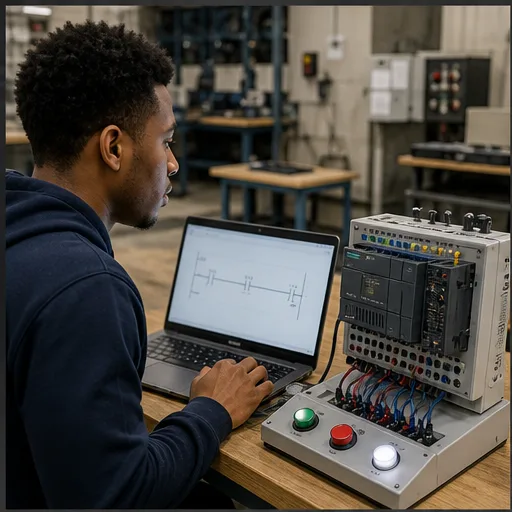
Beginner building a simple ladder-logic rung on a laptop beside a compact PLC training panel
01Start with one observable relationship: a field input changes controller state and a rung decides whether an output should energize.
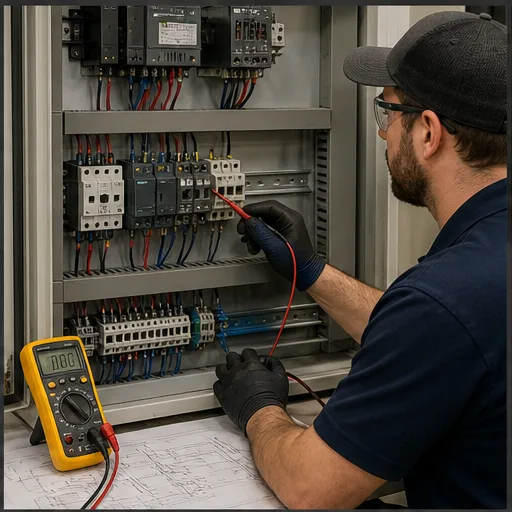
Industrial trainee tracing a low-voltage control circuit with a multimeter, schematic and PLC panel
02Software state is only half the diagnosis. Wiring practice teaches where to measure safely and how to separate logic faults from field faults.
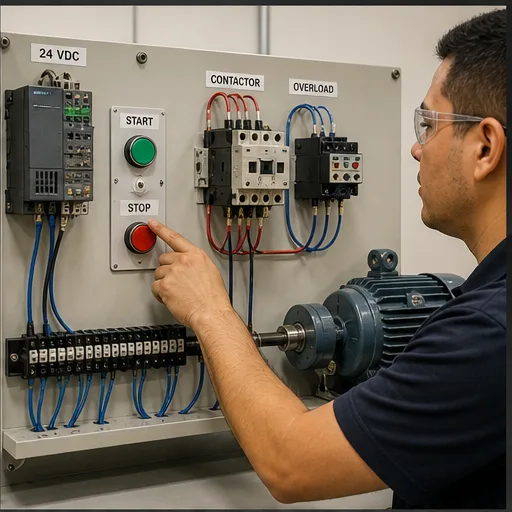
Motor starter training board with PLC, start and stop pushbuttons, contactor, overload relay and motor
03A three-wire motor circuit connects PLC instructions to real components: start, stop, seal-in, contactor and overload protection.
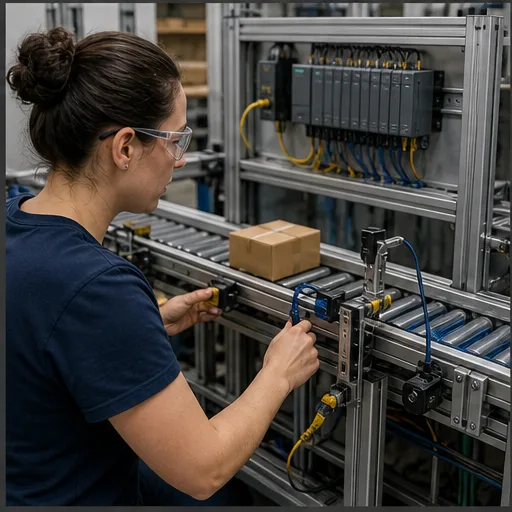
Learner commissioning a conveyor photoelectric sensor connected to PLC input hardware
04Sensor labs make input behavior concrete: alignment, target detection, electrical output type and PLC tag state must agree.
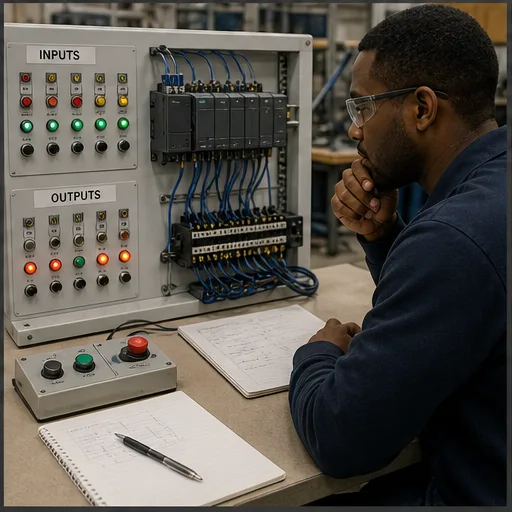
Learner diagnosing a PLC training machine with visible input and output states and a wiring diagram
05Troubleshooting becomes systematic when you define the expected sequence, observe I/O evidence and isolate the first point of disagreement.
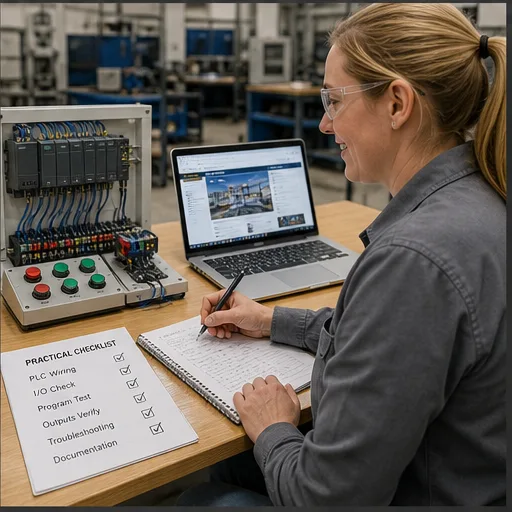
Automation learner recording completed PLC wiring, I/O, programming and troubleshooting exercises
06A useful progression records demonstrated tasks—not merely time watched—so the next exercise targets a real skill gap.

Why most free courses fall short

What is free PLC training?

Free PLC training often begins with videos and PDF manuals. Those can explain concepts and vendor terminology, but they do not by themselves confirm that you can predict a rung, build it, test it and diagnose the result.

Other platforms make course access free while charging for assessment or a certificate. That model is not inherently wrong, but the boundary should be clear before a learner invests time. Here, the current free scenario count and paid capabilities are stated on the page and derived from the live catalog.

Good free PLC training does three things. First, it teaches concepts clearly — what a contact is, what a coil does, why the scan cycle matters. Second, it gives you a live environment to practice in: a real PLC simulator that runs your code against real machine behaviour. Third, it is honest about what is free and what is not, so you can plan accordingly.

This platform gives you the beginner curriculum at no cost — lessons, quizzes, embedded practice problems, and the in-browser simulator. Advanced catalog access and assessed interview-track certificates are behind a paid plan, and we tell you that before you create an account. Reading versus doing is the gap that most free PLC training never closes. We close it in the free tier.

Curriculum overview

What you will learn

The curriculum covers foundational areas relevant to an entry-level PLC technician or controls electrician—from contacts and coils to wiring, sensors and fault diagnosis. It supplements, rather than replaces, supervised work on real equipment.

Ladder logic fundamentals

Contacts, coils, sealing-in, branching, and the scan cycle. The building blocks that every PLC program is built from, explained with interactive diagrams and practice rungs.

Timers and counters

TON on-delay, TOF off-delay, and TP pulse timers. CTU up-counters and CTD down-counters. Real timing diagrams, not just theory — you run them in the simulator and see the accumulator tick.

Fault diagnosis

Systematic troubleshooting methodology: divide-and-conquer, half-split, voltage checks, continuity checks. Seven beginner fault scenarios with progressive hints.

Sensors and wiring

Limit switches, proximity sensors, photoelectric sensors, and pressure switches. How to wire them correctly, read their wiring diagrams, and verify them with a multimeter.

Free PLC training ladder logic rung — an examine-if-closed contact driving an output coil, the first concept the free lessons teachA basic ladder logic rung between two power rails: an examine-if-closed contact (XIC) in series driving an output coil (OTE).L1L2] [StartXIC I:0/0LampOTE O:0/0
Lesson 1 — the rung. Contacts and coils on a power rail, taught free and run live in the browser simulator.
Free PLC training timer lesson — TON on-delay timing diagram showing the enable rung, accumulator counting up, and the done bit firing at presetA TON on-delay timer: the accumulated time bar ramps up toward the preset value, and the done (DN) bit turns on when the accumulator reaches preset.TONPRE 5000ACCACC ramps to PREPREDNdone bit
Timers, free. TON, TOF and TP with real timing diagrams — watch the accumulator tick as you run the scenario.
Free PLC training fault diagnosis lesson — systematic troubleshooting flow to isolate a failing rung and verify the fixA PLC fault-diagnosis flow from top to bottom: observe the symptom, check the inputs, check the logic, check the outputs, then apply the fix.SymptomCheck inputsCheck logicCheck outputsFix
Fault diagnosis, free. The systematic divide-and-conquer method, with seven beginner fault scenarios.
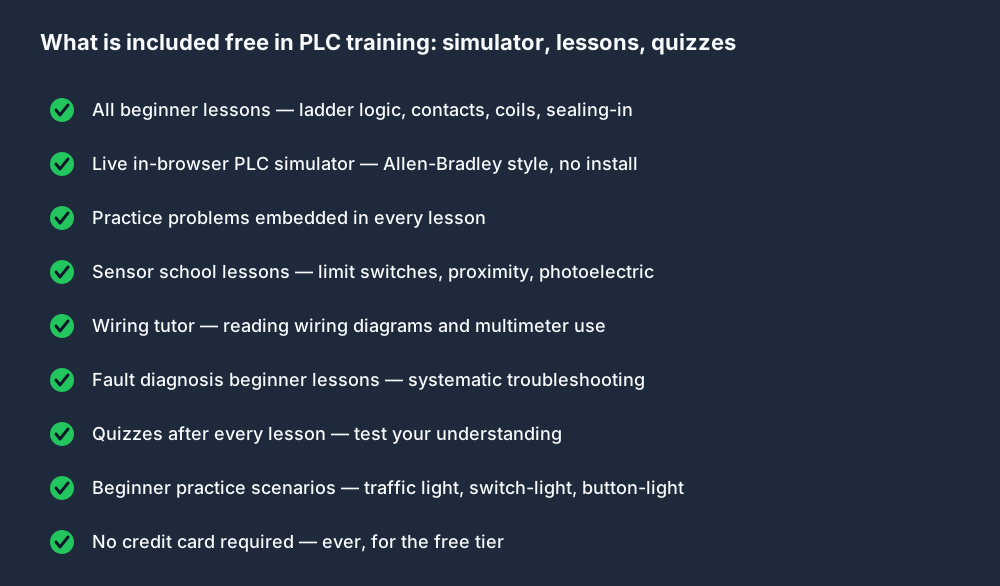
what is included free in plc training simulator lessons quizzes
Everything in the free tier — no credit card required.

Free PLC training software

Free PLC training with a live in-browser simulator

The simulator adds an active step to the training: open the browser, place contacts and coils on a rung, run the program and compare the simulated machine response with your prediction. It models useful control behavior, but it is not a cycle-accurate emulator for every physical controller.

The free tier uses Allen-Bradley-style ladder logic syntax: XIC for normally-open contacts, XIO for normally-closed contacts, OTE for output coils. The same instruction mnemonics you will see in RSLogix and Studio 5000. No download, no Windows licence, no ControlLogix hardware required.

Guided beginner lessons keep explanations and practice close together. The useful loop is simple: read the objective, predict the behavior, build the logic, run it, inspect the feedback and explain why the result occurred.

How the free tier works

  • Create a free account — no credit card, no trial clock
  • Work through all beginner lessons in order, or jump to a topic
  • Complete the embedded practice problem in each lesson
  • Run beginner scenarios in the live simulator
  • Track your quiz scores and lesson completions on your dashboard
  • Decide whether to upgrade when you reach the paid modules
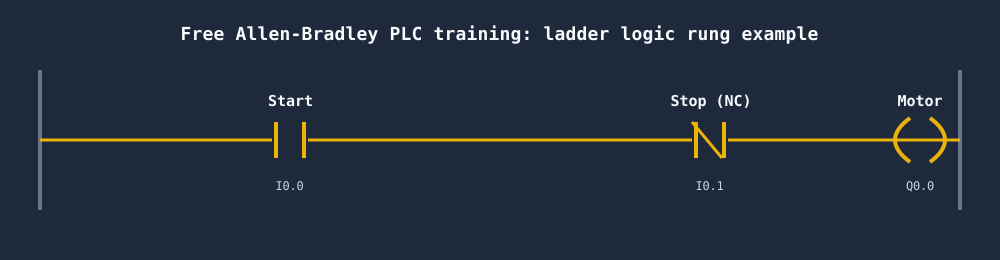
free allen bradley plc training course ladder logic rung example
A start/stop rung from the free Allen-Bradley PLC training — your first real ladder logic.

Practice scenarios

Start with a real scenario — not a contrived example

Switch and Light

Free

Your first rung: a single contact energises an output coil. Covers XIC, output coil, and the scan cycle.

Try this scenario →

Button and Light

Free

Momentary push-button vs. a latching coil. Introduces the difference between a maintained input and a sealed-in rung.

Try this scenario →

CCST Cert Prep — Problem 1

Pro

First problem from the CCST certification pack. Timed, auto-graded, with a detailed solution walkthrough.

Try this scenario →

PLC certificate online

PLC certificate online — what you earn and how

A certificate confirms that you passed one specific timed interview track. It does not claim that you finished every catalog item, and it is not an industry-accredited credential like the ISA CCST — we state that plainly because the distinction matters. An accredited certification is administered by an industry body and carries formal weight in hiring. A platform completion certificate records a narrower assessed result. Both can be useful, but they serve different purposes.

For electricians transitioning into controls roles, a completion certificate backed by graded machine scenarios is often more persuasive in an interview than a video-course certificate with no verifiable exercises. You can point to specific scenarios you passed, the score you earned, and the skills each problem tested. That evidence is harder to fake than a completion badge from a passive video course.

The honest breakdown — free vs. paid

Free — always, no card needed

  • All beginner lessons (ladder logic, contacts, coils, sealing-in)
  • Practice problems embedded in every lesson
  • Quizzes after every lesson
  • Sensor school — limit switches, proximity, photoelectric
  • Wiring tutor — reading diagrams, multimeter use
  • Fault diagnosis beginner lessons
  • Beginner practice scenarios in the live simulator
  • Allen-Bradley-style in-browser simulator — no download

Paid plan — full curriculum

  • All 140 published machine and industrial scenarios
  • Allen-Bradley dialect track (RSLogix-style mnemonics)
  • Siemens TIA Portal dialect track
  • CCST exam preparation pack
  • Structured Text and advanced instructions
  • Interview prep tracks with timed exercises
  • Verifiable PDF for each passed interview track
  • Access to all future curriculum additions

The beginner lessons, practice problems, and in-browser simulator are free — no credit card or install. Pro unlocks advanced practice, timed interview tracks, and their certificates. See pricing →

How to compare free PLC training options

Compare the current provider terms directly: which lessons are accessible, whether exercises run or only demonstrate, whether progress is graded, what the certificate represents, and which vendor family the material targets. Prices and access models can change, so this page does not reproduce a competitor price table.

This platform publishes its free catalog count from the live product data and places current paid-plan terms on the pricing page. Its differentiator is browser-based, auto-graded practice; vendor courses remain the better source for exact hardware, software and commissioning procedures.

Full curriculum

Full curriculum breakdown

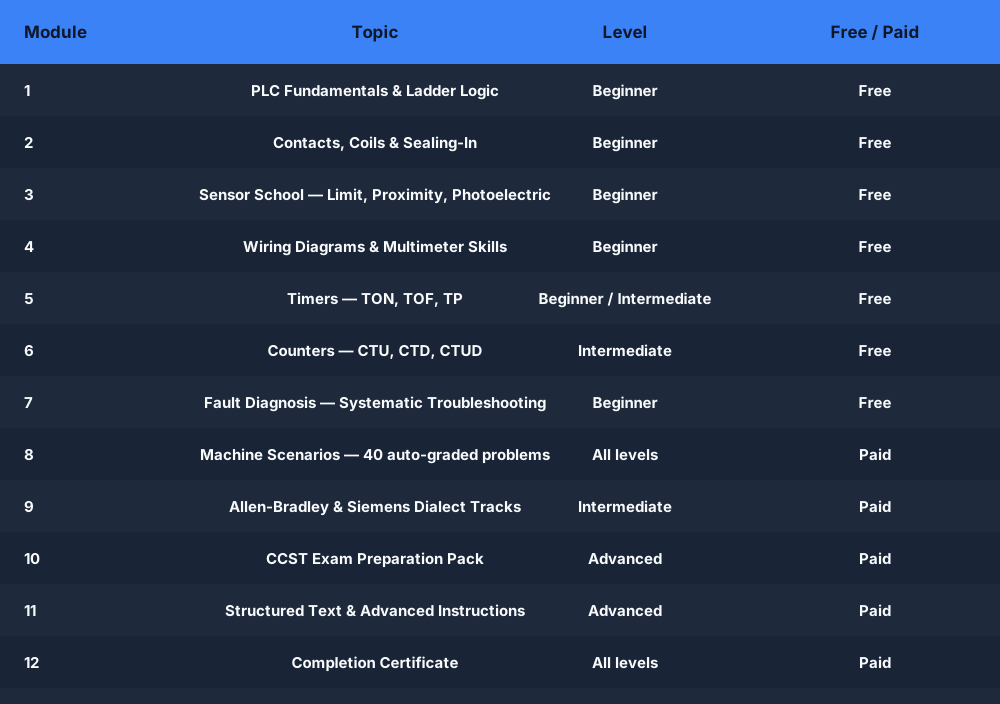
Twelve learning areas from first contact to timed interview assessment. Free modules are available immediately with a free account.

free plc training course curriculum modules beginner to advanced
Full PLC training curriculum — free and paid modules at a glance.
ModuleTopicLevelAccess
1PLC Fundamentals and Ladder LogicBeginnerFree
2Contacts, Coils, and Sealing-InBeginnerFree
3Sensor School — Limit, Proximity, PhotoelectricBeginnerFree
4Wiring Diagrams and Multimeter SkillsBeginnerFree
5Timers — TON, TOF, TPBeginner / IntermediateFree
6Counters — CTU, CTD, CTUDIntermediateFree
7Fault Diagnosis — Systematic TroubleshootingBeginnerFree
8Machine Scenarios — 140 published recordsAll levelsFree + paid
9Allen-Bradley and Siemens Dialect TracksIntermediatePaid
10CCST Exam Preparation PackAdvancedPaid
11Structured Text and Advanced InstructionsAdvancedPaid
12Timed Interview Tracks & CertificatesIntermediate / AdvancedPaid

How to start your free PLC training

01

Create a free account

No credit card. Takes under a minute. You land directly on the beginner curriculum.

02

Work through beginner lessons

Each lesson is a short written module with diagrams, embedded practice, and a quiz. Work at your own pace.

03

Practice in the live simulator

Open any beginner scenario. Write ladder logic. Click Run. The machine responds to your code — motor, traffic light, switch and light.

04

Upgrade when you are ready

When you finish the free modules, you will know exactly what the paid plan unlocks. No surprise charges, no hidden certificate fee.

Free PLC training software

Free PLC training software vs. downloaded software

Vendor engineering suites such as Studio 5000 Logix Designer and Siemens TIA Portal are designed for configuring and commissioning their controller ecosystems. They require compatible operating systems, installers and the appropriate licenses or trials; their simulation capabilities and hardware scope depend on the product and version.

Downloaded vendor tools are the right choice when you need exact project formats, communications, controller configuration or commissioning workflows. A browser simulator is useful earlier in the journey when the goal is fast, guided practice with logic and machine behavior.

This simulator runs in a modern browser with no local engineering-suite install. Its Allen-Bradley learning dialect uses familiar mnemonics such as XIC, XIO, OTE, TON and CTU, but it does not reproduce every Logix instruction, prescan rule, data type or controller service. Transfer the mental model, then verify exact behavior in the target vendor documentation.

No Windows-only restriction — runs on Mac, Linux, Chromebook
No licence download, no trial expiry, no Rockwell registration
AB-style instruction mnemonics — XIC, XIO, OTE, TON, CTU
Auto-graded scenarios with per-test feedback — not just simulation
Structured beginner curriculum, not random exercises
Progress tracking and quiz scores on your dashboard
Questions

Free PLC Training — Frequently Asked Questions

The free tier includes 27 practice scenarios, guided beginner labs, learning modules, quizzes and browser simulation without requiring a card. Pro adds all 140 published scenarios, 9 dialect tracks, advanced paths, CCST preparation and interview-track certificates.

Reviewed August 7, 2026 · Scope and references

Free and paid scenario counts on this page are populated from the published product catalog at render time. Vendor-runtime differences should be checked in the relevant manufacturer documentation; for example, Rockwell Automation publishes current Logix Designer system requirements and version-specific instruction help. This course is independent training software, not official vendor training or an accredited certification program.

Start your free PLC training today

Beginner lessons, practice problems, and the in-browser simulator are free — no credit card or install. Pro unlocks advanced practice, timed interview tracks, and certificates for passed tracks. Start free now, decide later.

Free PLC training — honest, interactive, and in your browser

No install. No credit card for the free tier. No certificate surprise at the last step.

Start free

Competency and practice field guide

Free PLC training: implementation, evidence and troubleshooting

Direct answer

Free PLC training becomes useful when it connects a competency checklist rather than a collection of unsequenced links with free lessons, simulators, documentation and exercises to one roadmap, then proves a complete input-logic-output-feedback project under normal, boundary, fault and recovery conditions. The objective is a repeatable engineering or learning result, not merely activity inside a page or tool.

This guide is written for beginners building a no-cost PLC learning plan with runnable practice and honest limitations. The intended result is specific: the learner can select free resources by competency, produce evidence and identify when paid tools or hardware become necessary.

System map / 02

Six concepts that control the result

Treat these as connected checkpoints. Each checkpoint has an expected state, an observable state and a boundary to the next part of the system. That structure prevents a software indication from being mistaken for physical proof.

NODE 01observable

Define the operating contract

a competency checklist rather than a collection of unsequenced links. For free PLC learning resources, record the initial condition, actor, requested change, observable result and stopping condition before selecting a tool or implementation.

NODE 02observable

Map the evidence path

free lessons, simulators, documentation and exercises to one roadmap. Separate request, internal state, output or service, physical or user-visible result and independent feedback so each boundary can be inspected.

NODE 03observable

Prove normal operation

a complete input-logic-output-feedback project. Run more than one cycle from a known state and retain the values, timings or artifacts that demonstrate repeatability.

NODE 04observable

Exercise a boundary case

access limits, platform requirements and missing feedback. Choose minimum, maximum, simultaneous, delayed or restart conditions that reveal assumptions hidden by the happy path.

NODE 05observable

Diagnose a controlled fault

a changed scenario that tests independent diagnosis. Preserve the first symptom, divide the system at a measurable boundary and change one condition only after predicting the result.

NODE 06observable

Transfer and hand over

evidence reviewed before spending on the next constraint. Restore normal state, remove temporary changes, repeat affected checks and document which claims remain limited to the learning environment.

Procedure / 03

A six-step practice and commissioning workflow

Run the steps in order the first time. Later, the same structure becomes a diagnostic loop: define the expected condition, observe the boundary, interpret the difference and choose one proving action.

  1. 01

    Write the acceptance case

    Convert a competency checklist rather than a collection of unsequenced links into initial conditions, one stimulus and observable pass criteria.

    Evidence: Another person can repeat the case without guessing the intended result.

    Avoid: Using page completion or an animation as the acceptance criterion.

  2. 02

    Build the map

    Document free lessons, simulators, documentation and exercises to one roadmap and name who owns each state or decision.

    Evidence: Every request and result has a source, destination and useful inspection point.

    Avoid: Using the same value as command, status and independent feedback.

  3. 03

    Run the baseline

    Apply a complete input-logic-output-feedback project from a clean start and record the expected evidence.

    Evidence: Repeated runs produce the same bounded result.

    Avoid: Changing several parameters before a baseline exists.

  4. 04

    Challenge assumptions

    Test access limits, platform requirements and missing feedback without changing the acceptance contract.

    Evidence: Limits, timing and restart behavior reach defined states.

    Avoid: Testing only one ideal sequence.

  5. 05

    Isolate one failure

    Introduce or analyse a changed scenario that tests independent diagnosis and locate the first disagreement.

    Evidence: The proving action distinguishes the leading hypotheses.

    Avoid: Resetting, forcing or replacing before evidence is retained.

  6. 06

    Close the evidence loop

    Complete evidence reviewed before spending on the next constraint and repeat the affected regression cases.

    Evidence: A learner completes the surface by explaining the result, passing a changed case and identifying what still requires supervised target-equipment practice.

    Avoid: Treating an acknowledged message or one successful rerun as handover.

Diagnostic matrix / 04

Symptoms, proving points and next actions

The table is a reasoning aid, not a parts-replacement chart. Preserve the initial symptom, inspect the named boundary and use the interpretation to choose the next controlled test. Site safety procedures and equipment manuals remain authoritative.

Diagnostic symptoms, inspection points, interpretations and next actions for Free PLC training: implementation, evidence and troubleshooting
Observed symptomInspectInterpretationNext proving action
The expected result is unclearRequirement, initial state, actor, stimulus, units and pass conditionThe learner, instructor and assessor may be solving different versions of the task.Rewrite one observable acceptance case before continuing.
Internal state changes but the outcome does notRequest, final owner, output or service boundary and independent feedbackA software or interface indication proves intent at one layer, not the complete outcome.Trace the first boundary after the changing state.
Normal case passes but an edge case failsLimits, timing, simultaneous events, reset and restart assumptionsThe implementation contains a hidden assumption exposed by the changed condition.Add the failed boundary as a permanent regression case.
The failure disappears after resetOriginal symptom, histories, diagnostics, timestamps and active causeReset changed evidence or state without proving the initiating cause.Reproduce under a controlled condition and preserve pre/post-event data.
Simulator and target disagreeModel boundary, software version, task timing, I/O behavior, data types and configurationA learning model and the intended target do not share one of the recorded assumptions.Reduce the case and verify against current target documentation.
The result cannot be explainedPrediction, observation, proving action, alternative hypotheses and limitationsActivity occurred but the evidence is not yet transferable or reviewable.Have the learner defend the signal path and repeat a changed case.

Product evidence / 05

What the browser practice can actually demonstrate

The browser platform can retain programs, scenario results, attempts and observable machine state so practice is attached to evidence rather than seat time alone.

Where simulation stops

Free access does not guarantee complete vendor coverage, instructor review, certification or physical equipment competence.

Commissioning notebook / 06

Six cases that turn the concepts into evidence

Use these as written briefs rather than click-through instructions. For every case, state the expected condition before acting, retain the first useful observation and explain why the final result proves the requirement. A different program or component choice can still be correct when it produces the same bounded behavior and evidence.

Case 01

predict → observe → prove

Prove define the operating contract

Engineering context. a competency checklist rather than a collection of unsequenced links. For free PLC learning resources, record the initial condition, actor, requested change, observable result and stopping condition before selecting a tool or implementation. Begin with a written normal condition and identify which request, state, physical result or communication value will provide independent confirmation. Do not begin by changing the configuration; the initial state is part of the evidence and should remain reproducible.

Controlled setup. Use the “Write the acceptance case” stage of the workflow: convert a competency checklist rather than a collection of unsequenced links into initial conditions, one stimulus and observable pass criteria. The acceptance record should show this result: another person can repeat the case without guessing the intended result. Record initial conditions, the exact stimulus and the observation point so another learner can repeat the case without relying on your memory.

Fault challenge. Introduce or analyse “The expected result is unclear” as one bounded deviation. Inspect requirement, initial state, actor, stimulus, units and pass condition The working interpretation is that the learner, instructor and assessor may be solving different versions of the task. The next proving action is to rewrite one observable acceptance case before continuing. Change only one condition before observing the result, and preserve timestamps or measurements where timing matters.

Review and recovery. The most common trap here is using page completion or an animation as the acceptance criterion. After restoring the cause, repeat the normal case and at least one stop, timeout, disconnect or restart boundary relevant to this topic. Remove temporary forces and bypasses, return the model to a known state and retain the evidence that both operation and recovery are deliberate.

Explain it aloud: What should I learn first about free PLC learning resources? A defensible short answer is: Start with the operating contract and evidence path: a competency checklist rather than a collection of unsequenced links, followed by free lessons, simulators, documentation and exercises to one roadmap. Add advanced features only after the baseline is predictable.

Case 02

predict → observe → prove

Prove map the evidence path

Engineering context. free lessons, simulators, documentation and exercises to one roadmap. Separate request, internal state, output or service, physical or user-visible result and independent feedback so each boundary can be inspected. Begin with a written normal condition and identify which request, state, physical result or communication value will provide independent confirmation. Do not begin by changing the configuration; the initial state is part of the evidence and should remain reproducible.

Controlled setup. Use the “Build the map” stage of the workflow: document free lessons, simulators, documentation and exercises to one roadmap and name who owns each state or decision. The acceptance record should show this result: every request and result has a source, destination and useful inspection point. Record initial conditions, the exact stimulus and the observation point so another learner can repeat the case without relying on your memory.

Fault challenge. Introduce or analyse “Internal state changes but the outcome does not” as one bounded deviation. Inspect request, final owner, output or service boundary and independent feedback The working interpretation is that a software or interface indication proves intent at one layer, not the complete outcome. The next proving action is to trace the first boundary after the changing state. Change only one condition before observing the result, and preserve timestamps or measurements where timing matters.

Review and recovery. The most common trap here is using the same value as command, status and independent feedback. After restoring the cause, repeat the normal case and at least one stop, timeout, disconnect or restart boundary relevant to this topic. Remove temporary forces and bypasses, return the model to a known state and retain the evidence that both operation and recovery are deliberate.

Explain it aloud: How do I practise free PLC learning resources effectively? A defensible short answer is: Use short cases with known initial conditions, a written prediction, one action and an observable result. Then alter a boundary or fault and explain why the evidence changed.

Case 03

predict → observe → prove

Prove prove normal operation

Engineering context. a complete input-logic-output-feedback project. Run more than one cycle from a known state and retain the values, timings or artifacts that demonstrate repeatability. Begin with a written normal condition and identify which request, state, physical result or communication value will provide independent confirmation. Do not begin by changing the configuration; the initial state is part of the evidence and should remain reproducible.

Controlled setup. Use the “Run the baseline” stage of the workflow: apply a complete input-logic-output-feedback project from a clean start and record the expected evidence. The acceptance record should show this result: repeated runs produce the same bounded result. Record initial conditions, the exact stimulus and the observation point so another learner can repeat the case without relying on your memory.

Fault challenge. Introduce or analyse “Normal case passes but an edge case fails” as one bounded deviation. Inspect limits, timing, simultaneous events, reset and restart assumptions The working interpretation is that the implementation contains a hidden assumption exposed by the changed condition. The next proving action is to add the failed boundary as a permanent regression case. Change only one condition before observing the result, and preserve timestamps or measurements where timing matters.

Review and recovery. The most common trap here is changing several parameters before a baseline exists. After restoring the cause, repeat the normal case and at least one stop, timeout, disconnect or restart boundary relevant to this topic. Remove temporary forces and bypasses, return the model to a known state and retain the evidence that both operation and recovery are deliberate.

Explain it aloud: What counts as proof of competence? A defensible short answer is: A repeatable artifact or system result plus an explanation of the signal path is stronger than time spent, screenshots or a copied answer. Physical competence requires separate supervised evidence.

Case 04

predict → observe → prove

Prove exercise a boundary case

Engineering context. access limits, platform requirements and missing feedback. Choose minimum, maximum, simultaneous, delayed or restart conditions that reveal assumptions hidden by the happy path. Begin with a written normal condition and identify which request, state, physical result or communication value will provide independent confirmation. Do not begin by changing the configuration; the initial state is part of the evidence and should remain reproducible.

Controlled setup. Use the “Challenge assumptions” stage of the workflow: test access limits, platform requirements and missing feedback without changing the acceptance contract. The acceptance record should show this result: limits, timing and restart behavior reach defined states. Record initial conditions, the exact stimulus and the observation point so another learner can repeat the case without relying on your memory.

Fault challenge. Introduce or analyse “The failure disappears after reset” as one bounded deviation. Inspect original symptom, histories, diagnostics, timestamps and active cause The working interpretation is that reset changed evidence or state without proving the initiating cause. The next proving action is to reproduce under a controlled condition and preserve pre/post-event data. Change only one condition before observing the result, and preserve timestamps or measurements where timing matters.

Review and recovery. The most common trap here is testing only one ideal sequence. After restoring the cause, repeat the normal case and at least one stop, timeout, disconnect or restart boundary relevant to this topic. Remove temporary forces and bypasses, return the model to a known state and retain the evidence that both operation and recovery are deliberate.

Explain it aloud: Why test faults and restart behavior? A defensible short answer is: Because a changed scenario that tests independent diagnosis or access limits, platform requirements and missing feedback can expose assumptions that never appear during ideal startup and steady operation.

Case 05

predict → observe → prove

Prove diagnose a controlled fault

Engineering context. a changed scenario that tests independent diagnosis. Preserve the first symptom, divide the system at a measurable boundary and change one condition only after predicting the result. Begin with a written normal condition and identify which request, state, physical result or communication value will provide independent confirmation. Do not begin by changing the configuration; the initial state is part of the evidence and should remain reproducible.

Controlled setup. Use the “Isolate one failure” stage of the workflow: introduce or analyse a changed scenario that tests independent diagnosis and locate the first disagreement. The acceptance record should show this result: the proving action distinguishes the leading hypotheses. Record initial conditions, the exact stimulus and the observation point so another learner can repeat the case without relying on your memory.

Fault challenge. Introduce or analyse “Simulator and target disagree” as one bounded deviation. Inspect model boundary, software version, task timing, I/O behavior, data types and configuration The working interpretation is that a learning model and the intended target do not share one of the recorded assumptions. The next proving action is to reduce the case and verify against current target documentation. Change only one condition before observing the result, and preserve timestamps or measurements where timing matters.

Review and recovery. The most common trap here is resetting, forcing or replacing before evidence is retained. After restoring the cause, repeat the normal case and at least one stop, timeout, disconnect or restart boundary relevant to this topic. Remove temporary forces and bypasses, return the model to a known state and retain the evidence that both operation and recovery are deliberate.

Explain it aloud: Can browser practice replace official software or hardware? A defensible short answer is: No. It can build concepts and diagnostic reasoning. Exact firmware, I/O electrical behavior, networking, safety and commissioning require current official tools, documentation and target equipment.

Case 06

predict → observe → prove

Prove transfer and hand over

Engineering context. evidence reviewed before spending on the next constraint. Restore normal state, remove temporary changes, repeat affected checks and document which claims remain limited to the learning environment. Begin with a written normal condition and identify which request, state, physical result or communication value will provide independent confirmation. Do not begin by changing the configuration; the initial state is part of the evidence and should remain reproducible.

Controlled setup. Use the “Close the evidence loop” stage of the workflow: complete evidence reviewed before spending on the next constraint and repeat the affected regression cases. The acceptance record should show this result: a learner completes the surface by explaining the result, passing a changed case and identifying what still requires supervised target-equipment practice. Record initial conditions, the exact stimulus and the observation point so another learner can repeat the case without relying on your memory.

Fault challenge. Introduce or analyse “The result cannot be explained” as one bounded deviation. Inspect prediction, observation, proving action, alternative hypotheses and limitations The working interpretation is that activity occurred but the evidence is not yet transferable or reviewable. The next proving action is to have the learner defend the signal path and repeat a changed case. Change only one condition before observing the result, and preserve timestamps or measurements where timing matters.

Review and recovery. The most common trap here is treating an acknowledged message or one successful rerun as handover. After restoring the cause, repeat the normal case and at least one stop, timeout, disconnect or restart boundary relevant to this topic. Remove temporary forces and bypasses, return the model to a known state and retain the evidence that both operation and recovery are deliberate.

Explain it aloud: How should progress be documented? A defensible short answer is: Keep the requirement, initial state, program or configuration, observed values, fault hypothesis, proving action, recovery result and a concise limitations statement.

Answer surface / 07

Questions people ask about Free PLC training

These concise answers define the operating, training and product boundaries most often missed in broad summaries. The full workflow and diagnostic table above provide the evidence behind them.

What should I learn first about free PLC learning resources?

Start with the operating contract and evidence path: a competency checklist rather than a collection of unsequenced links, followed by free lessons, simulators, documentation and exercises to one roadmap. Add advanced features only after the baseline is predictable.

How do I practise free PLC learning resources effectively?

Use short cases with known initial conditions, a written prediction, one action and an observable result. Then alter a boundary or fault and explain why the evidence changed.

What counts as proof of competence?

A repeatable artifact or system result plus an explanation of the signal path is stronger than time spent, screenshots or a copied answer. Physical competence requires separate supervised evidence.

Why test faults and restart behavior?

Because a changed scenario that tests independent diagnosis or access limits, platform requirements and missing feedback can expose assumptions that never appear during ideal startup and steady operation.

Can browser practice replace official software or hardware?

No. It can build concepts and diagnostic reasoning. Exact firmware, I/O electrical behavior, networking, safety and commissioning require current official tools, documentation and target equipment.

How should progress be documented?

Keep the requirement, initial state, program or configuration, observed values, fault hypothesis, proving action, recovery result and a concise limitations statement.

What should I do when the answer differs from a guide?

Check assumptions, version, units and initial state first. Reduce the case, compare one boundary at a time and prefer current primary documentation for target-specific behavior.

When is a free PLC learning resources exercise finished?

A learner completes the surface by explaining the result, passing a changed case and identifying what still requires supervised target-equipment practice.