There is plenty of free PLC programming software, but "free" rarely means what you think. Some tools are free forever (OpenPLC, vendor "lite" editions like Connected Components Workbench), some are free trials that expire in three or four weeks (TIA Portal, GX Works), and some give you a free editor with a runtime that stops after a couple of hours (CODESYS). The only option with nothing to download and no expiry is a browser PLC simulator — and for most people learning ladder logic, that is the fastest way to start. This roundup is honest about the catch behind each one so you do not waste a weekend installing something that locks you out.
The free PLC software options at a glance
Before the detail, here is the landscape. Each of these is genuinely free to start using, but the column that matters is "the catch".
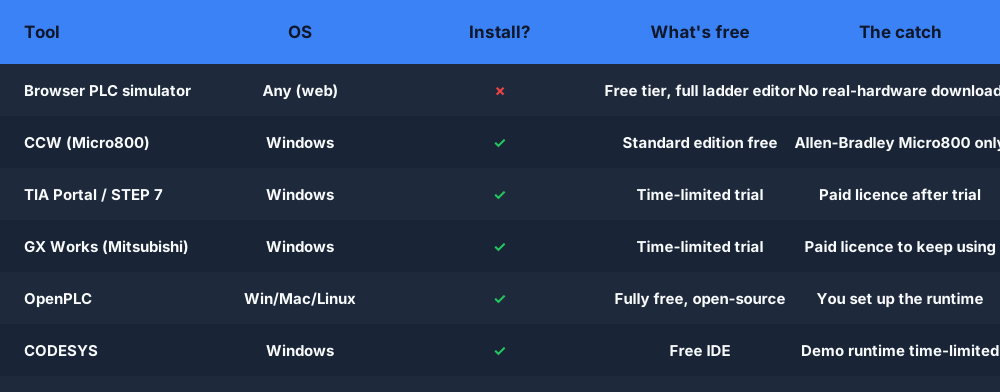
The pattern is clear: vendor tools are powerful but Windows-only, large, and almost always tied to that vendor's hardware. Open-source and browser tools trade some hardware reach for being instantly usable. Let's go through the real options.
Vendor free tiers
Most of the big PLC makers offer something free, but the boundaries are sharp.
Connected Components Workbench (CCW) — Rockwell Automation's free Standard edition. It is a real, no-cost programming environment, which is unusual and welcome. The catch is the hardware: CCW programs the Micro800 family (Micro810/820/850/870) and Micro800-class controllers, not the big ControlLogix or CompactLogix PLCs. If your target is a Micro800, this is the right free tool. If it isn't, CCW won't help you.
TIA Portal / STEP 7 — Siemens' environment is the industry's heavyweight. There is a time-limited trial so you can evaluate it, and the older STEP 7 line had limited "lite"-scope editions, but the full, ongoing license is paid. Treat the trial as exactly that: a few weeks to learn the interface, not a permanent free toolchain.
GX Works (Mitsubishi) — same story. You can download a time-limited trial of GX Works to explore Mitsubishi's FX and iQ-series programming, but keeping it past the trial requires a paid license. Great for a focused evaluation; not a long-term free option.
The honest summary on vendor tiers: free to try, free forever only when hardware-locked (CCW), otherwise a paid license is waiting at the end of the trial.
OpenPLC — genuinely free and open-source
OpenPLC is the one tool here with no asterisk on "free". It is open-source, runs on Windows, macOS and Linux, programs in standard IEC 61131-3 languages, and can drive real hardware like a Raspberry Pi or Arduino as a soft PLC. If you want to run actual control logic on cheap hardware without paying anyone, this is your answer.
The trade-off is effort. OpenPLC gives you the editor and the runtime, but you assemble the pieces yourself — flashing the runtime, wiring I/O, mapping addresses. It rewards people who like to tinker and want full control. (If you have used OpenPLC and want a no-setup ladder editor to prototype in first, that's exactly where the browser simulator fits.)
CODESYS — free IDE, limited runtime
CODESYS is the engine inside a huge number of third-party PLCs, and the IDE itself is free to download. That makes it tempting as a "free PLC software download". The catch lives in the runtime: the demo soft-PLC runs for a limited time (commonly around two hours) before you have to restart it, and a production license is paid. For learning the IEC languages and structured text it is excellent; for running anything continuously, budget for a license.
LogixPro-style trainers
The classic ladder-logic trainers — LogixPro and its lookalikes — are paid or institutional in most cases, not free. They simulate Allen-Bradley-style RSLogix 500 programming against animated machines, which is great for coursework. If you specifically want that "RSLogix 500 look" for free in a browser, a modern web simulator covers the same ladder fundamentals without a Windows install or a license.
Free download vs the browser
Here is the decision that trips most beginners up: do you download and install free PLC software, or do you run a simulator in your browser?
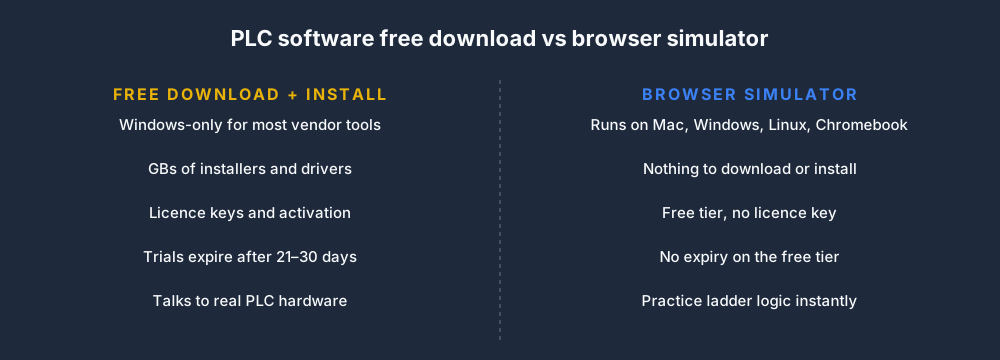
If your end goal is to flash logic onto a physical controller, you will eventually install the vendor's tool — there is no way around it, because the download is what talks to the hardware. But if your goal right now is to learn ladder logic, timers, counters and sequencing, installing a 4 GB Windows-only suite (that may not even run on your Mac or Chromebook) is a slow, frustrating first step. A browser PLC simulator skips all of it: open a tab and you are wiring rungs in seconds.
Which free option fits your goal?
Pick by what you are actually trying to do, not by brand name.
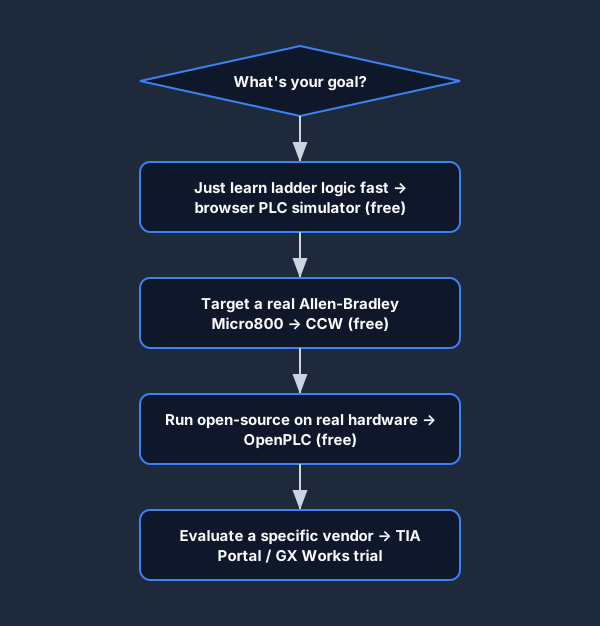
- Just learning ladder logic? Start in the browser simulator — zero install, free tier, works everywhere.
- Targeting a real Allen-Bradley Micro800? Download CCW; it's free and built for that hardware.
- Want open-source on real hardware? OpenPLC, and budget some setup time.
- Evaluating Siemens or Mitsubishi? Grab the TIA Portal or GX Works trial and treat the clock as real.
Read the license before you call it free
The single biggest disappointment with "free PLC software" is discovering the limit after you have invested time. Know what kind of free you are getting.
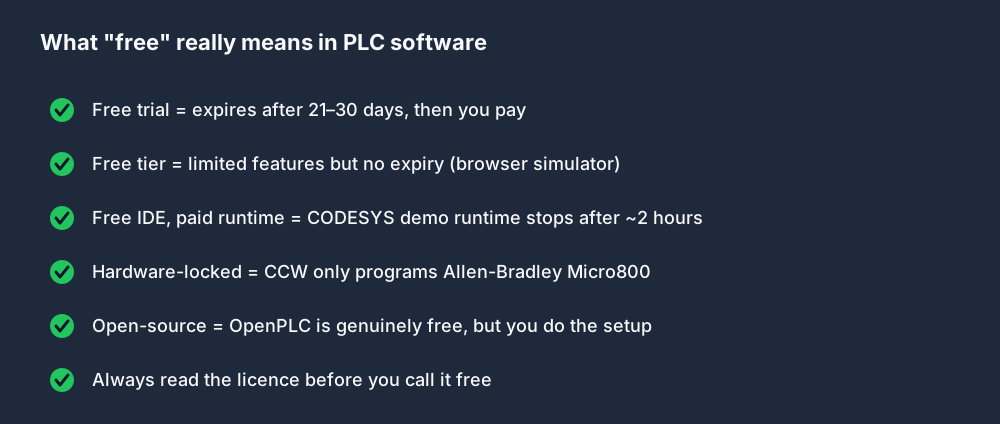
A free trial will expire. A free tier won't, but is limited in scope. A free IDE may pair with a runtime that stops after a couple of hours. And a hardware-locked tool is only "free" if you own that exact hardware. None of this is dishonest on the vendors' part — it is just easy to miss until you hit the wall.
Nothing to install vs a full toolchain
It is worth seeing the two architectures side by side, because it explains why the browser route is so much faster to start.
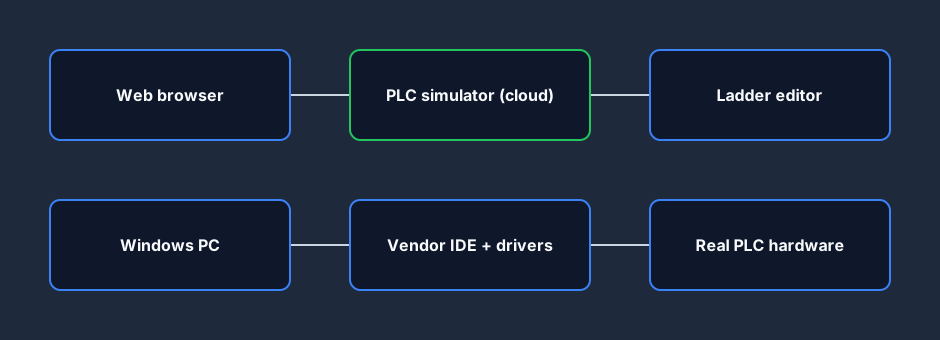
The installed path is Windows PC → vendor IDE and drivers → real PLC hardware. Every box is a thing to acquire, configure and maintain. The browser path is web browser → cloud simulator → ladder editor. There is no driver to install, no license key to enter, and it runs the same on a Mac, a Windows laptop or a school Chromebook. That is the entire appeal of a no-install PLC simulator: the friction between "I want to learn" and "I'm writing logic" is basically zero.
The best free option by use-case
Different goals have different best answers. Here is the cheat sheet.
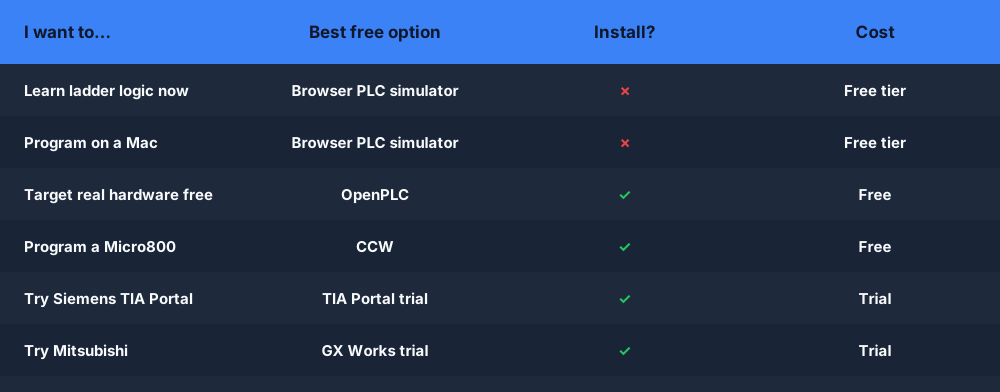
For the most common case — learning ladder logic, especially on a Mac or without admin rights to install software — the free PLC simulator wins on speed and accessibility. For getting logic onto real hardware for free, OpenPLC. For a specific vendor's controller, that vendor's free tier or trial. There is no single "best" free PLC software; there is a best one for your goal.
Start writing ladder logic in the next 60 seconds
You do not need to pick the perfect tool before you start learning. The concepts — contacts, coils, latches, timers, counters, the scan cycle — are the same across every package, and they transfer directly when you later move to CCW, TIA Portal or OpenPLC. The quickest way to make them stick is to wire a rung and watch it run.
Open the browser PLC simulator now — it's free, there's nothing to download, and you can switch the ladder editor between IEC, Allen-Bradley and Siemens dialects to learn the naming differences as you go. Build the fundamentals here, then bring them to whichever paid or free vendor tool your job needs.
FAQ
What is the best free PLC programming software? It depends on your goal. For learning ladder logic, a browser PLC simulator (free tier, no install) is fastest. For free programming of real hardware, OpenPLC is genuinely free and open-source. For a specific controller, use that vendor's free tier — CCW for Allen-Bradley Micro800 — or a trial of TIA Portal or GX Works.
Is there a free PLC software download for beginners? Yes. CCW (Connected Components Workbench) and OpenPLC are free downloads, and CODESYS offers a free IDE. But if you just want to start without installing anything, a free browser PLC simulator needs no download at all.
Is TIA Portal free? Not permanently. Siemens offers a time-limited trial of TIA Portal so you can evaluate it, but ongoing use requires a paid license.
Can I program a PLC for free without installing software? Yes — a browser-based PLC simulator runs in any modern browser on Mac, Windows, Linux or Chromebook with nothing to install and a free tier with no expiry. It is ideal for learning ladder logic, though programming physical hardware still requires the vendor's downloadable tool.
Is OpenPLC really free? Yes. OpenPLC is open-source and free to use, including on real hardware like a Raspberry Pi or Arduino. The trade-off is that you set up the runtime and I/O yourself.