The market for online PLC training split three ways over the last five years. On one side: free YouTube and cheap Udemy listings — abundant, passive, inconsistent. In the middle: subscription academies (Pluralsight, LinkedIn Learning, niche automation platforms) with better production values but no graded assessment. On the other side: a handful of simulator-led platforms that actually grade your code and let you fail until you pass.
This post sorts them out. If you're deciding where to spend a budget — or whether to spend one at all — read this first.
The five formats, ranked by effectiveness
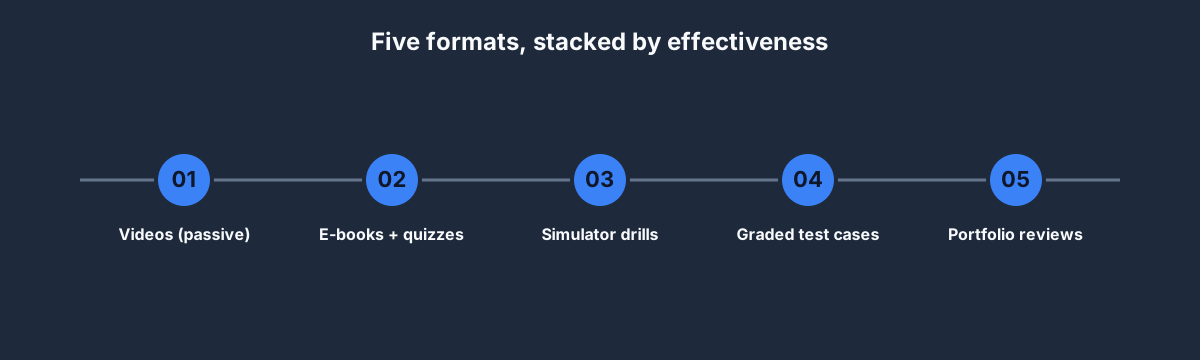
Every online PLC course is one of five things:
- Passive videos — the baseline. Cheap to produce, cheap to consume. Useful for orientation, not for skill-building.
- E-books + quizzes — slightly better because quizzes force retrieval. Still doesn't touch your programming skills.
- Simulator drills — a browser or desktop simulator where you write code and see it run. Big jump in effectiveness.
- Graded test cases — the simulator submits your program against automated assertions. Now you can't lie to yourself about whether you understood.
- Portfolio reviews — a human looks at your code and gives structured feedback. The gold standard, but expensive and rare.
The first two formats are what 90% of online PLC training sells. The last three are what you actually need. If you're evaluating a course, ask: "does it include graded submissions?" — if the answer is no, it's a video library.
How to evaluate an online PLC course
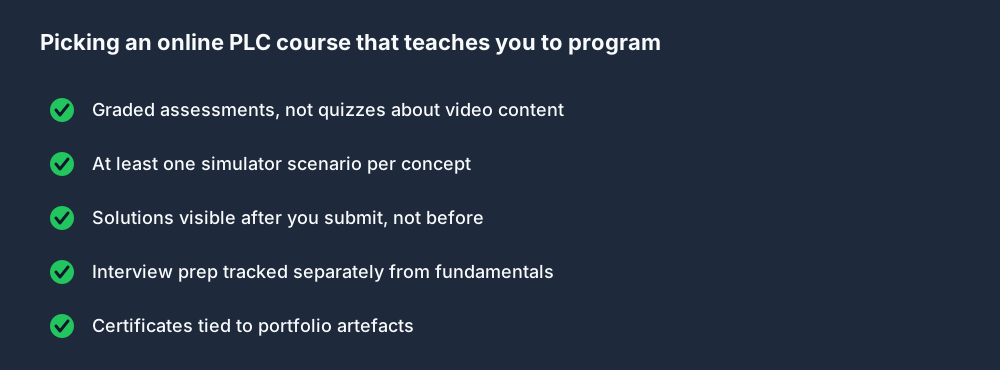
Five questions to ask before paying:
- Are the assessments graded, or are the quizzes about the video? Video-quiz courses test whether you watched. Graded assessments test whether you can write code that runs.
- Is there at least one hands-on scenario per concept? If a course "covers timers" but never asks you to write a timer rung against a test case, the coverage is cosmetic.
- Can you see solutions after you submit? A course that hides solutions is trying to pad completion time. A good course reveals the canonical solution the moment you pass so you can learn from diffs.
- Does it track interview prep separately from fundamentals? Fundamentals and interview prep use different teaching patterns. Courses that collapse them underserve both.
- Do certificates tie to portfolio artefacts? A certificate that just says "Completed PLC 101" is signal-free. A certificate that points at a portfolio PDF is verifiable.
If a course fails three of those five, you are paying for video entertainment.
Named courses, ranked honestly
Our take on the obvious options, based on hiring-manager conversations and our own evaluation:
Tier A — graded, simulator-led
- Our Pro plan at USD 249/year — every published scenario, all supported lesson dialects, interview tracks, solution walk-throughs, fault injection, portfolio exports and the custom 3D Sandbox. Disclosure: we made this; evaluate the hands-on workflow before relying on our ranking.
- Inductive Automation's University of Ignition — free, vendor-issued, genuinely respected. Weaker on PLC fundamentals, strong on SCADA/HMI and Ignition specifically.
- AutomationDirect's free online training — vendor-run, covers Productivity and Do-more PLCs specifically. Good for their hardware, narrow elsewhere.
Tier B — video-heavy but respectable
- RealPars — YouTube and a paid "Pro" tier. Excellent presentation, popular globally, weak on graded assessment. A fine supplement.
- PLC Academy (plcacademy.com) — solid e-book-style material with some paid tracks. Useful as a reading library.
- Coursera "PLC" specializations (e.g., Tec de Monterrey's) — university-pedigree video plus some quizzes. Recognized by some employers; no hands-on programming.
Tier C — consumer marketplaces
- Udemy PLC listings — 200+ courses priced USD 12–200. Quality is wildly variable. Certificates have near-zero signal. Use selectively for specific topics, not as a primary course.
- LinkedIn Learning PLC tracks — production values are high, depth is shallow. Fine for LinkedIn visibility; not for skill-building.
Tier D — skip
- "Complete PLC Bootcamp 2026" listings from unknown vendors — usually scraped content with a fresh date.
- Free PDF e-books from lead-gen sites — the e-book is 40 pages and the rest is upsell.
Free YouTube vs paid graded training
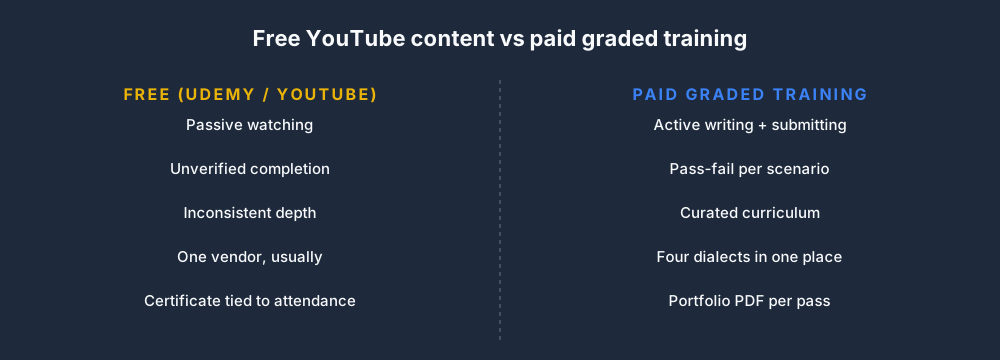
Free content is useful. It's also limited:
- You watch, you don't write. Writing is where the skill lives.
- No feedback loop. You can't tell if you understood without a test case.
- Inconsistent depth. One video goes deep on TON, the next skips retentive counters entirely.
- Certificate signal is zero. Hiring managers don't count YouTube hours.
Paid graded training fixes all four — but only if the grading is real. A Udemy course with a multiple-choice "final exam" about the videos is paid content with YouTube-grade assessment, not graded training.
What a full online training stack looks like
A realistic stack for someone learning from scratch in 2026:
- Free foundation: our 12-week course post plus the free Beginner Track, first six curriculum lessons and starter wiring and fault-finding practice.
- Graded intermediate: Basic at USD 99/year for the wider core curriculum, guided scenarios, quizzes, progress tracking and a guided 3D scenario.
- Pro + interview prep: Pro at USD 249/year if you need every published scenario, all lesson dialects, interview tracks, solution walk-throughs, portfolio exports and the custom 3D Sandbox.
- Vendor specialization: Rockwell / Siemens classroom if your employer pays, or a used starter kit from eBay if they don't.
Total cost for a job-ready stack: USD 99–249/year and 12–16 weeks. Compare with a USD 10,000 classroom program that takes the same time and produces a single vendor's certificate.
Is "online PLC training free" a real thing?
Yes, and most of it is good:
- Our free tier — the complete Beginner Track, first six curriculum lessons, and starter wiring and fault-finding practice. No time limit or card.
- RealPars YouTube — 500+ videos, genuinely free, high quality.
- University of Ignition (Inductive Automation) — free, free certification, free software (Ignition Maker).
- SIOS (Siemens) and Rockwell's LiteratureLibrary — free official PDFs and videos.
- LearnChannel-TV — YouTube content, vendor-neutral, very good beginner material.
The combination of free resources plus our free tier can get you most of the way through basic PLC programming without spending a penny. Paying starts being worth it when you want graded assessment and interview-track curation.
FAQ
What is the best online PLC training?
For self-funders: begin with the free hands-on path before deciding whether Basic or Pro is justified. For employer-funded vendor work: compare Rockwell or Siemens training for the exact hardware stack, then use a simulator for repeatable practice. For the quickest start, open the free training path.
Is online PLC training worth it?
If the grading is real, yes. If it's video-only, you can do the equivalent on YouTube for free. The threshold is whether the course forces you to write code that's tested against assertions.
Can I learn PLC programming online?
Completely. The IEC 61131-3 skills transfer directly to physical hardware. The only things you can't learn purely online are vendor IDE-specific UI quirks (fixable with a used starter kit after you know the fundamentals) and on-site commissioning (fixable with a first job).
How much does online PLC training cost?
Free to USD 500/year for high-quality subscription access. Vendor classroom programs are USD 2,000–10,000 and usually include hardware. Udemy individual courses are USD 12–200 each but vary wildly in quality.
What online PLC training is best for beginners?
Start with the free hands-on training path, then use the basic PLC programming post when the first exercise raises a question. Practice before you pay for anything.
Where to start
- Start the free hands-on training path.
- Complete the first runnable exercise instead of watching another overview video.
- Read the 12-week course post when you want the longer plan.
- Upgrade only if the graded practice loop matches how you learn and you need the wider catalog.
Either path works. The point is to write code, not watch it.