PLC Simulator
Practice exercises

PLC Practice Exercises That Grade Themselves

Stop checking your own homework against a PDF answer key. Every exercise here runs against real test cases in your browser — write the logic, hit Run, and find out immediately whether it survives the edge cases.

Join 2800+ learners practicing PLC programming

How practice works

Write it. Run it against a machine. Get graded on the edge cases.

Write the logic

Build your program in ladder logic or structured text, in IEC 61131-3, Allen-Bradley, or Siemens-style syntax. The same editor for every exercise — no software to install.

The simulator drives a real machine model

Your code does not get pattern-matched against a model answer. It executes on a real scan cycle that controls a simulated machine — the tank fills, the motor runs, the conveyor jams.

The auto-grader checks what you would miss

Hidden test cases force the conditions you would never think to check by hand: stop pressed mid-sequence, sensor chatter, timer overlap. Per-test pass/fail, with failure reasons.

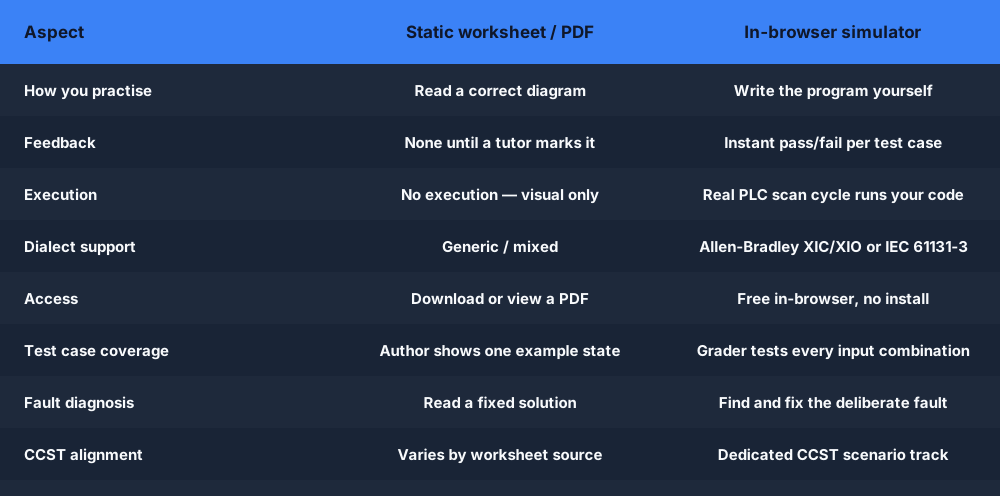
PLC practice exercises comparison — static worksheet PDFs versus auto-graded in-browser simulator exercises with instant per-test feedback
A static exercise PDF shows you one correct diagram. An auto-graded exercise runs your program and tells you which test case broke it.

The patterns you practise

The core ladder logic patterns every exercise drills

Almost every PLC practice exercise reduces to a handful of foundational rung patterns. Learn these six cold and you can build the seal-in circuits, timed sequences, and counting logic behind the entire machine library.

Ladder logic rung practice exercise — an examine-if-closed contact driving an output coil between two power railsA basic ladder logic rung between two power rails: an examine-if-closed contact (XIC) in series driving an output coil (OTE).L1L2] [StartXIC I:0/0LampOTE O:0/0
Contact + coil. The first exercise — one input examines closed, one output energises. The whole beginner track builds from this rung.
Seal-in latch practice exercise — a parallel holding contact keeps a motor running after the start button is releasedA seal-in latch rung: a Start contact in parallel with a Hold contact, in series with a normally-closed Stop contact, driving an output coil.StartHold (seal)StopMotor
Seal-in latch. Three-wire control — the pattern in the Motor Start/Stop exercise and nearly every real control panel.
TON on-delay timer practice exercise — timing diagram showing the enable rung, accumulated time, and the done bit firing at presetA TON on-delay timer: the accumulated time bar ramps up toward the preset value, and the done (DN) bit turns on when the accumulator reaches preset.TONPRE 5000ACCACC ramps to PREPREDNdone bit
TON on-delay timer. The timing-sequence exercises: the enable rung accumulates time, the Done bit fires at preset, the rung resets.
CTU up-counter practice exercise — counting parts on a conveyor and setting the done bit when the accumulated count reaches presetA CTU count-up counter: each input pulse increments the accumulator toward the preset, and the done (DN) bit turns on when count reaches preset.count pulsesCTUPRE 5ACC 3ACCcount toward presetDNdone bit
CTU counter. The batch and bottle-counting exercises — each rising edge increments the count, the done bit stops the line at preset.
Motor start/stop control practice exercise — start and stop pushbuttons, seal-in branch, overload, and the motor output coilA 3-wire motor control circuit: Stop and Start pushbuttons, a contactor coil with a seal-in auxiliary contact and an overload contact, driving a motor.StopStartM (seal-in)OLMMmotor
Motor control. Start PB, NC Stop, overload interlock, and seal-in together — the canonical motor exercise graded on the stop-mid-cycle edge case.
Ladder logic symbol reference for PLC practice exercises — examine-if-closed, examine-if-open, output energise, latch, unlatch, timer and counter blocksThe core ladder logic symbols side by side: XIC examine-if-closed, XIO examine-if-open, OTE output energize, OTL output latch and OTU output unlatch.XICIfXIOIfOTEEnergizeLOTLLatchUOTUUnlatch
Symbol set. XIC, XIO, OTE, OTL/OTU, TON, CTU — the instructions you place in the editor, in Allen-Bradley or IEC 61131-3 form.

Exercise tracks

131 exercises across seven tracks (one shared)

Each track is sequenced by difficulty so you always know what to attempt next. Free, Basic, and Pro labels show exactly what each tier unlocks — no surprises behind the paywall.

Beginner track

Free

10 exercises · Difficulty 1–2

From "switch turns on light" to counting five boxes with a CTU. Contacts, coils, AND/OR, NC stop buttons, latching, TON timers — 3 to 7 minutes each.

Browse the track →

Curriculum lessons

Free (1–6) / Pro

12 lessons · Difficulty 1–3

A sequenced course in exercise form: button-to-light, E-stop NC contacts, seal-in, SET/RST, edge triggers, TON/TOF, counters, a conveyor-reject integration exercise, and a traffic-light capstone (shared with the machines track).

Browse the track →

Machine scenarios

Free / Basic / Pro

47 machines · Difficulty 1–5

Full machine projects with physics models — motors, pumps, conveyors, packaging lines, HVAC, brewing. The closest thing to plant work you can do in a tab.

Browse the track →

Fault-finding

Pro

8 exercises · Difficulty 2–4

Someone else broke the program — you diagnose it. NO/NC swaps, broken seal-ins, wrong addresses, stuck inputs, scan-order races, and intermittent bugs.

Browse the track →

Wiring labs

Free (1–2) / Pro

10 labs · Difficulty 1–4

24 VDC supplies, NPN/PNP sensors, 4–20 mA loops, relay outputs, dual-channel E-stops, RS-485, and industrial Ethernet — wiring before programming.

Browse the track →

CCST cert prep

Pro

40 exercises · Difficulty 1–4

Exam-style exercises in the style of the ISA CCST: contacts, timers, diagnostics, safety categories, drive handshakes, HMI tags, and documentation reading.

Browse the track →

Analog & scaling

Free (first) / Pro

4 exercises · Difficulty 2–3

Scale a 4–20 mA pressure transmitter, build level alarms with hysteresis, hold a temperature setpoint with deadband, and drive a proportional valve.

Browse the track →

Free tier

Start free right now — 23 exercises, no card

The free tier is not a teaser. You get the entire 10-exercise beginner track, curriculum lessons 1–6, and these complete exercises — all auto-graded, all in the browser:

Practice free. Upgrade when you run out of exercises.

Free

$0

Beginner track, curriculum lessons 1–6, and free-tier machine, wiring, and analog exercises.

Basic

$12/mo or $99/yr

The broader scenario library — 35 of the 40 core machines — plus all 18 lessons and 12 quizzes.

Pro

$29/mo or $249/yr

All tracks: fault-injection, CCST cert prep, all 8 dialects, AI rung assistant, and solution walk-throughs.

Full pricing comparison →

Questions

PLC practice exercises FAQ

A real slice of them, yes — 23 exercises are free with a free account: the full 10-exercise beginner track, curriculum lessons 1–6, complete machine scenarios including Motor Start/Stop, Traffic Light, Garage Door Controller, and Car Wash, the first analog scaling exercise, and the first two wiring labs. No credit card and no trial clock. Basic ($12/mo) unlocks the broader scenario library, and Pro ($29/mo) adds the fault-finding and CCST cert-prep tracks.

Your next practice session starts in the browser

No install. No PDF answer keys. No credit card.

Create free account →