TL;DR
- OpenPLC: free, open-source, runs on Raspberry Pi / Arduino / ESP32, great for learning and small projects, gentle on-ramp.
- CODESYS: commercial, embedded in industrial OEM controllers, larger library ecosystem, steeper curve, the platform of choice for production machines.
- Which to pick? OpenPLC if you are learning or budget-constrained; CODESYS if you need industrial-grade certified libraries and OEM hardware support.
- Both use IEC 61131-3, so skills transfer between them.
OpenPLC is a free, open-source IEC 61131-3 platform that turns low-cost hardware like a Raspberry Pi, an Arduino or an ESP32 into a working PLC. CODESYS is a commercial IEC 61131-3 development system that ships inside thousands of industrial controllers from hundreds of OEMs. Both let you program in ladder, function block and the other 61131-3 languages — the real difference is cost, hardware reach and the level of industrial support behind them. Neither is "better" in the abstract; they target different problems.
This guide compares the two fairly so you can pick the right tool for learning, for a hobby build, or for a machine that has to run for years in a plant.
What each one actually is
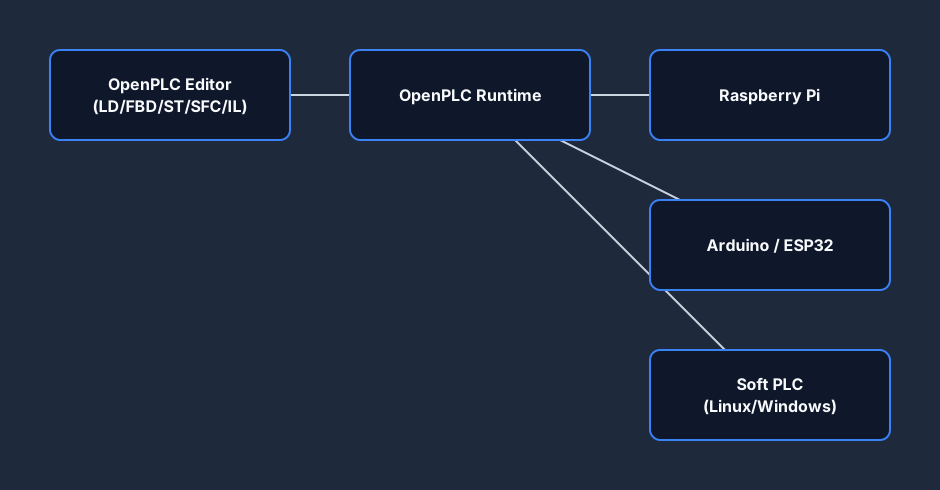
OpenPLC is an open-source project (released under GPL/open licenses) consisting of an editor, a runtime and a web-based monitoring interface. You write your program in the OpenPLC Editor — which is built on the well-known MatIEC / Beremiz lineage — and load it onto the OpenPLC Runtime running on inexpensive hardware or a plain Linux/Windows box (a "soft PLC"). Because it is open, you can read the source, modify it, and run it without license keys.
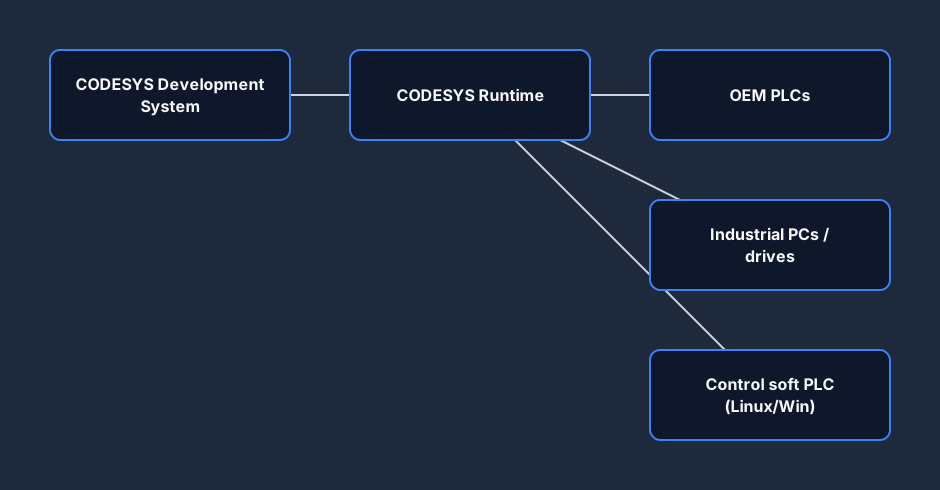
CODESYS (from CODESYS GmbH, formerly 3S-Smart Software Solutions) is a commercial, hardware-independent IEC 61131-3 IDE. It is not usually sold as a finished controller; instead, many automation vendors embed the CODESYS runtime in their PLCs, drives and HMIs, then ship the CODESYS Development System for engineers to program them. You will find CODESYS-based controllers from a long list of industrial brands, which is why the same toolchain skill transfers across a lot of hardware.
The mental model worth holding onto is this: OpenPLC is a product you run — you download it, point it at a board, and it is yours. CODESYS is more of a platform you build on — the IDE is the visible part, but its real value is the runtime that controller makers license and the deep library stack that sits behind it. That distinction explains almost every difference that follows: cost, hardware reach, support model and learning curve all flow from "free open-source project" versus "commercial industrial platform."
Licensing and cost
This is the headline difference.
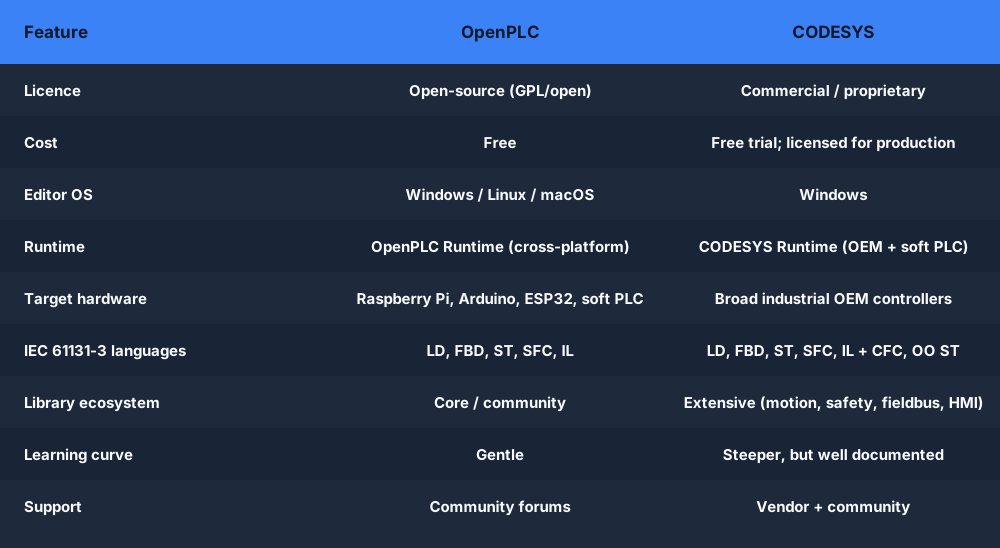
OpenPLC is free. The editor, the runtime and the source code are open and cost nothing to download, use commercially, or modify. Your only spend is the hardware you choose to run it on.
CODESYS is commercial. The Development System has a free or trial path for evaluation and learning, but production use, certain runtimes, and add-on libraries (safety, motion, fieldbus stacks, web visualization, etc.) are licensed. In practice the cost is usually folded into the OEM controller you buy, or paid per-runtime/per-feature — we won't quote figures here because they change and depend heavily on the vendor and the modules you need.
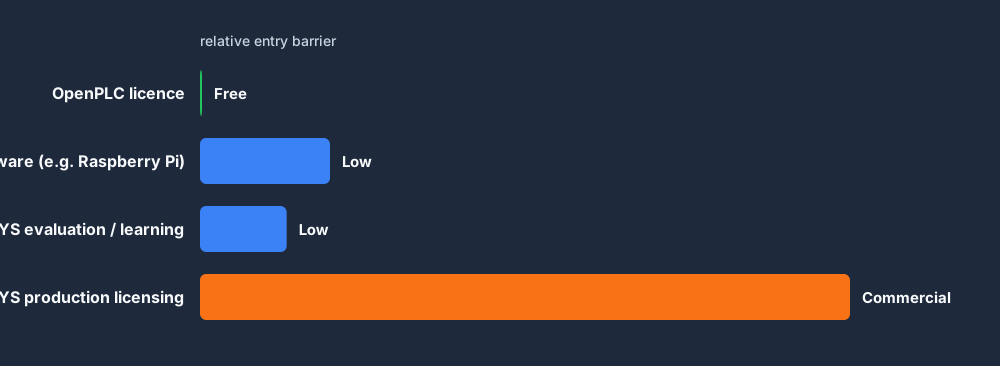
A fair way to frame it: OpenPLC removes the license barrier and lets you spend on cheap hardware; CODESYS charges for a deep, supported, certifiable ecosystem that is already proven on industrial controllers. With OpenPLC, the total cost of a working controller can be the price of a single-board computer. With CODESYS, the license cost is rarely the whole story — you are also buying into a supported supply chain, version-locked runtimes, and the assurance that the same code will behave consistently on hardware from many vendors. For a one-off project that distinction may not matter; for a production line that has to be maintained for a decade, it often does.
IEC 61131-3 language support
Both platforms are built around the IEC 61131-3 standard, so the core programming model is familiar in either.
OpenPLC supports the standard 61131-3 languages — Ladder Diagram (LD), Function Block Diagram (FBD), Structured Text (ST), Sequential Function Chart (SFC) and Instruction List (IL) — through its Beremiz-derived editor. Coverage is solid for the fundamentals; very advanced library features are more limited than a top-tier commercial suite.
CODESYS supports all the 61131-3 languages plus its own Continuous Function Chart (CFC) editor, and modern extensions like object-oriented Structured Text. It also brings a large library ecosystem — motion control, fieldbuses (EtherCAT, PROFINET, Modbus, CANopen and more), safety, and a web/HMI visualization editor.
Supported hardware, runtime and operating systems
OpenPLC is happiest on accessible hardware: Raspberry Pi, Arduino (Uno/Mega/etc.), ESP32/ESP8266, and as a soft PLC on Linux or Windows. I/O is wired directly to the board's pins or expanded over Modbus. The editor runs on Windows, Linux and macOS, and the runtime is genuinely cross-platform. That makes it perfect for a desk, a classroom or a small custom rig.
CODESYS targets the broad industrial base. The CODESYS runtime is embedded by OEMs in PLCs, industrial PCs, drives and panels, and there is a soft-PLC ("Control" runtime) for Linux and Windows PCs. The Development System itself is Windows-based. Hardware reach is enormous, but it is tied to controllers that ship — or are licensed for — the CODESYS runtime.

Learning curve
If you are learning IEC 61131-3 from scratch, OpenPLC has the gentler on-ramp: it is free, the toolchain is small, and you can be blinking an output on a Raspberry Pi in an afternoon. The interface is utilitarian rather than polished, and you'll lean on community forums for help.
CODESYS is a deeper, more capable environment, which means more to learn — projects, device trees, libraries, task configuration and the visualization editor. The payoff is professional documentation, a vast feature set, and skills that map directly onto industrial controllers you'll meet on the job.
There is also a transfer effect worth noting. The IEC 61131-3 model is the same in both tools, so time spent in OpenPLC is far from wasted if you later move to CODESYS — ladder is ladder, structured text is structured text, and the function-block thinking carries straight across. What changes is the surrounding machinery: device configuration, fieldbus setup, library management and visualization. Many engineers deliberately learn the language in a free tool and then learn the platform once they need it, rather than paying to learn both at once.
Strengths and trade-offs
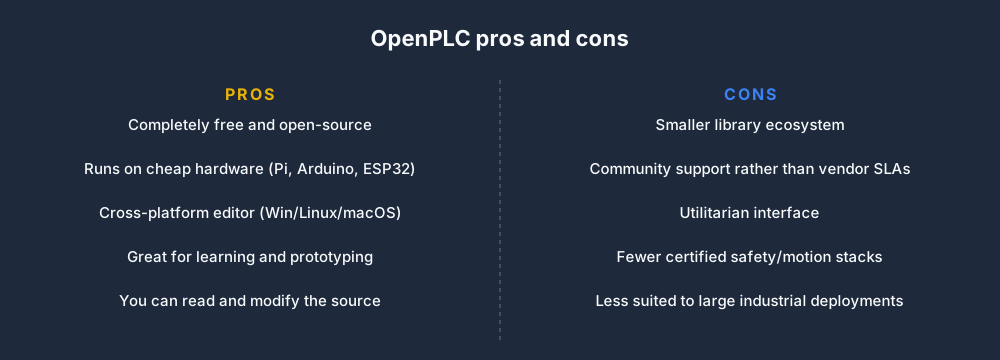
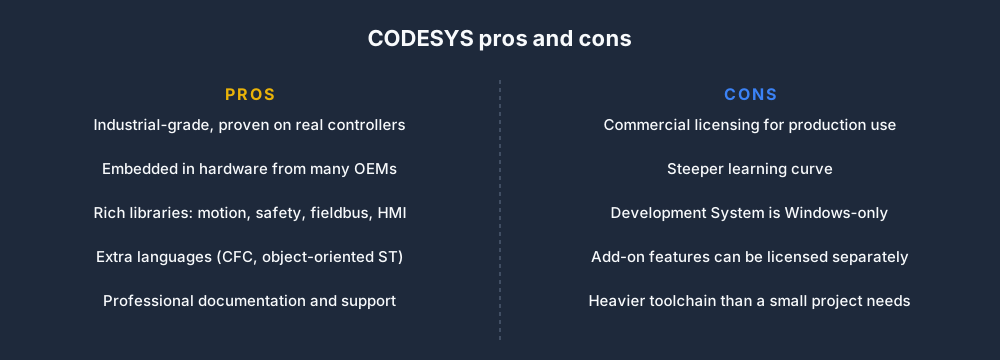
No tool wins on every axis. Here is an honest pros-and-cons view of each.
Which should you choose?
Match the tool to the job, not to the hype.
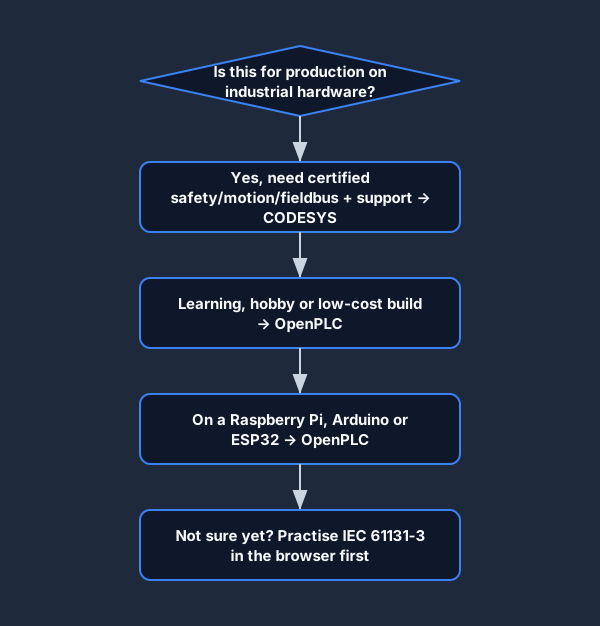
- Learning, hobby projects, education, low-cost automation, or anything where the license cost is the blocker — OpenPLC is an excellent, honest fit.
- A machine that must run for years, needs certified safety/motion/fieldbus stacks, vendor support, and runs on industrial controllers — CODESYS (or the OEM platform built on it) is the safer, more capable choice.
Plenty of engineers use both: OpenPLC to prototype and teach, CODESYS for production hardware. A common workflow is to sketch and validate control logic cheaply — on a Raspberry Pi running OpenPLC or in a simulator — then re-implement the proven logic on the CODESYS-based controller the customer specified. Because the language is standardized, that hand-off is usually a translation of configuration rather than a rewrite of the program.
It is also worth being clear about what neither tool changes: the underlying control problem. A scan still runs, inputs are still read, logic still executes, outputs still update. Whether you write that on a £30 board with OpenPLC or on a high-end industrial controller with CODESYS, the discipline of clean, deterministic ladder and structured text is the same. Picking the tool is the easy part; writing logic that is safe and maintainable is the skill that pays off regardless of which platform you land on.
Is OpenPLC a CODESYS alternative?
For learning and many small or DIY applications, yes — OpenPLC is a credible free alternative that covers the IEC 61131-3 fundamentals without license cost. For heavy industrial deployments that depend on CODESYS's library ecosystem, certifications and OEM hardware, it is more of a complement than a drop-in replacement. If you specifically want a no-cost route into 61131-3, see our CODESYS alternative overview.
Practice IEC 61131-3 in your browser first
Before you install either toolchain, it helps to be comfortable with ladder and the rest of the IEC 61131-3 model. You can write, run and debug ladder logic with zero install in our free browser PLC simulator — no license, no hardware, no setup. Get the fundamentals solid in the browser, then move to OpenPLC on cheap hardware or CODESYS on an industrial controller with confidence. New to controllers entirely? Start with what is a PLC.
FAQ
Is OpenPLC free? Yes. OpenPLC is open-source software released under open licenses. The editor, runtime and source code are free to download, use (including commercially) and modify. Your only cost is the hardware you choose to run it on.
What is the main difference between OpenPLC and CODESYS? OpenPLC is free and open-source and targets low-cost hardware like the Raspberry Pi, Arduino and ESP32. CODESYS is a commercial IEC 61131-3 IDE whose runtime is embedded in industrial controllers from many OEMs, with a much larger library and support ecosystem.
Can OpenPLC replace CODESYS? For learning, hobby builds and many small applications, OpenPLC is a viable alternative. For large industrial systems that rely on CODESYS's certified safety, motion and fieldbus libraries and OEM hardware, CODESYS remains the stronger choice — many engineers use both.
Do OpenPLC and CODESYS use the same programming languages? Both are based on IEC 61131-3, so ladder, function block, structured text and the other standard languages carry over. CODESYS adds extras such as Continuous Function Chart (CFC) and a richer library set; OpenPLC focuses on solid coverage of the standard languages.