

PLC Simulator
OpenPLC alternative

Open PLC Simulator Online — OpenPLC Alternative, No Setup Required

OpenPLC is brilliant free open-source software for running real ladder logic on a Raspberry Pi or Arduino. But before you install an editor, flash a board, and wire Modbus I/O, you can learn the logic itself in seconds — in a browser, with scored scenarios.

Join 2000+ learners practicing PLC programming

OpenPLC alternative — practise ladder logic and IEC 61131-3 in the browser with zero setup, no editor install and no Raspberry Pi
A browser-based OpenPLC alternative for learning IEC 61131-3 — no install, no hardware.
A browser PLC simulator running an IEC 61131-3 ladder rung with no install — the OpenPLC alternative for the learning phase, no editor and no Raspberry PiA web browser window running a PLC ladder logic simulator with an input/output strip, requiring no installation or download.plcsimulator.app/playno installINPUTSOUTPUTS
The OpenPLC alternative for learning: a ladder rung running in a browser tab — no editor install, no runtime, no board.

Opening honesty

OpenPLC is genuinely excellent — and free.

OpenPLC is fully open-source IEC 61131-3 software that runs real logic on cheap hardware. If your goal is to control a Raspberry Pi, Arduino, or ESP32, you should absolutely use it. This page is about the learning phase that comes first — where a browser beats an install. We are complementary to OpenPLC, not a competitor to it.

Background

What OpenPLC is

OpenPLC is a free, open-source IEC 61131-3 environment created by Thiago Alves. It has two parts: the OpenPLC Editor, built on the open-source Beremiz IDE and the matiec compiler, where you write ladder, structured text, FBD, SFC, and IL; and the OpenPLC Runtime, a soft-PLC that executes your compiled program.

The runtime targets a remarkable range of cheap hardware — Raspberry Pi, Arduino boards, ESP32/ESP8266, plain Linux and Windows as a soft-PLC — and exposes I/O over Modbus. That makes it one of the best ways to run genuine PLC logic on real hardware for almost no money.

Pricing: free and open source (GPL) end to end. The cost is your time — installing the editor and runtime, optionally flashing firmware, and wiring I/O before your logic does anything visible.

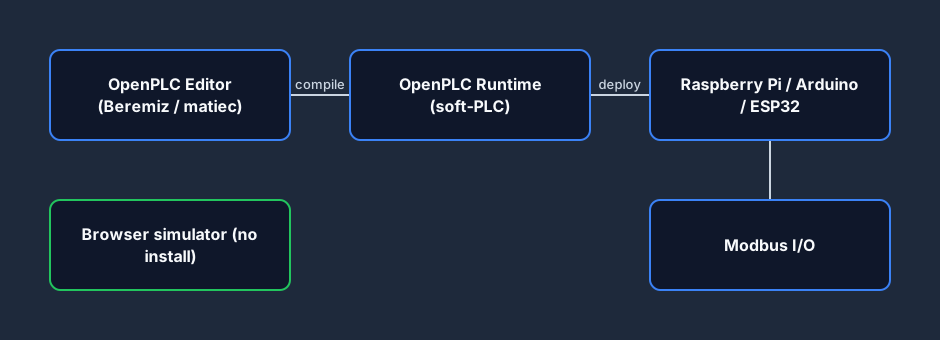
OpenPLC architecture diagram: the OpenPLC Editor compiles to the OpenPLC Runtime, which drives a Raspberry Pi, Arduino or ESP32 over Modbus, compared with a browser simulator
OpenPLC: editor → runtime → real hardware over Modbus. A browser simulator runs entirely in the tab.
The PLC architecture the OpenPLC Runtime emulates — a CPU scanning input and output points, running on a Raspberry Pi, Arduino or ESP32A modular PLC rack on a backplane: power supply, CPU processor, input module, output module and a communications module side by side.PLC RACKbackplane busPSUPowerCPUProcessorDIInputDOOutputNETComms
The soft-PLC model the OpenPLC Runtime turns a Pi or Arduino into: a CPU scanning I/O.
OpenPLC Modbus I/O — the OpenPLC Runtime exposes inputs and outputs to field devices over Modbus, the protocol it uses to reach real sensors and actuatorsA Modbus master polling three slave devices over a shared serial or TCP link, reading and writing their holding registers and coils.MASTERpolls slavesModbus RTU / TCPID 01regs/coilsID 02regs/coilsID 03regs/coilsrequest / response polling
OpenPLC drives real I/O over Modbus — the wiring layer a browser simulator skips while you learn.
A typical OpenPLC deployment network — a soft-PLC on a Raspberry Pi talking over Ethernet and Modbus to remote I/O, an HMI and an engineering PCAn industrial Ethernet/IP or PROFINET network: a PLC, operator HMI, a variable frequency drive and remote I/O all connected through a network switch.SWITCHEthernet/IP · PROFINETPLCHMIVFDI/Ostar topology via managed switch
A real OpenPLC setup is a small network — Pi runtime, Modbus I/O, HMI, and an engineering PC.

Strengths

What OpenPLC does well

Truly free & open source

No licence files, no demo timers, no per-target fees. The editor and runtime are GPL — inspect, modify, and run them however you like.

Real hardware, real cheap

Run actual IEC 61131-3 logic on a Raspberry Pi, Arduino, or ESP32 for a few dollars. This is genuine soft-PLC control, not a simulation.

Standard IEC + Modbus

Built on Beremiz and matiec with clean IEC 61131-3 languages, and Modbus I/O so it talks to real sensors and actuators.

Learner friction

Where OpenPLC slows a first-time learner

None of these are flaws — they are the natural cost of software that runs real hardware. They are simply friction if your only goal today is to learn ladder logic.

Two installs to start

You install the OpenPLC Editor and the OpenPLC Runtime before writing a rung. That is reasonable for a runtime — slow if you just want to try the idea.

Hardware to see real I/O

To watch inputs and outputs move you typically wire a Raspberry Pi or flash an Arduino / ESP32 and configure Modbus addresses.

No scored curriculum

OpenPLC gives you a workbench, not a syllabus. There is no auto-grader telling you whether your logic actually solves the exercise.

No dialect switching

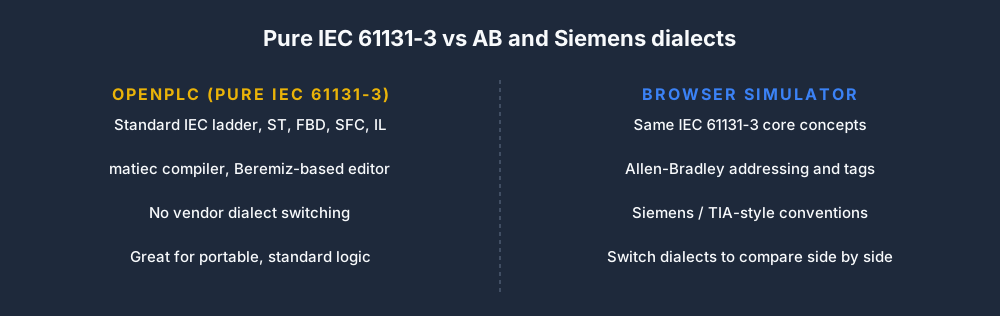
Pure IEC 61131-3. Excellent for portable, standard logic — but it will not show you Allen-Bradley or Siemens conventions side by side.

Not for Chromebook / phone

The desktop editor and runtime do not fit a school Chromebook or a phone, where browser practice runs fine.

Compile / upload loop

Each change means compile and upload before you see a result — great discipline for deployment, slow for rapid first-time learning.

Checklist of OpenPLC setup steps a browser simulator skips: install the editor, install the runtime, flash firmware, wire Modbus I/O, then compile and upload
The setup steps the browser lets you skip while you are still learning the logic.

Feature comparison

OpenPLC vs plcsimulationsoftware.com

FeatureOpenPLCOurs
PriceFree & open sourceFree tier + Pro monthly
Install requiredEditor + runtimeNone (browser)
Runs real hardwareYes (Pi, Arduino, ESP32)No
Real Modbus I/OYesNo
Start practisingAfter install / wiringInstantly
Scored scenariosNo40 auto-graded
Dialect switchingIEC onlyIEC + AB + Siemens
Chromebook / phoneNoYes
Interview-timerNoYes (Pro)
Portfolio PDF exportNoYes (Pro)
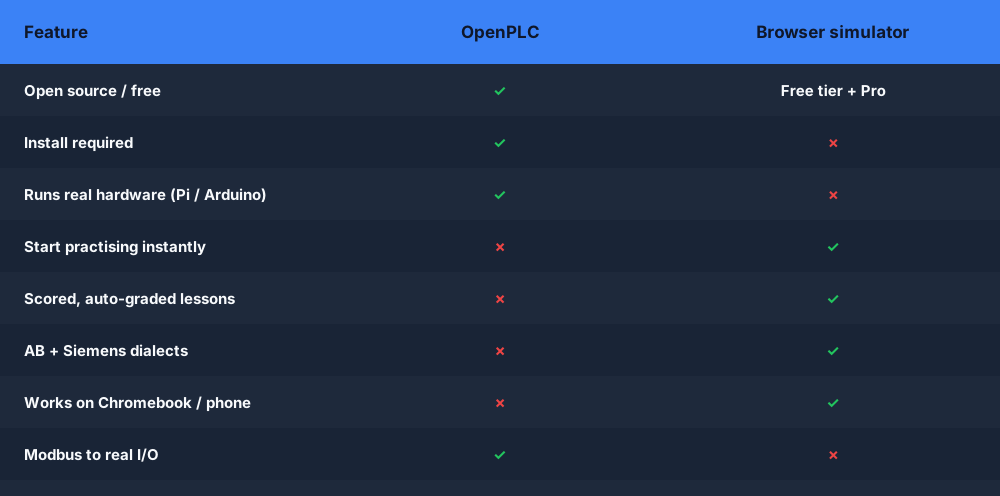
OpenPLC vs browser PLC simulator comparison table covering setup, real hardware, scored lessons, dialects and Modbus I/O
OpenPLC for running logic on hardware; the browser for learning it instantly.

Decision guide

When to use which

Use OpenPLC if…

  • You want to run real logic on a Raspberry Pi, Arduino, or ESP32.
  • You need Modbus I/O talking to real sensors and actuators.
  • You want a fully free, open-source, modifiable runtime.
  • You are building a hardware project, not just learning.
  • You are comfortable installing the editor and runtime.

Use us if…

  • You want an "open-browser-and-practise" experience.
  • You are on a Chromebook, phone, Mac, or locked-down PC.
  • You want scored scenarios with immediate feedback.
  • You want to compare IEC, Allen-Bradley, and Siemens dialects.
  • You are learning the logic before you touch hardware.
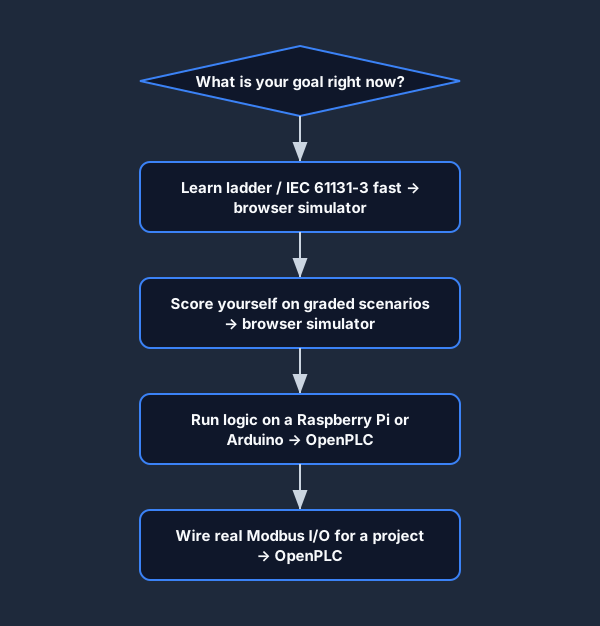
Flowchart showing when to use OpenPLC versus a browser simulator: learn and score in the browser, run on Raspberry Pi or Arduino with OpenPLC
A simple rule: learn and score in the browser, deploy to hardware with OpenPLC.

IEC 61131-3 that transfers

Learn the standard logic — then carry it into OpenPLC

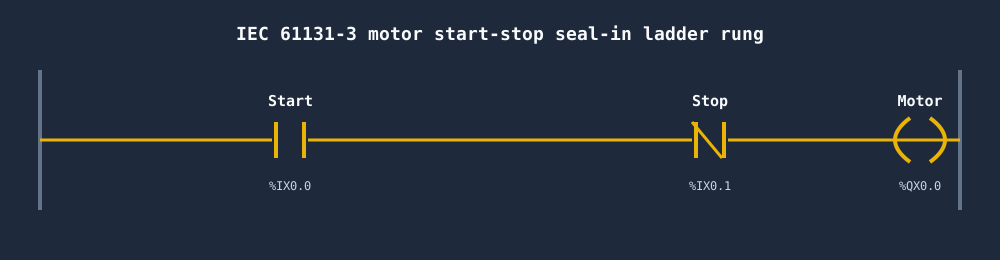
Contacts, coils, seal-in logic, and IEC timers are identical concepts whether they run in your browser or compile to the OpenPLC Runtime. Build them here first, watch them work instantly, and the portable IEC 61131-3 logic moves straight into OpenPLC when you are ready for hardware.

IEC 61131-3 motor start-stop seal-in ladder rung with a Start contact, normally-closed Stop contact and Motor coil, the same logic OpenPLC compiles
The classic start-stop seal-in rung — standard IEC 61131-3 that transfers to OpenPLC.
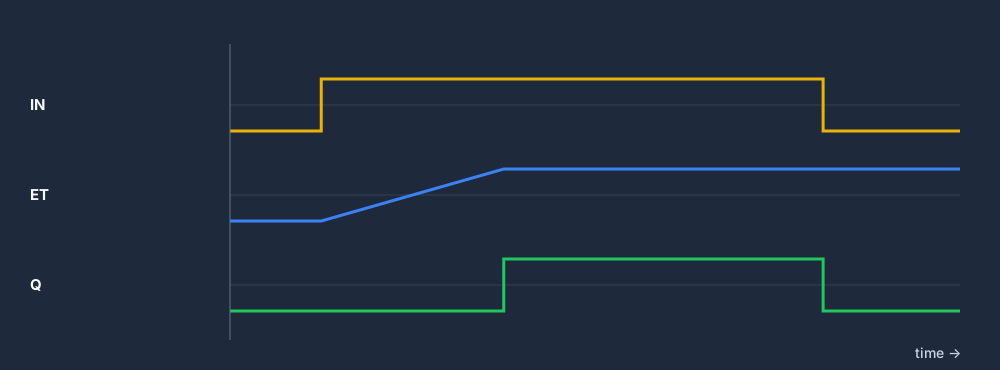
IEC 61131-3 TON on-delay timer timing diagram showing Q turning on after the preset time once IN is true
A TON on-delay timer — the same standard function block OpenPLC uses.
Comparison of pure IEC 61131-3 in OpenPLC versus Allen-Bradley and Siemens dialect practice in a browser simulator
OpenPLC stays pure IEC; the browser lets you switch into AB and Siemens conventions to compare.
The five IEC 61131-3 languages OpenPLC compiles — Ladder Diagram, Function Block Diagram, Structured Text, Instruction List and Sequential Function ChartThe five IEC 61131-3 PLC programming languages as chips: Ladder Diagram, Function Block Diagram, Structured Text, Instruction List and Sequential Function Chart.IEC 61131-3 — five languagesLDLadder DiagramFBDFunction BlockSTStructured TextILInstruction ListSFCSequential Func. Chart
The five IEC 61131-3 languages OpenPLC's matiec compiler accepts — the same standard the browser teaches.
The scan cycle the OpenPLC Runtime executes — read inputs, run the compiled IEC 61131-3 program, write outputs, repeat each cycleThe repeating PLC scan cycle: read inputs, execute the ladder logic, update outputs, then housekeeping, looping continuously.1Read Inputs2Execute Logic3Update Outputs4HousekeepingSCANCYCLE
The scan cycle the OpenPLC Runtime executes — identical in concept to the browser simulator.
An IEC 61131-3 Structured Text snippet that compiles in OpenPLC — text-based logic for math, comparisons and control flow that transfers from the browserA small Structured Text code block in an editor: an IF/THEN condition, a TON timer call and assignments, showing text-based PLC programming.main.st — Structured Text1IF Start AND NOT Stop THEN2 Run := TRUE;3END_IF;4DelayTmr(IN := Run, PT := T#5s);5Lamp := DelayTmr.Q;
Structured Text written in the browser is portable IEC 61131-3 that OpenPLC compiles unchanged.

The fast path

Browser-first, OpenPLC-next

The quickest route to competence is to remove the setup tax while you are still learning, then add the hardware once the logic is second nature.

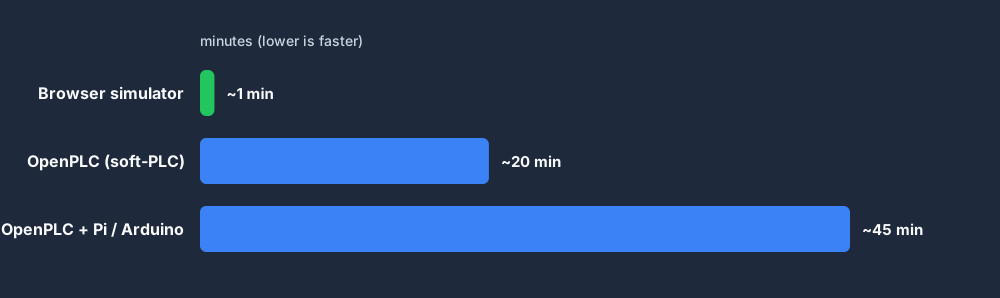
Bar chart of approximate time to your first working ladder rung: about one minute in a browser simulator versus around twenty minutes for the OpenPLC soft-PLC and longer with a Raspberry Pi or Arduino
Illustrative time-to-first-rung — the browser removes the setup ramp for the learning phase.
Browser-first learning path before OpenPLC: master seal-in logic, practise timers and counters, pass scored scenarios, compare dialects, then deploy IEC logic to OpenPLC hardware
A practical path from first rung to OpenPLC on real hardware.

IEC 61131-3 scenarios

Scored practice that transfers to OpenPLC later

Motor Start / Stop

Three-wire control with seal-in — the classic first rung.

View scenario →

Traffic Light

Sequencing — the textbook IEC 61131-3 scenario.

View scenario →

Tank Fill

Level sensor, valve, pump, overflow alarm — process staple.

View scenario →

Elevator

Full state machine — maps cleanly to IEC state patterns.

View scenario →

Batch Mixer

Recipe-driven sequencing — matches standard library patterns.

View scenario →

PID Temperature

Structured-text PID loop with Kp/Ki/Kd tuning.

View scenario →

Related reading

Keep exploring

Other honest options

If you want real hardware

  • OpenPLC — fully open-source IEC 61131-3 runtime + editor. Best for real-hardware experiments on Raspberry Pi, Arduino, and ESP32.
  • Beremiz — the open-source IEC 61131-3 IDE OpenPLC's editor is built on; shares the matiec compiler.
  • Codesys SoftPLC — the industry-reference IDE with a free Windows soft-PLC (2-hour demo limit) and Raspberry Pi targets.

Online simulation

OpenPLC Simulator online — what that actually means

When people search for an OpenPLC simulator online, they usually want one of two things: the OpenPLC editor running in a browser (which does not exist — it is a desktop install), or a way to practice writing and running IEC 61131-3 logic online without setting up the full OpenPLC stack. This simulator is the second option.

The OpenPLC stack — editor plus runtime plus hardware wiring — is a meaningful setup effort. You install the Beremiz-based editor on Windows or Linux, install the runtime on a Raspberry Pi or Arduino, flash the firmware, and configure Modbus I/O before your first program does anything. For learning the logic (contacts, coils, timers, counters, structured text) that setup is overkill. An online IEC 61131-3 simulator skips all of it: open the browser, write the rung, watch the machine respond.

Once you are fluent in the IEC 61131-3 core — which this simulator covers — dropping into OpenPLC to deploy real logic to a Pi is a much shorter learning curve. The instruction set is the same standard; the tooling differences are mechanical, not conceptual.

Questions

OpenPLC alternative FAQ

Yes. OpenPLC is fully free and open source under the GPL. Both the OpenPLC Editor and the OpenPLC Runtime cost nothing, and you can run real IEC 61131-3 logic on cheap hardware like a Raspberry Pi, Arduino, or ESP32. This page is not about price — it is about whether you want to install and wire all of that to start learning, or practise in a browser first.

Write your first rung in the browser.

No editor install. No runtime. No Raspberry Pi. Then deploy to OpenPLC when you are ready.

Open the simulator →