PLC Simulator
PLC field notessimulator

PLC Programming Online Simulator: Browser-First, No Install, Real Code

An online PLC simulator is a browser-based environment where you write ladder logic or structured text, wire it to simulated I/O, and run it against machine physics without any install. Here's what to look for, who it's for, and what a good one feels like in 2026.

PLC Simulation Software12 min read

PLC programming online — no install, real code

An online PLC simulator is a browser-based environment where you write ladder logic or structured text, wire it to simulated inputs and outputs, and run the program against a machine physics model — all without installing a thing. You open a URL, sign in, and you're coding.

This post is the honest, builder's-view answer to plc programming online simulator as a search query. If you're evaluating simulators for a course, a bootcamp, your own self-study, or a CI pipeline that tests student submissions, this post will save you a week of trials.

Why "online" matters in 2026

Ten years ago, running a PLC simulator meant installing a few gigabytes of vendor IDE on a Windows machine that probably wasn't yours. Five years ago, the story improved slightly — Codesys and PLC Fiddle started to offer browser-adjacent flavours, but both still expected desktop tooling for serious work. Today, a handful of simulators run entirely in the browser, and the gap between "running in the browser" and "being a real tool" has closed.

Three things changed:

  1. WebAssembly matured. A PLC runtime — parser, compiler, scan loop — is small enough to ship as WASM and run at near-native speed in the browser. The scan loop in this simulator runs at a true 20 Hz inside the same JS heap as the UI, with no round-trip to a server.
  2. Canvas and WebGL are production-grade. Machine physics — a traffic light, a conveyor, a PID temperature loop — used to require a native runtime. Now it's a thousand lines of Phaser.
  3. Auth is trivial. Sessions, subscriptions, state persistence — all standard commodity infrastructure. You don't need a VM to save your progress across devices.

Put together, these shifts make an online PLC simulator the right default for anyone who isn't already sitting in front of a physical PLC.

What "online" gets you that installed software doesn't
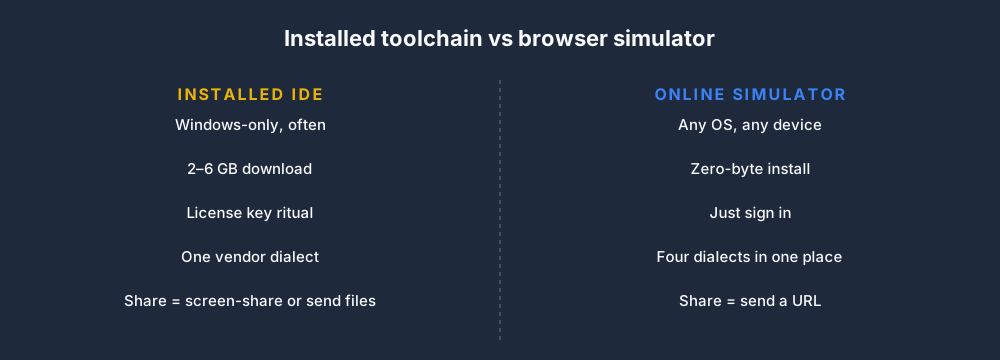
Installed toolchain vs browser simulator

Four wins for browser-first:

  • It works on any OS. If your laptop is a Mac, or your Chromebook was the cheapest thing on offer, or you want to squeeze in 20 minutes on an iPad on a train, none of the vendor IDEs will talk to you. A browser simulator doesn't care.
  • There is no install ritual. RSLogix 5000 is 2.5 GB before you add the license manager. TIA Portal is north of 6 GB. Students reliably lose a day of course time on activation servers, license dongles, and firewall rules. An online tool skips all of it.
  • Sharing a program is a URL. Teaching? Debugging with a colleague? Grading a cohort? Pasting plcsimulator.com/play/traffic-light?state=... beats zipping up a project directory and hoping the recipient's version matches yours.
  • Updates are invisible. You never open the tool and discover you can't open a project because you're two point-releases behind.

The trade-offs are real, though, and you should know them:

  • No direct hardware I/O. You can't flash code from a browser to a physical PLC. For learning and prototyping, that doesn't matter. For production commissioning, it obviously does.
  • No vendor-specific extensions. Allen-Bradley add-on instructions, Siemens SCL libraries, Delta XINJE co-processor bits — you work in the IEC-61131-3 subset. Good for portability, annoying if your employer standardised on one extension.
  • Offline work depends on service-worker caching. Most online simulators run fine offline after the first load, but none of them pretend to replace a full desktop IDE for field work.

What runs where in a browser-first simulator
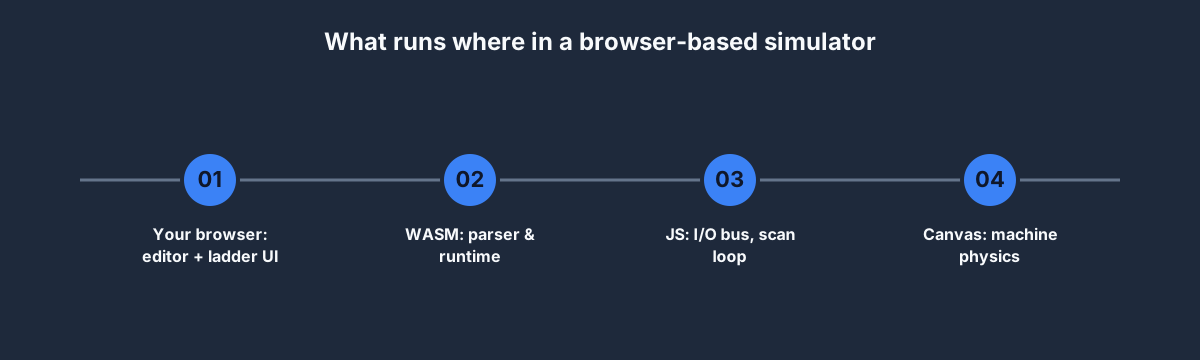
What runs where in a browser-based simulator

A good mental model for how an online PLC simulator works:

  • The editor is React-based and supports nine learning dialects, including IEC 61131-3, Allen-Bradley-style mnemonics, Siemens SCL, Mitsubishi, Omron, KEYENCE, Schneider, Delta and Instruction List. These teach transferable syntax patterns rather than emulating every vendor firmware instruction.
  • The interpreter (parser → AST → bytecode → interpreter) ships as either plain JS or compiled WebAssembly. Ours is JS and fits in about 120 KB gzipped.
  • The I/O bus is an in-memory map of tag-name → current value. The scan loop ticks it at 20 Hz (50 ms per scan — the same cadence Rockwell and Siemens use as a default), the runtime solves the ladder, and the bus publishes changes back.
  • The machine physics run on a separate canvas via Phaser. They subscribe to the I/O bus, react to output changes ("MOTOR_CONTACTOR just went high, so spin the pulley"), and write back any sensor changes ("tank is now full, so FILL_HIGH = 1").
  • Persistence is a plain JSON blob per (user, scenario). A 150-line ladder program serialises to about 12 KB. It syncs on change via a debounced fetch.

If you want to see all of this running, every scenario on this site has a live preview embedded on its public page — for example, the Traffic Light scenario preview boots the scene in your browser, loads the canonical solution ladder, and runs the demo loop. No login required.

Your first rung, live
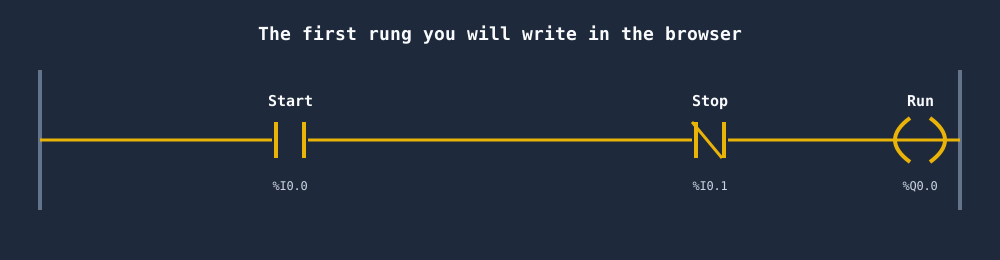
The first rung you will write in the browser

The rung above is the single most-important 5-symbol pattern in PLC programming: start-stop with seal-in. In IEC 61131-3 ladder it reads as:

| Start  Stop                         Run |
|---[ ]---[/]-----------------------( )---|
|   Run                                    |
|---[ ]---+                                |

A well-built online simulator lets you:

  1. Open a scenario (say, Motor Start/Stop).
  2. Type that rung into the editor.
  3. Press Run.
  4. Click the simulated Start button on the canvas.
  5. Watch the motor spin. Let go of Start. Motor keeps spinning because of the seal-in. Press Stop. Motor stops.

That whole loop — from "I have an idea for a rung" to "I saw the motor move in response to my code" — takes about 45 seconds. On installed vendor tooling, the same loop takes closer to 10 minutes for a first-timer once you factor in the project wizard, the tag database, and the download-to-emulator step.

Is a browser simulator the right tool for you?
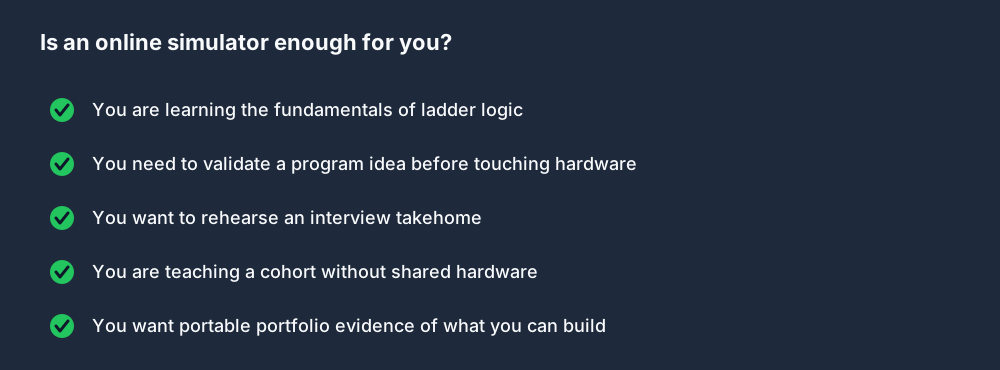
Is an online simulator enough for you?

Browser-first is a yes when:

  • You are learning fundamentals or training a cohort
  • You want to validate a program idea before touching hardware
  • You are rehearsing an interview takehome or a portfolio project
  • Your class or bootcamp lacks the budget for per-student licences

Browser-first is a no (or at least "not alone") when:

  • You are commissioning a physical machine on site — you need vendor tooling that can talk to the PLC
  • You rely on vendor-specific add-on instructions or proprietary function blocks
  • Your employer's change-control policy forbids code outside an approved IDE

For almost every learner, the first case applies. For working engineers, an online simulator complements — not replaces — the vendor IDE.

Five things to look for before committing to one

Not all "online PLC simulators" are built the same. When you're evaluating, check for:

  1. Real IEC 61131-3 parsing — not just pattern-matched examples. A good simulator should accept ST, LD, and ideally SFC, and flag syntax errors with line numbers and sensible messages.
  2. Deterministic scan semantics — input read → logic → output write, once per scan. If the simulator lets outputs change mid-scan, you will learn habits that fail on real hardware.
  3. Automated test cases — you submit a program, the simulator pokes the simulated inputs according to a recipe, and you see pass/fail per assertion. This is the single largest differentiator between "toy" and "teaching tool."
  4. A real solution per scenario — so you can stop, read how a senior engineer would solve it, and learn from diffs. Our simulator ships a canonical solution.iec for every scenario and walks you through it rung-by-rung with commentary.
  5. Persistence and sharing — your program should save across sessions, and you should be able to share a URL that someone else can open and inspect.

If a simulator you're looking at misses any three of those, keep shopping.

How we built ours

Short version: we took the browser-first approach seriously.

  • Parser and runtime are hand-written in TypeScript, ~4,000 lines. Four dialects covered.
  • Physics models are Phaser scenes, one per scenario — 40 of them at launch, from traffic lights through PID temperature control.
  • State persists to a Postgres-backed API with a 50-line Inertia controller.
  • The entire toolchain runs against a single React + Laravel codebase, and every push deploys to production in ~3 minutes.

You're welcome to run the guided first program without an account, then sign up for the free tier with no credit card or trial clock. The source catalogue tags 27 practice records for free-tier access; visibility can vary by entitlement and staged rollout.

FAQ

Is there a free online PLC simulator?

Yes — including ours. The current Free tier includes 27 practice scenarios, 24 learning modules and 54 dialect lessons, with no trial clock. Basic expands access to 60 Free/Basic scenarios; Pro unlocks all 140 published scenarios and the advanced paths. See the live pricing and entitlement comparison.

Can I run an online PLC simulator on an iPad or Chromebook?

Yes. Anything that runs a modern Chromium-based browser will run ours. The editor is touch-friendly; the canvas is responsive.

Does an online simulator support Allen-Bradley or Siemens dialects?

Ours does — plus IEC 61131-3 and Delta. See our dialects comparison post for the syntax map between them.

Can I use an online simulator to prepare for a job interview?

Yes, that's one of the strongest use cases. Run through our interview questions post first, then work through the Junior Controls interview track which packages the simulator scenarios into a rehearsable 6-hour block.

What about OpenPLC?

OpenPLC is an excellent open-source runtime and the industry reference for a free alternative. The gap is on the teaching side — there's no curriculum, no graded test cases, no interview prep, no machine-physics models. It's a runtime; ours is a course. They complement each other if you want to deploy your learning to a Raspberry Pi.

Is browser PLC programming "real"?

Yes. The IEC 61131-3 language your browser executes is the same language your Allen-Bradley or Siemens PLC executes — just on a different machine. Skills, idioms, and debugging intuitions transfer 1:1. We built this simulator precisely because that's true.

Start coding now

You don't need a credit card to write your first rung.

  1. Open the Traffic Light scenario preview — it auto-runs in your browser, no login.
  2. Sign up free when you're ready to start writing your own code.
  3. Work through the complete 12-week course at your own pace.

The only way this doesn't work is if you don't start.
ShareX / TwitterLinkedIn

From reading to running logic

Practice this yourself in the simulator

Start with guided PLC practice in your browser. No install and no credit card required.

Start practising free

Continue learning

Related field notes

All articles
tools
beginner

Best PLC Simulators for Students (Free and Paid)

Compare the best PLC simulators for students in 2026: browser-based, desktop, free, and paid options. Includes OpenPLC, Codesys, LogixPro, and browser simulators.

8 min read
beginner
basics

Basic PLC Programming: The 20 Rungs You Will Use for the Rest of Your Career

Basic PLC programming is a surprisingly small set of patterns — maybe twenty rungs — that appear in almost every real program. Learn them in the right order, in the browser, with automated tests, and you will never have to re-learn the fundamentals.

11 min read
timers
ladder logic

Timers in PLC Programming: TON, TOF, TP Explained

TON, TOF, and TP are the three standard IEC 61131-3 timer function blocks. Learn how each works, when to use each, and how they map to Allen-Bradley and Siemens syntax.

10 min read

Runnable simulator field guide

Online PLC programming simulator guide: implementation, evidence and troubleshooting

Direct answer

Online PLC programming simulator guide becomes useful when it connects user task, device and browser, language, instruction set, scan model, scenario, i/o, persistence, account, export, collaboration, privacy and target compatibility with browser input through editor, parser, runtime scan, modeled i/o, machine response, saved artifact, grader and target-platform recreation, then proves one program created, run, stopped, reset, saved and reopened with repeatable behavior under normal, boundary, fault and recovery conditions. The objective is a repeatable engineering or learning result, not merely activity inside a page or tool.

This guide is written for students, technicians and instructors comparing online PLC editors with installed vendor software and hardware-based practice. The intended result is specific: the reader can choose an online task by language, instruction, scenario, persistence and evidence needs and plan target-platform validation.

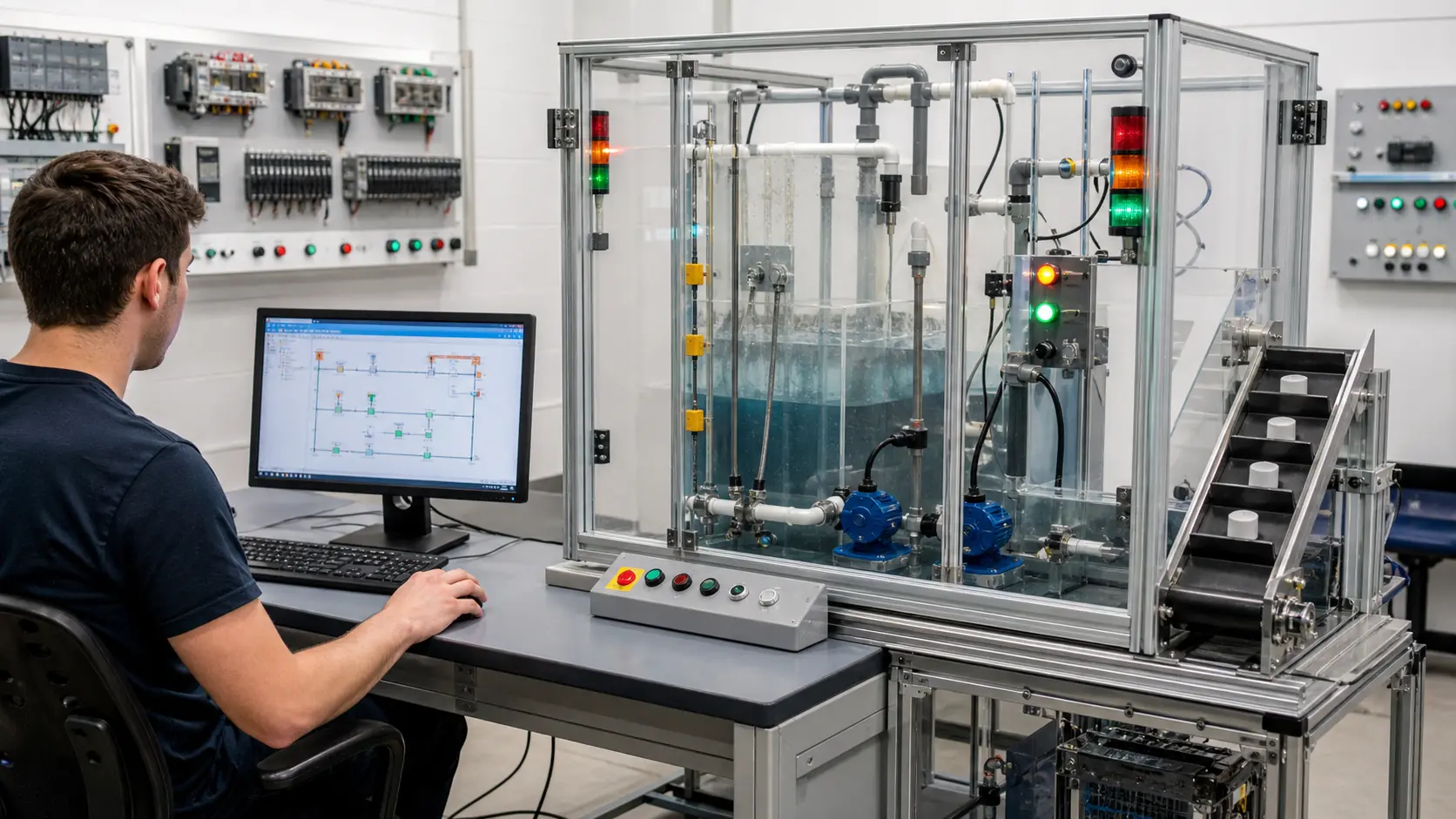
a browser PLC workstation connected to a guarded pump, level and conveyor training rig for repeatable control cases while studying browser PLC programming, simulation and transfer
The scene keeps browser PLC programming, simulation and transfer attached to declared conditions, observable results, diagnostic boundaries and evidence another person can reproduce.

System map / 02

Six concepts that control the result

Treat these as connected checkpoints. Each checkpoint has an expected state, an observable state and a boundary to the next part of the system. That structure prevents a software indication from being mistaken for physical proof.

NODE 01observable

Define the operating contract

user task, device and browser, language, instruction set, scan model, scenario, I/O, persistence, account, export, collaboration, privacy and target compatibility. For browser PLC programming, simulation and transfer, record the initial condition, actor, requested change, observable result and stopping condition before selecting a tool or implementation.

NODE 02observable

Map the evidence path

browser input through editor, parser, runtime scan, modeled I/O, machine response, saved artifact, grader and target-platform recreation. Separate request, internal state, output or service, physical or user-visible result and independent feedback so each boundary can be inspected.

NODE 03observable

Prove normal operation

one program created, run, stopped, reset, saved and reopened with repeatable behavior. Run more than one cycle from a known state and retain the values, timings or artifacts that demonstrate repeatability.

NODE 04observable

Exercise a boundary case

unsupported syntax, browser refresh, lost network, shared device, mobile viewport, invalid program, restart, account limit and export requirement. Choose minimum, maximum, simultaneous, delayed or restart conditions that reveal assumptions hidden by the happy path.

NODE 05observable

Diagnose a controlled fault

an access, browser, editor, parser, runtime, scenario, persistence, account, compatibility or evidence mismatch. Preserve the first symptom, divide the system at a measurable boundary and change one condition only after predicting the result.

NODE 06observable

Transfer and hand over

the same behavior rebuilt and regression-tested in current official engineering software and target hardware. Restore normal state, remove temporary changes, repeat affected checks and document which claims remain limited to the learning environment.

Procedure / 03

A six-step practice and commissioning workflow

Run the steps in order the first time. Later, the same structure becomes a diagnostic loop: define the expected condition, observe the boundary, interpret the difference and choose one proving action.

  1. 01

    Write the acceptance case

    Convert user task, device and browser, language, instruction set, scan model, scenario, i/o, persistence, account, export, collaboration, privacy and target compatibility into initial conditions, one stimulus and observable pass criteria.

    Evidence: Another person can repeat the case without guessing the intended result.

    Avoid: Using page completion or an animation as the acceptance criterion.

  2. 02

    Build the map

    Document browser input through editor, parser, runtime scan, modeled i/o, machine response, saved artifact, grader and target-platform recreation and name who owns each state or decision.

    Evidence: Every request and result has a source, destination and useful inspection point.

    Avoid: Using the same value as command, status and independent feedback.

  3. 03

    Run the baseline

    Apply one program created, run, stopped, reset, saved and reopened with repeatable behavior from a clean start and record the expected evidence.

    Evidence: Repeated runs produce the same bounded result.

    Avoid: Changing several parameters before a baseline exists.

  4. 04

    Challenge assumptions

    Test unsupported syntax, browser refresh, lost network, shared device, mobile viewport, invalid program, restart, account limit and export requirement without changing the acceptance contract.

    Evidence: Limits, timing and restart behavior reach defined states.

    Avoid: Testing only one ideal sequence.

  5. 05

    Isolate one failure

    Introduce or analyse an access, browser, editor, parser, runtime, scenario, persistence, account, compatibility or evidence mismatch and locate the first disagreement.

    Evidence: The proving action distinguishes the leading hypotheses.

    Avoid: Resetting, forcing or replacing before evidence is retained.

  6. 06

    Close the evidence loop

    Complete the same behavior rebuilt and regression-tested in current official engineering software and target hardware and repeat the affected regression cases.

    Evidence: A run is complete only when the requested behavior, stop behavior, fault response and recovery are observable from a fresh initial condition.

    Avoid: Treating an acknowledged message or one successful rerun as handover.

Diagnostic matrix / 04

Symptoms, proving points and next actions

The table is a reasoning aid, not a parts-replacement chart. Preserve the initial symptom, inspect the named boundary and use the interpretation to choose the next controlled test. Site safety procedures and equipment manuals remain authoritative.

Diagnostic symptoms, inspection points, interpretations and next actions for Online PLC programming simulator guide: implementation, evidence and troubleshooting
Observed symptomInspectInterpretationNext proving action
The expected result is unclearRequirement, initial state, actor, stimulus, units and pass conditionThe operator, programmer and reviewer may be solving different versions of the task.Rewrite one observable acceptance case before continuing.
Internal state changes but the outcome does notRequest, final owner, output or service boundary and independent feedbackA software or interface indication proves intent at one layer, not the complete outcome.Trace the first boundary after the changing state.
Normal case passes but an edge case failsLimits, timing, simultaneous events, reset and restart assumptionsThe implementation contains a hidden assumption exposed by the changed condition.Add the failed boundary as a permanent regression case.
The failure disappears after resetOriginal symptom, histories, diagnostics, timestamps and active causeReset changed evidence or state without proving the initiating cause.Reproduce under a controlled condition and preserve pre/post-event data.
Simulator and target disagreeModel boundary, software version, task timing, I/O behavior, data types and configurationA learning model and the intended target do not share one of the recorded assumptions.Reduce the case and verify against current target documentation.
The result cannot be explainedPrediction, observation, proving action, alternative hypotheses and limitationsActivity occurred but the evidence is not yet transferable or reviewable.Have the learner defend the signal path and repeat a changed case.

Product evidence / 05

What the browser practice can actually demonstrate

The browser runtime joins editable control state to visible I/O and machine or process behavior, allowing the same initial conditions and stimuli to be replayed.

Where simulation stops

Browser access does not imply offline use, native project import, complete vendor instruction support, firmware emulation, physical I/O or production validation.

Commissioning notebook / 06

Six cases that turn the concepts into evidence

Use these as written briefs rather than click-through instructions. For every case, state the expected condition before acting, retain the first useful observation and explain why the final result proves the requirement. A different program or component choice can still be correct when it produces the same bounded behavior and evidence.

Case 01

predict → observe → prove

Prove define the operating contract

Engineering context. user task, device and browser, language, instruction set, scan model, scenario, I/O, persistence, account, export, collaboration, privacy and target compatibility. For browser PLC programming, simulation and transfer, record the initial condition, actor, requested change, observable result and stopping condition before selecting a tool or implementation. Begin with a written normal condition and identify which request, state, physical result or communication value will provide independent confirmation. Do not begin by changing the configuration; the initial state is part of the evidence and should remain reproducible.

Controlled setup. Use the “Write the acceptance case” stage of the workflow: convert user task, device and browser, language, instruction set, scan model, scenario, i/o, persistence, account, export, collaboration, privacy and target compatibility into initial conditions, one stimulus and observable pass criteria. The acceptance record should show this result: another person can repeat the case without guessing the intended result. Record initial conditions, the exact stimulus and the observation point so another learner can repeat the case without relying on your memory.

Fault challenge. Introduce or analyse “The expected result is unclear” as one bounded deviation. Inspect requirement, initial state, actor, stimulus, units and pass condition The working interpretation is that the operator, programmer and reviewer may be solving different versions of the task. The next proving action is to rewrite one observable acceptance case before continuing. Change only one condition before observing the result, and preserve timestamps or measurements where timing matters.

Review and recovery. The most common trap here is using page completion or an animation as the acceptance criterion. After restoring the cause, repeat the normal case and at least one stop, timeout, disconnect or restart boundary relevant to this topic. Remove temporary forces and bypasses, return the model to a known state and retain the evidence that both operation and recovery are deliberate.

Explain it aloud: Can PLC programming be practised online? A defensible short answer is: Yes for supported languages, instructions and modeled scenarios. Check persistence, access, browser and target-compatibility boundaries before relying on a tool.

Case 02

predict → observe → prove

Prove map the evidence path

Engineering context. browser input through editor, parser, runtime scan, modeled I/O, machine response, saved artifact, grader and target-platform recreation. Separate request, internal state, output or service, physical or user-visible result and independent feedback so each boundary can be inspected. Begin with a written normal condition and identify which request, state, physical result or communication value will provide independent confirmation. Do not begin by changing the configuration; the initial state is part of the evidence and should remain reproducible.

Controlled setup. Use the “Build the map” stage of the workflow: document browser input through editor, parser, runtime scan, modeled i/o, machine response, saved artifact, grader and target-platform recreation and name who owns each state or decision. The acceptance record should show this result: every request and result has a source, destination and useful inspection point. Record initial conditions, the exact stimulus and the observation point so another learner can repeat the case without relying on your memory.

Fault challenge. Introduce or analyse “Internal state changes but the outcome does not” as one bounded deviation. Inspect request, final owner, output or service boundary and independent feedback The working interpretation is that a software or interface indication proves intent at one layer, not the complete outcome. The next proving action is to trace the first boundary after the changing state. Change only one condition before observing the result, and preserve timestamps or measurements where timing matters.

Review and recovery. The most common trap here is using the same value as command, status and independent feedback. After restoring the cause, repeat the normal case and at least one stop, timeout, disconnect or restart boundary relevant to this topic. Remove temporary forces and bypasses, return the model to a known state and retain the evidence that both operation and recovery are deliberate.

Explain it aloud: Does an online PLC simulator replace vendor software? A defensible short answer is: No. It supports transferable learning and behavioral tests; native projects, exact runtime details and hardware commissioning need the official environment.

Case 03

predict → observe → prove

Prove prove normal operation

Engineering context. one program created, run, stopped, reset, saved and reopened with repeatable behavior. Run more than one cycle from a known state and retain the values, timings or artifacts that demonstrate repeatability. Begin with a written normal condition and identify which request, state, physical result or communication value will provide independent confirmation. Do not begin by changing the configuration; the initial state is part of the evidence and should remain reproducible.

Controlled setup. Use the “Run the baseline” stage of the workflow: apply one program created, run, stopped, reset, saved and reopened with repeatable behavior from a clean start and record the expected evidence. The acceptance record should show this result: repeated runs produce the same bounded result. Record initial conditions, the exact stimulus and the observation point so another learner can repeat the case without relying on your memory.

Fault challenge. Introduce or analyse “Normal case passes but an edge case fails” as one bounded deviation. Inspect limits, timing, simultaneous events, reset and restart assumptions The working interpretation is that the implementation contains a hidden assumption exposed by the changed condition. The next proving action is to add the failed boundary as a permanent regression case. Change only one condition before observing the result, and preserve timestamps or measurements where timing matters.

Review and recovery. The most common trap here is changing several parameters before a baseline exists. After restoring the cause, repeat the normal case and at least one stop, timeout, disconnect or restart boundary relevant to this topic. Remove temporary forces and bypasses, return the model to a known state and retain the evidence that both operation and recovery are deliberate.

Explain it aloud: What should I learn first about browser PLC programming, simulation and transfer? A defensible short answer is: Start with the operating contract and evidence path: user task, device and browser, language, instruction set, scan model, scenario, i/o, persistence, account, export, collaboration, privacy and target compatibility, followed by browser input through editor, parser, runtime scan, modeled i/o, machine response, saved artifact, grader and target-platform recreation. Add advanced features only after the baseline is predictable.

Case 04

predict → observe → prove

Prove exercise a boundary case

Engineering context. unsupported syntax, browser refresh, lost network, shared device, mobile viewport, invalid program, restart, account limit and export requirement. Choose minimum, maximum, simultaneous, delayed or restart conditions that reveal assumptions hidden by the happy path. Begin with a written normal condition and identify which request, state, physical result or communication value will provide independent confirmation. Do not begin by changing the configuration; the initial state is part of the evidence and should remain reproducible.

Controlled setup. Use the “Challenge assumptions” stage of the workflow: test unsupported syntax, browser refresh, lost network, shared device, mobile viewport, invalid program, restart, account limit and export requirement without changing the acceptance contract. The acceptance record should show this result: limits, timing and restart behavior reach defined states. Record initial conditions, the exact stimulus and the observation point so another learner can repeat the case without relying on your memory.

Fault challenge. Introduce or analyse “The failure disappears after reset” as one bounded deviation. Inspect original symptom, histories, diagnostics, timestamps and active cause The working interpretation is that reset changed evidence or state without proving the initiating cause. The next proving action is to reproduce under a controlled condition and preserve pre/post-event data. Change only one condition before observing the result, and preserve timestamps or measurements where timing matters.

Review and recovery. The most common trap here is testing only one ideal sequence. After restoring the cause, repeat the normal case and at least one stop, timeout, disconnect or restart boundary relevant to this topic. Remove temporary forces and bypasses, return the model to a known state and retain the evidence that both operation and recovery are deliberate.

Explain it aloud: How do I practise browser PLC programming, simulation and transfer effectively? A defensible short answer is: Use short cases with known initial conditions, a written prediction, one action and an observable result. Then alter a boundary or fault and explain why the evidence changed.

Case 05

predict → observe → prove

Prove diagnose a controlled fault

Engineering context. an access, browser, editor, parser, runtime, scenario, persistence, account, compatibility or evidence mismatch. Preserve the first symptom, divide the system at a measurable boundary and change one condition only after predicting the result. Begin with a written normal condition and identify which request, state, physical result or communication value will provide independent confirmation. Do not begin by changing the configuration; the initial state is part of the evidence and should remain reproducible.

Controlled setup. Use the “Isolate one failure” stage of the workflow: introduce or analyse an access, browser, editor, parser, runtime, scenario, persistence, account, compatibility or evidence mismatch and locate the first disagreement. The acceptance record should show this result: the proving action distinguishes the leading hypotheses. Record initial conditions, the exact stimulus and the observation point so another learner can repeat the case without relying on your memory.

Fault challenge. Introduce or analyse “Simulator and target disagree” as one bounded deviation. Inspect model boundary, software version, task timing, I/O behavior, data types and configuration The working interpretation is that a learning model and the intended target do not share one of the recorded assumptions. The next proving action is to reduce the case and verify against current target documentation. Change only one condition before observing the result, and preserve timestamps or measurements where timing matters.

Review and recovery. The most common trap here is resetting, forcing or replacing before evidence is retained. After restoring the cause, repeat the normal case and at least one stop, timeout, disconnect or restart boundary relevant to this topic. Remove temporary forces and bypasses, return the model to a known state and retain the evidence that both operation and recovery are deliberate.

Explain it aloud: What counts as proof of competence? A defensible short answer is: A repeatable artifact or system result plus an explanation of the signal path is stronger than time spent, screenshots or a copied answer. Physical competence requires separate supervised evidence.

Case 06

predict → observe → prove

Prove transfer and hand over

Engineering context. the same behavior rebuilt and regression-tested in current official engineering software and target hardware. Restore normal state, remove temporary changes, repeat affected checks and document which claims remain limited to the learning environment. Begin with a written normal condition and identify which request, state, physical result or communication value will provide independent confirmation. Do not begin by changing the configuration; the initial state is part of the evidence and should remain reproducible.

Controlled setup. Use the “Close the evidence loop” stage of the workflow: complete the same behavior rebuilt and regression-tested in current official engineering software and target hardware and repeat the affected regression cases. The acceptance record should show this result: a run is complete only when the requested behavior, stop behavior, fault response and recovery are observable from a fresh initial condition. Record initial conditions, the exact stimulus and the observation point so another learner can repeat the case without relying on your memory.

Fault challenge. Introduce or analyse “The result cannot be explained” as one bounded deviation. Inspect prediction, observation, proving action, alternative hypotheses and limitations The working interpretation is that activity occurred but the evidence is not yet transferable or reviewable. The next proving action is to have the learner defend the signal path and repeat a changed case. Change only one condition before observing the result, and preserve timestamps or measurements where timing matters.

Review and recovery. The most common trap here is treating an acknowledged message or one successful rerun as handover. After restoring the cause, repeat the normal case and at least one stop, timeout, disconnect or restart boundary relevant to this topic. Remove temporary forces and bypasses, return the model to a known state and retain the evidence that both operation and recovery are deliberate.

Explain it aloud: Why test faults and restart behavior? A defensible short answer is: Because an access, browser, editor, parser, runtime, scenario, persistence, account, compatibility or evidence mismatch or unsupported syntax, browser refresh, lost network, shared device, mobile viewport, invalid program, restart, account limit and export requirement can expose assumptions that never appear during ideal startup and steady operation.

Answer surface / 07

Questions people ask about Online PLC programming simulator guide

These concise answers define the operating, training and product boundaries most often missed in broad summaries. The full workflow and diagnostic table above provide the evidence behind them.

Can PLC programming be practised online?

Yes for supported languages, instructions and modeled scenarios. Check persistence, access, browser and target-compatibility boundaries before relying on a tool.

Does an online PLC simulator replace vendor software?

No. It supports transferable learning and behavioral tests; native projects, exact runtime details and hardware commissioning need the official environment.

What should I learn first about browser PLC programming, simulation and transfer?

Start with the operating contract and evidence path: user task, device and browser, language, instruction set, scan model, scenario, i/o, persistence, account, export, collaboration, privacy and target compatibility, followed by browser input through editor, parser, runtime scan, modeled i/o, machine response, saved artifact, grader and target-platform recreation. Add advanced features only after the baseline is predictable.

How do I practise browser PLC programming, simulation and transfer effectively?

Use short cases with known initial conditions, a written prediction, one action and an observable result. Then alter a boundary or fault and explain why the evidence changed.

What counts as proof of competence?

A repeatable artifact or system result plus an explanation of the signal path is stronger than time spent, screenshots or a copied answer. Physical competence requires separate supervised evidence.

Why test faults and restart behavior?

Because an access, browser, editor, parser, runtime, scenario, persistence, account, compatibility or evidence mismatch or unsupported syntax, browser refresh, lost network, shared device, mobile viewport, invalid program, restart, account limit and export requirement can expose assumptions that never appear during ideal startup and steady operation.

Can browser practice replace official software or hardware?

No. It can build concepts and diagnostic reasoning. Exact firmware, I/O electrical behavior, networking, safety and commissioning require current official tools, documentation and target equipment.

How should progress be documented?

Keep the requirement, initial state, program or configuration, observed values, fault hypothesis, proving action, recovery result and a concise limitations statement.