PLC Simulator
CODESYS alternative

CODESYS Alternative for Browser-Based IEC 61131-3 Practice

CODESYS is a professional IEC 61131-3 engineering platform. This independent comparison shows where a no-install, scored browser exercise is useful—and where only CODESYS and its supported runtimes can do the job.

Join 13400+ learners practicing PLC programming

Real CODESYS PLC simulator footage

See this exact skill in the working simulator.

Watch the real browser product respond to the task on this page, then try the same practical workflow yourself. No slides, concept mockups, install, or credit card.

Try this in the browser
CODESYS Simulator Alternative — Browser PLC Practice Compared

Choose the tool for the job

Browser practice and CODESYS engineering are different layers

These views separate concept practice from target configuration, field I/O mapping, runtime deployment and machine commissioning so the comparison stays technically honest.

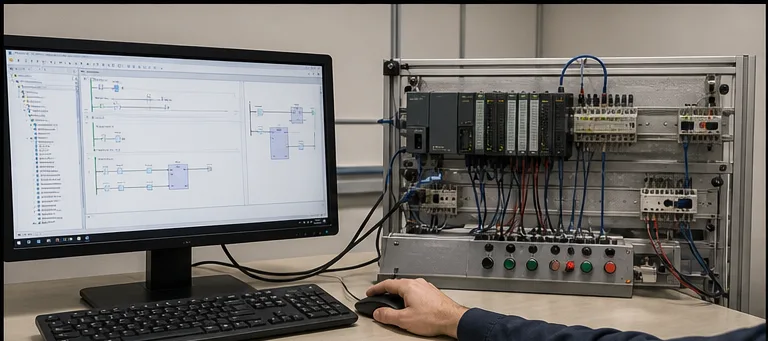
IEC 61131-3 engineering workstation connected to a compact PLC and I/O training panel
01A professional engineering environment manages projects, tasks, devices, libraries and deployment—not only the ladder editor.
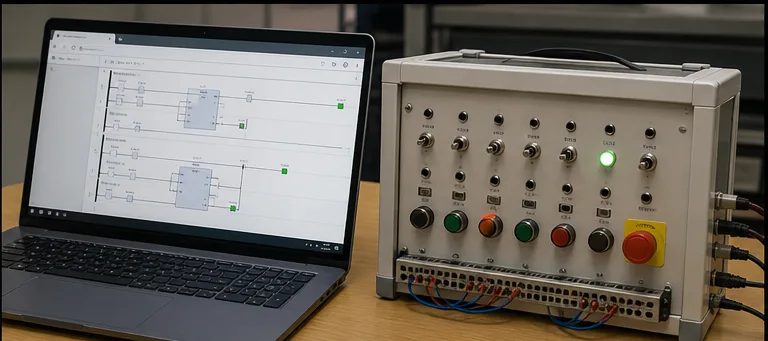
Browser-based ladder-logic practice running beside a switch and light PLC training panel
02Browser practice reduces setup friction for a first exercise, while deliberately leaving vendor deployment and hardware configuration out of scope.
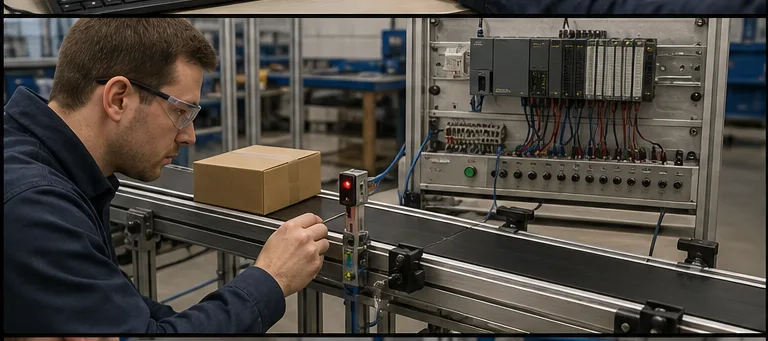
Technician testing an on-delay timer with a conveyor photoelectric sensor and PLC input hardware
03A timer makes sense in context: the sensor state enables the block, elapsed time accumulates, then Q changes the machine sequence.
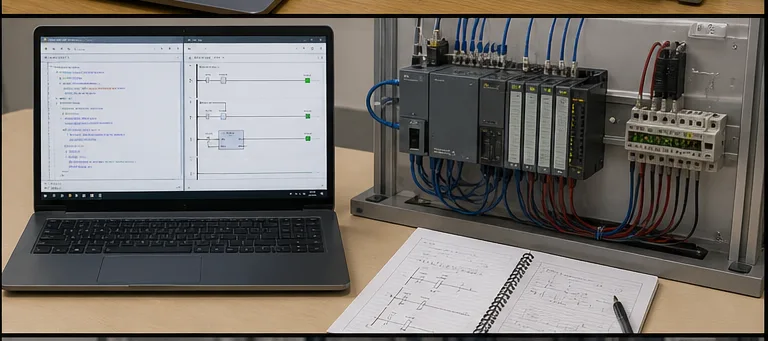
Ladder diagram and Structured Text study setup beside industrial PLC I/O hardware
04IEC 61131-3 concepts span multiple languages, but syntax, libraries and execution details still depend on the selected environment and target.
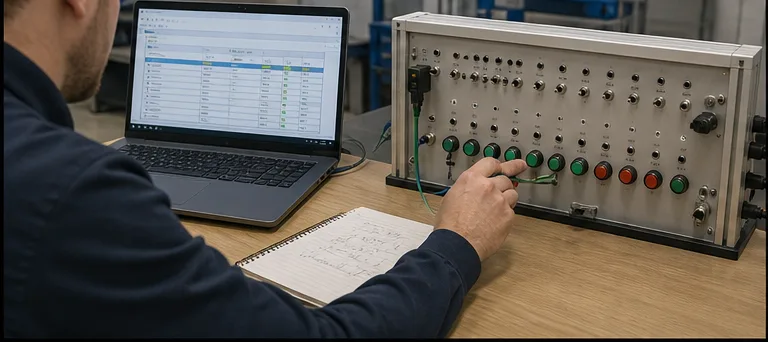
Engineer mapping controller variables to switches and indicators on an industrial training panel
05Variable-to-I/O mapping is where abstract program data becomes a physical channel; a browser-only exercise cannot commission that target mapping.
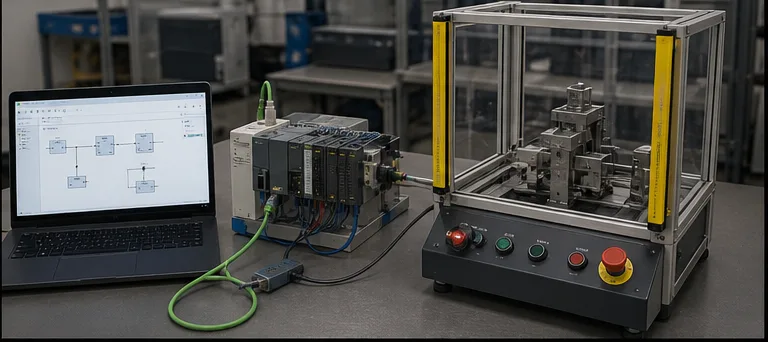
PLC, engineering laptop and guarded tabletop machine prepared for controlled commissioning tests
06Production commissioning adds communications, device configuration, controlled tests and safety validation beyond logic simulation.
Browser-based IEC 61131-3 ladder and structured-text practice compared with the CODESYS engineering workflow
Browser practice reduces setup for a learning exercise; CODESYS remains the target engineering and deployment environment.

Opening honesty

CODESYS is a professional engineering platform.

CODESYS implements IEC 61131-3 editors, libraries, device configuration and deployment for supported controllers and SoftPLCs. If your target is a CODESYS-based device, learn the real Development System and the correct target documentation. This page is about a lower-friction place to practise control concepts first—not a claim that every IEC vendor uses the same engine.

A browser-based IEC 61131-3 PLC simulator running on any OS with no install and no 2-hour demo limit — a free no-install alternative to the CODESYS SoftPLC for learning ladder logic and structured textA web browser window running a PLC ladder logic simulator with an input/output strip, requiring no installation or download.plcsimulator.app/playno installINPUTSOUTPUTS
A browser-based Codesys alternative — editor, simulation, and scoring in one tab, no Windows install.

Background

What Codesys is

CODESYS Development System V3 is an IEC 61131-3 programming tool for industrial controllers. CODESYS states that the Development System is free to download and that its setup includes a demo version of CODESYS Control Win SL. Current product requirements list supported Windows versions for the V3 engineering system.

CODESYS technology is available across many manufacturer devices and target runtimes, but support is product-specific. Separately developed IEC 61131-3 tools can share languages and concepts without being CODESYS. Verify the exact controller, engineering software and runtime rather than inferring compatibility from the IEC label alone.

The Development System download is free. Permanent runtime licensing depends on the selected SoftPLC, target and application scope; current CODESYS application-based licensing considers factors such as I/O channels, fieldbus networks and code size.

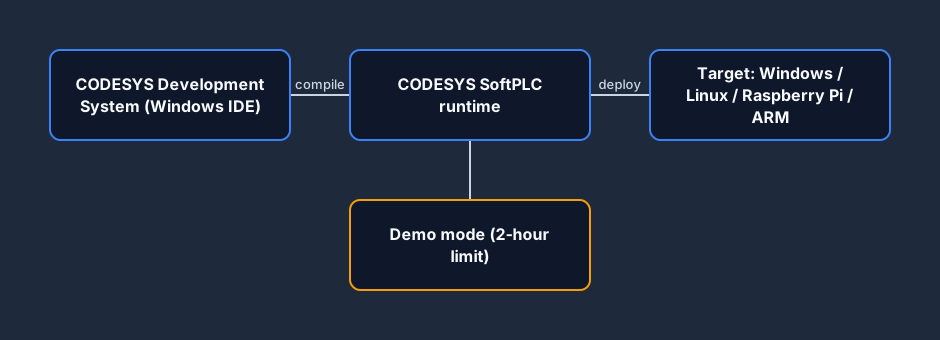
CODESYS architecture diagram: the CODESYS Development System IDE compiles to the SoftPLC runtime, which deploys to a Windows, Linux, Raspberry Pi or ARM target, with a 2-hour demo-mode limit
CODESYS: Windows IDE → SoftPLC runtime → real target. Demo mode stops after two hours.
PLC architecture behind CODESYS and IEC 61131-3 — CPU, scanned digital and analog I/O, and program memory — the same model a browser-based Codesys alternative teaches without a SoftPLC runtimeA modular PLC rack on a backplane: power supply, CPU processor, input module, output module and a communications module side by side.PLC RACKbackplane busPSUPowerCPUProcessorDIInputDOOutputNETComms
A common PLC mental model—CPU, program memory and I/O images—before target-specific task and device details.

By contrast

A browser tool — nothing to install

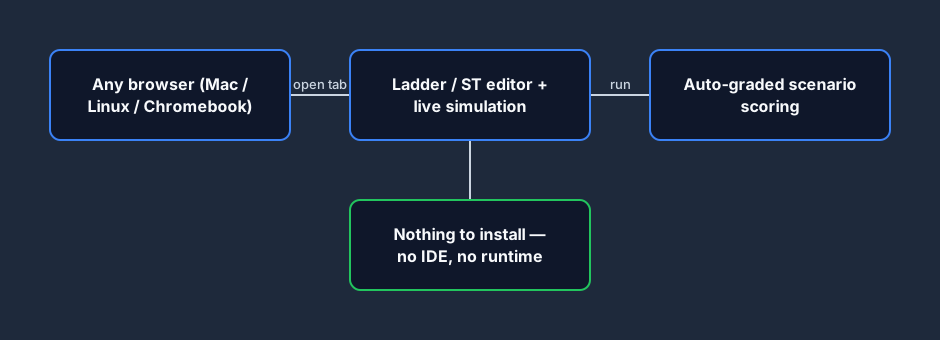
Where CODESYS layers an IDE on top of a runtime on top of a target, a browser-based tool collapses that stack into a single tab. The editor, the live simulation, and the auto-grader all run in the browser — so a learner on a Mac, Linux box, or Chromebook is writing their first rung in seconds, with no install and no demo-mode countdown.

Browser IEC 61131-3 tool architecture: the ladder and structured text editor, live simulation, and auto-graded scoring all run in the browser tab with no IDE or runtime to install
The browser tool: editor, simulation, and scoring in one tab — no IDE, no runtime, any OS.
The PLC scan cycle — read inputs, execute logic, update outputs — runs continuously in a browser-based Codesys alternative with no 2-hour SoftPLC demo cut-offThe repeating PLC scan cycle: read inputs, execute the ladder logic, update outputs, then housekeeping, looping continuously.1Read Inputs2Execute Logic3Update Outputs4HousekeepingSCANCYCLE
The read-solve-write scan runs uninterrupted in the browser — no demo-mode countdown.

Strengths

What Codesys does well

Broad IEC 61131-3 coverage

CODESYS provides LD, FBD, ST and SFC editors plus libraries, device configuration and task execution. Legacy IL can be enabled where required but is no longer maintained.

Industrial device ecosystem

CODESYS supplies target runtimes and device integration across multiple manufacturers and platforms. Compatibility remains controller- and runtime-specific.

Deployable runtimes

Unlike a learning-only browser simulator, supported CODESYS SoftPLCs can execute on licensed Windows, Linux, ARM and other target environments.

The five IEC 61131-3 languages CODESYS implements — Ladder Diagram, Function Block Diagram, Structured Text, Sequential Function Chart, and Instruction List — the same standard a browser Codesys alternative trainsThe five IEC 61131-3 PLC programming languages as chips: Ladder Diagram, Function Block Diagram, Structured Text, Instruction List and Sequential Function Chart.IEC 61131-3 — five languagesLDLadder DiagramFBDFunction BlockSTStructured TextILInstruction ListSFCSequential Func. Chart
CODESYS supports the IEC language family; legacy IL is obsolete and is not maintained by default.

Learner friction

Where Codesys slows a first-time learner

Windows-only IDE

The Codesys IDE does not run on Mac, Linux, or Chromebook natively. The workaround is a Windows VM and its own cost and complexity.

Two-hour unlicensed runtime

CODESYS Control Win SL documentation says demo operation stops after two hours and then requires a manual restart; other runtimes and licenses must be checked separately.

Engineering setup comes first

Targets, devices, tasks, I/O and libraries are necessary production concepts, but they add decisions before a beginner reaches the first machine exercise.

Training is not its primary job

CODESYS provides the engineering workbench. A course, exercise library and assessment layer must come from training materials or another product.

Vendor-neutral, not vendor-identical

IEC concepts are portable at a high level; vendor extensions, libraries, device models and runtime rules still require platform-specific learning.

Feature comparison

Codesys SoftPLC vs plcsimulationsoftware.com

FeatureCodesysOurs
IDE platformWindows onlyAny browser
Runtime platformWindows, Linux, Raspberry Pi, ARMBrowser only
IDE priceFreeFree tier + Pro monthly
Runtime demo limitControl Win SL demo: 2 hours, then restartNot governed by a CODESYS runtime timer
Local installDevelopment System and target packagesNone for the browser exercise
Learning conventionsIEC editors plus target/vendor extensionsIEC, AB-style and Siemens-style learning dialects
Scored scenariosRequires separate training content170 published catalog records
Interview-timerNoYes (Pro)
Portfolio PDF exportNoYes (Pro)
Real-hardware targetsYes (Pi, BeagleBone, etc.)No

Use Codesys if…

  • You need a professional IEC 61131-3 engineering environment.
  • Your target device or runtime is documented as CODESYS-compatible.
  • You want to deploy to a supported physical or virtual controller.
  • You are comfortable with the IDE ramp and Windows requirement.
  • You can use the demo runtime boundary or have the appropriate license.

Use us if…

  • You want an "open-browser-and-practise" experience.
  • You are on Mac, Linux, or Chromebook.
  • You want scored scenarios with immediate feedback.
  • You want to bounce between IEC, AB, and Siemens dialects.
  • You are prepping for interviews in the next 4 weeks.
  • You want practice that is independent of the Control Win SL demo timer.

IEC 61131-3 scenarios

IEC-style practice before a real CODESYS project

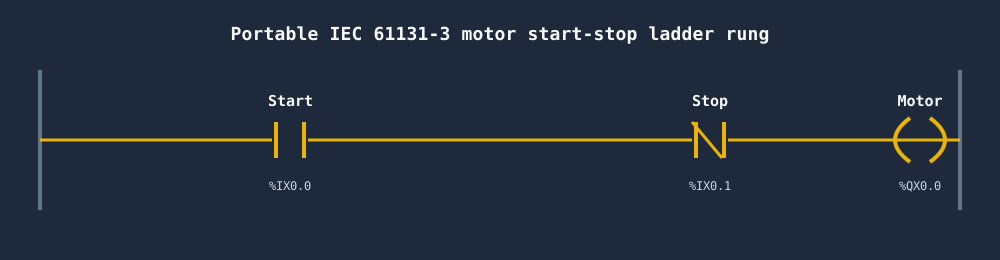
Contacts, coils, seal-in logic, timers and Structured Text expressions build a useful mental model before CODESYS. They do not make a portable project by themselves. Expect to recreate tags, tasks, I/O mapping, libraries and target configuration in the real Development System. Here is the classic motor start-stop behavior to reason through.

Portable IEC 61131-3 motor start-stop seal-in ladder rung with a Start contact, normally-closed Stop contact, and Motor coil — the portable core that transfers from a browser tool to CODESYS
A start-stop seal-in pattern expressed with IEC-style addressing; recreate and test it against the target project configuration.
Three-wire start-stop seal-in latch in portable IEC 61131-3 ladder logic — Start, normally-closed Stop, and a Motor coil with a holding contact — built in a browser Codesys alternative and transferable to the CODESYS IDEA seal-in latch rung: a Start contact in parallel with a Hold contact, in series with a normally-closed Stop contact, driving an output coil.StartHold (seal)StopMotor
The seal-in holding-contact concept; exact symbols, variables and task behavior must be verified in the target project.

Traffic Light

Sequencing — the textbook IEC SFC scenario.

View scenario →

PID Temperature

Structured text PID loop with Kp/Ki/Kd tuning.

View scenario →

Elevator

Full state machine — maps cleanly to IEC state patterns.

View scenario →

Batch Mixer

Recipe-driven sequencing — matches Codesys library patterns.

View scenario →

Motor Start / Stop

Three-wire control with seal-in — the classic first rung.

View scenario →

Tank Fill

Level sensor, valve, pump, overflow alarm — water/process staple.

View scenario →
An IEC 61131-3 TON on-delay timer with its IN, PT preset, ET elapsed, and Q output — the standard timer block used in scored scenarios on a browser Codesys alternative that transfers straight to CODESYSA TON on-delay timer: the accumulated time bar ramps up toward the preset value, and the done (DN) bit turns on when the accumulator reaches preset.TONPRE 5000ACCACC ramps to PREPREDNdone bit
Standard timer concepts graded here; use the CODESYS Standard library documentation for exact block behavior.

Third options

Other honest options

A browser tool is not the only choice. If you are weighing Codesys alternatives for real-hardware work rather than learning, these open-source options are worth a look.

  • OpenPLC — fully open-source IEC 61131-3 runtime + editor. Best for real-hardware experiments on Raspberry Pi and Arduino.
  • Beremiz — another open-source IEC 61131-3 IDE; shares the Matiec compiler with OpenPLC.
  • Beckhoff TwinCAT — a separate Beckhoff IEC 61131-3 engineering and runtime platform; evaluate it when the target is EtherCAT- and PC-control-centric.

Online simulation

Using this as a Codesys PLC Simulator online

Searches for a Codesys PLC simulator usually mean one of two things: you want to simulate IEC 61131-3 logic without installing the full Codesys IDE, or you want to practice on a machine where the Codesys SoftPLC will not run (Mac, Linux, Chromebook, locked corporate Windows). Both use cases are what this browser simulator was built for.

The browser editor covers representative contacts, coils, timers, counters, edges, comparisons and Structured Text expressions. It does not guarantee identical behavior across CODESYS libraries, versions or targets. Rebuild and test the logic inside the real project, including addressing, tasks, persistence and device I/O.

The key difference from Codesys's own SoftPLC is the starting point: no IDE to configure, no task scheduler to wire up, no demo-mode two-hour countdown. Open the scenario, write the rung, run the test harness. For learners who just want to practice IEC logic, that friction removal matters.

IEC 61131-3 Structured Text concepts in a browser exercise, with IF and assignment logic to verify later in the CODESYS target projectA small Structured Text code block in an editor: an IF/THEN condition, a TON timer call and assignments, showing text-based PLC programming.main.st — Structured Text1IF Start AND NOT Stop THEN2 Run := TRUE;3END_IF;4DelayTmr(IN := Run, PT := T#5s);5Lamp := DelayTmr.Q;
Structured Text concepts in the browser; verify supported syntax, types and libraries in CODESYS.
Questions

Codesys alternative FAQ

CODESYS Development System can be downloaded free of charge. Its setup includes a demo version of CODESYS Control Win SL; official store documentation says the unlicensed runtime operates for two hours and then requires a manual restart. Permanent runtime licensing depends on the target and application scope, so check the current CODESYS Store rather than relying on a generic price range.

Reviewed August 7, 2026 · Primary references

Product and language claims are checked against the official CODESYS Development System overview, CODESYS Control Win SL licensing details and the current Standard library documentation. This is an independent learning-product comparison, not an emulator endorsed by CODESYS GmbH.

Start IEC practice in a browser.

No Windows install. No 2-hour shutdown. No license file.

Run your first PLC program — no signup →

Software evaluation field guide

CODESYS alternative: evaluation checklist

Direct answer

The evaluator can distinguish learning convenience, language coverage, target support and commissioning needs using the same task.

Written for learners and teams comparing browser practice with CODESYS and other controller-oriented environments.

System map / 02

NODE 01observable

Requirement

The required IEC languages, target, deployment and learning workflow.

NODE 02observable

Test job

Editor, runtime, visualization, I/O and device integration boundaries.

NODE 03observable

Baseline result

One ladder or Structured Text behavior in each environment.

NODE 04observable

Stress case

Offline use, project portability, target timing and library constraints.

NODE 05observable

Failure handling

A syntax, runtime, mapping or target-connection mismatch.

NODE 06observable

Decision record

A current capability matrix and representative proof project.