
PLC Simulator
PLC field notesscada

What Is SCADA? A Plain-English Explainer for PLC Engineers

SCADA — Supervisory Control And Data Acquisition — is the software layer above PLCs that handles visualisation, historians, alarms, and reporting. This post explains what SCADA does, where it ends and the PLC begins, and why learning both together is the right move.

PLC Simulation Software8 min read

What is SCADA? Plain-English explainer for engineers

SCADA stands for Supervisory Control And Data Acquisition. In practice it's the software layer that sits above your PLCs and does the jobs a PLC can't — visualisation for operators, long-term historian storage, alarm routing, and shift-and-compliance reporting.

If you already know what a PLC is, SCADA is "everything a PLC shouldn't do, but somebody has to." If you don't know what a PLC is, start with our what-is-a-PLC explainer first.

The four jobs a SCADA system does
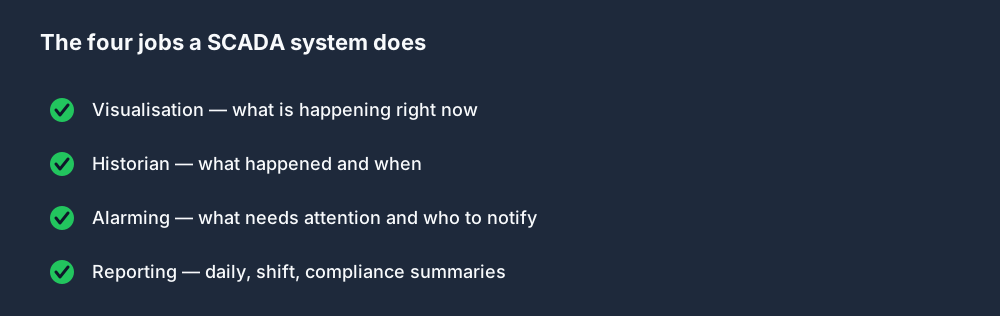
The four jobs a SCADA system does

Every SCADA product (Ignition, Wonderware / AVEVA, FactoryTalk View, iFIX, ScadaBR, OpenSCADA) does some version of four things:

  1. Visualisation. Render dashboards — "here's the tank level, here's the pump status, here's the batch recipe in progress" — for operators to see what's going on right now. Often called the HMI layer.
  2. Historian. Log tag values over time. "What was Tank 3 level at 0347 yesterday" is a SCADA question, not a PLC question.
  3. Alarming. Raise alarms when values exceed thresholds, route them to the right operators, track acknowledgement, escalate if ignored.
  4. Reporting. Generate shift reports, OEE summaries, compliance logs, maintenance schedules. Usually scheduled and emailed automatically.

PLCs don't do any of these. SCADA systems don't do real-time control. Each layer is good at one thing and terrible at the other.

Where SCADA ends and PLC begins
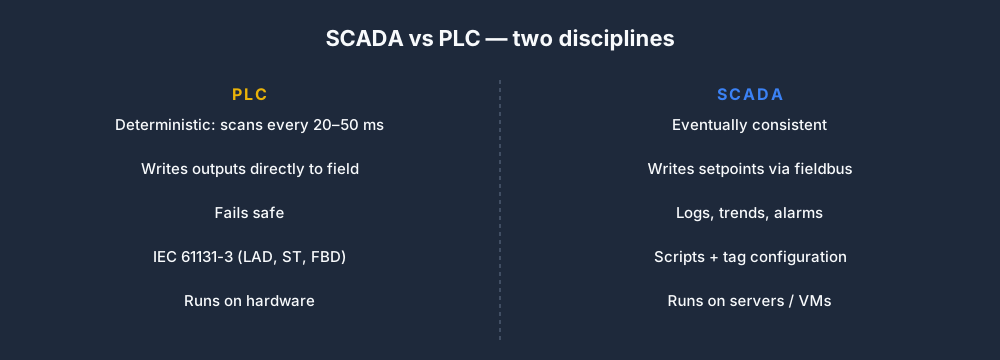
SCADA vs PLC — two disciplines

A useful rule of thumb based on latency:

  • 20 ms decision → PLC. "Close the emergency-stop loop on a limit switch fault."
  • 2 second decision → PLC usually, SCADA can trigger it. "Start the CIP sequence."
  • 2 minute decision → SCADA. "Operator, acknowledge the high-temperature alarm before the batch proceeds."
  • Daily decision → SCADA. "Generate yesterday's production report and email it to the plant manager."

A PLC program must never rely on SCADA being online. A SCADA screen must never rely on seeing every PLC scan. The fieldbus between them (Modbus TCP, Ethernet/IP, Profinet, OPC UA) is the contract.

The stack, top to bottom
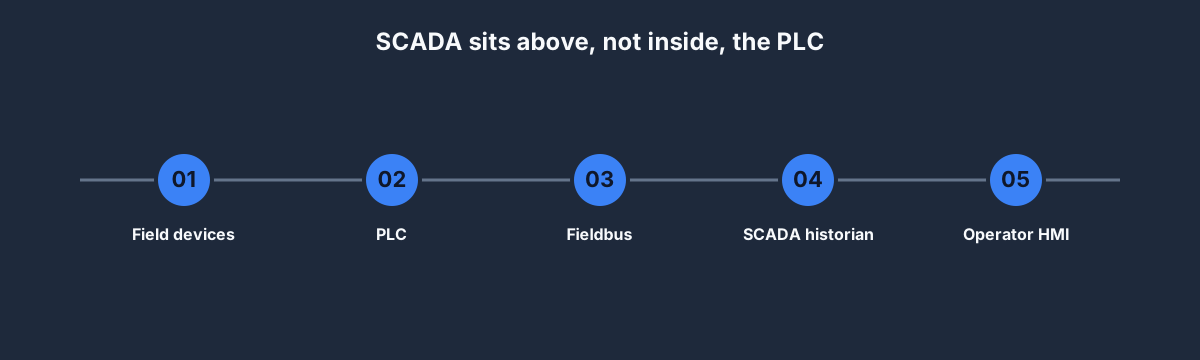
SCADA sits above, not inside, the PLC

  • Operator HMI — the dashboards operators look at. Usually rendered by the SCADA server and streamed to clients.
  • SCADA historian — the database that logs tag values. Stores billions of rows across years. Specialised time-series compression.
  • Fieldbus — Modbus TCP, Ethernet/IP, Profinet, OPC UA. The protocol the SCADA uses to talk to PLCs.
  • PLC — the deterministic controller. Runs the ladder that controls physical machinery.
  • Field devices — the actual sensors and actuators.

SCADA is the top three layers. PLC is the bottom two. The fieldbus is the interface.

Named SCADA products

Four you're likely to meet in 2026:

  • Ignition (Inductive Automation) — growing fast. Free Maker edition for learning. Best first SCADA to learn on your own.
  • AVEVA (ex-Wonderware) InTouch + System Platform — market leader in process industries. Dominant in refineries, pharma, water/wastewater. No free tier.
  • FactoryTalk View (Rockwell) — ubiquitous wherever Rockwell PLCs live. Tight integration with Studio 5000.
  • Siemens WinCC — the Siemens counterpart, bundled into TIA Portal. Common in European automotive and heavy manufacturing.

Our PLC and SCADA training post has the 16-week plan for learning both together — including an Ignition-based hands-on.

Common confusions

SCADA vs HMI. HMI is the display layer (screens, gauges, buttons for operators). SCADA includes HMI plus historian, alarming, reporting. Every SCADA system has an HMI; not every HMI is a SCADA system. For a deeper comparison of how a PLC and an HMI divide responsibilities, see PLC vs HMI.

SCADA vs DCS. DCS (Distributed Control System) is a similar but older concept used in process industries. The lines are blurring — modern Ignition or AVEVA System Platform is often deployed as what used to be a DCS. Don't obsess over the distinction.

SCADA vs MES. MES (Manufacturing Execution System) is above SCADA. It manages work orders, batches, inventory, quality. SCADA gives MES the tag values; MES decides what to do with them business-wise.

SCADA vs IIoT / cloud. IIoT platforms (AWS IoT, Azure IoT, Cumulocity) are a newer layer that sometimes replaces or complements SCADA. For deterministic plant operation you still need SCADA locally; the IIoT layer tends to be where analytics and AI live.

Is SCADA programming or configuration?

Both, and the mix matters. In Ignition:

  • Configuration — tag definitions, screen layouts, alarm thresholds. Done in Designer (Ignition's IDE). 80% of a new engineer's first year.
  • Scripting — Python (Jython 2.7 historically, 3.x going forward). Used for custom reports, unusual alarm logic, database integrations.

In FactoryTalk View and WinCC: similar split, different script languages (VBA-like for FactoryTalk, VBS/C# for WinCC).

Who uses SCADA

Every continuous-process industry. Power generation, water and wastewater, oil and gas, mining, food and beverage, pharmaceuticals, pulp and paper. Much of discrete manufacturing uses SCADA-lite setups or HMI-only solutions because the latency requirements are lower.

If you're targeting roles in process industries, SCADA fluency is mandatory. If you're targeting discrete manufacturing, it's helpful but not blocking.

FAQ

Is SCADA the same as HMI?

No. HMI is the display layer. SCADA includes HMI plus historian, alarming, and reporting. See the confusion section above.

Is SCADA a programming language?

No. SCADA is a category of software. The programming inside a SCADA system is usually configuration (drag-and-drop) with a scripting language (Python, VBS) for custom logic.

What's the best free SCADA to learn?

Ignition Maker Edition. Free for non-commercial use, vendor-supported, free certification. Start there.

How long does SCADA take to learn?

Four weeks for basic visualisation and alarming. Three months to be fluent in one product (Ignition or WinCC). A year or more for deep historian and scripting expertise.

Do I need to know SCADA to be a PLC programmer?

Not strictly, but it plateaus your career. The best PLC engineers can read and modify SCADA screens well enough to know where the data comes from. See our PLC and SCADA training post.

Where to start

  1. Read our PLC and SCADA training post for the full 16-week learning plan.
  2. Install Ignition Maker Edition — free, 15 minutes to install.
  3. Work through Ignition's own "Gateway Setup" tutorial — about two hours.
  4. Come back to our PLC course for the controls half.

SCADA without PLC is a hollow skill. Together, they're an employable one.


Related comparisons: Not sure where the PLC layer ends and SCADA begins? See the SCADA vs PLC breakdown. Confused about SCADA vs HMI? Read SCADA vs HMI — same screen, very different jobs. Evaluating a DCS vs SCADA for a process plant? SCADA vs DCS covers the architectural differences.
ShareX / TwitterLinkedIn

From reading to running logic

Practice this yourself in the simulator

Start with guided PLC practice in your browser. No install and no credit card required.

Start practising free

Continue learning

Related field notes

All articles
wiring
fault finding

How to Learn PLC Panel Wiring & Fault-Finding Online (2026 Guide)

A practical guide for learners who want to practice industrial control panel wiring and physical-fault diagnosis without a hardware bench. What you can learn online, what you can't, and how to structure deliberate practice.

14 min read
beginner
fundamentals

PLC Programming for Absolute Beginners (2026 Roadmap)

A gentle, non-jargon guide to PLC programming for people with no electrical background. Covers the scan cycle, your first rung, the five things that will confuse you, and a four-week starter plan that you can follow in a browser without installing anything.

9 min read
beginner
basics

Basic PLC Programming: The 20 Rungs You Will Use for the Rest of Your Career

Basic PLC programming is a surprisingly small set of patterns — maybe twenty rungs — that appear in almost every real program. Learn them in the right order, in the browser, with automated tests, and you will never have to re-learn the fundamentals.

11 min read

Technical reference and worked-example guide

What is SCADA technical guide: implementation, evidence and troubleshooting

Direct answer

What is SCADA technical guide becomes useful when it connects field process, instrument, plc or rtu, communications, data server, quality and timestamp, hmi, alarm, historian, user role and supervisory command with physical condition through controller data, protocol, server processing and operator display, then authorized request back to controller and independent response, then proves a known field change arrives with correct identity, value, unit, quality and time while an authorized bounded command produces verified process behavior under normal, boundary, fault and recovery conditions. The objective is a repeatable engineering or learning result, not merely activity inside a page or tool.

This guide is written for students, operators, technicians and engineers who need an accurate system-level explanation of supervisory control and data acquisition. The intended result is specific: the reader can trace one value and one command across field device, controller, network, server and operator interface while distinguishing control from supervision.

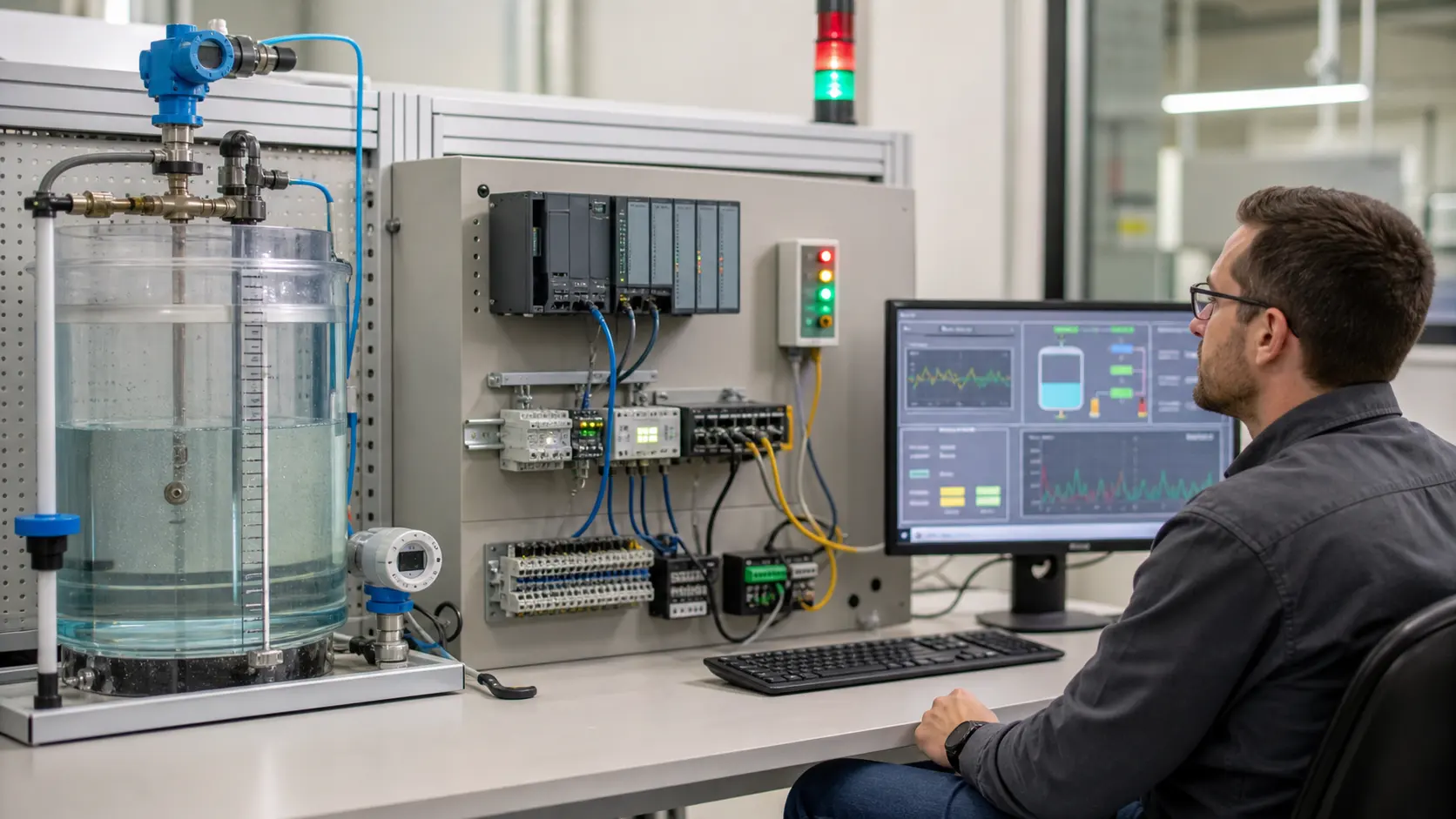
an industrial communications and supervisory-control lab joining a process tank, PLC, network path and operator display for end-to-end data validation while studying SCADA acquisition, quality, alarms, trends, supervisory commands and system boundaries
The training scene connects SCADA acquisition, quality, alarms, trends, supervisory commands and system boundaries to a declared initial state, inspectable boundaries, safe limits and repeatable acceptance evidence.

System map / 02

Six concepts that control the result

Treat these as connected checkpoints. Each checkpoint has an expected state, an observable state and a boundary to the next part of the system. That structure prevents a software indication from being mistaken for physical proof.

NODE 01observable

Define the operating contract

field process, instrument, PLC or RTU, communications, data server, quality and timestamp, HMI, alarm, historian, user role and supervisory command. For SCADA acquisition, quality, alarms, trends, supervisory commands and system boundaries, record the initial condition, actor, requested change, observable result and stopping condition before selecting a tool or implementation.

NODE 02observable

Map the evidence path

physical condition through controller data, protocol, server processing and operator display, then authorized request back to controller and independent response. Separate request, internal state, output or service, physical or user-visible result and independent feedback so each boundary can be inspected.

NODE 03observable

Prove normal operation

a known field change arrives with correct identity, value, unit, quality and time while an authorized bounded command produces verified process behavior. Run more than one cycle from a known state and retain the values, timings or artifacts that demonstrate repeatability.

NODE 04observable

Exercise a boundary case

communication loss, stale value, bad quality, time skew, server failover, duplicate alarm, unauthorized request, controller restart and partial recovery. Choose minimum, maximum, simultaneous, delayed or restart conditions that reveal assumptions hidden by the happy path.

NODE 05observable

Diagnose a controlled fault

a field, controller, map, transport, server, quality, time, display, command-authority or process-response mismatch. Preserve the first symptom, divide the system at a measurable boundary and change one condition only after predicting the result.

NODE 06observable

Transfer and hand over

the target architecture threat-modeled, validated and operated under current vendor, site and cybersecurity requirements. Restore normal state, remove temporary changes, repeat affected checks and document which claims remain limited to the learning environment.

Procedure / 03

A six-step practice and commissioning workflow

Run the steps in order the first time. Later, the same structure becomes a diagnostic loop: define the expected condition, observe the boundary, interpret the difference and choose one proving action.

  1. 01

    Write the acceptance case

    Convert field process, instrument, plc or rtu, communications, data server, quality and timestamp, hmi, alarm, historian, user role and supervisory command into initial conditions, one stimulus and observable pass criteria.

    Evidence: Another person can repeat the case without guessing the intended result.

    Avoid: Using page completion or an animation as the acceptance criterion.

  2. 02

    Build the map

    Document physical condition through controller data, protocol, server processing and operator display, then authorized request back to controller and independent response and name who owns each state or decision.

    Evidence: Every request and result has a source, destination and useful inspection point.

    Avoid: Using the same value as command, status and independent feedback.

  3. 03

    Run the baseline

    Apply a known field change arrives with correct identity, value, unit, quality and time while an authorized bounded command produces verified process behavior from a clean start and record the expected evidence.

    Evidence: Repeated runs produce the same bounded result.

    Avoid: Changing several parameters before a baseline exists.

  4. 04

    Challenge assumptions

    Test communication loss, stale value, bad quality, time skew, server failover, duplicate alarm, unauthorized request, controller restart and partial recovery without changing the acceptance contract.

    Evidence: Limits, timing and restart behavior reach defined states.

    Avoid: Testing only one ideal sequence.

  5. 05

    Isolate one failure

    Introduce or analyse a field, controller, map, transport, server, quality, time, display, command-authority or process-response mismatch and locate the first disagreement.

    Evidence: The proving action distinguishes the leading hypotheses.

    Avoid: Resetting, forcing or replacing before evidence is retained.

  6. 06

    Close the evidence loop

    Complete the target architecture threat-modeled, validated and operated under current vendor, site and cybersecurity requirements and repeat the affected regression cases.

    Evidence: Reference use is complete when inputs, assumptions, units or initial conditions are recorded and the result is independently checked at a useful boundary.

    Avoid: Treating an acknowledged message or one successful rerun as handover.

Diagnostic matrix / 04

Symptoms, proving points and next actions

The table is a reasoning aid, not a parts-replacement chart. Preserve the initial symptom, inspect the named boundary and use the interpretation to choose the next controlled test. Site safety procedures and equipment manuals remain authoritative.

Diagnostic symptoms, inspection points, interpretations and next actions for What is SCADA technical guide: implementation, evidence and troubleshooting
Observed symptomInspectInterpretationNext proving action
The expected result is unclearRequirement, initial state, actor, stimulus, units and pass conditionThe technician, programmer and reviewer may be solving different versions of the task.Rewrite one observable acceptance case before continuing.
Internal state changes but the outcome does notRequest, final owner, output or service boundary and independent feedbackA software or interface indication proves intent at one layer, not the complete outcome.Trace the first boundary after the changing state.
Normal case passes but an edge case failsLimits, timing, simultaneous events, reset and restart assumptionsThe implementation contains a hidden assumption exposed by the changed condition.Add the failed boundary as a permanent regression case.
The failure disappears after resetOriginal symptom, histories, diagnostics, timestamps and active causeReset changed evidence or state without proving the initiating cause.Reproduce under a controlled condition and preserve pre/post-event data.
Simulator and target disagreeModel boundary, software version, task timing, I/O behavior, data types and configurationA learning model and the intended target do not share one of the recorded assumptions.Reduce the case and verify against current target documentation.
The result cannot be explainedPrediction, observation, proving action, alternative hypotheses and limitationsActivity occurred but the evidence is not yet transferable or reviewable.Have the learner defend the signal path and repeat a changed case.

Product evidence / 05

What the browser practice can actually demonstrate

The page connects definitions and worked examples to runnable tools, explicit assumptions and repeatable checks so a formula or pattern can be challenged.

Where simulation stops

The overview does not design a production architecture, cybersecurity program, alarm philosophy, safety system, historian or site operating procedure.

Commissioning notebook / 06

Six cases that turn the concepts into evidence

Use these as written briefs rather than click-through instructions. For every case, state the expected condition before acting, retain the first useful observation and explain why the final result proves the requirement. A different program or component choice can still be correct when it produces the same bounded behavior and evidence.

Case 01

predict → observe → prove

Prove define the operating contract

Engineering context. field process, instrument, PLC or RTU, communications, data server, quality and timestamp, HMI, alarm, historian, user role and supervisory command. For SCADA acquisition, quality, alarms, trends, supervisory commands and system boundaries, record the initial condition, actor, requested change, observable result and stopping condition before selecting a tool or implementation. Begin with a written normal condition and identify which request, state, physical result or communication value will provide independent confirmation. Do not begin by changing the configuration; the initial state is part of the evidence and should remain reproducible.

Controlled setup. Use the “Write the acceptance case” stage of the workflow: convert field process, instrument, plc or rtu, communications, data server, quality and timestamp, hmi, alarm, historian, user role and supervisory command into initial conditions, one stimulus and observable pass criteria. The acceptance record should show this result: another person can repeat the case without guessing the intended result. Record initial conditions, the exact stimulus and the observation point so another learner can repeat the case without relying on your memory.

Fault challenge. Introduce or analyse “The expected result is unclear” as one bounded deviation. Inspect requirement, initial state, actor, stimulus, units and pass condition The working interpretation is that the technician, programmer and reviewer may be solving different versions of the task. The next proving action is to rewrite one observable acceptance case before continuing. Change only one condition before observing the result, and preserve timestamps or measurements where timing matters.

Review and recovery. The most common trap here is using page completion or an animation as the acceptance criterion. After restoring the cause, repeat the normal case and at least one stop, timeout, disconnect or restart boundary relevant to this topic. Remove temporary forces and bypasses, return the model to a known state and retain the evidence that both operation and recovery are deliberate.

Explain it aloud: What does SCADA stand for? A defensible short answer is: SCADA stands for supervisory control and data acquisition: systems that collect distributed operational data, present status and alarms and support authorized supervisory actions.

Case 02

predict → observe → prove

Prove map the evidence path

Engineering context. physical condition through controller data, protocol, server processing and operator display, then authorized request back to controller and independent response. Separate request, internal state, output or service, physical or user-visible result and independent feedback so each boundary can be inspected. Begin with a written normal condition and identify which request, state, physical result or communication value will provide independent confirmation. Do not begin by changing the configuration; the initial state is part of the evidence and should remain reproducible.

Controlled setup. Use the “Build the map” stage of the workflow: document physical condition through controller data, protocol, server processing and operator display, then authorized request back to controller and independent response and name who owns each state or decision. The acceptance record should show this result: every request and result has a source, destination and useful inspection point. Record initial conditions, the exact stimulus and the observation point so another learner can repeat the case without relying on your memory.

Fault challenge. Introduce or analyse “Internal state changes but the outcome does not” as one bounded deviation. Inspect request, final owner, output or service boundary and independent feedback The working interpretation is that a software or interface indication proves intent at one layer, not the complete outcome. The next proving action is to trace the first boundary after the changing state. Change only one condition before observing the result, and preserve timestamps or measurements where timing matters.

Review and recovery. The most common trap here is using the same value as command, status and independent feedback. After restoring the cause, repeat the normal case and at least one stop, timeout, disconnect or restart boundary relevant to this topic. Remove temporary forces and bypasses, return the model to a known state and retain the evidence that both operation and recovery are deliberate.

Explain it aloud: Is SCADA the same as a PLC? A defensible short answer is: No. A PLC or RTU usually performs local control; SCADA supervises and visualizes many data points and controllers across a communications architecture.

Case 03

predict → observe → prove

Prove prove normal operation

Engineering context. a known field change arrives with correct identity, value, unit, quality and time while an authorized bounded command produces verified process behavior. Run more than one cycle from a known state and retain the values, timings or artifacts that demonstrate repeatability. Begin with a written normal condition and identify which request, state, physical result or communication value will provide independent confirmation. Do not begin by changing the configuration; the initial state is part of the evidence and should remain reproducible.

Controlled setup. Use the “Run the baseline” stage of the workflow: apply a known field change arrives with correct identity, value, unit, quality and time while an authorized bounded command produces verified process behavior from a clean start and record the expected evidence. The acceptance record should show this result: repeated runs produce the same bounded result. Record initial conditions, the exact stimulus and the observation point so another learner can repeat the case without relying on your memory.

Fault challenge. Introduce or analyse “Normal case passes but an edge case fails” as one bounded deviation. Inspect limits, timing, simultaneous events, reset and restart assumptions The working interpretation is that the implementation contains a hidden assumption exposed by the changed condition. The next proving action is to add the failed boundary as a permanent regression case. Change only one condition before observing the result, and preserve timestamps or measurements where timing matters.

Review and recovery. The most common trap here is changing several parameters before a baseline exists. After restoring the cause, repeat the normal case and at least one stop, timeout, disconnect or restart boundary relevant to this topic. Remove temporary forces and bypasses, return the model to a known state and retain the evidence that both operation and recovery are deliberate.

Explain it aloud: What should I learn first about SCADA acquisition, quality, alarms, trends, supervisory commands and system boundaries? A defensible short answer is: Start with the operating contract and evidence path: field process, instrument, plc or rtu, communications, data server, quality and timestamp, hmi, alarm, historian, user role and supervisory command, followed by physical condition through controller data, protocol, server processing and operator display, then authorized request back to controller and independent response. Add advanced features only after the baseline is predictable.

Case 04

predict → observe → prove

Prove exercise a boundary case

Engineering context. communication loss, stale value, bad quality, time skew, server failover, duplicate alarm, unauthorized request, controller restart and partial recovery. Choose minimum, maximum, simultaneous, delayed or restart conditions that reveal assumptions hidden by the happy path. Begin with a written normal condition and identify which request, state, physical result or communication value will provide independent confirmation. Do not begin by changing the configuration; the initial state is part of the evidence and should remain reproducible.

Controlled setup. Use the “Challenge assumptions” stage of the workflow: test communication loss, stale value, bad quality, time skew, server failover, duplicate alarm, unauthorized request, controller restart and partial recovery without changing the acceptance contract. The acceptance record should show this result: limits, timing and restart behavior reach defined states. Record initial conditions, the exact stimulus and the observation point so another learner can repeat the case without relying on your memory.

Fault challenge. Introduce or analyse “The failure disappears after reset” as one bounded deviation. Inspect original symptom, histories, diagnostics, timestamps and active cause The working interpretation is that reset changed evidence or state without proving the initiating cause. The next proving action is to reproduce under a controlled condition and preserve pre/post-event data. Change only one condition before observing the result, and preserve timestamps or measurements where timing matters.

Review and recovery. The most common trap here is testing only one ideal sequence. After restoring the cause, repeat the normal case and at least one stop, timeout, disconnect or restart boundary relevant to this topic. Remove temporary forces and bypasses, return the model to a known state and retain the evidence that both operation and recovery are deliberate.

Explain it aloud: How do I practise SCADA acquisition, quality, alarms, trends, supervisory commands and system boundaries effectively? A defensible short answer is: Use short cases with known initial conditions, a written prediction, one action and an observable result. Then alter a boundary or fault and explain why the evidence changed.

Case 05

predict → observe → prove

Prove diagnose a controlled fault

Engineering context. a field, controller, map, transport, server, quality, time, display, command-authority or process-response mismatch. Preserve the first symptom, divide the system at a measurable boundary and change one condition only after predicting the result. Begin with a written normal condition and identify which request, state, physical result or communication value will provide independent confirmation. Do not begin by changing the configuration; the initial state is part of the evidence and should remain reproducible.

Controlled setup. Use the “Isolate one failure” stage of the workflow: introduce or analyse a field, controller, map, transport, server, quality, time, display, command-authority or process-response mismatch and locate the first disagreement. The acceptance record should show this result: the proving action distinguishes the leading hypotheses. Record initial conditions, the exact stimulus and the observation point so another learner can repeat the case without relying on your memory.

Fault challenge. Introduce or analyse “Simulator and target disagree” as one bounded deviation. Inspect model boundary, software version, task timing, I/O behavior, data types and configuration The working interpretation is that a learning model and the intended target do not share one of the recorded assumptions. The next proving action is to reduce the case and verify against current target documentation. Change only one condition before observing the result, and preserve timestamps or measurements where timing matters.

Review and recovery. The most common trap here is resetting, forcing or replacing before evidence is retained. After restoring the cause, repeat the normal case and at least one stop, timeout, disconnect or restart boundary relevant to this topic. Remove temporary forces and bypasses, return the model to a known state and retain the evidence that both operation and recovery are deliberate.

Explain it aloud: What counts as proof of competence? A defensible short answer is: A repeatable artifact or system result plus an explanation of the signal path is stronger than time spent, screenshots or a copied answer. Physical competence requires separate supervised evidence.

Case 06

predict → observe → prove

Prove transfer and hand over

Engineering context. the target architecture threat-modeled, validated and operated under current vendor, site and cybersecurity requirements. Restore normal state, remove temporary changes, repeat affected checks and document which claims remain limited to the learning environment. Begin with a written normal condition and identify which request, state, physical result or communication value will provide independent confirmation. Do not begin by changing the configuration; the initial state is part of the evidence and should remain reproducible.

Controlled setup. Use the “Close the evidence loop” stage of the workflow: complete the target architecture threat-modeled, validated and operated under current vendor, site and cybersecurity requirements and repeat the affected regression cases. The acceptance record should show this result: reference use is complete when inputs, assumptions, units or initial conditions are recorded and the result is independently checked at a useful boundary. Record initial conditions, the exact stimulus and the observation point so another learner can repeat the case without relying on your memory.

Fault challenge. Introduce or analyse “The result cannot be explained” as one bounded deviation. Inspect prediction, observation, proving action, alternative hypotheses and limitations The working interpretation is that activity occurred but the evidence is not yet transferable or reviewable. The next proving action is to have the learner defend the signal path and repeat a changed case. Change only one condition before observing the result, and preserve timestamps or measurements where timing matters.

Review and recovery. The most common trap here is treating an acknowledged message or one successful rerun as handover. After restoring the cause, repeat the normal case and at least one stop, timeout, disconnect or restart boundary relevant to this topic. Remove temporary forces and bypasses, return the model to a known state and retain the evidence that both operation and recovery are deliberate.

Explain it aloud: Why test faults and restart behavior? A defensible short answer is: Because a field, controller, map, transport, server, quality, time, display, command-authority or process-response mismatch or communication loss, stale value, bad quality, time skew, server failover, duplicate alarm, unauthorized request, controller restart and partial recovery can expose assumptions that never appear during ideal startup and steady operation.

Answer surface / 07

Questions people ask about What is SCADA technical guide

These concise answers define the operating, training and product boundaries most often missed in broad summaries. The full workflow and diagnostic table above provide the evidence behind them.

What does SCADA stand for?

SCADA stands for supervisory control and data acquisition: systems that collect distributed operational data, present status and alarms and support authorized supervisory actions.

Is SCADA the same as a PLC?

No. A PLC or RTU usually performs local control; SCADA supervises and visualizes many data points and controllers across a communications architecture.

What should I learn first about SCADA acquisition, quality, alarms, trends, supervisory commands and system boundaries?

Start with the operating contract and evidence path: field process, instrument, plc or rtu, communications, data server, quality and timestamp, hmi, alarm, historian, user role and supervisory command, followed by physical condition through controller data, protocol, server processing and operator display, then authorized request back to controller and independent response. Add advanced features only after the baseline is predictable.

How do I practise SCADA acquisition, quality, alarms, trends, supervisory commands and system boundaries effectively?

Use short cases with known initial conditions, a written prediction, one action and an observable result. Then alter a boundary or fault and explain why the evidence changed.

What counts as proof of competence?

A repeatable artifact or system result plus an explanation of the signal path is stronger than time spent, screenshots or a copied answer. Physical competence requires separate supervised evidence.

Why test faults and restart behavior?

Because a field, controller, map, transport, server, quality, time, display, command-authority or process-response mismatch or communication loss, stale value, bad quality, time skew, server failover, duplicate alarm, unauthorized request, controller restart and partial recovery can expose assumptions that never appear during ideal startup and steady operation.

Can browser practice replace official software or hardware?

No. It can build concepts and diagnostic reasoning. Exact firmware, I/O electrical behavior, networking, safety and commissioning require current official tools, documentation and target equipment.

How should progress be documented?

Keep the requirement, initial state, program or configuration, observed values, fault hypothesis, proving action, recovery result and a concise limitations statement.